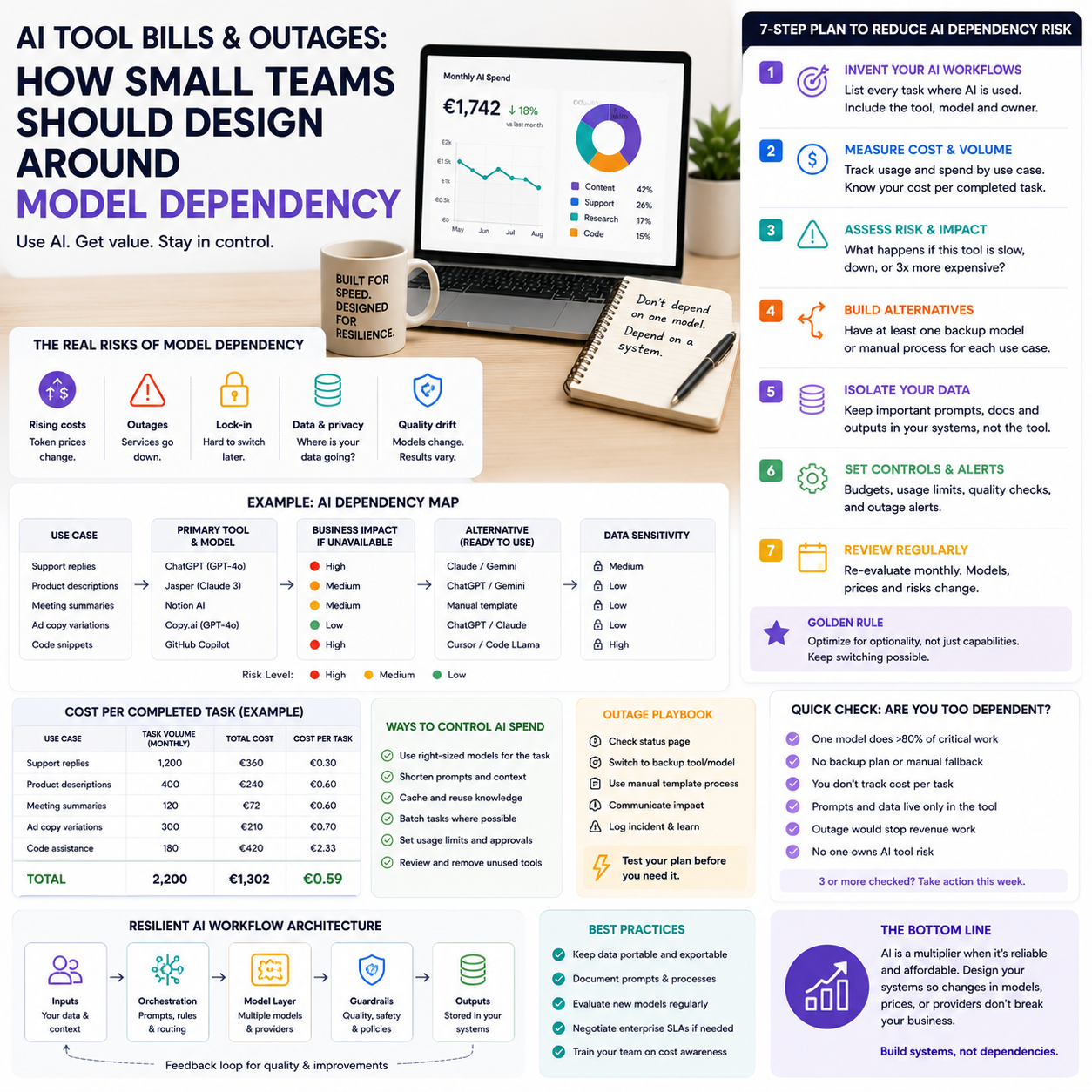
AI tools are starting to behave less like cheap software experiments and more like operating costs with reliability risk. For small teams using AI inside customer support, content production, research, coding, CRM notes, or internal automation, the real question is not whether AI is useful. The question is where the business becomes too dependent on one model, one integration, or one pricing structure.
Recent reports about rising AI token costs and a temporary Notion-Anthropic access disruption point to a practical issue for operators: AI workflows need cost controls and fallback paths. If your business has started building processes around AI output, you need a dependency map before the next price change or service interruption forces one on you.
The operator problem: AI is moving from tool choice to workflow risk
Many small businesses began using AI through simple interfaces: a chat window, an AI writing assistant, a note-taking app, a helpdesk add-on, or a browser extension. That made adoption easy, but it also hid the operating model. Under the surface, many of these products depend on external AI model providers, usage-based pricing, token limits, rate limits, and commercial agreements that the end user does not control.
For a founder or small team manager, this creates a different kind of software risk. A normal SaaS tool might change its subscription price once a year. An AI-enabled workflow can become more expensive because usage increases, prompts become longer, model providers raise prices, a feature moves to a higher plan, or an integration is paused. The cost is not only the invoice. It is also the interruption to a process that staff may now rely on every day.
This matters most in workflows where AI has become part of throughput. Examples include product description generation for e-commerce, support ticket drafting, call summaries, internal knowledge search, ad variant production, meeting notes, proposal drafting, and data-cleaning scripts. If one of those processes stops for a day, the team can usually survive. If it stops during a launch, a seasonal sales period, or a client delivery deadline, the hidden dependency becomes visible very quickly.
Where small teams accidentally build single-model dependence
AI dependency rarely starts with a formal decision. It usually grows through convenience. One employee finds that an AI assistant inside a productivity tool saves time. A marketing operator builds a prompt library for campaign copy. A support manager starts using AI summaries to triage tickets. A founder uses a model to prepare investor updates, product notes, or competitive research. Within weeks, the team has a new process, but no one has written down what happens if the tool becomes slower, more expensive, unavailable, or worse at the task.
The risk is higher when AI is embedded inside another product. If your team uses AI through a workspace, CRM, automation platform, website builder, or helpdesk, you may not know which model is doing the work. That is not a problem for casual use. It is a problem when the output becomes operationally important. The team may believe it depends on one software vendor, while the workflow actually depends on that vendor plus a model provider plus an integration layer plus a pricing agreement.
What most people miss
The fragile point is not always the AI model itself. It is often the handoff between tools. A content workflow might depend on a spreadsheet, an automation platform, a model API, a CMS, and a human editor. A customer support workflow might depend on helpdesk labels, a knowledge base, an AI drafting feature, and a review queue. If one piece changes, the whole workflow can slow down even if the AI model is technically available elsewhere.
Small teams also underestimate switching costs. If your prompts are written for one model, your output quality may drop when moved to another. If your team has trained itself around one tool interface, a backup tool can create errors. If your internal documentation says simply “use AI to draft this,” without naming the input format, approval step, and quality check, the fallback plan will be improvised under pressure.
The cost question is not subscription price, it is cost per completed task
AI pricing can be difficult to read because invoices are often separated from the business activity they support. A founder may know the company pays for an AI subscription, but not whether that subscription produces profitable output. For small businesses, the useful metric is cost per completed task, not cost per user seat.
For an e-commerce operator, the task might be “publish one product page ready for review.” For an agency, it might be “prepare one client brief.” For a support team, it might be “resolve one ticket with an approved AI draft.” For a software founder, it might be “generate one tested internal script.” Each of those tasks has a different value, error cost, and acceptable level of automation.
A practical cost view should include:
- Tool subscription cost, including paid AI add-ons inside existing software.
- Usage-based AI charges where APIs or token billing are involved.
- Staff time spent prompting, reviewing, correcting, and formatting output.
- Error correction cost when AI output creates rework.
- Fallback cost if the AI tool is unavailable and the task returns to manual work.
- Opportunity cost when a workflow slows during a sales or delivery window.
This does not require a finance department. A small team can track one or two representative workflows for a month. The point is to learn whether AI is reducing the cost of a task, shifting work from one person to another, or creating a hidden review burden.
A practical dependency map for AI workflows
The most useful exercise is to map the AI workflows that would cause pain if they stopped tomorrow. Do not map every casual use. Focus on the workflows connected to revenue, customer response, publishing, delivery, or internal decision-making.
For each workflow, write down five things: the task, the tool used by the team, the model or AI provider if known, the human approval step, and the fallback method. If the model is hidden inside a SaaS product, write “unknown through vendor” rather than guessing. That label is useful because it tells you where you lack control.
A simple example for an online store could look like this:
- Task: draft product descriptions for new catalogue items.
- Tool: AI feature inside the content workspace, plus spreadsheet prompts.
- Model dependency: provider unclear unless disclosed by the vendor.
- Approval: merchandiser checks claims, sizing language, SEO title, and category fit.
- Fallback: use saved prompt templates in a second AI tool, then manual edit before publishing.
The value of this map is not documentation for its own sake. It helps the owner see which AI workflows are safe experiments and which ones need controls. A newsletter subject line generator may not need a formal fallback. A support triage system that affects response times probably does.
Which workflows deserve a backup model
Not every AI use case needs redundancy. Backups cost time, create complexity, and can confuse staff. The right decision depends on business impact and switching difficulty.
A workflow deserves a backup if it meets at least two of these conditions:
- It affects customer-facing output, such as replies, product pages, sales proposals, or public content.
- It is used daily or several times per week.
- It blocks another person’s work when unavailable.
- It is tied to a campaign, launch, fulfilment process, or client deadline.
- It requires a specific tone, format, data structure, or compliance check.
- The team would need more than one hour to recreate the process manually.
For lower-risk workflows, the backup can be simple: saved prompts, a manual checklist, and a second tool account. For higher-risk workflows, the backup should include sample outputs, formatting rules, and a named reviewer. The reviewer is important because different models can produce different styles of error. One may be verbose, another may omit details, another may invent confident wording that sounds polished but does not match the source data.
When a second tool is enough, and when it is not
A second AI subscription is enough when the work is creative, low-risk, and easy to inspect. Drafting social post variants, brainstorming titles, or summarising internal notes can usually move between tools without much damage.
A second tool is not enough when the workflow depends on structured data, brand-approved language, regulated claims, customer account context, or a connection to another system. In those cases, the backup is a process, not just a login. You need input templates, approved source material, review rules, and a way to move output into the next system without breaking formatting or losing context.
Build a human boundary where mistakes become expensive
The human review step should sit where an AI mistake becomes costly. That point varies by business model. For an e-commerce seller, it may be before product copy goes live, especially if the description includes material, compatibility, delivery promise, warranty language, or size guidance. For a service business, it may be before a proposal is sent to a client. For a support team, it may be before a refund, cancellation, or technical instruction is communicated.
The mistake many teams make is reviewing everything lightly instead of reviewing critical points deeply. A better workflow separates low-risk AI assistance from high-risk approval. For example, an AI tool can draft five versions of a product description, but a human should verify factual claims against supplier data. An AI tool can summarise a customer complaint, but a human should approve any promise involving compensation, delivery timing, or account changes.
This boundary also protects margins. AI output that creates rework can look cheap on the invoice and expensive in operations. If a warehouse receives unclear product attributes, if a support reply creates another angry ticket, or if a product page attracts returns because the wording overpromised, the AI task was not actually cheap.
The metrics that reveal whether AI is helping or just spreading work around
Small teams do not need a complex AI dashboard. They need a few metrics attached to the workflows where AI has become part of production. The aim is to catch cost creep, quality drift, and reliability issues early.
Useful metrics include:
- Cost per completed task: subscription or usage cost divided by approved outputs, not raw generations.
- Review time per output: how long a human spends correcting or approving AI work.
- Rework rate: how often AI-assisted work needs major revision after review.
- Fallback frequency: how often the team needs a backup process because a tool is unavailable, slow, or unsuitable.
- Cycle time: whether the workflow is actually faster from request to approved output.
- Error category: factual error, tone mismatch, missing data, wrong format, policy risk, or duplicated output.
The most revealing metric is often review time. If AI reduces drafting time but doubles editing time, the workflow may still be worthwhile, but the team should know that. The fix may be better input data, a shorter prompt, a different model, or a narrower task. Without review-time tracking, the business may keep paying for AI while the real workload moves silently to editors, managers, or support leads.
A realistic scenario: the e-commerce catalogue sprint
Consider a small online retailer preparing a large seasonal catalogue update. The team uses an AI assistant inside its workspace to convert supplier notes into product descriptions, meta descriptions, and category snippets. The workflow is fast: import supplier rows, generate draft copy, check claims, paste approved text into the store backend.
Then the AI feature becomes unavailable for part of a working day, or the underlying access changes. The team still has supplier data and store access, but the production rhythm breaks. Staff can write manually, but the saved prompts are inside the unavailable workspace. The product manager remembers the tone rules, but the part-time merchandiser does not. The fallback tool produces longer copy that does not fit the store’s preferred format. The launch is not destroyed, but the team loses time in exactly the week when time matters.
A better setup would not require enterprise infrastructure. The retailer could keep prompt templates outside the AI tool, store two examples of approved output per product category, maintain a simple claim-check checklist, and pre-test one alternative AI tool before peak season. The cost is a few hours of preparation. The payoff is not theoretical resilience. It is the ability to keep publishing acceptable product pages when the preferred AI path is unavailable or too expensive to use at the same volume.
Procurement questions before adding AI to a core workflow
Before a small team makes an AI feature part of a daily process, the owner or operator should ask more specific questions than “does it save time?” The right questions expose cost, lock-in, and failure points.
- Is the AI feature included in the current plan, or can it move behind a higher tier?
- Does pricing depend on seats, usage, tokens, credits, or hidden fair-use limits?
- Can prompts, templates, and examples be exported or stored outside the tool?
- Does the vendor disclose which AI provider powers the feature?
- What happens to the workflow if the AI function is unavailable but the main software still works?
- Can the output be reviewed before it reaches customers, ads, product pages, or support replies?
- Does the tool keep a usable history of prompts and outputs for auditing quality issues?
- Who owns the fallback process internally?
These questions are not only for technical teams. They belong in normal operating decisions. If a tool is used once a month, a weak answer may be acceptable. If it supports daily customer or revenue work, weak answers should slow the rollout.
Rollout sequence for AI-dependent work
Use this sequence before moving an AI workflow from experiment to normal operations:
- Pick one workflow with a measurable output. Examples: approved product page, resolved support draft, edited sales email, cleaned supplier row, or published help article.
- Record the current manual baseline. Track time, rework, and bottlenecks for a small sample before adding AI.
- Define the approved input format. AI performs better when staff provide consistent source data, not scattered instructions.
- Save prompts outside the AI tool. Keep them in a shared document or operations folder so they survive tool changes.
- Create two approved output examples. These become quality references for staff and backup tools.
- Name the human approval point. Decide who checks facts, customer promises, claims, tone, or formatting before output goes live.
- Test one fallback path before it is needed. Run the same input through a second tool or manual process and compare the result.
- Track cost per approved output for one month. Include tool cost, review time, and rework, not only subscription price.
- Review dependency every quarter. Check whether pricing, usage, vendor access, or workflow volume has changed.
The businesses that get durable value from AI will not be the ones that add it everywhere first. They will be the ones that know which tasks AI is allowed to accelerate, which tasks still need human control, what each workflow really costs, and how work continues when a model, integration, or price plan changes.