Fulfillment automation is often presented as a labor-saving purchase. That framing is too narrow. The real investment question is whether automation can change the relationship between cost, throughput and operational flexibility without making the network dangerously rigid.
UPS and Walgreens illustrate two different versions of that equation. UPS applies automation across a parcel network built for enormous volume. Walgreens uses centralized prescription micro-fulfillment to shift repetitive work away from individual pharmacies. Neither model should be copied literally by a smaller operator. Their value lies in the principles they reveal: concentrate repeatable work, measure economics per completed unit and preserve alternatives when demand or equipment behavior changes.
Two automation models—and two different constraints
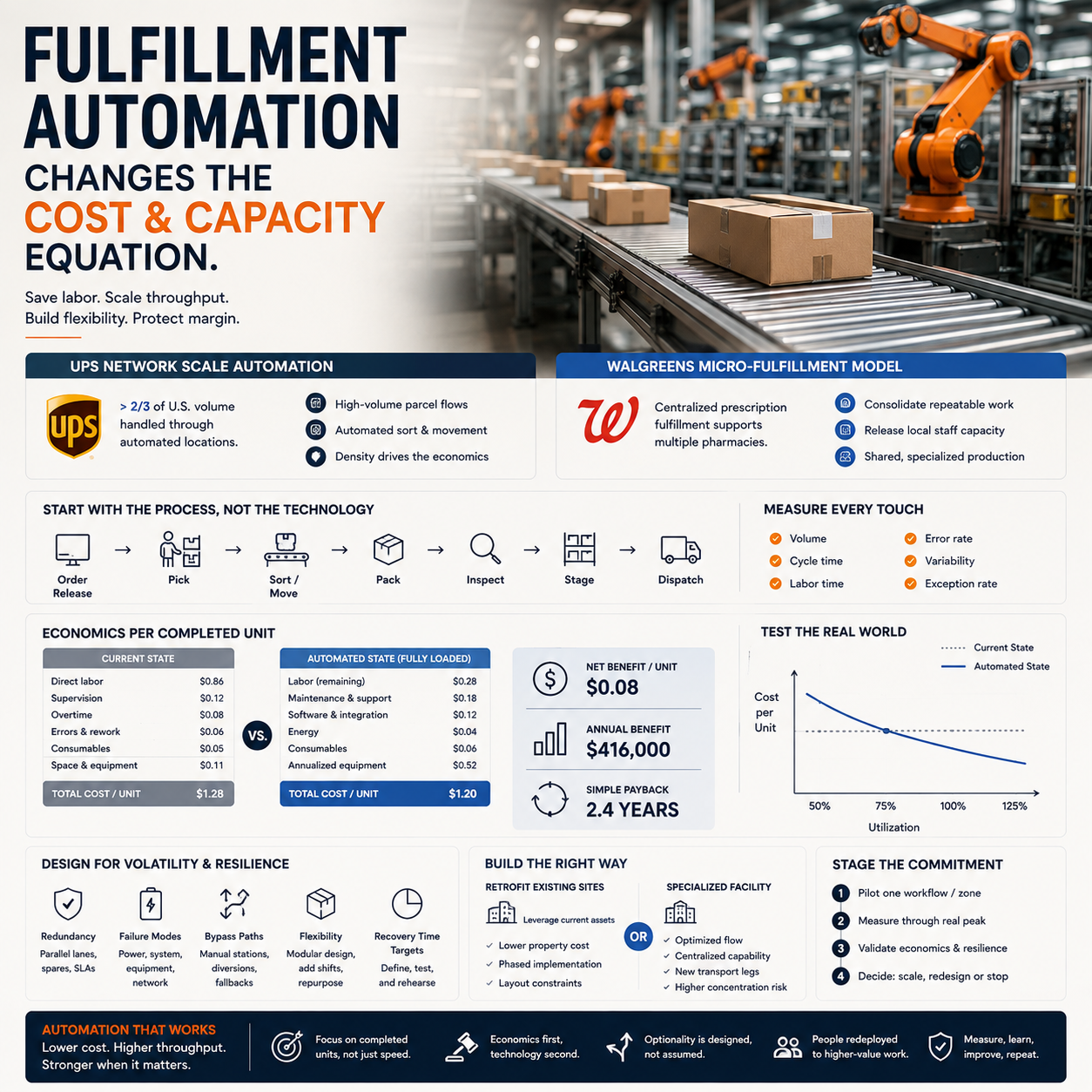
UPS represents network-scale automation. Supply Chain Dive reports that more than two-thirds of the company’s U.S. volume is now handled through automated locations. At that scale, automated sorting and handling can support high throughput while reducing repeated manual touches. The economic case depends on dense parcel flows: expensive equipment has more opportunities to create value when it processes large, sustained volumes.
Walgreens’ Washington micro-fulfillment center reflects a different design. Instead of automating a broad parcel network, the company centralizes eligible prescription work that would otherwise be distributed across pharmacies. This can release pharmacy staff from repetitive fulfillment tasks while supporting multiple regional locations from a specialized facility.
The contrast matters. UPS automates movement through a network; Walgreens consolidates a defined workflow before automating it. One seeks economies across exceptionally high parcel volume, while the other creates a shared production layer for local outlets. Operators should first decide which problem resembles their own: excessive touches in an existing flow, or duplicated work spread across many sites.
Find workflows that deserve automation
Start with a process map rather than a technology demonstration. Record each touch from order release to dispatch, including scanning, travel, sorting, picking, packing, inspection, staging and exception handling. For every step, capture volume, cycle time, labor time, error frequency and variability.
Strong candidates tend to be repetitive, rules-based and sufficiently standardized. They also have stable inputs and clear outputs. Examples may include routing parcels by destination, moving totes between zones, labeling standard packages or picking a predictable range of fast-moving items.
Weak candidates have frequent product changes, ambiguous decisions, irregular dimensions or a high proportion of exceptions. Automating such work may merely convert a visible labor problem into a less visible engineering and maintenance problem.
What most people miss
Average volume is not enough. A system may look efficient on an annual spreadsheet yet fail during hourly surges or sit underused for much of the week. Measure demand by hour, shift and day, then separate ordinary peaks from rare extremes. Also determine the exception rate. If people must frequently rescue stalled, damaged or non-standard units, advertised machine throughput will overstate usable capacity.
Calculate the economics per completed unit
Compare the current process with the proposed one using the same volume and service assumptions. Current cost per completed unit should include direct labor, supervision, overtime, error correction, consumables and an appropriate share of space and equipment costs.
For the automated case, include annualized equipment and installation costs, software, integration, maintenance, energy, specialist support, financing, additional space and the labor that remains. Divide that total by the number of units successfully completed—not merely units entering the system. Failed or reworked units still consume capacity and money.
Annual benefit equals avoidable current cost minus the full annual operating cost of the new design. Simple payback is the initial investment divided by annual net benefit. Operators should also model a low-volume case, the expected case and a peak case. Include ramp-up losses, training time and temporary parallel operations instead of assuming full productivity on day one.
Not every benefit appears as immediate headcount reduction. Automation may avoid future hiring, reduce overtime, increase cutoff capacity, improve consistency or free skilled employees for customer-facing and exception work. Count those benefits only when they can be tied to an operational outcome. “More capacity” has little value unless demand, service improvement or facility avoidance can use it.
Design for volatility, failure and change
Automation creates fixed capacity in exchange for lower variable effort. That trade can be attractive at high utilization and painful when demand declines. Test how unit cost behaves at several utilization levels and ask whether the system can run fewer hours, add shifts, process other workflows or expand modularly.
Redundancy is part of the investment, not an optional add-on. Define what happens when equipment, software, power or upstream data fails. Options include parallel lanes, bypass routes, manual workstations, spare components, vendor response agreements and the ability to redirect work to another site. Establish recovery-time targets and rehearse the fallback process before launch.
A resilient design should also tolerate changes in product mix, packaging and service promises. Avoid optimizing every component for today’s narrow profile. Standard interfaces, modular equipment and accessible manual intervention may sacrifice some theoretical efficiency but protect the operation from becoming obsolete or brittle.
Retrofit, specialize or combine both
A retrofit can be appropriate when existing sites have predictable volume, suitable space and processes that can remain live during installation. It may reduce property investment and keep automation close to current demand. However, awkward layouts, old controls and phased construction can raise integration costs and constrain the final design.
A specialized facility, closer to the Walgreens model, can centralize repeated work and be designed around an optimized flow. It can also create new transport legs, a larger concentration of risk and dependence on accurate coordination with local sites. The decision must therefore include inventory positioning, delivery timing and business-continuity costs—not just building productivity.
Smaller operators should usually stage the commitment. Pilot one stable workflow or one bounded zone, retain a manual route and define success metrics before procurement. Validate throughput, completed-unit cost, exception handling, uptime and employee requirements over representative peak periods. Scale only after actual results support the business case.
Practical automation investment checklist
- Map every touch, queue, handoff and exception in the target workflow.
- Measure demand by hour, shift and season rather than relying on annual averages.
- Choose repetitive, standardized work with stable inputs and measurable outputs.
- Calculate current and automated cost per successfully completed unit.
- Include integration, maintenance, software, energy, training and remaining labor.
- Model low, expected and peak volumes, plus ramp-up and downtime scenarios.
- Value capacity only when it supports demand, service gains or avoided expansion.
- Specify bypasses, manual fallbacks, spare parts and recovery-time targets.
- Compare retrofit and specialized-site options using transport and continuity costs.
- Run a bounded pilot through representative peaks before scaling.
- Set stop, redesign and expansion thresholds before approving the investment.