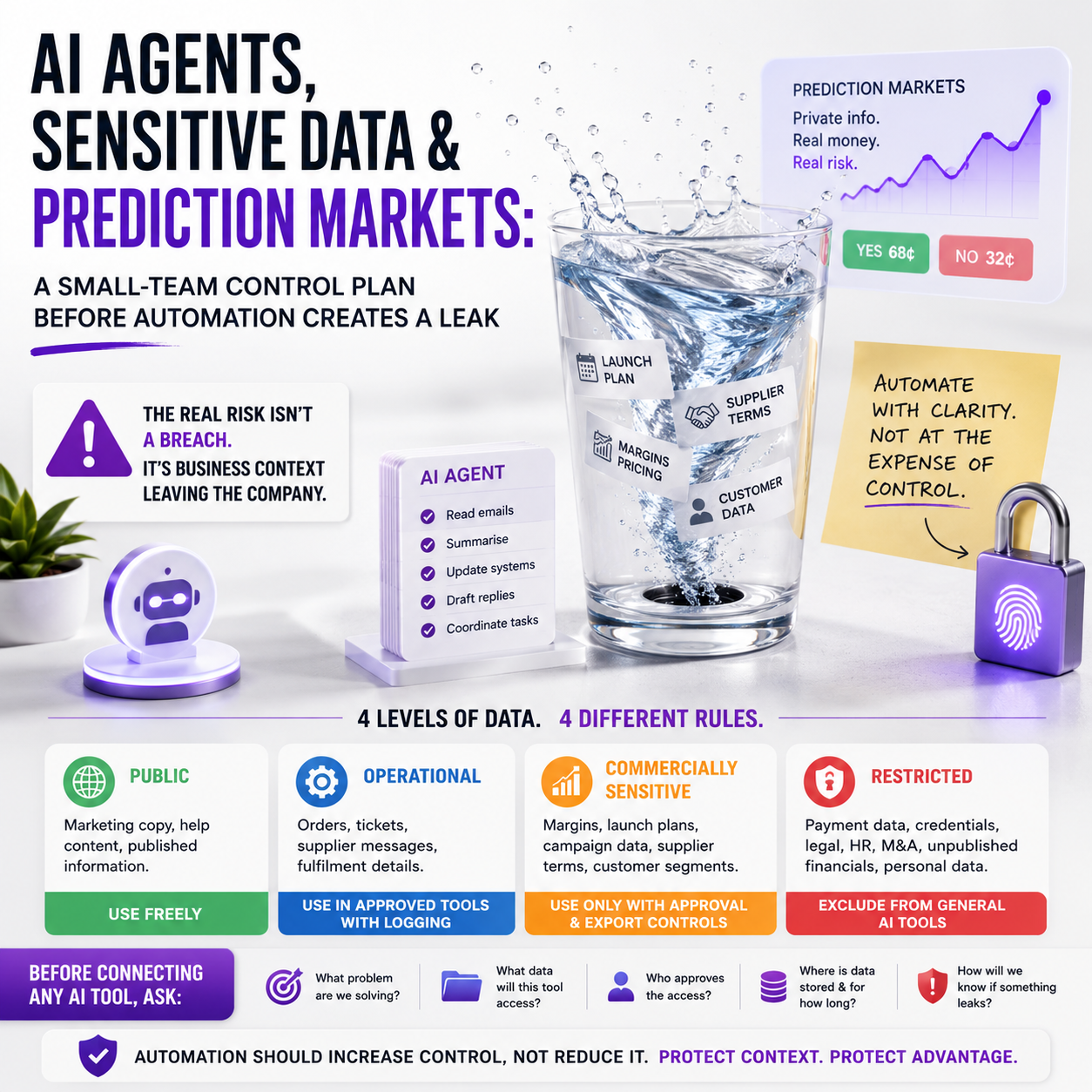
Small teams are moving company data into AI tools faster than their internal controls can keep up. The operational issue is not whether an employee is allowed to use a chatbot or an agent; it is whether the business can see what data moved, who had access, and what decisions were made with it.
Two recent technology signals point in the same direction: AI-agent workflows are being packaged for executives, while prediction-market activity is creating new ways for private information to be monetised. For founders and digital operators, the useful question is simple: before you automate more work, what data should never become portable?
The risk is not only cyber security; it is business context leaving the company
Many small companies treat sensitive data as a cyber-security category: passwords, payment details, customer records and admin accounts. That list is necessary, but too narrow for an AI-enabled operation.
The more valuable leakage may be business context. A product launch calendar, an upcoming supplier change, a private discount plan, a marketplace account issue, a pending acquisition conversation, a campaign budget, or early sales data can all become valuable outside the company. None of these may look like a classic breach. They may sit inside a spreadsheet, meeting transcript, CRM note, task-management board, finance export or AI prompt.
The TechCrunch report about a Google engineer charged with insider trading after allegedly making money on Polymarket is a warning signal for operators even if the case itself involves a large company. The small-business version is usually less dramatic but more common: someone with access to private business information uses it in a way the owner did not anticipate. That could be a contractor using ad account data to pitch a competitor, a staff member feeding customer exports into an unapproved AI tool, or a partner sharing margin information in a marketplace group.
The arrival of AI-agent products aimed at executive workflows adds a second pressure point. If a tool can read inboxes, summarise meetings, draft replies, update systems and coordinate tasks, it can also move sensitive context across systems at speed. The question is no longer only, “Can this tool save time?” It is, “Which information should this tool never touch, and how would we know if it did?”
What to classify before you connect another AI tool
Most small companies do not need an enterprise compliance department. They do need a simple data classification model that maps directly to daily work. If the classification is too theoretical, the team will ignore it. If it is tied to tools and permissions, it becomes usable.
A practical model can use four internal labels:
- Public: product pages, published prices, public help content, approved brand copy, press materials.
- Operational: order notes, support tickets, supplier messages, fulfilment details, non-sensitive SOPs.
- Commercially sensitive: margins, campaign performance, launch plans, supplier terms, customer segments, refund patterns, marketplace disputes, pricing tests.
- Restricted: payment data, access credentials, legal correspondence, HR matters, acquisition discussions, unpublished financials, investor documents, personal customer data beyond operational need.
The useful part is not the label itself. The useful part is deciding what each class is allowed to do. Public content can be used freely in AI drafting tools. Operational content may be used in approved tools with logging and account-level access. Commercially sensitive content should only go into tools with a clear business purpose, owner approval and export controls. Restricted content should be excluded from general AI tools unless the company has reviewed the vendor, retention settings, access controls and legal basis for processing that data.
For an e-commerce operator, this may mean product descriptions can be processed in a copywriting system, but supplier cost sheets cannot. For a small agency, public case-study text can be repurposed, but client analytics exports and unpublished campaign plans should not be pasted into open tools. For a founder, meeting notes about ordinary tasks may be summarised automatically, while financing negotiations and payroll matters should be kept out of agent workflows by default.
Where AI agents create hidden permission expansion
Traditional software usually asks for one job: send email, manage inventory, analyse analytics, update a CRM. Agent-style software often asks for a bundle of access: inbox, calendar, files, CRM, documents, Slack or Teams, browser activity and task tools. That bundle can be convenient, but it can also collapse several internal boundaries at once.
A founder may think they are authorising an assistant to schedule meetings. In practice, the tool may be able to read email threads about supplier disputes, retrieve attached spreadsheets, summarise private commercial discussions and create tasks visible to a wider team. The risk is not that the software is malicious. The risk is that the operator has not defined the boundary between helpful automation and excessive access.
This matters especially for small teams because roles are often blended. One person may handle customer support, purchasing, marketplace listings and analytics. If that person connects an AI assistant to “save time”, the assistant may inherit a broader permission set than any one workflow requires.
What most people miss
The biggest control failure is not usually the first prompt. It is the second-order workflow. A staff member uploads a sales export to generate a summary. The summary is then pasted into a project board. The project board is connected to an AI meeting assistant. That assistant creates a task in a shared channel. The original spreadsheet never left the company visibly, but its commercial meaning has now moved through several systems.
Small-business owners should therefore monitor not only files but also derived information: summaries, labels, forecasts, alerts and recommendations. An AI-generated note saying “delay supplier negotiation until after campaign data is reviewed” may reveal more than the raw data itself. In a small market, even timing and intent can be sensitive.
A control workflow that does not slow the team down
The right system for a small company is lightweight enough to be followed during busy weeks. A practical workflow can be built around tool approval, data boundaries and review points.
Step one: approve tools by use case, not by brand
Do not approve an AI platform with a vague rule such as “the team can use it for productivity”. Approve specific use cases. For example: writing product descriptions from public product specs, summarising non-sensitive support themes, converting SOPs into checklists, drafting internal meeting agendas, or creating first-pass spreadsheet formulas.
Then list blocked use cases beside them: uploading full customer exports, processing supplier contracts, summarising legal documents, analysing payroll files, drafting responses using private acquisition or financing information, or connecting executive inboxes without review.
This matters because the same tool can be low-risk in one workflow and high-risk in another. A chatbot used to rewrite a returns-policy explanation is not the same as an agent connected to the founder’s email and finance folder.
Step two: assign a data owner for each system
Small teams often have tools but no owner. That is where leakage starts. Every core system should have a named person responsible for access: Shopify or WooCommerce, marketplace accounts, accounting software, CRM, email platform, shared drive, analytics, helpdesk and automation tools.
The owner is not a bureaucratic title. It means someone can answer three questions quickly: who has access, what data is stored there, and which external tools are connected. If nobody can answer, the system is already unmanaged.
Step three: create an AI connection register
This can be a simple spreadsheet. Record each AI or automation tool, who approved it, what systems it connects to, what data types it may process, whether outputs are stored, whether data is used for training, who has admin access, and when it should be reviewed.
The register should include browser extensions and meeting assistants, not only major SaaS platforms. These tools often enter the business quietly because they feel personal rather than operational. If they process company data, they belong in the register.
The founder decision: automate the task or redesign the permission first
Before a small business automates a workflow, the owner should decide whether the process is ready for automation. A messy human workflow can become a faster messy machine workflow.
Use this decision rule: if the task requires access to restricted or commercially sensitive information, redesign the permission layer before adding automation. If the task uses only public or low-risk operational data, automation can usually move faster.
Consider a small e-commerce seller preparing a seasonal launch. The team wants an AI assistant to help coordinate product copy, influencer outreach, supplier updates and campaign tasks. The safe version gives the assistant access to public product specs, approved launch dates, non-sensitive task boards and template emails. The risky version connects the assistant to the founder’s inbox, supplier folders, ad performance exports and full margin sheet. Both versions may produce useful work. Only one keeps the company’s negotiating position contained.
The operator’s job is not to block automation. It is to keep the automation inside the smallest permission box that still gets the work done.
Cost implications: the cheap tool may become expensive after access spreads
AI tools often look inexpensive at subscription level. The real cost appears when access is unmanaged. A low monthly fee can create hours of cleanup if the tool is connected to the wrong inbox, stores sensitive prompts, exposes data to a contractor, or produces outputs that the team treats as safe without review.
There are also switching costs. Once a team builds habits around a tool, removing it can disrupt workflows. If customer support replies, campaign plans, product descriptions and internal summaries all depend on the same unreviewed assistant, the business may have to pause work to unwind it.
Small companies should therefore budget for control work as part of automation, not as a later add-on. That budget does not need to be large. It may be a few hours each month for access review, prompt-policy updates, tool audits and staff training. But it should be assigned, because unassigned control work does not happen.
There is also a vendor-selection cost. A cheaper tool may not offer admin controls, retention settings, workspace permissions, audit logs or clear data-handling terms. For public content workflows, that may be acceptable. For commercially sensitive workflows, missing controls should change the buying decision.
Metrics that show whether the system is under control
A founder cannot manage AI-data risk by asking the team to “be careful”. The business needs a small dashboard that makes drift visible.
Useful metrics include:
- Number of AI tools in use: separated by approved, trial and unknown.
- External connections per core system: especially email, shared drives, CRM, accounting and helpdesk.
- Users with admin access: reviewed monthly for core operational tools.
- Restricted-data exceptions: any approved case where sensitive data enters an AI or automation workflow.
- Inactive users with access: contractors, former staff, old agencies and test accounts.
- Unreviewed browser extensions: especially those with page-reading, email or clipboard access.
- AI outputs used without human approval: for customer-facing, financial, legal, pricing or supplier communications.
These metrics are not vanity controls. They answer operational questions: do we know what is connected, can we remove access quickly, are sensitive workflows being approved, and are AI outputs being treated differently depending on risk?
Human review belongs at the point of business consequence
Not every AI output needs manual review. If an assistant turns public product specifications into draft bullet points, a normal editorial check may be enough. If it drafts a supplier negotiation, customer refund decision, ad budget recommendation, financial forecast or marketplace appeal, the review threshold should be higher.
The review rule should follow the consequence, not the format. A short AI-generated message can carry a large commercial consequence. A long internal summary may carry very little. Small teams should mark workflows where AI output can affect money, access, reputation, contractual position or customer trust.
For example, an AI assistant can summarise support tickets to identify recurring product issues. But if it recommends which customers should receive refunds or which supplier should be blamed for a defect, a human manager should review the context. The business can automate pattern detection without automating accountability.
Practical rollout sequence for the next 14 days
Use this sequence if your team already uses AI tools but has not formalised controls.
- Day 1: List every AI tool, meeting assistant, browser extension and automation platform used by the team. Include personal tools used for company work.
- Day 2: Mark which tools touch email, files, CRM, accounting, analytics, support tickets, marketplace accounts or customer data.
- Day 3: Create the four data labels: public, operational, commercially sensitive and restricted. Add examples from your own business.
- Day 4: Write allowed and blocked AI use cases. Keep it to one page so the team can actually use it.
- Day 5: Remove unused integrations and old contractor access from core systems.
- Day 6: Check retention, training and sharing settings in the AI tools you keep.
- Day 7: Assign owners for email, shared drive, CRM, store platform, accounting, helpdesk and automation tools.
- Day 8: Build the AI connection register with tool name, owner, connected systems, data class, approval date and review date.
- Day 9: Identify workflows where AI outputs affect pricing, refunds, supplier negotiations, customer access, financial decisions or public claims.
- Day 10: Add mandatory human review to those workflows.
- Day 11: Train the team using three real examples from your business, not abstract rules.
- Day 12: Decide which sensitive workflows should stay manual until better controls are available.
- Day 13: Set a monthly 30-minute access review for AI tools and external integrations.
- Day 14: Test the process by asking: if a contractor left tomorrow, could we remove their access and know which AI tools they used?
If the answer to the final question is no, the business is not ready to expand agent access. Fix the permission map first, then automate the next workflow.


