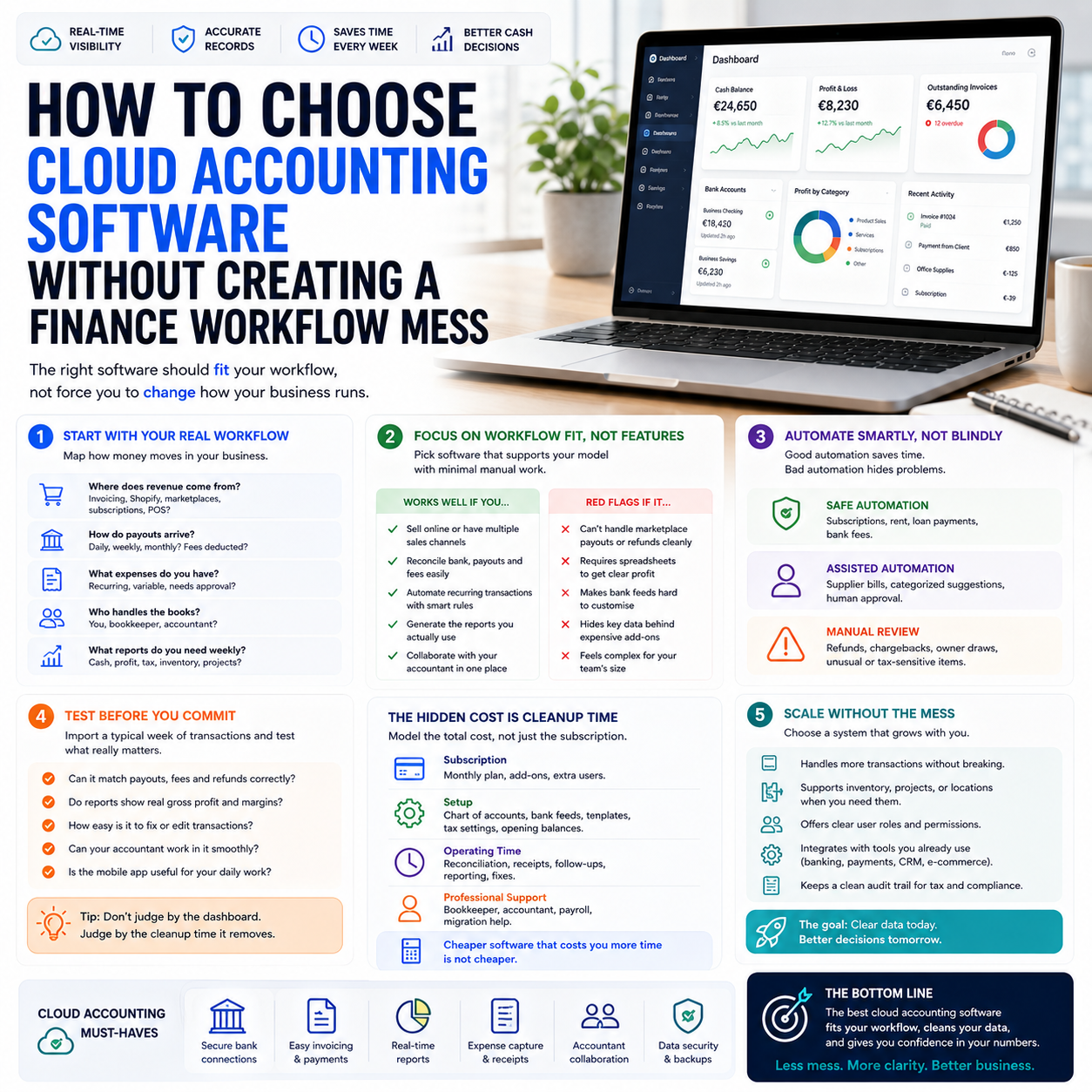
Cloud accounting software is not just a place to store invoices and receipts. For a small business owner, solo founder or digital operator, it becomes the operating system for cash visibility, tax preparation, payment follow-up and management reporting. Choosing the wrong tool usually does not hurt on day one; it hurts six months later when sales channels, bank feeds, expenses and accountant access stop matching the way the business actually works.
The useful question is not which accounting app has the longest feature list. The better question is: which finance workflow are you prepared to run every week, and which parts should the software control automatically?
The real buying decision is workflow fit, not feature count
A small business can easily overbuy accounting software. A founder sees dashboards, payroll modules, forecasting, receipt capture, project tracking and dozens of integrations, then signs up for a plan that looks safe. The problem is that unused finance features do not create better financial control. They create another system the owner feels guilty about not maintaining.
The decision should start with the transactions the business actually creates. A local service business with bank transfers and supplier bills needs a different setup from a Shopify seller with card payouts, refunds, marketplace fees, advertising spend and international software subscriptions. A solo consultant may only need clean invoicing, expense capture and quarterly reporting. An e-commerce operator may need sales channel reconciliation, payment processor matching, inventory cost visibility and margin reporting by product category.
The Small Business Trends coverage of cloud accounting options is useful because it points to the range of software now available to small firms, but operators should avoid treating that list as a simple ranking. The right choice depends on whether the tool can support the business model without manual spreadsheet repair every month.
Before comparing prices, map the finance workflow in plain language:
- Where does revenue enter the business: invoices, card payments, marketplaces, subscriptions or point-of-sale?
- How often do payouts arrive, and are fees deducted before money reaches the bank?
- Which expenses are recurring, which are variable and which need approval?
- Who prepares accounts: the owner, a bookkeeper, an accountant or a mixed setup?
- Which numbers must be visible weekly, not just at year-end?
If the software cannot make those flows visible with low manual effort, it is the wrong fit even if it has strong reviews.
Bank feeds are useful only if reconciliation rules are designed carefully
Bank feed automation is often sold as the main time-saver in cloud accounting. It can be, but only when transaction rules are specific enough to avoid quiet errors. A rule that automatically categorises every payment to a software vendor as “subscriptions” may be fine. A rule that categorises every card charge from a large marketplace or payment provider can hide advertising costs, fulfilment costs, refunds or owner purchases inside one vague account.
For small operators, the weekly finance process should separate three types of automation:
- Safe automation: recurring subscriptions, fixed rent, loan repayments, predictable bank charges.
- Assisted automation: supplier payments that need suggested categories but human approval.
- Manual review: refunds, chargebacks, owner withdrawals, unusual supplier payments and tax-sensitive items.
This boundary matters because cloud accounting software can make bad bookkeeping look tidy. A dashboard may show profit, but if marketplace fees are treated as general expenses or refunds are not matched correctly, the owner is making decisions from a distorted view of margin.
What most people miss
The real risk is not that a transaction is missed. The more common problem is that a transaction is captured but classified in a way that makes management reporting useless. A small e-commerce seller can connect the bank, import payment processor payouts and still have no clear view of gross sales, refunds, fees, shipping, ad spend and product costs. The bank balance may reconcile while the business model remains unclear.
This is why a cloud accounting tool should be tested against sample transactions before committing. Import a typical week: sales payouts, supplier bills, software subscriptions, advertising charges, refunds and owner expenses. Then check whether the reports answer operating questions without spreadsheet reconstruction. If they do not, the system is not ready.
The hidden cost is not the subscription; it is cleanup time
Monthly pricing gets too much attention. For most small firms, the larger cost is the time spent fixing records, explaining transactions to an accountant, hunting receipts and rebuilding reports outside the accounting system. A cheaper tool that requires two extra hours of owner time each week is rarely cheaper in practice.
When comparing tools, build a simple cost model with four lines:
- Software subscription: the monthly plan, add-ons and extra users.
- Setup cost: chart of accounts, bank feed setup, invoice templates, tax settings and opening balances.
- Operating time: weekly reconciliation, receipt handling, invoice follow-up and report checks.
- Professional support: bookkeeping, accountant review, payroll assistance or migration help.
The setup cost is easy to underestimate. A service business with simple invoicing may be live in a few hours. A business selling through multiple online channels may need careful configuration for sales tax treatment, marketplace payouts, payment fees, inventory purchases and shipping costs. If that setup is done badly, every monthly report becomes suspect.
The owner should also look at plan limits. Some tools restrict users, invoices, bills, bank connections or advanced reporting by tier. A low entry price may be fine for a solo operator, but if the business needs accountant access, approval workflows, inventory tracking or multi-currency handling, the real monthly cost may sit one or two tiers higher.
Match the accounting tool to the business model
Cloud accounting software becomes easier to choose when the business is grouped by operating pattern rather than industry label.
Solo service operator
A consultant, designer, tradesperson or independent professional usually needs fast invoicing, bank matching, expense capture and accountant collaboration. The main workflow risk is late invoicing and weak separation between business and personal expenses. The software should make it easy to issue invoices immediately, track payment status and attach receipts from a phone.
For this operator, advanced inventory or channel integrations may not matter. The stronger decision criteria are invoice speed, mobile receipt capture, bank feed reliability, simple profit reporting and accountant familiarity with the tool.
E-commerce seller or marketplace operator
An online seller needs more than a neat profit and loss report. The system must help separate sales revenue from payment fees, refunds, shipping costs, advertising spend and stock purchases. If the accounting platform does not integrate cleanly with the selling stack, the owner may need a connector or a separate reconciliation workflow.
The risk here is margin blindness. Sales can grow while cash gets worse because fees, returns, ad costs or fulfilment charges rise faster than revenue. A good accounting setup should support weekly checks on gross margin, cash balance, accounts payable, inventory purchasing and advertising spend as a percentage of sales.
Small team with approvals and recurring suppliers
Once a business has employees or regular contractors, the accounting system also becomes a control tool. Supplier bills, reimbursement claims and recurring subscriptions need ownership. Without controls, the owner becomes the approval system by memory, which fails as the business grows.
For this type of business, choose software that supports user permissions, bill approval, document attachments and reporting by department, project or cost category if needed. The operational value is not only cleaner records; it is fewer surprise costs.
Do not ignore the legal and tax boundary, especially for sole proprietors
One of the supplied sources covers responsibilities that come with operating as a sole proprietor or self-employed person. That topic is broad and jurisdiction-specific, so owners should not treat any general article as tax advice. But it does highlight a practical point for software selection: the accounting system must support the owner’s reporting obligations and recordkeeping discipline.
For a sole proprietor, poor separation between personal and business spending can create unnecessary accounting work and unclear profit visibility. Cloud accounting software cannot solve that alone. The workflow should include a dedicated business bank account where possible, clear rules for owner drawings, receipt capture for business expenses and regular review with a qualified adviser who understands the relevant jurisdiction.
The tool should make those boundaries easier to maintain. If the owner constantly has to explain mixed transactions, missing documents or unclear transfers, the software is being used as a storage box rather than a control system.
The reports that matter before fancy dashboards
Many accounting tools promote dashboards, but small operators should define the few reports they will actually use. A dashboard that is checked weekly is more valuable than a complex report pack opened twice a year.
For a small service business, the practical reporting set might include:
- Cash balance by bank account.
- Overdue invoices and expected collections.
- Monthly revenue by service line.
- Operating expenses by category.
- Owner drawings or compensation visibility.
For an e-commerce seller, the reporting set should be more operational:
- Gross sales, refunds and net sales.
- Payment processor and marketplace fees.
- Product or category margin where the data is reliable.
- Advertising spend compared with sales.
- Inventory purchases and cash tied up in stock.
- Shipping and fulfilment cost trends.
The test is simple: can the owner make a decision from the report? If a report does not help with pricing, cash planning, hiring, inventory buying, supplier negotiation, debt repayment or tax preparation, it may be noise.
A practical scenario: moving from spreadsheet control to cloud accounting
Consider a small online seller using a spreadsheet, a payment processor export and a folder of receipts. The business is still manageable, but the owner is spending a full evening each month trying to understand whether growth is profitable. Sales are coming through an online store and one marketplace. Advertising is paid by card. Supplier invoices arrive by email. Shipping costs are deducted in different places.
The owner should not start by subscribing to the most advanced accounting plan. A better rollout would look like this:
- First, list every money source and cost source: store payouts, marketplace payouts, payment fees, ad platforms, suppliers, shipping providers and software subscriptions.
- Second, choose an accounting tool that can connect the bank and either integrate with the sales channels directly or through a reliable connector.
- Third, design the chart of accounts around decisions: sales, refunds, payment fees, advertising, shipping, product purchases, software, professional services and owner payments.
- Fourth, import one recent month and reconcile it before moving historical data.
- Fifth, ask whether the reports reveal cash, margin and tax preparation needs without maintaining a second spreadsheet for basic finance control.
This scenario shows why implementation order matters. If the owner imports months of messy data before defining categories and rules, the cleanup becomes larger than the migration. If the workflow is tested on one month first, mistakes are cheaper to fix.
Where automation should stop
Finance automation works best when it reduces repetitive handling but keeps human review near judgment-heavy transactions. Small business owners should not automate every transaction simply because the software allows it.
Keep human review for:
- New suppliers.
- Large one-off expenses.
- Refunds and chargebacks.
- Owner transfers.
- Tax-sensitive transactions.
- Transactions that affect product margin or project profitability.
Automate the predictable items:
- Fixed software subscriptions.
- Bank charges.
- Recurring rent or workspace costs.
- Regular loan payments.
- Routine payment processor fees, if the mapping has been tested.
The owner or bookkeeper should also review automation rules every quarter. Businesses change: new sales channels are added, suppliers rename billing descriptors, subscriptions move plans and banks change feed details. A rule that was safe in January may be misleading by September.
The selection checklist before you commit to a platform
Use this checklist before moving live data into a cloud accounting platform or switching from an existing tool:
- Transaction fit: The tool can handle the way revenue, refunds, fees and expenses actually flow through the business.
- Bank feed reliability: The main business bank and payment accounts connect cleanly, with a backup export process if feeds fail.
- Accountant access: Your bookkeeper or accountant is comfortable reviewing and correcting records in the platform.
- Reporting usefulness: The system can produce weekly or monthly reports tied to cash, margin, overdue invoices, expenses and tax preparation.
- Automation controls: Rules can be reviewed, edited and limited so that high-risk transactions do not disappear into automatic categories.
- Document capture: Receipts, bills and supplier documents can be attached without building a separate filing routine.
- Plan limits: The pricing tier you choose supports the users, invoices, bills, integrations and reporting you need over the next year.
- Migration path: You can test one month of data before committing to a full migration.
- Owner routine: The weekly finance task list is realistic enough that someone will actually do it.
The strongest signal is not a polished demo. It is whether a normal week of transactions can be captured, reconciled and turned into decisions without the owner rebuilding the numbers elsewhere.


