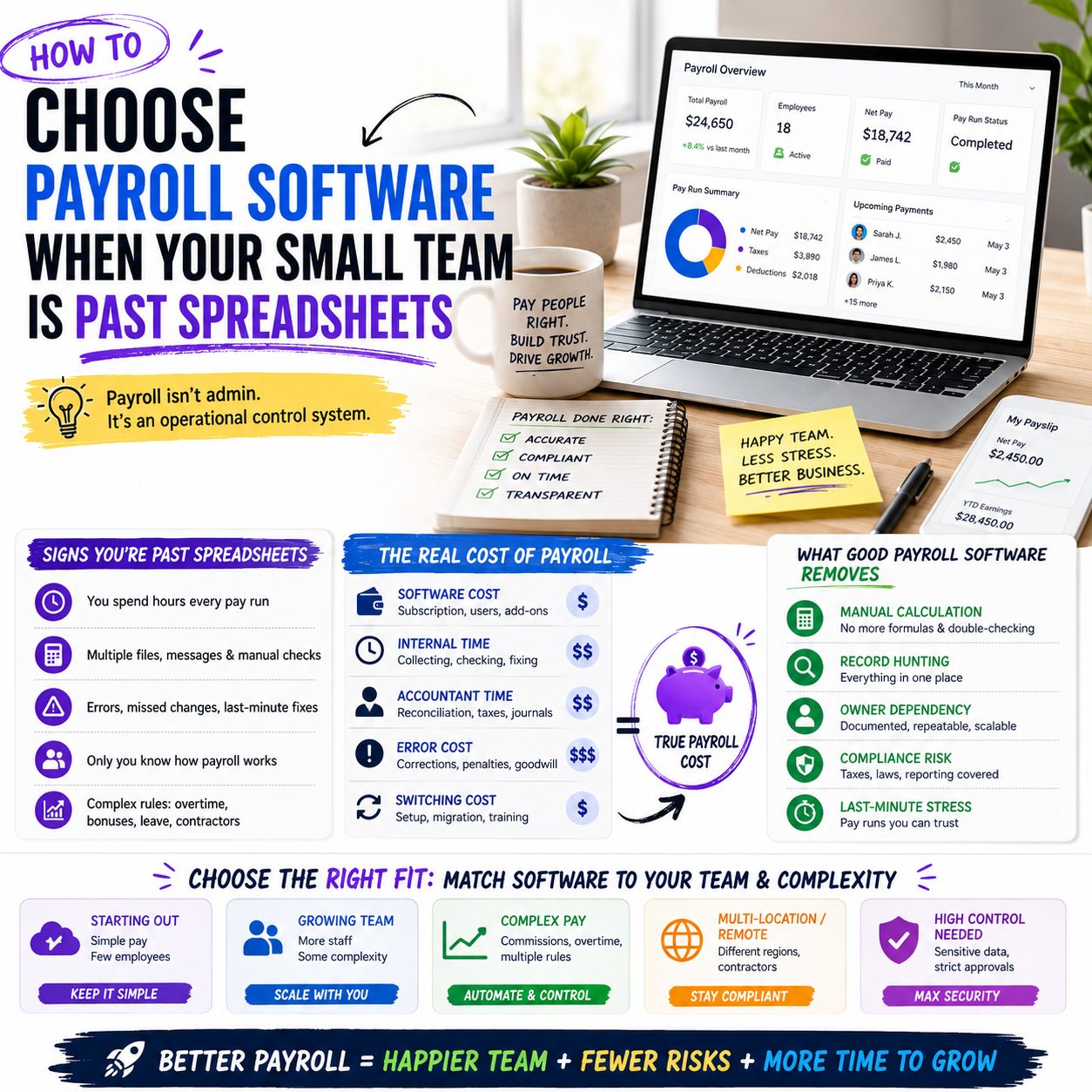
Payroll software becomes a real business decision when the owner is no longer just paying two people from memory. Once a business has hourly staff, contractors, paid leave, commissions, bonuses, or multiple locations, payroll stops being an admin task and becomes an operational control system.
This guide is for small business owners, e-commerce operators, agencies, shops and service firms that are deciding whether to keep payroll in spreadsheets, use a lightweight payroll package, or move to a more structured HR and payroll stack.
The trigger is not headcount, it is payroll complexity
Many owners wait until they reach a certain number of employees before changing payroll systems. That is the wrong trigger. A five-person business with commissions, shift changes, part-time hours and contractors can have more payroll risk than a 15-person office team on fixed salaries.
The practical question is not, “How many employees do we have?” It is, “How many exceptions do we process every pay run?” Exceptions are where errors, missed approvals and hidden costs appear.
Examples of payroll complexity include:
- Hourly staff with changing schedules
- Overtime or weekend rates
- Sales commissions or performance bonuses
- Freelancers and contractors paid on different cycles
- Paid time off, sick leave or unpaid leave adjustments
- Multiple tax or reporting categories
- Manual reimbursement approvals
- International or remote staff arrangements
If payroll requires the owner or office manager to check several spreadsheets, messages, bank transfers and calendar notes before every pay run, the business has already outgrown informal payroll handling. The cost is not only the software subscription. The real cost is the recurring management time and the risk of paying people incorrectly.
What a payroll package should actually remove from the business
A payroll system should not be judged only by its feature list. A small business should judge it by which manual decisions it removes, which checks it makes visible, and which records it keeps clean enough for future review.
The source article on payroll packages from Small Business Trends lists payroll tools as a way to simplify operations through automation and compliance support. That is a useful starting point, but the buying decision needs to be more specific. For a small operator, payroll software should remove at least three operational burdens.
Manual calculation work
The system should reduce repeated calculations around gross pay, deductions, overtime, leave, bonuses and recurring payments. If the manager still has to calculate these separately and enter only final amounts into the system, the software is acting as a payment form rather than a payroll control tool.
Record-hunting before every pay run
Payroll should not depend on searching emails, chat threads or handwritten notes. A workable system should centralise hours, leave, employee records, pay rates, approval history and payment status. The owner should be able to answer, “Why was this person paid this amount?” without reconstructing the month manually.
Owner dependency
In many small companies, only the founder knows how payroll is assembled. That becomes a business continuity risk. A payroll package should make it possible for a trained manager, accountant or operations assistant to run the process with documented steps and approval controls.
The cost model: subscription price is the visible part
Payroll software is often priced as a monthly platform fee plus a per-employee or per-user charge. That makes comparison look simple, but it is incomplete. A cheaper tool can cost more if it creates manual work around timesheets, accounting exports, contractor handling or corrections.
When comparing tools, small businesses should calculate payroll cost across five areas:
- Software subscription: monthly base fee, per-employee fee, add-ons and payment processing fees.
- Internal admin time: hours spent collecting timesheets, checking changes, correcting errors and answering pay questions.
- Accountant or bookkeeper time: extra work needed to reconcile payroll, taxes, benefits, reimbursements or journals.
- Error handling: time and goodwill cost when employees are paid incorrectly or late.
- Switching cost: setup, migration, staff training, integrations and parallel runs during transition.
A practical way to compare payroll options is to estimate the number of management hours saved per month. If the owner currently spends six hours per month on payroll checks and a system reduces that to two, the value is not abstract. Those four hours can be compared against the subscription and setup cost.
For a founder still handling sales, customer service and supplier issues, payroll admin time often lands at the worst moment: right before payment deadlines. Software that removes last-minute checking has value even if it is not the cheapest line item.
Where payroll connects to training and staff development
The candidate source on employee development training may seem separate from payroll, but in a small business the two systems often overlap. Training, pay progression and role changes create payroll consequences. If those changes are handled informally, payroll becomes disconnected from how the team actually works.
For example, a warehouse assistant may complete forklift training, a support agent may move into a team lead role, or a sales assistant may become eligible for commission after training. If the training record sits in one place and payroll sits somewhere else, the pay change can be delayed, missed or applied inconsistently.
This is why some businesses should not choose payroll software in isolation. They should decide whether they need a payroll-only tool or a broader people-operations workflow that tracks employee data, training status, role changes and approvals.
What most people miss
The hidden issue is not whether payroll software can process wages. Most credible tools can. The issue is whether the business has a reliable source of truth for the events that change pay.
Pay changes usually come from operational events: a promotion, a completed certification, a commission approval, a new schedule, a contract change, a leave request or a manager decision. If those events are not captured before payroll is run, the payroll tool will simply process incomplete information more efficiently.
That is why the implementation plan matters as much as the product choice. A payroll tool will not fix a business where managers approve changes through casual messages and no one owns the final payroll checklist.
Payroll-only tool or broader HR stack: the decision boundary
A small business does not always need a full HR platform. Many owners should avoid buying more system than they can maintain. The decision depends on the type of workforce and the number of payroll inputs, not on whether a vendor has more features.
A payroll-only package can be enough when the team is mostly salaried, pay changes are rare, leave is simple, and the accountant or bookkeeper already handles reporting cleanly. In that case, the priority is accurate pay runs, clean records, basic compliance support and accounting integration.
A broader HR and payroll stack becomes more useful when the business has frequent onboarding, role changes, training requirements, approvals, shift work, performance-linked pay or multiple managers submitting payroll inputs. In that environment, the payroll process depends on upstream people data.
The wrong purchase goes both ways. A payroll-only tool can leave the business stitching together training records, leave approvals and pay changes manually. But a full HR suite can become shelfware if the business has no one to maintain workflows, permissions and employee records.
The operator decision is simple: buy the smallest system that removes the current bottleneck without creating a new admin burden.
A practical scenario: the e-commerce seller with warehouse help
Consider a small e-commerce seller with a founder, one customer support employee, two warehouse assistants, one part-time packer during busy periods and several freelancers handling creative work. At first, payroll is manageable through bank transfers, invoices and a spreadsheet.
Then the business adds weekend dispatch during seasonal peaks. One warehouse assistant works extra hours. The part-time packer changes availability. The support employee receives a bonus for handling a backlog. A freelancer moves from project invoices to a monthly retainer. None of this is unusual, but it creates payroll friction.
If the founder keeps using spreadsheets, the pay run now depends on several separate inputs: timesheets, bonus approval, freelancer invoice status, leave records and bank payment checks. The founder may still be able to process payroll, but the process becomes fragile. If one message is missed, the wrong amount goes out.
In this scenario, the right payroll package is not necessarily the tool with the most HR features. The business needs:
- Hourly pay handling for warehouse staff
- Approval workflow for overtime or seasonal hours
- Support for recurring contractor or freelancer payments where appropriate
- Clear employee records and pay history
- Export or integration for bookkeeping
- A pre-pay-run review screen that shows changes before money moves
The business should not buy a complex enterprise HR suite just because it looks complete. It should choose the tool that makes the founder stop acting as the memory layer between operations and payroll.
Implementation risk: the first pay run is not the real test
Many payroll software implementations look successful after the first pay run because everyone is paying attention. The owner checks every field, the accountant reviews the setup, and employees are told to report issues quickly.
The real test is the third or fourth pay cycle, when the process becomes routine and exceptions start appearing. That is when the business discovers whether its workflow is strong enough.
Before switching, a small company should run a short payroll readiness check:
- Who approves hours, overtime, bonuses and corrections?
- Where are employee records stored and updated?
- Who owns the final payroll review?
- How are last-minute changes handled?
- Can the bookkeeper reconcile payroll without asking for extra screenshots?
- What happens if the owner is unavailable on payroll day?
The system should also support a parallel run during transition where the business compares the old method and the new system before fully relying on the software. This is not wasted time. It exposes setup errors, missing employee details and unclear approval rules before they affect payments.
Metrics that show whether the payroll system is working
After implementation, the business should not judge payroll software by whether it feels modern. It should track whether the payroll operation is becoming cleaner, faster and less dependent on one person.
Useful payroll operating metrics include:
- Time to prepare payroll: total admin hours from collecting inputs to final approval.
- Number of corrections per pay cycle: underpayments, overpayments, missed changes or manual adjustments.
- Late payroll inputs: hours, leave requests, bonuses or invoices submitted after the cutoff.
- Owner involvement: how many steps still require founder approval or manual checking.
- Employee pay queries: questions about missing hours, unclear deductions or disputed amounts.
- Bookkeeping reconciliation time: how long it takes to match payroll with accounting records.
These metrics make the software decision measurable. If a new payroll system reduces preparation time but increases corrections, the workflow is not fixed. If it reduces owner involvement but creates confusion for staff, employee self-service or communication may need adjustment. If bookkeeping still requires manual exports and reformatting, the integration decision may have been weak.
Decision checklist before signing a payroll contract
Use this checklist before choosing a payroll package or upgrading from spreadsheets. The goal is not to find the most feature-rich platform. It is to avoid buying software that does not match how pay decisions happen inside the business.
- Map the current pay run: write down every input needed before payroll can be approved, including hours, leave, bonuses, commissions, reimbursements and contractor payments.
- Identify the exception pattern: list the changes that cause manual work each month. Choose software around those exceptions, not around the easiest pay run.
- Check approval controls: confirm whether managers can approve hours, overtime or pay changes without sending separate messages.
- Review accounting fit: ask how payroll data reaches the bookkeeping system and whether exports require manual reformatting.
- Test employee records: make sure pay rates, roles, leave status and historical changes can be reviewed without searching outside the system.
- Decide the human boundary: define which steps software can automate and which still require owner, manager or accountant review.
- Plan a parallel run: compare the old payroll method with the new system before relying on it fully.
- Set three operating metrics: track preparation time, correction count and late payroll inputs for the first three pay cycles.


