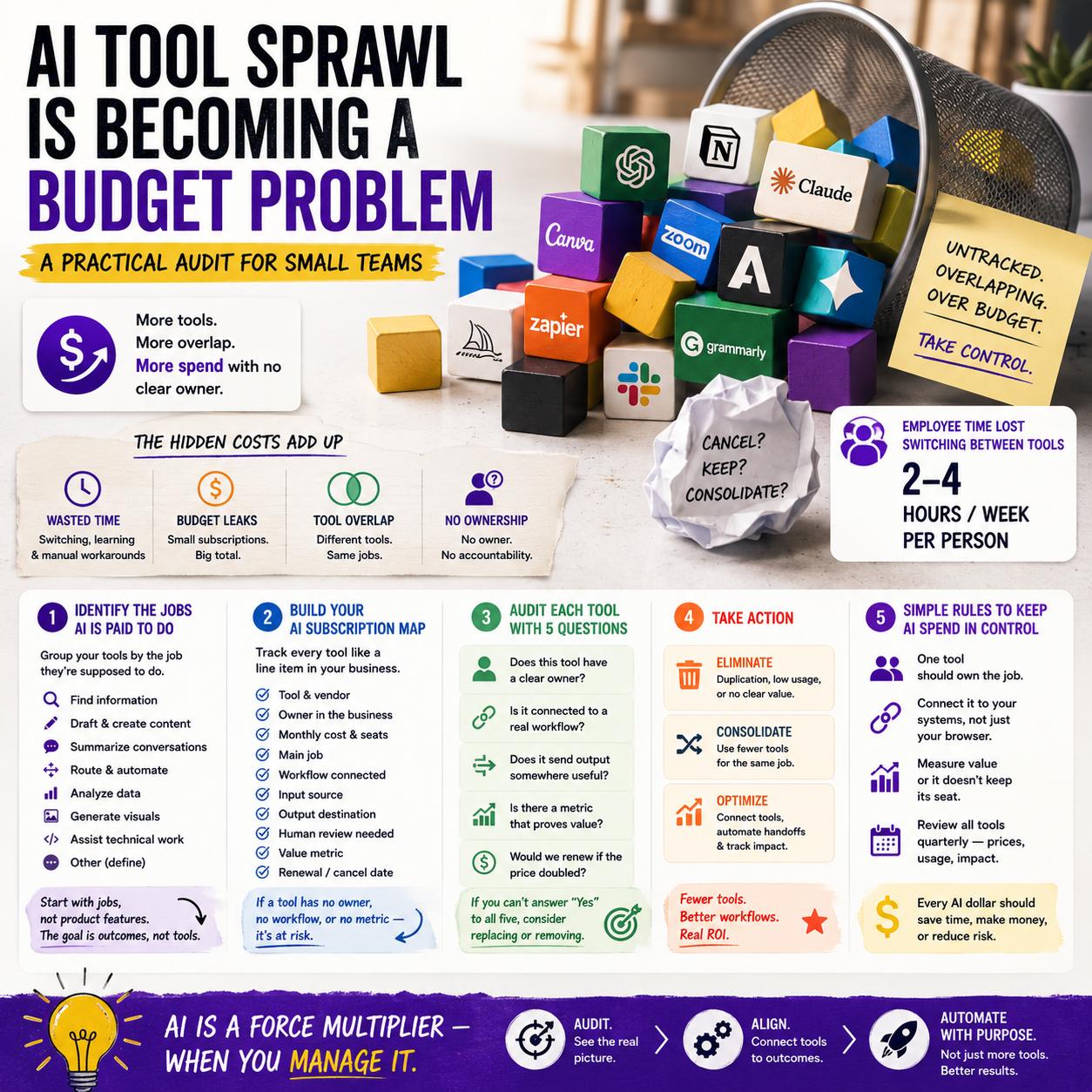
Glean’s reported growth while selling AI budget reduction tells small operators something more useful than another AI funding story: the AI stack is starting to look like the SaaS stack did five years ago. Tools get added by department, experiments become subscriptions, and nobody owns the total monthly cost. For a small team, the real decision is not whether to use AI. It is which AI jobs deserve a paid tool, which can run through an existing platform, and which should stay manual.
This article is for founders, e-commerce operators, agency owners, small service teams and digital managers who already have AI tools scattered across search, support, writing, analytics, meeting notes, CRM, code, image creation or internal knowledge. The goal is to turn AI spending into an operating system, not a drawer full of subscriptions.
The budget signal: AI buyers are moving from experimentation to consolidation
TechCrunch reported that Glean crossed $300 million in annual revenue and that AI budget-cutting has become a major part of its sales message. That matters because Glean is not selling to hobby users. It sits in the enterprise AI search and workplace knowledge category, where buyers are now asking whether multiple AI tools can be reduced into fewer systems.
Small businesses should not copy enterprise buying behavior, but they should read the signal. When larger companies start looking for AI consolidation, it usually means one of three things is happening:
- Too many teams bought overlapping tools.
- AI features have been bundled into existing software, making standalone tools harder to justify.
- Finance teams are asking for proof that AI subscriptions reduce real labor, support time, content costs, decision delays or error rates.
The same pattern appears in small teams, just with less formal procurement. A founder pays for a writing assistant. The support lead tests an AI helpdesk add-on. The operations manager adds a meeting note taker. The marketing person upgrades a design tool because its AI features are locked behind a higher tier. Individually, each subscription feels small. Together, they create a recurring cost base that is rarely reviewed with the same seriousness as ad spend, payroll or inventory.
The practical move is not to cancel AI tools blindly. It is to separate tools that operate a workflow from tools that merely make individual work feel faster.
Do not audit tools first; audit the jobs they are being paid to do
A weak AI audit starts with a list of subscriptions. A useful one starts with the business jobs that AI is supposed to perform. This avoids the common mistake of comparing tools by features rather than by operational value.
For a small business, most AI tools fall into a limited set of paid jobs:
- Finding internal information faster, such as policies, product details, supplier terms or past client work.
- Producing draft content for listings, newsletters, support replies, ads or documentation.
- Summarising conversations, meetings, tickets, calls or long documents.
- Routing work, such as support requests, leads, order issues or internal tasks.
- Analysing business data, including sales trends, customer complaints, inventory movements or campaign results.
- Generating creative assets, such as product images, ad variations, packaging drafts or social visuals.
- Helping technical work, including code, spreadsheet formulas, automations and data cleanup.
Once the jobs are visible, the tool list becomes easier to judge. If three tools all summarise meetings or documents, the question is not which one has the nicest interface. The question is where summaries actually change a workflow. A call summary that automatically creates CRM tasks is more valuable than a beautiful transcript that nobody reads. A product description generator connected to Shopify or WooCommerce may be more useful than a separate writing app that still requires copy-paste, formatting and manual review.
What most people miss
The hidden cost of AI tools is often not the subscription. It is the unfinished workflow around the tool. If an AI tool produces output that must be checked, copied, reformatted, approved, uploaded, tagged, translated and tracked manually, then the team may have bought a faster drafting step while leaving the expensive operational work untouched.
This is why small operators should measure AI tools against workflow completion, not output volume. A tool that writes ten draft replies in a minute is not automatically useful if a human must still investigate the order, check the customer record, verify the policy, correct the tone and manually close the ticket. A less impressive tool that pulls the order data, suggests a policy-compliant response and tags the issue type may save more real time.
The AI subscription map every small team should build
Build a simple AI subscription map before cancelling anything. It can live in a spreadsheet, Notion table, Airtable base or the finance tab of your operating dashboard. The point is not elegance. The point is ownership.
Each row should contain:
- Tool name and vendor.
- Owner inside the business.
- Monthly cost and billing cycle.
- Number of paid seats.
- Main job performed.
- Workflow connected to it.
- Input source, such as CRM, inbox, product catalogue, documents, analytics or calls.
- Output destination, such as Shopify, helpdesk, email platform, task manager, CMS or reporting dashboard.
- Human review required.
- Metric used to prove value.
- Renewal or cancellation date.
The important columns are owner, workflow, output destination and metric. If nobody owns the tool, it will drift. If it is not attached to a workflow, it is probably personal productivity software masquerading as business infrastructure. If the output has no destination, the team is paying for isolated drafts. If there is no metric, the tool will survive because people like it, not because it improves the business.
A small e-commerce seller might discover that AI is being paid for in a product description app, an email marketing add-on, a support chatbot, a design platform, a meeting recorder and a general AI assistant. The better question is not whether the total is too high. It is whether these tools support separate workflows or whether three of them are doing similar text generation with different interfaces.
Where consolidation usually makes sense
Consolidation is not the same as buying one giant system. For small teams, it often means choosing one tool as the place where a job happens and removing the duplicate tools around it.
There are several areas where consolidation is usually worth checking first.
Internal search and company knowledge
If the team uses Google Drive, Slack, Notion, email, project management software and a helpdesk, internal information can become a daily tax. AI search tools promise to reduce that tax, and Glean’s growth shows that companies are paying for this problem at scale. For a small team, the decision is more specific: is information retrieval a real bottleneck, or just an occasional annoyance?
If staff repeatedly ask the same operational questions, search through old chats for supplier rules, misquote policies, or waste time finding past client work, an AI knowledge layer may be worth evaluating. If the company has fewer than ten people and most critical information lives in one clean knowledge base, adding a separate AI search product may simply create another place to manage permissions and source quality.
Customer support drafting
Support is one of the easiest places to overbuy AI. A chatbot, helpdesk AI assistant, inbox summariser and general writing tool can all appear useful. The better setup is usually one support workflow with clear escalation rules.
For example, an e-commerce operator can define which tickets AI may draft: delivery status, returns policy, product availability, address correction, invoice copy and warranty instructions. Refund disputes, angry customers, chargebacks, damaged high-value orders and regulatory complaints should stay closer to human review. The tool should be judged by resolution time, reopen rate, refund leakage, customer contact reason tags and the percentage of replies that require major editing.
Marketing content production
Marketing AI spend gets messy because many tools now include writing features. The same team may pay for AI inside email software, design software, SEO software, a social scheduler and a standalone assistant. This can be acceptable if each tool produces content directly where it is used. It is wasteful if the team is paying multiple systems to generate generic copy that still requires the same editorial work.
The consolidation rule: keep the AI tool closest to the publishing or performance data. If the email platform’s AI can use past campaign data and produce variants inside the campaign builder, it may beat a standalone writer. If a standalone tool produces stronger product copy and can export cleanly into the catalogue workflow, it may stay. The metric is not word count; it is production time, approval time, error rate, conversion on tested assets and the amount of rework before publishing.
Where cancellation is risky
A finance-led AI audit can go wrong when it removes tools that look expensive but protect operational quality. The right question is not only “what does this cost?” It is also “what breaks if this disappears?”
Be careful cancelling AI tools that sit inside compliance-sensitive, customer-facing or revenue-critical workflows. For example, if an AI support assistant enforces approved refund language and prevents staff from making inconsistent promises, its value may be risk reduction rather than speed. If a data-cleaning automation prevents catalogue errors before products go live, the savings may appear in fewer customer complaints, fewer returns and less manual correction.
Also be careful with tools that have become part of a repeatable operating process. If a small agency uses AI to turn client calls into task lists, scopes of work and follow-up emails, cancelling the tool might push work back onto senior people. That may save a subscription fee while adding invisible labor cost.
The cancellation test should include four checks:
- Can the same job be done inside an existing paid platform?
- Will removing the tool create manual work for a higher-cost person?
- Does the tool reduce customer-facing mistakes or policy inconsistency?
- Is there stored knowledge, prompts, workflows or history that must be migrated?
A practical scenario: the 12-person online retailer with six AI tools
Consider a 12-person online retailer selling across its own store and marketplaces. The team pays for a general AI assistant, an AI product description tool, an AI feature inside its email platform, a support chatbot, a meeting note tool and an AI design upgrade. None of these purchases was reckless. Each solved a real annoyance at the time.
The audit starts by mapping jobs. Product copy and email copy are both text generation, but the workflows are different. Product copy touches catalogue accuracy, SEO fields, marketplace rules and translation. Email copy touches campaign performance and segmentation. The team may keep both if each is embedded in the right workflow. But if the product description tool only creates generic drafts and the team rewrites everything manually, it becomes a cancellation or downgrade candidate.
The support chatbot needs a stricter test. If it answers order-status questions using live order data and routes damaged-item claims to a human, it is part of operations. If it gives vague answers and creates extra tickets when customers get frustrated, it is a brand and workload risk. The metric should include deflection quality, not just the number of chats handled by automation.
The meeting note tool may look small, but its value depends on whether notes become tasks. If it records supplier calls and automatically pushes agreed actions into the project management tool, it may stay. If it creates long transcripts that nobody reads, it can be cancelled or replaced by a built-in feature.
The design upgrade should be measured against paid asset production. If it reduces outsourced banner work or speeds up marketplace image variations, it may be justified. If it is mainly used for experimental visuals that never ship, the team should downgrade and keep creative work in a simpler process.
The result is not necessarily a smaller AI stack. It is a cleaner one: fewer overlapping tools, clearer owners, and each retained subscription tied to a workflow where it changes speed, quality, risk or revenue.
The metric set that keeps AI spend honest
AI tools need different metrics depending on the job. A single return-on-investment calculation is often too blunt for small teams because many AI tools affect time, quality and risk rather than direct revenue. Use a small metric set per workflow.
For support AI, track:
- Average first response time.
- Average resolution time.
- Reopen rate.
- Escalation rate to human staff.
- Refund or goodwill cost by ticket type.
- Percentage of AI drafts requiring major edits.
For content and catalogue AI, track:
- Time from draft to approved asset.
- Number of corrections after publishing.
- Marketplace rejection or compliance issues.
- Conversion rate on tested product pages or campaigns.
- Editorial review time per batch.
For internal knowledge AI, track:
- Repeated internal questions by category.
- Time to find policy, product or client information.
- Incorrect answers detected during review.
- Adoption by the roles that actually need the information.
For meeting, task and operations AI, track:
- Tasks created automatically versus manually.
- Missed follow-ups.
- Time between meeting and assigned action.
- Manual cleanup required after transcription or summarisation.
The measurement does not need to be perfect. It needs to be good enough to stop subscription decisions from being based on enthusiasm, vendor demos or who complains loudest when a tool is removed.
The memory bottleneck is a reminder that AI costs will not only be software costs
Another TechCrunch report covered Xcena, a South Korean chip startup betting that AI’s bottleneck is memory rather than compute. That may sound far away from a small online store or agency, but it matters at the pricing level. AI software costs are shaped by infrastructure costs: model usage, storage, retrieval, memory, inference and vendor margins.
Small businesses do not need to follow chip markets closely. They do need to avoid building workflows that assume AI usage will always become cheaper in a straight line. Some AI features will be bundled into existing platforms. Others may remain metered, capped, seat-based or pushed into higher plans because the vendor carries real infrastructure costs.
This affects tool selection. A cheap AI tool with unclear usage limits may become expensive once the team runs customer support, catalogue generation or document analysis through it at volume. A more expensive platform with predictable seat pricing may be easier to budget. For operators, predictability can matter more than the lowest entry price.
When evaluating AI vendors, ask practical pricing questions:
- Is pricing per seat, per action, per message, per document, per token, per workflow or bundled into a plan?
- What happens when usage spikes during peak season?
- Are integrations included or charged separately?
- Can admin users cap usage by team or workflow?
- Is data retrieval across company documents included in the base plan?
- What is the cost of adding temporary staff, freelancers or external partners?
This is especially relevant for e-commerce teams with seasonal peaks. A support AI bill that looks fine in March may behave differently in November if pricing is tied to tickets, conversations or automated resolutions.
The 30-day AI spend reset for a small team
Use a 30-day reset rather than a one-day cancellation session. Fast cuts often remove context. A short operating review gives enough time to see which tools are actually embedded in work.
Days 1-5: freeze new AI purchases
Pause new trials, upgrades and seat additions unless they are needed for an urgent operational problem. Ask every team member to list the AI tools they use, including tools expensed personally or bundled inside larger software. Include browser extensions, meeting tools, content tools, design tools, CRM add-ons, helpdesk features and analytics assistants.
Days 6-10: map each tool to one primary job
Force each tool into one main job. If a tool has no primary job, mark it as experimental. If two tools have the same primary job, mark them for comparison. If a tool supports multiple jobs, identify which job justifies the subscription.
Days 11-17: check workflow completion
For each retained tool, document where the input comes from and where the output goes. A tool that starts from a live business system and ends inside another live business system is usually more valuable than one that produces isolated text or files. Note every manual step after AI output: review, formatting, tagging, upload, approval, translation, data checking and customer verification.
Days 18-24: run downgrade and replacement tests
Do not cancel the tool yet. Test whether the same job can be done with an existing platform, a lower plan, fewer seats or a more limited workflow. For example, keep AI access for the support lead and remove it from users who only need approved macros. Keep the catalogue AI tool for new product batches but cancel seats used only for occasional rewrites.
Days 25-30: assign owners, metrics and review dates
Every paid AI tool should leave the reset with an owner, a workflow, a metric and a review date. Tools without those four items should be cancelled, downgraded or moved into a time-limited experiment. The review date matters because AI tools change quickly. A tool that is useful now may be duplicated by an existing platform in three months.
The practical standard is simple: keep AI tools that remove a real bottleneck, reduce expensive rework, improve operational consistency or connect directly into revenue and service workflows. Cut tools that only create more drafts, more dashboards, more transcripts or more places for the team to check.


