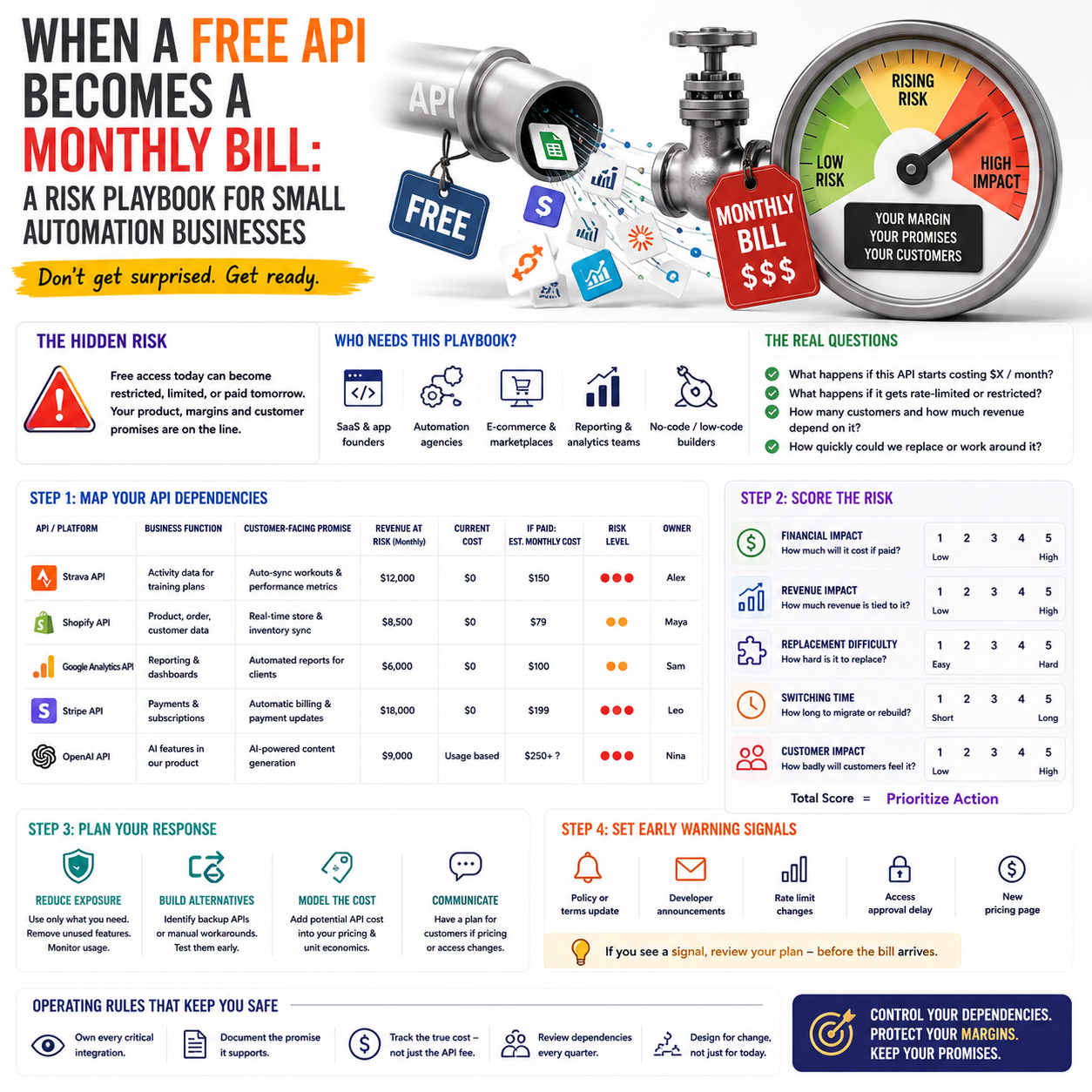
Strava’s move to charge developers a flat monthly fee for API access is not just a fitness-app story. It is a useful warning for small software businesses, automation builders, agencies and niche operators that quietly rely on third-party data pipes they do not control.
If your product, reporting workflow, customer dashboard, lead process or internal automation depends on another company’s API, the real question is not whether the API is useful. The question is whether your margin, pricing and customer promise still work when that access becomes paid, restricted or politically sensitive.
The operator problem: free access hides inside the margin
Many small digital businesses build around APIs without treating them as billable infrastructure. A Shopify app pulls product data. A reporting agency syncs ad metrics into Looker Studio. A marketplace seller exports inventory feeds. A fitness coach uses connected activity data to build paid training plans. A no-code consultant connects form submissions, CRM records and email journeys through automation tools.
At the start, these integrations feel like leverage. They reduce manual work, help a small team look larger and make a product more useful. The weakness appears later: the cost is often invisible until the platform changes access rules, usage limits, approval requirements or pricing.
According to TechCrunch, Strava plans to charge developers a flat monthly fee for API access. The details matter less for most Make Business readers than the operating pattern: a platform with valuable data tightens control before a major corporate milestone. That can happen in fitness, e-commerce, payments, marketplaces, AI tools, maps, email, logistics, social platforms or analytics.
For a small company, the risk is not only the new invoice. It is the work around the invoice: product changes, customer communication, support tickets, data gaps, broken automations, new monitoring and possible repricing.
Who should pay attention before this becomes urgent
This is most relevant for three groups of operators.
First, small software and app founders that use another platform’s API as a core product feature. If users pay you because you import, analyze, enrich or display third-party data, your supplier risk may be larger than your hosting cost.
Second, agencies and automation builders that sell workflows to clients. A client may not care that a platform changed its API terms. They will care that their dashboard, lead routing, invoice sync or product update process stopped working.
Third, e-commerce and service businesses that have assembled lightweight operating systems using connectors. These may include Zapier, Make, Airtable, Google Sheets, email tools, CRM platforms, marketplace exports, payment notifications and inventory apps. The business may not think of itself as technical, but it can still be dependent on technical access rights.
The practical decision is simple: if a third-party API would interrupt sales, fulfilment, reporting, customer delivery or billing, it belongs on your operating risk map. It should not sit only in a developer’s memory or a no-code consultant’s diagram.
Turn API dependency into a cost line, not a surprise
The first mistake is treating API access as a technical issue. It is a pricing and margin issue.
A flat monthly API fee behaves differently from a usage-based fee. A flat fee hurts low-volume operators first because the cost is not matched to revenue. If you have 40 paying users and a platform charges a fixed monthly amount, the cost per user may be uncomfortable. If you have 4,000 users, the same fee may be manageable. That means the same API change can be harmless to one business and damaging to another.
Small operators should model API access in three layers:
- Base access cost: the fixed fee required before any customer value is delivered.
- Operational maintenance cost: the time needed to handle authentication changes, failed syncs, support questions and platform reviews.
- Failure cost: refunds, churn risk, manual workarounds or missed delivery when the integration stops working.
This does not require a complex finance model. A founder can use a simple spreadsheet with each dependency listed as a supplier. The columns should include current monthly cost, possible paid access cost, customers affected, revenue connected to that integration, manual workaround time and owner.
The point is not to predict the exact new fee. The point is to know whether a fee of any meaningful size would force a product, pricing or workflow decision.
What most people miss
The API bill is rarely the largest cost. The larger cost is usually the promises already built on top of it.
If your sales page says customers receive automatic syncing, the business has made a promise. If your onboarding flow assumes imported data, the customer experience depends on access. If your monthly report template pulls external data, the agency’s delivery process depends on access. If your support team cannot explain why data is missing, the platform change becomes your customer trust problem.
This is why the cheapest-looking integration can become the most expensive part of the operation. It sits between the customer promise and the supplier’s rules.
A practical dependency map for small teams
A dependency map should be short enough that a founder actually maintains it. It should focus on systems that affect revenue, delivery or customer trust. The goal is not documentation for its own sake; it is faster decisions when a platform changes terms.
Create one table with these fields:
- Platform or API: for example, Strava, Shopify, Meta Ads, Google Analytics, Stripe, a courier API or an AI model provider.
- Business function: sales reporting, fulfilment, product feature, customer dashboard, billing, lead routing or content production.
- Customer-facing promise: what the customer expects because this integration exists.
- Breakage signal: what you would notice first if access changed, such as failed jobs, missing records or login errors.
- Revenue exposed: which plan, service package, client account or product line depends on it.
- Fallback option: manual export, alternative provider, delayed reporting, reduced feature set or paid upgrade.
- Decision owner: the person allowed to approve spend, disable a feature or notify clients.
For many small companies, this can live in Notion, Airtable, Google Sheets or an internal wiki. The tool matters less than the discipline. Each dependency should have a business owner, not only a technical owner.
When a platform announces paid access or tighter rules, the first meeting should not be a vague discussion about whether the change is bad. The dependency map should answer: which customers are affected, how fast action is needed, what the fallback is and whether the margin can absorb the new cost.
Scenario: a small coaching platform built on activity data
Consider a small subscription business that sells training plans and progress dashboards for amateur athletes. It is not a large tech company. It has a founder, a part-time developer, one support person and several coaches. Customers connect their activity accounts so coaches can review progress and personalize plans.
If API access becomes a monthly cost, the founder has several choices. None are purely technical.
One option is to absorb the fee. That works only if the affected subscription revenue comfortably covers the new cost and the business expects enough retention from the connected-data feature.
A second option is to move connected-data features into a higher plan. That protects margin, but it may annoy customers who see the feature as part of the original product. The communication must explain the supplier cost and the value of automated syncing without sounding like an excuse.
A third option is to support manual uploads or periodic exports. This reduces platform dependency but increases friction for customers and coaches. The business must decide whether the lower infrastructure risk is worth the weaker experience.
A fourth option is to reduce the feature set. Instead of continuous syncing, the platform might refresh data weekly or show fewer metrics. This can reduce technical complexity but changes the product promise.
The right answer depends on revenue concentration. If only a small share of paying customers use the integration, a premium add-on may be sensible. If most customers bought the product because of the integration, the business may need to treat API access as a core cost of goods sold, not a side expense.
Where data access and infrastructure secrecy overlap
Another TechCrunch report covered criticism of data center secrecy, with Erin Brockovich focusing on the lack of transparency around data centers. At first glance, that is a different topic from API pricing. For small operators, the common thread is dependence on infrastructure they rarely see and cannot easily negotiate with.
Modern small businesses often run on layers of invisible infrastructure: cloud hosting, AI tools, analytics platforms, payment gateways, email deliverability systems, marketplace rules and third-party APIs. The business owner experiences these as apps and dashboards. Underneath, they are supplier relationships.
When those suppliers change pricing, access rules, environmental disclosures, usage caps or compliance requirements, small businesses usually receive the decision after it has been made. They are not in the room. That does not mean they should avoid these tools. It means they should avoid building a fragile operating model where one hidden dependency controls too much of the customer experience.
This is especially relevant for AI and automation workflows. A small team may use an AI model provider for product descriptions, support triage, content tagging or internal analysis. If the provider changes price, model availability, data policy or rate limits, the workflow can change overnight. The lesson from API fee changes is transferable: every automated workflow needs a supplier-risk view.
Pricing decisions when an API becomes paid
When a previously free or cheap data source becomes paid, founders often delay the pricing decision because they hope the fee will be temporary, negotiable or minor. That delay can be expensive if the business keeps selling plans that no longer fit the cost structure.
Use four decision tests.
Test 1: Is the API a feature or the product?
If the API simply improves an internal workflow, the cost may belong in operating expenses. If customers buy the product mainly because of that data connection, the API is part of the product’s cost base. It should be included in plan pricing, gross margin review and product roadmap decisions.
Test 2: Can the cost be matched to usage?
A flat monthly fee creates pressure to grow volume or limit access. A usage-based fee creates pressure to monitor heavy users. If your pricing is flat but your supplier cost grows with usage, heavy users can quietly reduce margin.
Test 3: Can customers understand the value?
If customers understand that automated syncing saves time, reduces errors or improves reporting, a paid add-on may work. If the integration is hidden in the background, passing on the cost may be harder. Hidden value is difficult to price.
Test 4: Is there a credible fallback?
If there is no fallback, you may need to pay and redesign later. If a fallback exists, you can compare the paid API against the cost of manual work, delayed delivery or reduced functionality.
The workflow changes before the invoice arrives
Small teams should prepare for API changes before a specific platform email creates urgency. The preparation is not complicated, but it does require ownership.
Assign monitoring responsibility. Someone should receive developer emails, platform updates and policy notices. Many small businesses lose time because these messages go to an old developer account, a founder’s unused inbox or a contractor who is no longer involved.
Set up failure alerts. If a sync fails, the team should know before customers do. This might be a simple email alert from an automation tool, an error log in a shared dashboard or a daily check of failed jobs.
Keep authentication records clean. Expired tokens, unmanaged app credentials and personal logins create avoidable risk. Use business-owned accounts and document where credentials live.
Create a manual fallback for the highest-risk workflow. It does not need to be elegant. A CSV export, temporary spreadsheet or limited reporting view is better than telling customers that nothing can be done.
Review customer messaging in advance. If a platform change affects delivery, the business should explain what is changing, what remains available and what timeline customers should expect. Support teams need a plain-language version, not a developer explanation.
Metrics that show whether the dependency is worth it
An API should earn its place in the business. Operators should track whether the integration creates enough value to justify the cost and risk.
Useful metrics include:
- Active connected accounts: how many customers actually use the integration.
- Revenue attached to connected accounts: monthly recurring revenue, project revenue or client fees that depend on the integration.
- Support tickets caused by sync issues: a direct signal of operational drag.
- Failed sync rate: the percentage of jobs that fail or require manual repair.
- Manual replacement time: the hours required if the API is unavailable.
- Churn or downgrade patterns: whether customers who use the integration retain better or worse than others.
These metrics help avoid emotional decisions. A founder may love an integration because it feels advanced, while customers barely use it. Or the opposite may be true: the integration may be the quiet reason customers stay. Without usage and revenue data, the business is guessing.
Supplier-risk checklist for API-based automations
Use this checklist for any workflow that depends on third-party data access, especially if it touches paid customers, fulfilment, reporting or billing.
- List every external API, connector and data feed used in customer-facing delivery.
- Mark each dependency as revenue-critical, operations-critical or convenience-only.
- Check whether the current pricing is free, fixed monthly, usage-based or bundled inside another tool.
- Estimate the highest monthly fee the business could absorb without changing plan prices.
- Identify which customers, plans or services would be affected if access stopped for seven days.
- Create one fallback for each revenue-critical dependency, even if it is manual and temporary.
- Move platform notices and developer emails to a monitored business inbox.
- Add failed-sync alerts for the workflows customers would notice first.
- Review customer-facing promises so they do not overstate reliability you cannot control.
- Decide in advance who can approve paying for API access, changing a feature or notifying customers.


