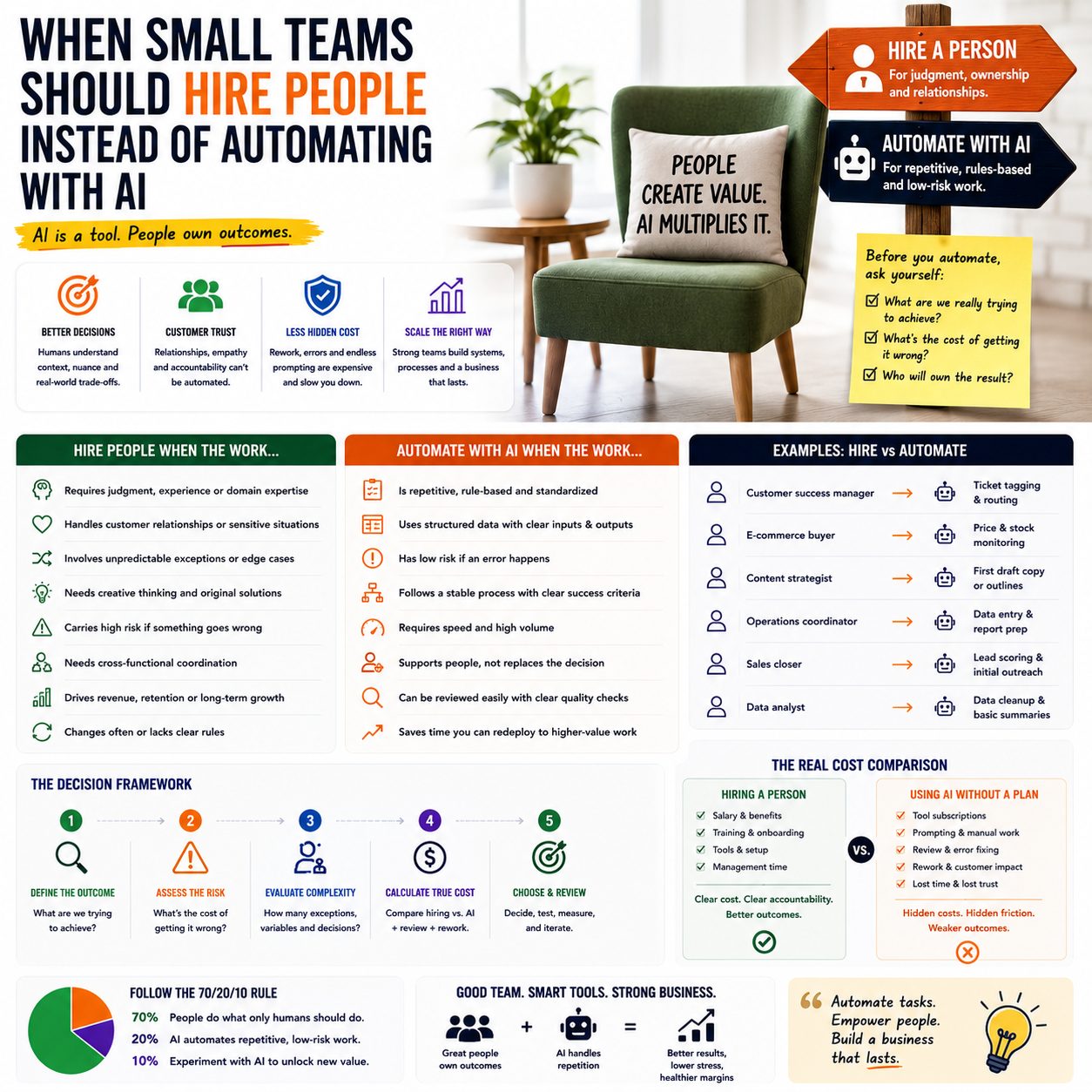
Impulse Space raising $500 million with a stated focus on hiring people, not replacing them with AI, is a useful reminder for much smaller companies: automation is not a staffing strategy by itself. The lesson is not about rockets. It is about knowing which work can be systemized, which work should be assisted by software, and which work still needs accountable human judgment.
For a small e-commerce seller, service business or digital operator, the wrong AI decision is not just a bad tool choice. It can create slow customer responses, messy product data, weak quality control, higher refund rates and management work disguised as automation.
The real decision is not AI versus people
Most small teams frame the question too narrowly: should this task be done by a person or by an AI tool? That is rarely the correct operational question. The more useful version is: which part of the workflow needs speed, which part needs judgment, and which part creates business risk if it fails?
Impulse Space operates in an extreme technical environment where physical systems, engineering judgment and safety matter. A Shopify store, WooCommerce business, agency or subscription service is not building spacecraft, but the same boundary problem appears in smaller form. AI can draft, classify, summarize, check patterns and move data. It cannot own commercial trade-offs, negotiate with angry customers, understand supply constraints from context, or decide when a process exception should override a standard rule.
That distinction matters because AI tools are often bought to reduce payroll, when they should first be used to reduce low-value handling inside a controlled workflow. If a founder uses AI to avoid hiring before the workflow is stable, the business may not save money. It may simply move the cost into rework, customer churn, tool sprawl and founder supervision.
The better decision is to divide work into three layers: automation, human review and human ownership. Automation handles repetitive inputs. Human review catches exceptions and protects quality. Human ownership makes decisions where the company carries brand, cash-flow or legal risk.
Where automation pays back fastest in a small operation
Small teams should not start with the most visible AI use case. They should start with the workflow where manual handling is frequent, rules are clear and errors are cheap to catch. That usually means back-office and operational work before customer-facing autonomy.
Examples include tagging support tickets, turning supplier emails into task records, summarizing product reviews, creating first drafts of product descriptions from approved attributes, extracting invoice data, generating internal order notes, and preparing weekly performance summaries. These jobs are repetitive, bounded and measurable.
The payback comes from reducing handling time rather than pretending the tool can run the business. A founder should be able to answer: how many times per week does this task occur, how long does it take, who checks the output, and what happens when it is wrong?
If the answer is vague, the business is not ready to automate that workflow. It is ready to document it. A process that cannot be described in steps cannot be safely delegated to software.
What most people miss
The hidden cost of AI is not always the subscription. It is the review layer. A €30 or €100 monthly tool can become expensive if the founder has to inspect every output, repair formatting, correct product claims, respond to confused customers or rebuild reports because the data source was inconsistent.
This is why the first automation project should include a review budget. If a virtual assistant, operations coordinator or founder spends 20 minutes checking each batch, that time has a cost. If the review step is not designed, the company will either trust weak output or abandon the system after a few weeks.
A useful rule: automate only when the review time is lower than the original task time and the error rate can be measured. If the tool saves 60 minutes of drafting but creates 50 minutes of checking and correction, it has not improved operations. It has changed the shape of the work.
Where a person is still cheaper than a messy AI stack
Hiring looks expensive because payroll is visible. Poor automation is harder to see because the costs are scattered across tools, lost time and small mistakes. For small businesses, the break point is often reached earlier than founders expect.
A person is usually the better choice when the work contains many exceptions, depends on changing context, affects cash collection, touches customer trust, or requires coordination across suppliers, freelancers and internal systems. Customer complaints, wholesale account management, returns disputes, inventory substitutions, B2B quotes and margin-sensitive promotions are common examples.
Consider a small e-commerce operator selling home goods across several marketplaces. AI can help classify incoming support messages and draft reply options. But if an order is delayed because one supplier shipped partial stock, another marketplace has a strict response-time rule, and the customer has already received the wrong tracking number, a human needs to own the decision. The cost is not the reply. The cost is the combination of refund risk, marketplace account health, customer trust and supplier follow-up.
In that scenario, replacing a human operations assistant with an AI inbox tool may look efficient for the first week. Then exceptions appear. The founder starts checking more threads. The AI drafts polite but incomplete answers. The marketplace dashboard shows unresolved cases. The supplier issue sits outside the support tool. What looked like automation becomes fragmented management.
A trained part-time operator with clear authority may be cheaper than three connected tools and daily founder cleanup. The AI can still assist that person, but it should not own the workflow.
A practical hiring-versus-automation test
Before buying another tool or posting a job, map the work against five operational questions. This avoids emotional decisions such as hiring because the founder is tired, or automating because software looks cheaper.
- Frequency: Does the task happen often enough to justify a system?
- Variation: Are the inputs predictable, or does every case require context?
- Error cost: What happens if the output is wrong?
- Review load: Who checks the work, and how long does that take?
- Ownership: Who is accountable when the workflow fails?
If frequency is high, variation is low and error cost is low, automation should be tested first. If frequency is high but variation and error cost are also high, hire or assign a human owner and use AI as support. If frequency is low and error cost is high, do not automate it early. Create a manual checklist and keep the decision close to the founder or a senior operator.
This test is especially useful for small businesses that are tempted to automate customer support, content production or financial admin too quickly. These areas appear repetitive, but they often contain exceptions that affect revenue, trust or compliance.
The cost model founders should use before replacing a role
A simple cost comparison between a salary and a software subscription is misleading. The better model includes setup, supervision, correction and failure cost.
For each workflow, estimate the monthly cost in four buckets: tool cost, integration cost, review time and mistake cost. Tool cost is the subscription. Integration cost is the time spent connecting forms, inboxes, CRM records, spreadsheets, automations or marketplace exports. Review time is the human checking layer. Mistake cost includes refunds, discounts, delayed invoices, duplicated work, lost leads or account penalties.
Then compare that total against a human option: employee, freelancer, virtual assistant, specialist contractor or existing team member with a revised role. The human option also has onboarding cost, management time and quality variation, but those costs are easier to assign once the work is defined.
For example, an owner may want to automate product listing creation. The direct tool cost might be low. But the true workflow includes supplier data cleanup, title rules per marketplace, prohibited claim checks, image matching, category mapping, pricing logic and final approval. If the business sells regulated, technical or high-return products, human review becomes central. If it sells simple accessories with structured supplier data, automation can carry more of the workload.
The same tool can be profitable in one operation and wasteful in another because the process maturity is different.
How to design the human-plus-AI workflow
The strongest small-team setup is rarely a fully manual process or a fully automated one. It is a narrow workflow where AI handles preparation and a person handles acceptance, escalation and improvement.
Start with one controlled queue
Choose one workflow with a clear input and output. Do not begin with the whole business inbox or every content task. Start with something like return request classification, product description first drafts, lead enrichment, invoice extraction or support ticket summaries.
Create a small set of allowed actions. For support, those actions might be: draft reply, request order details, flag refund risk, escalate supplier issue, or mark as duplicate. For product content, they might be: generate description from approved attributes, flag missing specifications, suggest category, or send to review.
The human reviewer should not simply approve or reject. They should label why the output was wrong. Over time, those labels become the improvement system. Common labels might include missing context, wrong product detail, tone too strong, unsupported claim, bad category, incomplete refund logic or needs supplier check.
Keep authority outside the tool
AI should not quietly change prices, issue refunds, promise delivery dates, approve supplier substitutions or alter financial records unless the business has a mature control process. For many small teams, the safest setup is to let AI prepare actions and let a person execute the final decision in Shopify, WooCommerce, the CRM, accounting software or marketplace dashboard.
This may sound slower, but it protects the business while the workflow is being tested. Once the error pattern is known and the exception rules are stable, some low-risk actions can be automated further.
Metrics that show whether AI is helping or hiding work
A founder should not judge automation by how modern the stack looks. The dashboard should show whether the workflow is faster, cleaner and less dependent on the founder.
Track a small set of operational metrics before and after the rollout:
- Average handling time: time from input to completed action.
- Review time per batch: how long a person spends checking AI output.
- Escalation rate: percentage of items that still need a senior decision.
- Correction rate: percentage of outputs edited before use.
- Customer or revenue risk events: refunds, complaints, payment delays, listing rejections or missed leads tied to the workflow.
- Founder touch rate: how often the founder has to step in.
The founder touch rate is often the most honest metric. If the company bought AI to free the owner but the owner is still checking every output, the system has not worked. It may still be useful, but the role design is wrong.
Use startup visibility opportunities only when the operation can absorb them
The Startup Battlefield article is a reminder that founder opportunities often arrive with operational pressure attached: applications, visibility, preparation, investor conversations and follow-up. For a tiny team, the same principle applies to any growth push, whether it is a marketplace launch, press feature, affiliate campaign or trade event.
Automation can help prepare materials, summarize feedback and organize follow-up. But a person still needs to decide which leads matter, what promises the company can keep, and whether the business is ready for the volume that attention may create.
Small companies often chase exposure before the internal workflow can handle it. If customer support, order accuracy, onboarding or fulfillment is fragile, AI-generated speed can make the fragility worse. A campaign that creates 300 new inquiries is not useful if the team cannot qualify, respond and deliver without damaging trust.
The operational question is not whether AI can help with the campaign. It is whether the company has a human owner for the exceptions that the campaign will produce.
Automation-or-hiring checklist for the next role decision
Use this checklist before replacing a hire with software or hiring someone for work that should be systemized first.
- Write the workflow in steps from trigger to completed action.
- Mark each step as data handling, drafting, checking, decision-making or execution.
- Automate data handling and drafting first, not judgment-heavy decisions.
- Assign one human owner for exceptions, customer risk and cash-impacting choices.
- Estimate tool cost, setup time, review time and mistake cost before comparing against a hire.
- Run the workflow manually for a small batch, then with AI assistance, before giving the tool more authority.
- Track correction rate, escalation rate and founder touch rate for at least the first operating cycle.
- Hire when variation, context and accountability are the main workload.
- Automate when repetition, formatting and classification are the main workload.
- Stop expanding the system if review time is almost as high as the original task time.
The practical boundary is simple: use AI to reduce handling, not to remove accountability. A small team that gets this right can operate faster without creating a fragile business that only works when the founder watches every screen.


