Legal AI and HR automation are moving from specialist enterprise software into the everyday operating stack. Wordsmith has raised €60.2 million to scale legal AI for in-house teams, while Factorial has raised €129 million after building around HR operations for growing companies. For a small business owner, the useful question is not which company raised more money. It is whether your back-office work is repetitive enough, risky enough and expensive enough to justify adding another AI-enabled system.
This is a decision guide for founders, small team managers, digital operators and e-commerce businesses that are already feeling admin drag but are not ready to hire a full legal, HR or operations department. The aim is to decide where AI belongs in the workflow, where humans must stay in control, and what to measure before the subscription becomes another unused tool.
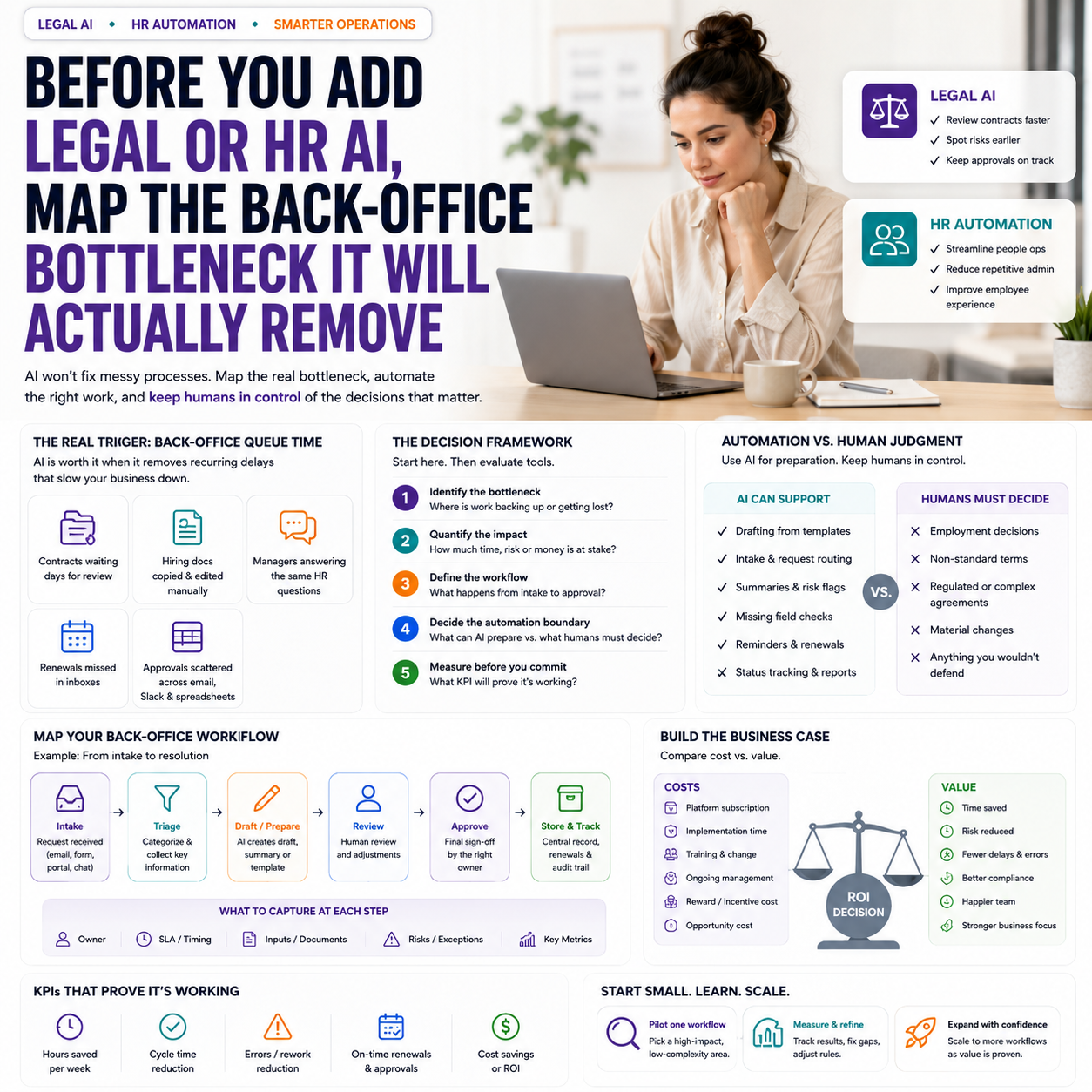
The real buying trigger is not AI, it is back-office queue time
Small businesses usually do not have a legal operations department or a formal HR operations function. They have a founder checking supplier terms at night, a manager rewriting employment documents from old templates, an operations person answering the same policy questions, and a finance lead chasing missing approval trails.
That is why the funding rounds behind Wordsmith and Factorial matter beyond the startup news cycle. They point to a software market that is packaging legal, HR and internal operations into platforms rather than isolated documents, spreadsheets and chat threads. The practical signal for small companies is that more of this work will be automated at the workflow layer: intake, routing, drafting, approval, audit trail and reminders.
Before comparing tools, identify the queue. A legal or HR AI system should remove a recurring bottleneck, not create a more polished version of an occasional task. Good candidates include:
- Supplier contracts that wait days for internal review because nobody owns first-pass screening.
- Hiring documents that are copied from old files and manually adjusted each time.
- Employee policy questions that interrupt managers repeatedly.
- Contract renewals that are missed because reminders live in inboxes.
- Approval processes that happen in Slack, email and spreadsheets with no single record.
If none of those queues exist, the business may not need a dedicated legal or HR AI tool yet. A document template library, project management checklist or better folder structure may solve the immediate problem at a lower cost.
Where small teams should draw the line between automation and judgment
The most expensive mistake is treating legal or HR AI as a replacement for responsibility. The better model is to use it as a preparation layer. It can collect information, suggest drafts, flag missing fields, compare documents against a preferred position and remind people to act. It should not become the final decision-maker on employment terms, dismissals, disputed clauses, regulatory exposure or high-value agreements.
For a small company, the boundary should be written into the workflow. That means deciding which tasks can move automatically and which require review. The boundary is not about distrust of software; it is about preventing quiet operational risk.
Tasks suitable for automation support
- Creating first drafts from approved templates.
- Turning a request form into a structured legal or HR ticket.
- Summarising standard supplier terms for internal review.
- Checking whether required fields are missing from a contract or employee file.
- Routing requests to the right person based on value, country, department or document type.
- Tracking renewal dates, probation reviews, policy acknowledgements and approval status.
Tasks that need human review
- Any employment decision involving performance, dismissal, discrimination risk or local law.
- Non-standard commercial terms that affect liability, exclusivity, payment timing or data handling.
- Contracts involving regulated products, international data transfer or sector-specific obligations.
- Documents where the other party has materially changed the company’s template.
- Anything the founder would not be comfortable defending if the AI summary was wrong.
The rule is simple: use AI to reduce preparation time, not to remove accountability. A small team still needs named owners for contract approval, people decisions and policy exceptions.
The cost question: subscription versus hidden admin payroll
The visible cost of a legal or HR platform is the monthly or annual subscription. The hidden cost is the time already being spent by higher-paid people doing low-leverage administration. That is where the buying decision should start.
Build a basic internal cost model before speaking to vendors. It does not need to be sophisticated. List the recurring workflows, estimate the number of cases per month, and add the time spent by each role. The important detail is to include waiting time and rework, not just active document editing.
For example, a small e-commerce company selling through its own site and marketplaces might handle supplier agreements, freelance creator contracts, warehouse service terms, employee onboarding, holiday requests and policy acknowledgements. None of these tasks may justify a full-time legal or HR hire. But together they may consume founder time, operations time and manager attention every week.
A useful cost model might include:
- Average number of supplier or freelancer agreements reviewed per month.
- Time spent finding the latest template.
- Time spent checking whether a clause is standard or unusual.
- Time lost waiting for a founder or external adviser.
- Number of repeated HR questions sent to managers.
- Time spent preparing onboarding documents.
- Number of missed renewals, delayed approvals or duplicated files.
The platform only makes sense if it reduces measurable work or risk in those areas. If the team cannot name the current workload, it will struggle to prove the tool is working.
A practical scenario: the founder who is still the contract router
Consider a founder running a 12-person digital commerce business with a small warehouse partner, several freelance marketers, two software subscriptions under negotiation and occasional wholesale supply contracts. The founder is still copied into every agreement because nobody else is confident enough to decide what is normal.
The current process looks harmless. A manager emails a contract. The founder scans it between calls. Sometimes an external lawyer is asked to review it. Sometimes the document is approved because the supplier is waiting. Renewals sit in calendars or inboxes. A few files are in shared folders, others are in email threads.
A legal AI workflow could help here, but only if the company designs the process around decision points. The first step is not asking the tool to “review contracts”. The first step is creating a contract intake form with fields such as counterparty, contract value, renewal date, payment terms, liability cap, data access, exclusivity and whether the company template was used.
From there, automation can route low-risk agreements for internal approval, flag missing commercial fields, summarise deviations from the preferred terms and create reminders before renewal. The founder only sees the exceptions: unusual liability, long payment terms, automatic renewal, exclusivity, data processing concerns or contract value above an agreed threshold.
The value is not that AI reads faster than the founder. The value is that the founder stops acting as the inbox-based routing system for every document.
What most people miss
The hardest part of adopting legal or HR AI is not the model quality. It is the company’s own messy source material. If templates are outdated, approval rights are unclear, policies contradict each other or employee records are incomplete, AI will accelerate confusion.
Small companies often discover this during implementation. They expected a tool purchase. They find an operations clean-up project. That is not a reason to avoid automation, but it changes the rollout plan and budget.
Before adding an AI layer, check four foundations:
- Template ownership: Who owns the latest supplier agreement, freelancer contract, employment document or policy?
- Approval thresholds: Who can approve which document types, values and exceptions?
- Data location: Where are signed files, employee records and renewal dates stored?
- Escalation rules: Which issues go to a founder, manager, external lawyer or HR specialist?
If those foundations are missing, the first month of the project should be spent cleaning workflows, not expanding automation. Otherwise the business pays for a smarter interface on top of weak process design.
How to compare tools without being distracted by enterprise features
Many platforms are built for larger companies, even when their marketing pages appeal to smaller teams. A small business does not need the biggest feature list. It needs a system that fits the volume, risk and staffing reality of the business.
When assessing a legal AI or HR operations platform, the buying team should test it against actual documents and requests, not demo data. Use three recent examples: one routine case, one messy case and one case that required escalation. If the tool only performs well on the routine example, it may still be useful, but its role should be limited.
For small teams, the evaluation should focus on operational fit:
- Can non-specialists submit requests without long training?
- Can the tool use company-approved templates and playbooks?
- Does it keep an audit trail of who approved what and when?
- Can it integrate with the tools already used, such as Google Workspace, Microsoft 365, Slack, HR software, CRM or project management systems?
- Can permissions separate employee data, commercial contracts and founder-only documents?
- Does it make escalation easier, or does it hide risk behind summaries?
- Can reports show workload, turnaround time, open approvals and overdue renewals?
Be cautious with features designed for enterprise legal departments if the company has no one to maintain them. A complex clause library, advanced permission structure or multi-step approval engine can become a maintenance burden if the team only processes a handful of agreements each month.
The metrics that prove the system is useful
AI tools often get judged by whether people like the interface. That is too soft for back-office operations. The better test is whether the system improves speed, control and visibility without increasing risk.
Choose a small set of metrics before rollout. For legal workflows, track:
- Average time from request submission to first response.
- Average time from request to approval or signature.
- Percentage of contracts using approved templates.
- Number of agreements missing renewal dates or ownership.
- Number of escalations by reason, such as liability, payment terms, data access or exclusivity.
For HR workflows, track:
- Time needed to complete onboarding document preparation.
- Number of repeated employee policy questions sent to managers.
- Percentage of employee files with required documents completed.
- Open tasks for probation reviews, policy acknowledgements or contract changes.
- Manager time spent on administrative HR requests.
The goal is not to eliminate all manual work. The goal is to reserve manual attention for cases where judgment matters. If the tool reduces simple work but creates more checking, correcting and explaining, the workflow needs redesign.
Implementation risks that small companies underestimate
Small businesses tend to look at AI tools as quick deployments. Back-office tools deserve more caution because they touch contracts, employee data, supplier relationships and internal authority.
The first risk is confidentiality. Contracts and HR records often include sensitive commercial, personal or strategic information. The company needs to understand what data is processed, where it is stored, who can access it and whether the tool uses customer content to improve models. This is not a legal opinion; it is basic vendor due diligence.
The second risk is false confidence. A polished summary can make a risky clause look manageable if the user does not know what to inspect. This is why escalation rules matter. Any AI-generated summary should sit beside the source document, not replace it.
The third risk is workflow bypass. If employees find the tool slow or confusing, they will return to email and chat. Then the business has two processes: the official one and the real one. A small team should keep intake short, approvals clear and notifications visible in the tools people already use.
The fourth risk is ownership drift. Someone must maintain templates, playbooks, user permissions and escalation rules. If nobody owns the system after launch, it decays quickly.
Rollout sequence for a 10 to 50 person team
Do not roll out legal and HR AI across the whole company at once. Start with one workflow where volume and risk are visible. The best first workflow is usually not the most complex one; it is the one that happens often enough to teach the team how the system behaves.
- Week 1: Pick one workflow. Choose supplier contract intake, freelancer agreements, employee onboarding or policy questions. Avoid sensitive employment disputes or complex legal matters as the first use case.
- Week 2: Clean the source material. Identify the approved template, owner, required fields, approval threshold and escalation triggers.
- Week 3: Build the intake route. Replace email requests with a short form that captures the information needed for triage.
- Week 4: Test with real historical cases. Run recent examples through the workflow and compare the output with what actually happened.
- Week 5: Launch with a named owner. Tell the team what goes through the system, what does not, and who reviews exceptions.
- Week 6: Review metrics and friction. Check turnaround time, missing information, escalations, user complaints and any cases where people bypassed the process.
After that, expand only if the first workflow is stable. A small company should prefer one reliable back-office automation over five half-configured ones. The test is whether the team can see work moving more clearly, not whether the tool can technically handle more categories.
Decision criteria before signing an annual contract
Use this checklist before committing to a legal AI or HR automation platform. It is designed for small companies where the founder or operations lead is still close to the work.
- The business has at least one recurring legal or HR workflow with visible delays, rework or missed follow-up.
- There is a named internal owner for templates, approvals and system rules.
- The tool can operate on approved company documents, not only generic templates.
- Escalation rules are clear for high-value, sensitive or non-standard cases.
- The vendor’s data handling, permissions and retention settings are understood by the buyer.
- The workflow can be measured with turnaround time, completion status, missing information and escalation reasons.
- The team has tested the tool with real past examples, including one messy case.
- The expected saving is tied to reduced admin time, fewer missed renewals, faster approvals or better record control.
- The first rollout is limited to one workflow, with expansion dependent on measured performance.
If the checklist exposes gaps, delay the purchase or start with a smaller workflow tool. Legal and HR AI can remove real operational drag, but only when the company first defines the queue, the owner, the risk boundary and the metric that will prove the work has improved.


