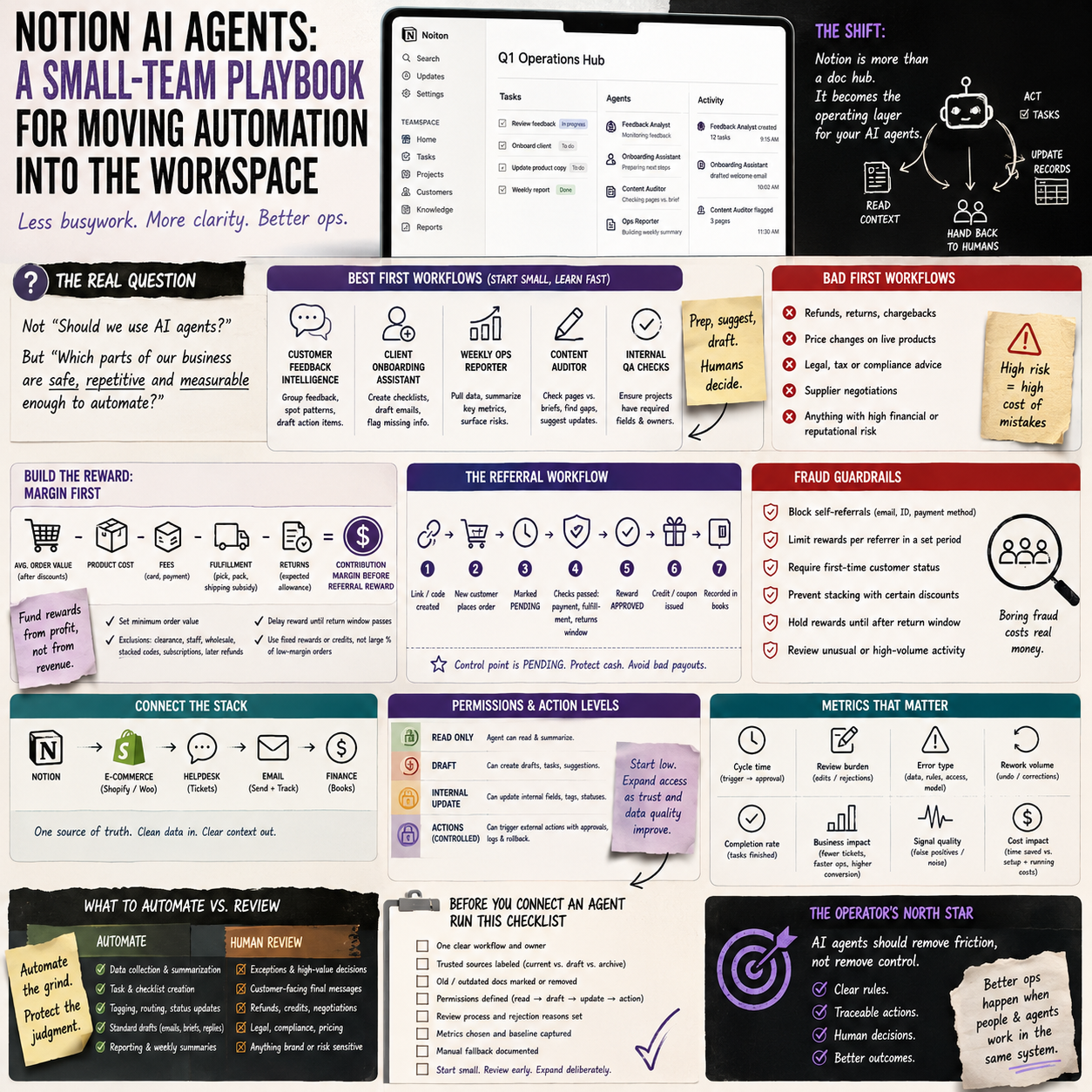
Notion is moving from a shared workspace into something closer to an operating layer for AI agents. For a small company, that is not just another productivity feature. It changes where automation work gets designed, approved, monitored and corrected.
The practical question is not whether to use AI agents. The question is which parts of the business are safe enough, repetitive enough and measurable enough to run from inside the workspace instead of through scattered tools, browser tabs and manual copy-paste.
The decision small teams actually face
Many small businesses already have automation, but it is usually fragmented. A Shopify order export sits in one tool. Customer questions arrive in Gmail or Help Scout. Product notes live in Notion. Invoices are handled somewhere else. A founder or operations manager becomes the person who mentally connects the system.
Notion’s move toward a developer platform for AI agents matters because it points to a different operating pattern: the workspace is no longer only where people write tasks and meeting notes. It can become the place where agents read context, trigger workflows, update records and hand work back to humans.
That is useful only if the business treats it as an operations decision, not a novelty. If a team connects an agent to every database and lets it act freely, the workspace becomes a liability. If the team limits the agent to narrow workflows with clear permissions, it can remove low-value coordination work without losing control.
The right first question is simple: what recurring decision in the business depends on information already stored in Notion or easily connected to it?
Where a workspace agent makes sense first
The best first workflows are not the most impressive ones. They are the boring workflows with frequent handoffs, visible records and low downside if a human reviews the output before action.
For a small e-commerce operator, this could be a weekly product operations workflow. The agent checks new customer feedback, compares it with product pages, flags recurring complaints, drafts suggested copy changes and creates tasks for the store manager. It should not automatically rewrite live product pages on day one. It should prepare the work and show its reasoning.
For a small service business, the first use case might be client onboarding. The agent reviews a signed proposal, creates an onboarding checklist, drafts the welcome email, opens tasks for finance and delivery, and marks missing information. Again, the useful part is not magic. It is reducing the manual translation between sales promises and operational tasks.
For a content-led business, the agent could audit a content calendar against product launches, campaign deadlines and existing research notes. It can propose gaps, but editorial approval stays with a person. That boundary matters because the cost of low-quality automated content is not only time; it can damage trust, rankings and conversion quality.
Good early candidates
- Internal task creation from approved source documents.
- Customer feedback clustering before a human decides what to change.
- Weekly operations summaries pulled from connected tools.
- Drafting standard responses where the source policy is already documented.
- Checking whether project pages have required fields before work starts.
Bad early candidates
- Refund decisions without a review step.
- Price changes on live products.
- Legal, tax or compliance answers sent directly to customers.
- Supplier negotiations without human approval.
- Anything where the source data is messy, disputed or not owned by the business.
The hidden cost is not the AI subscription
Small teams often evaluate AI tools by monthly price. That is too narrow. The real cost of a workspace-agent setup is the time required to make the workspace usable by machines.
An AI agent cannot reliably operate on a messy Notion setup where the same customer is named three different ways, project statuses are informal, tasks have no owners and policy pages are outdated. Before automation saves time, someone has to clean the operating model.
The cost categories are practical:
- Database cleanup: standardising fields, statuses, owners, due dates, tags and naming conventions.
- Permission design: deciding which databases the agent can read, where it can write, and which actions require approval.
- Workflow documentation: writing the rules that the agent should follow, including exceptions.
- Review time: assigning a human to inspect early outputs and correct failures.
- Integration maintenance: checking that connected sources still work when tools, APIs or internal processes change.
For a founder, the useful comparison is not AI tool versus no AI tool. It is agent setup cost versus the weekly cost of operational friction. If the workflow only happens once a month, automation may be theatre. If it happens every day and currently depends on a person manually checking three systems, it may be worth systemising.
What most people miss
The main risk is not that an AI agent gives a strange answer. The main risk is that the business quietly accepts the agent as an authority without knowing what it used, what it ignored and where it guessed.
This connects to a broader issue raised by the discussion around who decides what AI tells users. In a business setting, the question becomes sharper: who decides what the agent is allowed to treat as truth inside your company?
If an agent can read old policies, half-finished notes, abandoned pricing ideas and outdated supplier terms, it may produce work that looks confident but reflects the wrong version of the business. This is not a philosophical problem for a small operator. It shows up as a wrong refund promise, an inaccurate delivery estimate, a confused customer reply or a task created from obsolete internal guidance.
The fix is not to ban the tool. The fix is to build a source hierarchy. The agent needs to know which documents are authoritative, which are drafts, which are archived and which require human confirmation. A small team can do this with simple labels, but the labels must be enforced.
A useful rule: if a human employee would need manager approval before using a document to make a customer-facing decision, the agent should need the same approval boundary.
A practical scenario: using agents for customer feedback operations
Consider a small online store selling niche home office products. The team uses Notion for product planning, a helpdesk for customer tickets, Shopify for orders and a separate tool for reviews. The founder wants to know which product pages need changes, but the work is inconsistent because feedback is spread across systems.
A sensible agent workflow would not start by giving the agent control over the storefront. It would start inside Notion as an operations assistant.
Each Monday, the agent pulls or receives customer feedback from the previous week. It groups comments by product, complaint type and severity. It compares the issues with the current Notion product database: product claims, shipping notes, sizing details, return notes and known supplier constraints. Then it creates a review page for the operations manager.
The output should include:
- Products with repeated complaints or confusion.
- The exact source comments or ticket references.
- Suggested changes to internal product notes.
- Suggested changes to product page copy, kept as drafts.
- Questions that need a human decision, such as whether to update a supplier, alter packaging or change a promise on the page.
The manager then approves, edits or rejects the suggestions. If approved, the agent can create tasks for the content person, customer support lead or supplier contact. Only after the process has proven reliable should the team consider deeper automation, such as preparing CMS updates for review.
This scenario is valuable because it connects the agent to measurable business outcomes. The team can monitor whether repeated customer questions fall, whether fewer tickets are created for the same issue, whether product update tasks are completed faster and whether return reasons become clearer. Without those metrics, the agent is just producing more internal text.
Human approval should be designed into the workflow, not added after a mistake
Small businesses tend to rely on informal control. The founder checks things. The operations manager knows what is safe. The customer support lead remembers exceptions. AI agents weaken that informal model because they can act quickly across connected systems.
Approval points should be built into the workflow before the agent is allowed to touch live operations. A simple approval map can prevent most expensive errors:
- Read-only stage: the agent can gather information and produce summaries, but cannot change records.
- Draft stage: the agent can create draft tasks, draft emails or draft content, but a human must send or publish.
- Controlled write stage: the agent can update internal fields with low downside, such as tagging feedback or changing a task status.
- Action stage: the agent can trigger external actions only after the team has logs, review rules and rollback procedures.
Most small companies should spend longer in the draft and controlled write stages than they expect. This is not slow adoption. It is risk pricing. The business is deciding how much operational authority to give software that may misunderstand context.
Why legal tech adoption is a warning, not just a signal
The growth of AI use in legal tech, including platforms serving professional workflows, shows that AI adoption is moving into high-context work where accuracy, records and permissions matter. That does not mean small companies should copy legal workflows. It means they should notice the pattern: AI becomes valuable when it is tied to structured work, clear documents and repeatable processes.
A small business does not need an enterprise governance department. But it does need lightweight governance if agents are connected to customer, financial, operational or contract information. The more sensitive the workflow, the more the business must care about audit trails, permissions and review history.
For example, an agent summarising public reviews is a different risk level from an agent drafting responses to chargeback disputes. An agent creating internal onboarding tasks is different from one interpreting contract clauses. The technology may feel similar in the interface, but the business risk is not similar.
The operator’s job is to separate workflows by risk instead of treating all AI outputs as one category.
The metrics that tell you whether the agent is helping
A workspace agent should be judged like an operational system, not like a clever assistant. If the team cannot measure the workflow before and after, it will be hard to know whether the tool is saving time or creating review work.
Useful metrics depend on the workflow, but small teams can start with a compact dashboard:
- Cycle time: how long a task takes from trigger to approved output.
- Review burden: how many agent outputs require heavy editing or rejection.
- Error type: whether mistakes come from bad source data, unclear instructions, missing permissions or model behaviour.
- Rework volume: how often a human has to undo or correct agent-created records.
- Completion rate: whether agent-created tasks actually get finished or simply add clutter.
- Customer-facing effect: for support or product workflows, whether repeated questions, complaints or delays decrease.
The metric many founders forget is task clutter. An agent that creates more tasks than the team can process may feel productive while making operations worse. Automation should reduce bottlenecks or make them visible. It should not flood the workspace with low-priority work.
Before connecting an agent to Notion, run this operator checklist
Use this checklist before giving a workspace agent access to business workflows. It is deliberately practical because the failure points are usually basic.
- Pick one workflow: choose a recurring process with a clear trigger, such as new support feedback, a signed proposal, a product launch brief or a weekly operations review.
- Name the owner: one person must be responsible for approving the workflow, reviewing early outputs and deciding when the agent’s permissions can expand.
- Mark trusted sources: label the databases and pages the agent should treat as current policy, current product data or approved process documentation.
- Archive old instructions: remove or clearly mark outdated pages so the agent does not use them as current operating guidance.
- Define allowed actions: separate read, draft, internal update and external action permissions.
- Create rejection reasons: when a human rejects an output, capture why. Was the data wrong, the instruction vague, the source outdated or the task unsuitable for automation?
- Set a review period: run the workflow for a fixed number of cycles before expanding access. Do not judge it from one impressive demo.
- Track one business metric: connect the workflow to a practical measure such as faster onboarding, fewer repeated support issues, cleaner product updates or reduced manual reporting time.
- Keep a manual fallback: document how the team performs the workflow if the integration breaks, the output quality drops or access needs to be revoked.
If the checklist feels too heavy for the workflow, that is a signal. The task may be too small to automate, or the team may not yet have the operating discipline needed for an agent. The strongest use of Notion-style AI agents is not replacing judgment. It is putting repeatable coordination work into a controlled system where humans still decide what reaches customers, suppliers and the bank account.


