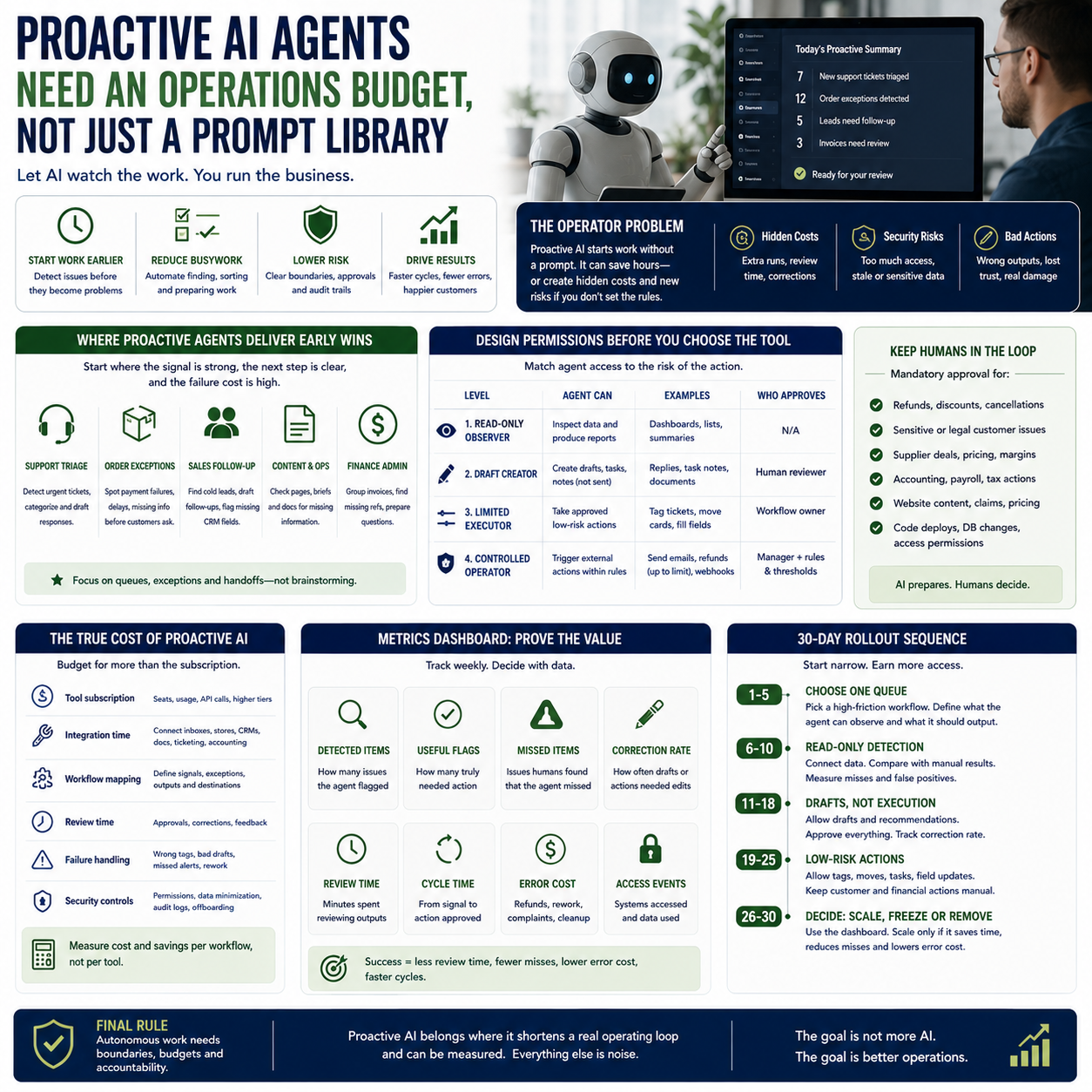
AI tools are moving from answering prompts to watching work, predicting needs and taking initiative. That shift matters less as a novelty and more as an operations question: who pays for the extra runs, who approves the actions, and what happens when the system acts on stale or sensitive information?
For small businesses, the useful question is not whether proactive AI sounds impressive. It is where a small team can safely let an AI system prepare, suggest or execute work without turning every workflow into a hidden cost centre or security exposure.
The operator problem: proactive AI changes where work begins
TechCrunch reported comments from Anthropic product leader Cat Wu about AI becoming more proactive, anticipating user needs before the user knows exactly what to ask. That points to a practical shift for digital operators: the work no longer starts only when a human opens a chatbot and types a request. It may start when the system notices a customer issue, a delayed order, a missing field in a CRM record, a code change, a support pattern or a calendar conflict.
That is operationally different from using AI as a writing assistant. A prompt-based assistant is usually easy to contain. Someone asks for a draft, a summary or a spreadsheet formula, then decides what to do with it. A proactive agent is closer to a junior operations coordinator with system access. It can monitor inputs, decide something needs attention, create tasks, draft replies, change records or trigger automations.
For a small e-commerce seller, agency owner or SaaS founder, that shift can save time only if the agent is attached to a clear workflow. Without that, it becomes another notification machine. Worse, it may create work that looks productive but does not reduce queue time, error rates or owner involvement.
The first decision is therefore not which AI tool to buy. It is which parts of the business should be allowed to start work without a human prompt.
Where proactive agents can earn their seat in a small team
The best early use cases are not the most glamorous ones. They are the workflows where the business already has a repeatable signal, a predictable next step and a clear failure cost.
In practice, this means proactive AI should start near operational bottlenecks rather than creative brainstorming. A small business should look for queues, exceptions and handoffs. These are the places where work sits because nobody has noticed it yet or because the next action is obvious but tedious.
Customer support triage: the agent watches incoming tickets, detects refund requests, delivery complaints or urgent account issues, then prepares a tagged queue and suggested response.
Order exception handling: the agent monitors failed payments, delayed fulfilment events or incomplete shipping information and creates a review list before customers complain.
Sales follow-up hygiene: the agent identifies leads with no reply after a defined period, drafts a follow-up and flags missing CRM fields that block qualification.
Content operations: the agent checks whether product pages, help articles or campaign briefs are missing required information before publishing.
Finance admin: the agent groups invoices, detects missing purchase references and prepares questions for the owner or bookkeeper.
These uses share one trait: the agent is not being asked to invent business strategy. It is reducing the cost of noticing, sorting and preparing work.
What most people miss
The expensive part of proactive AI is not always the subscription. It is the supervision layer. If an agent creates ten tasks that a manager must inspect, correct and close, the business may have moved work around rather than removed it.
Small companies should calculate the cost of review time before celebrating automation. If the owner spends 45 minutes each morning checking AI-generated tasks, the system must save more than 45 minutes elsewhere or protect revenue that would otherwise be lost. The value needs to show up in fewer late responses, fewer missed orders, shorter admin cycles, higher ticket deflection or faster quote turnaround.
There is also a quieter cost: exception anxiety. If staff do not trust the agent, they will duplicate its work manually. That is common when the agent has unclear authority. People check the inbox because they are not sure the AI checked the inbox. They re-read drafts because they are not sure which facts were used. They re-open orders because they do not know whether the suggested action was based on live inventory or yesterday’s export.
The fix is not more enthusiasm. It is a narrower operating boundary.
Design the permissions before choosing the tool
A proactive agent becomes risky when it can see too much, change too much or act without a trace. That matters for any business using customer data, payment information, supplier pricing, internal documents or code repositories.
TechCrunch also covered the scale of malware repositories in a separate security-focused article. The business lesson is not about the physical size of malware data. It is that hostile software, credential theft and compromised systems remain a normal operating condition of the internet. Proactive AI tools do not remove that risk. In some workflows, they create more paths for sensitive data to move across services.
Before a small company connects an AI agent to Gmail, Slack, Shopify, WooCommerce, HubSpot, Notion, GitHub, Google Drive or an accounting tool, it should define four levels of access.
Read-only observer: the agent can inspect data and produce a report, but cannot create, edit or send anything.
Draft creator: the agent can prepare replies, tasks, notes or documents, but a person must approve them.
Limited executor: the agent can take predefined low-risk actions, such as applying a tag, moving a ticket between queues or filling a non-sensitive field.
Controlled operator: the agent can trigger external actions, but only inside strict rules, logs and approval thresholds.
Most small businesses should spend longer in the first two levels than vendors imply. A support agent that drafts responses but cannot send them may still save time if it classifies tickets well and pulls the right context. A finance admin agent that prepares invoice queries without changing accounting records may reduce back-and-forth while keeping the bookkeeper in control.
Execution rights should be earned through observed accuracy, not granted because the demo was impressive.
The cost model: subscription is only one line item
When budgeting proactive AI, small teams should separate visible software costs from operating costs. The tool price is often the easiest part to understand. The hidden costs appear in setup, maintenance, governance and errors.
A practical AI agent budget should include:
Tool subscription: seats, usage-based charges, API calls or higher-tier plans required for integrations.
Integration time: connecting inboxes, stores, CRMs, knowledge bases, ticketing systems and internal documents.
Workflow mapping: documenting what the agent should watch, what counts as an exception and where outputs should go.
Review time: staff time spent approving, correcting and giving feedback on agent outputs.
Failure handling: time spent recovering from wrong tags, bad drafts, missed alerts or duplicated tasks.
Security controls: permission reviews, data minimisation, audit logs and offboarding processes.
The cost question should be framed per workflow, not per tool. For example, if a proactive agent is used for customer support triage, the business should compare its total cost against the current cost of manually sorting tickets. If it is used for order exceptions, compare it against the cost of late shipments, refunds, chargebacks, support messages and owner time.
This avoids a common trap: buying an AI platform because it can do many things, then never measuring whether any one workflow became cheaper or faster.
A practical scenario: using proactive AI for order exceptions
Consider a small online retailer selling across several channels. The owner uses Shopify, a helpdesk, a fulfilment provider dashboard and email with suppliers. The daily pain is not lack of ideas. It is that exceptions are scattered: a failed payment here, a delayed fulfilment event there, a customer asking where an order is, a supplier email mentioning a stock delay.
A prompt-based AI assistant can help draft replies after the owner notices the problem. A proactive agent can be more useful if it is configured to watch the exception signals and create a morning review queue.
The safe first version might work like this:
The agent has read-only access to order status, ticket subjects and fulfilment events.
Every morning, it produces a list of orders that match agreed exception rules: payment failed, fulfilment delayed, tracking missing, customer has contacted support, or item flagged by supplier email.
For each case, it drafts a suggested next action: contact customer, check stock, ask fulfilment provider, issue replacement review or wait until a defined cutoff.
The owner or operations assistant approves actions from one queue instead of checking four systems manually.
No customer message is sent automatically during the pilot.
This is not a futuristic setup. It is a controlled workflow redesign. The agent is useful because it reduces search time and standardises the morning exception review. It is not allowed to promise refunds, change addresses, cancel orders or message customers until the business has enough evidence that the draft logic is reliable.
The metric is not “AI usage”. The metric is how many exception orders are found before customers complain, how long the review takes, how many drafted actions need correction and whether support volume drops for avoidable order-status questions.
Where humans must stay in the loop
Small teams should be strict about the boundary between preparation and authority. Proactive AI can collect context, suggest actions and maintain queues. It should not silently make decisions that affect money, customer trust, legal commitments or sensitive data unless the business has mature controls.
Human approval should remain mandatory for:
Refunds, discounts, cancellations and compensation outside simple pre-approved rules.
Customer messages involving complaints, legal threats, health, safety, discrimination or reputational risk.
Supplier negotiations, pricing changes or margin-affecting commitments.
Accounting entries, payroll actions and tax-related classifications.
Changes to live website content where claims, prices or delivery promises may be affected.
Code deployment, database edits or access permission changes.
The human role should not be vague supervision. It should be designed into the workflow. For example, the agent can draft three categories of support response, but only a named role can approve them. The agent can tag an invoice as needing review, but cannot classify it for accounting. The agent can identify stale leads, but cannot send a discount offer unless the lead fits a pre-approved segment.
Use approval thresholds, not blanket permission
Approval thresholds help small teams gain efficiency without giving an AI system unrestricted authority. A support workflow might allow automatic tagging and routing, require approval for first customer replies, and block the agent completely from refund decisions. A sales workflow might allow the agent to draft follow-ups under a certain deal value, but require human review for enterprise prospects or custom pricing.
Thresholds should be written down in plain operational language. If the rule cannot be explained to a new employee, it is too loose for an autonomous system.
The metrics dashboard for a proactive agent pilot
A small business should not run a proactive AI pilot on vibes. The dashboard can be simple, but it must show whether the agent is reducing work or just generating outputs.
Track the following for each workflow:
Detected items: how many tickets, orders, leads or documents the agent flagged.
Useful flags: how many flagged items genuinely needed action.
Missed items: how many issues humans found that the agent failed to flag.
Correction rate: how often staff edited the suggested action or draft.
Review time: minutes spent checking the agent’s queue.
Cycle time: time from signal appearing to action being approved.
Error cost: refunds, apologies, rework, customer complaints or internal cleanup caused by wrong suggestions.
Access events: which systems the agent used and whether access matched the workflow.
The useful pilot outcome may be a decision not to automate execution. If the agent is excellent at detection but weak at writing customer-safe replies, keep it as an exception monitor. If it writes well but misses too many edge cases, use it only after human selection. If it requires constant correction, the workflow may need cleaner source data before AI is the right fix.
A 30-day rollout sequence for small teams
The safest way to adopt proactive AI is to make it prove value in one narrow workflow before expanding access. A small team can use the following rollout sequence.
Days 1-5: choose one queue with visible friction
Pick a workflow where delays are easy to see: support triage, order exceptions, invoice queries, lead follow-up or content quality checks. Avoid workflows where the cost of a mistake is high or the rules are unclear. Write down what the agent is allowed to observe and what output it should produce.
Days 6-10: run read-only detection
Connect the minimum data needed. Do not allow sending, editing, refunding, cancelling or publishing. Compare the agent’s detected items with what staff found manually. Record misses and false positives. This phase tests whether the agent sees the right signals.
Days 11-18: allow drafts, not execution
Let the agent prepare replies, task notes or action recommendations. Staff approve everything. Measure correction rate and review time. If drafts are usually rewritten, the agent may need better context, stricter instructions or a smaller job.
Days 19-25: permit low-risk system actions
If detection and drafts are reliable, allow limited actions such as tagging tickets, moving cards, creating internal tasks or filling non-sensitive fields. Keep customer-facing and financial actions under human approval.
Days 26-30: decide whether to scale, freeze or remove
Use the dashboard rather than preference. Scale only if the workflow shows lower review time, fewer missed issues or faster handling without a rise in error cost. Freeze if the agent is useful but not ready for broader permission. Remove it if it creates queues that staff do not trust or use.
The practical decision is simple: proactive AI belongs where it shortens a real operating loop and can be measured. It does not belong where a small business cannot define the signal, the allowed action, the approval owner and the cost of being wrong.


