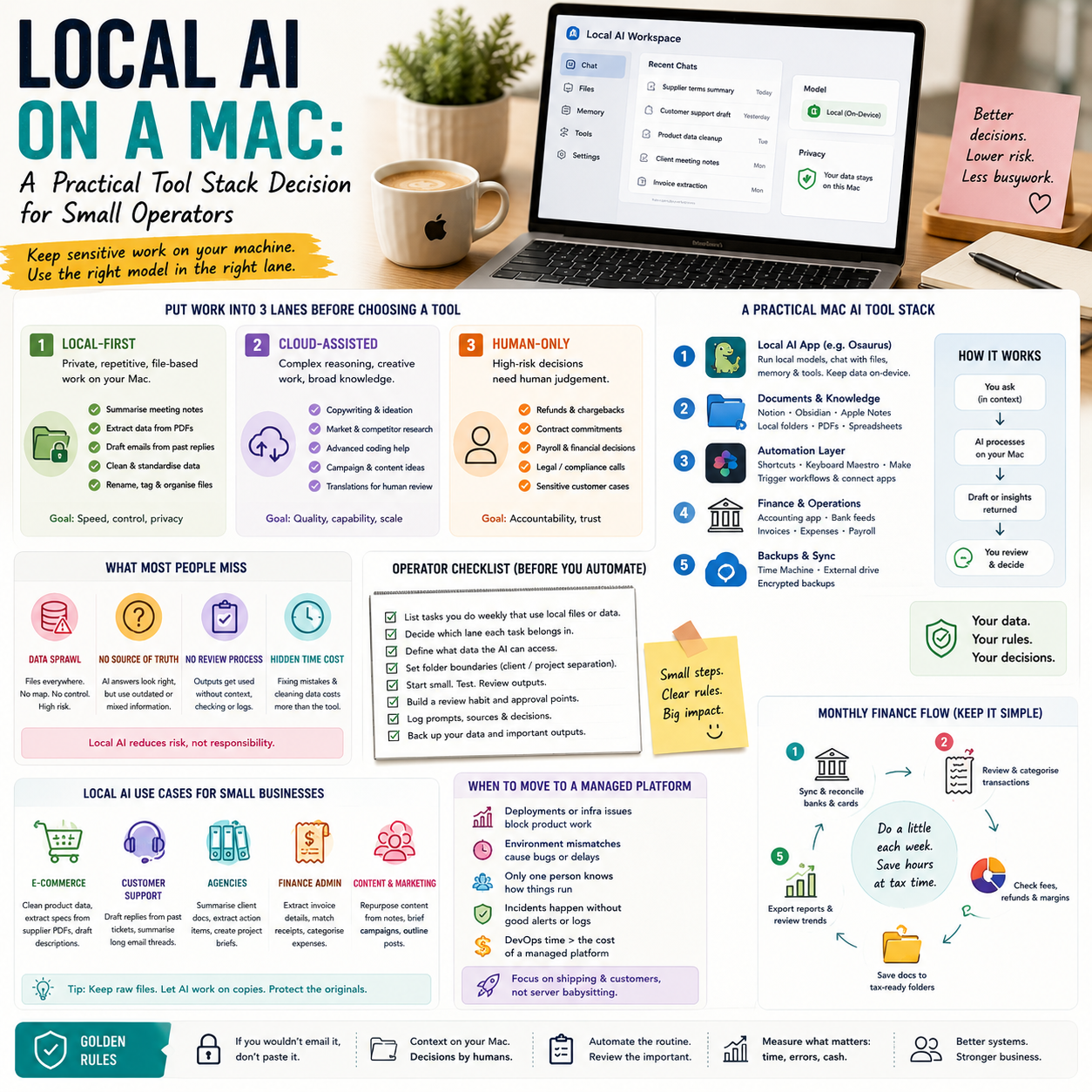
Local AI is becoming less of a technical hobby and more of an operating choice for small companies that handle customer data, product files, internal documents or repeat admin work. TechCrunch’s report on Osaurus, a Mac app combining local and cloud AI models while keeping memory, files and tools on the user’s own hardware, points to a practical question: which AI tasks should leave your business systems, and which should stay on the machine?
This is not a debate about whether cloud AI is good or bad. For a small e-commerce seller, agency owner, consultant, automation builder or small team manager, the useful decision is narrower: where should each workflow run, what should it cost, who checks the output, and what data should never be pasted into a remote model by default?
The operator problem is not model quality, it is workflow ownership
Many small businesses adopted AI tools in a scattered way. Someone uses a browser chatbot for product descriptions. Someone else pastes customer emails into a different tool. A founder uses AI to summarise supplier contracts. A virtual assistant uses another model to prepare social posts. Each tool may be useful, but the business often has no map of where data goes, what is saved, what can be audited, or which tasks are safe to automate.
A local AI app on a Mac changes the decision because it makes the computer itself part of the AI stack. Instead of treating AI as a distant website, the operator can start asking whether certain work should happen close to the files, spreadsheets, PDFs and folders already used every day. That matters for small teams because they usually do not have a dedicated security team, procurement process or IT administrator. Their protection comes from simpler defaults and fewer uncontrolled handoffs.
The real business question is not whether a local model can beat the strongest cloud model on every task. It usually cannot. The question is whether a local model is good enough for private, repetitive, internal work where speed, control and data boundaries matter more than perfect reasoning.
Put work into three lanes before adding another AI app
Small operators should not evaluate local AI as a single replacement for cloud AI. A better approach is to split work into three lanes: local-first, cloud-assisted and human-only. This prevents the common mistake of either sending everything to a cloud model or forcing a local model to handle work it is not suited for.
Local-first work
This lane is for tasks where the input is sensitive, repetitive or stored in local files, and where the output can be checked quickly by the person doing the work. Examples include summarising internal meeting notes, extracting action items from a local PDF, drafting replies from a folder of previous customer support answers, renaming files based on invoice content, cleaning product data before upload, or turning a messy supplier document into a structured checklist.
For an e-commerce operator, local-first AI could help classify product images, standardise product titles before they are reviewed, extract dimensions from supplier PDFs, or compare purchase order details against inventory sheets. The business value is not that the AI creates a polished final answer. The value is that it reduces manual handling without sending product files, supplier terms or order data through unnecessary external tools.
Cloud-assisted work
This lane is for tasks where a stronger remote model is worth the data exposure, latency or subscription cost. Examples include difficult copywriting, complex analysis, advanced coding help, campaign ideation, market research synthesis, or translating brand content into multiple languages for a human editor. Cloud models are often better when the task needs broad knowledge, strong reasoning, longer context windows or advanced integrations.
The cloud-assisted lane needs rules. A small team should decide what data can be included, what must be anonymised, and which outputs require approval. For example, a marketplace seller might send anonymised review themes to a cloud model but keep customer names, order IDs and refund cases out of the prompt.
Human-only work
This lane protects decisions that carry legal, financial, customer or reputational risk. Refund exceptions, supplier disputes, payroll decisions, contract commitments, credit decisions and complaints from high-value customers should not be delegated to a model without human judgement. AI can prepare notes, extract facts or flag missing information, but the decision should remain with a responsible person.
What most people miss
The hidden cost of AI adoption in a small business is not only the monthly subscription. It is the operational mess created when AI outputs move through the company without a trace. A product description gets generated but no one knows from which source file. A customer email is summarised incorrectly, then the wrong refund is approved. A spreadsheet is cleaned by AI, but the original field mapping is not saved. These are not dramatic technology failures. They are ordinary process failures made faster by automation.
Local AI can reduce some data-sharing risk, but it does not automatically create process discipline. If a Mac app can read files and remember context, the operator still needs to decide which folders it can use, which files are off limits, and how outputs are reviewed. Keeping data on the device is useful only if the device itself is managed properly: user access, backups, file naming, version control and client separation still matter.
For a small agency, this distinction is especially important. If one Mac contains files for multiple clients, a local AI assistant that can search and summarise local documents must be used with strict folder separation. The issue is not only whether data goes to the cloud. It is whether Client A’s material accidentally influences work for Client B, or whether an employee asks the assistant to retrieve information from the wrong folder.
The cost model: subscriptions are only one line item
When comparing local and cloud AI, small companies should calculate cost in operational terms, not only software price. A local-first setup may involve a more powerful Mac, paid apps, storage upgrades, backup discipline and setup time. A cloud-first setup may involve subscriptions, usage-based charges, team seats, API spend, integration tools and more review time for sensitive workflows.
There are also indirect costs. Cloud tools can create data governance work: deciding what can be pasted, training staff, checking vendor settings, and documenting use for clients or partners. Local tools can create device management work: ensuring the right person has access, maintaining local files, keeping machines updated and preventing knowledge from being trapped on one employee’s laptop.
A useful internal cost view is to list the five AI-supported workflows with the highest weekly volume, then estimate four items for each:
Time saved per week if the workflow is partially automated.
Risk if the wrong data is exposed or the output is wrong.
Tool cost, including subscriptions, local apps, API use or upgraded hardware.
Review cost, meaning who checks the output and how long that review takes.
This will often show that cloud AI is worth paying for in creative or analytical work, while local AI is better suited for file-heavy admin tasks where privacy, speed and repeatability are more important than high-end reasoning.
A practical scenario: the small online seller with too many product files
Consider a small online seller that receives supplier PDFs, product images, price lists and inconsistent spreadsheets every week. The team sells through its own store and one or two marketplaces. The bottleneck is not strategy. It is turning supplier material into clean product records without leaking margin data, supplier terms or draft pricing into every tool the team tries.
A local-first workflow could start with a folder structure: supplier files, extracted product attributes, draft listings and approved listings. A local AI assistant could summarise each supplier PDF, extract measurements, flag missing fields and draft internal notes. The output would then go into a spreadsheet or product information file for human review. Only after the sensitive cost fields are removed would selected copy tasks move to a cloud model for better product descriptions or localisation.
The operator can then define a simple rule: the local tool handles extraction and internal structuring; the cloud tool handles customer-facing copy after sensitive fields are removed; the human decides final pricing, marketplace category and claims that could trigger returns or compliance issues.
This scenario does not require a complex enterprise AI platform. It requires a lane system, folder discipline and a review point before content reaches the store. The win is not full automation. The win is fewer copy-paste errors, faster product preparation and less uncontrolled data movement.
Where a local Mac-based AI stack fits best
A local Mac-based AI stack is most useful for operators who already keep important work on their machines: consultants with client files, small agencies with project folders, e-commerce sellers with supplier documents, accountants preparing internal working papers, and founders who manage investor notes, product specs and customer research locally.
It is less compelling for businesses whose work already lives almost entirely inside cloud systems such as helpdesk platforms, cloud CRMs, online inventory systems or collaborative document suites. In those cases, the main question may be integration rather than local processing. If every useful file is already inside a SaaS tool, a local app may become another disconnected layer unless it can safely access and update the systems where work actually happens.
There is also a hardware boundary. Local models depend on the machine available. If staff are using older laptops, the experience may be slow or limited. If only the founder has a powerful Mac, AI-supported work may become centralised around one person, which creates a different bottleneck. Before making local AI part of operations, the business should decide whether the workflow belongs to one role, several team members or a shared process.
The risk map: privacy, accuracy, lock-in and shadow workflows
Local AI reduces some risks but introduces others. The privacy benefit is clear when sensitive files do not need to leave the machine for basic processing. But a local app with access to files still needs permissions, boundaries and user discipline. If the assistant can read the wrong folder, privacy risk remains inside the company.
Accuracy risk also remains. Smaller local models may be weaker at reasoning, long documents or nuanced judgement. This is manageable if the workflow is designed around extraction, classification, drafting and summarisation rather than final decisions. It becomes dangerous when the operator treats local output as verified simply because the data stayed on the device.
Lock-in looks different with local AI. With cloud tools, lock-in often comes from subscriptions, proprietary workflows and stored history. With local tools, lock-in may come from personal file structures, local memories, custom prompts and workflows that only one employee understands. A small company should document useful prompts, folder structures and review rules in a shared operating note, not leave them inside one person’s habits.
Shadow workflows are the most common risk. If the company does not provide a workable AI process, staff will use whatever tool is fastest. A realistic local-plus-cloud policy is better than a strict rule that no one follows. The goal is not to ban remote models. It is to make the safer path easy enough that people use it during busy periods.
Metrics that show whether the AI setup is working
A small business should not judge the setup by how impressive the AI feels in a demo. It should track whether the workflow improves real operating metrics. For a product operations workflow, useful measures include time from supplier file received to draft listing prepared, number of missing product fields at review, number of pricing or attribute corrections before publishing, and number of listing changes after customer complaints.
For customer support, useful measures include average time to prepare a reply, percentage of replies needing manager review, number of escalations caused by incorrect AI summaries, and whether sensitive customer fields are excluded from cloud prompts. For an agency, useful measures include time spent searching client files, number of draft deliverables requiring rework because the wrong source was used, and whether project folders remain separated.
These metrics do not need a large dashboard. A weekly review in a spreadsheet is enough at first. The important part is to measure the workflow, not the model. If a local tool saves time but increases rework, the process is not ready. If a cloud model improves quality but requires too much anonymisation work, the business may need a better preprocessing step or clearer data rules.
Decision criteria before you move work local
Before adopting a Mac-based local AI workflow, use this decision screen for each process you want to improve:
Data sensitivity: Does the task include customer records, supplier pricing, contracts, employee information, client files or unreleased product data?
Output risk: Would a wrong answer cost money, damage a customer relationship, create a compliance issue or publish inaccurate product information?
File location: Are the documents already stored locally, or would moving them to the Mac create extra work?
Model requirement: Is the task mainly extraction, sorting and drafting, or does it require strong reasoning and external knowledge?
Review point: Who checks the output before it affects a customer, order, invoice, campaign or store listing?
Repeatability: Will the same workflow run every week, or is this a one-off task that does not justify setup time?
Team access: Should this workflow live on one person’s Mac, several devices or inside a shared cloud system?
If the task is sensitive, file-based, repetitive and reviewable, it is a strong local-first candidate. If it needs advanced reasoning, broad context or collaboration across several cloud systems, keep it cloud-assisted and control the data sent into the prompt. If the output creates a binding business decision, keep a human decision point in the workflow.
Rollout sequence for a small team
Start with one workflow that already wastes time and carries moderate data risk. Good examples are supplier document processing, internal meeting summaries, product attribute cleanup, client document search or support reply preparation. Avoid starting with pricing decisions, legal documents, payroll, refunds or public claims.
Define the folder the AI tool may use, the exact output expected and the review step. Run the workflow manually once, then with local AI, then with cloud AI where appropriate. Compare the output quality, time saved and review burden. Do not expand until the team can describe the rule in one sentence, such as: local AI extracts supplier product data, cloud AI rewrites approved copy, and a human approves price and claims before publishing.
After two weeks, decide whether to keep, adjust or remove the workflow. Keep it only if it reduces handling time without increasing rework or data confusion. Then document the prompts, file locations, approval rule and metrics in a shared operating note. That document is what turns an AI experiment into a business process.


