AI training for frontline workers is moving from enterprise experiment to operational software category. The funding round for Berlin-based Elephant Company is one signal: investors are paying attention to tools that turn workplace knowledge into role-specific training for non-desk teams.
For small business owners, the useful question is not whether to copy a funded startup. It is whether your current training process is already costing you money through repeated mistakes, manager interruptions, uneven service quality or slow onboarding. If it is, an AI-assisted training workflow may be worth building before you buy a dedicated platform.
The operator this matters to
This article is for small team managers, e-commerce operators with warehouse or fulfilment staff, service businesses with field workers, hospitality operators, local retailers with rotating employees, and founders running teams where work happens away from a laptop.
The business problem is usually not called “training”. It shows up as:
- new hires asking the same operational questions every week;
- orders being packed incorrectly because process notes live in someone’s head;
- customer service quality depending on which staff member is working;
- managers losing time repeating instructions instead of improving the business;
- tools such as Shopify, WooCommerce, POS systems, route planners or inventory apps being used inconsistently;
- temporary or seasonal staff needing to become useful quickly.
The Elephant Company news matters because it confirms a business software direction: training content is becoming more adaptive, more role-specific and more connected to daily workflows. But a small operator should not begin by shopping for an AI training platform. The first decision is whether your knowledge base is clean enough to automate.
Do not automate messy training notes
Many small businesses have training material scattered across WhatsApp messages, old Google Docs, laminated sheets, Slack threads, supplier PDFs and verbal explanations from the most experienced employee. AI can make that mess easier to search, but it can also make bad instructions easier to repeat.
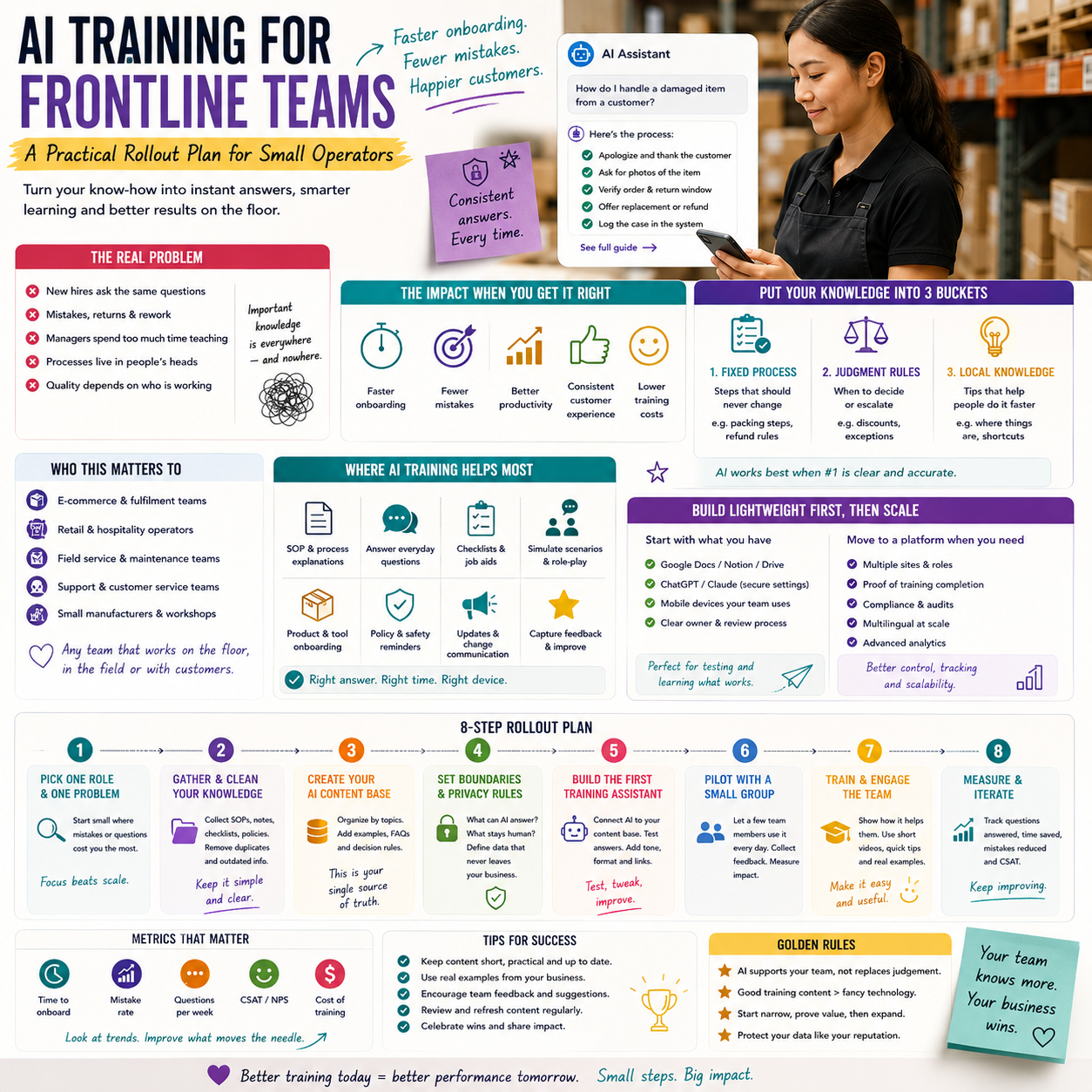
Before adding AI, separate your operating knowledge into three buckets:
- Fixed process: steps that should not vary, such as refund rules, packing sequence, safety checks, closing procedures or invoice handling.
- Judgment rules: situations where staff need decision boundaries, such as when to escalate a customer complaint, replace an item, approve a discount or stop a shipment.
- Local knowledge: tips that help people work faster, such as where tools are stored, which courier collects first, what product names customers confuse or which suppliers require manual confirmation.
AI is most useful in the second and third buckets once the first bucket is reliable. If your refund policy has three conflicting versions, an AI assistant can confidently give the wrong answer. If your warehouse pick path is not documented, a chatbot cannot infer it from intent.
What most people miss
The real value is not “AI teaches staff”. The value is that AI forces the business to turn informal operational knowledge into structured assets. That is where small operators often get the return: fewer interruptions, faster onboarding, fewer repeated mistakes and a clearer view of where the process itself is broken.
A manager who spends ten minutes answering the same question every day is not just losing time. The business has a knowledge distribution problem. AI training works only after that problem is visible.
A simple build-versus-buy decision
Small companies should avoid buying specialised training software too early. A dedicated AI training platform may be the right move later, especially for regulated, safety-sensitive or multi-site teams. But many operators can test the workflow first with existing tools.
Use this decision logic:
- Use your current tools if you have fewer than 20 frontline staff, one location, low regulatory exposure and training content that changes weekly.
- Build a lightweight AI layer if staff repeatedly ask operational questions and your SOPs already exist in Google Docs, Notion, Confluence, SharePoint or a helpdesk knowledge base.
- Evaluate a dedicated platform if you operate across several sites, need proof of completion, require role-based training paths, handle safety or compliance procedures, or need multilingual support at scale.
The cost risk is not only subscription pricing. The larger cost is implementation time. Someone must clean documents, decide what the AI can answer, test the outputs, maintain the content and review staff feedback. If nobody owns that process, the tool becomes another unused login.
A useful rule: if your business cannot maintain a one-page SOP, it will not maintain an AI training system. Start smaller.
The workflow small teams can test first
A practical AI training workflow does not need to start with a large software project. It can begin as a controlled internal assistant built around a narrow set of tasks.
For example, an e-commerce seller with a small fulfilment team may begin with “first-week warehouse training” rather than “company knowledge assistant”. The training scope could include receiving stock, checking SKUs, packing fragile items, printing labels, handling damaged goods and escalating address errors.
Step 1: Choose one role and one recurring failure
Do not start with every employee. Pick one role where training gaps create visible cost. Good candidates include warehouse picker, customer support agent, retail shift lead, field technician, appointment coordinator or returns handler.
Then pick one failure pattern. Examples:
- wrong product variants shipped;
- returns processed without checking item condition;
- discounts offered outside policy;
- courier cut-off times missed;
- customer complaints escalated too late;
- new staff unable to operate a POS, CRM or inventory tool without manager help.
This keeps the project measurable. “Improve training” is too vague. “Reduce manager interruptions about return eligibility” is operational.
Step 2: Turn the process into answerable questions
AI training performs better when content is written around decisions employees actually make. Instead of uploading a long manual and hoping for the best, convert the process into questions such as:
- When can I approve a refund without manager review?
- What should I do if a customer says the parcel arrived damaged?
- Which products require extra packaging?
- What happens if the inventory system and shelf count do not match?
- When should I use express replacement instead of refund?
Each answer should include the action, the boundary and the escalation trigger. That structure matters because frontline workers usually need a decision, not a policy essay.
Step 3: Create a human review loop
AI-generated answers should not go directly to staff without review. Assign one process owner to approve training responses. For a small team, this may be the founder, operations manager, warehouse lead or customer support lead.
The review process should check four things:
- Is the answer accurate?
- Is the wording clear enough for a new employee?
- Does it include the point at which the employee must escalate?
- Does it match the tools and systems actually used in the business?
The human review loop is where many businesses save themselves from operational drift. A polished AI answer based on outdated policy is worse than an incomplete manual because employees may trust it more.
Where the costs actually sit
The visible cost of AI training is the software. The hidden costs are content preparation, testing, supervision and maintenance. Small operators should budget attention before budgeting licences.
The cost areas usually look like this:
- Content cleanup: collecting SOPs, deleting outdated instructions, rewriting unclear steps and creating role-specific versions.
- Tool setup: connecting documents, setting permissions, deciding where staff access the assistant and configuring approval rights.
- Testing: asking real staff questions, checking wrong answers, logging gaps and adjusting source material.
- Training the trainers: making sure managers understand what the tool can and cannot answer.
- Maintenance: updating training content when products, suppliers, policies, systems or regulations change.
For a small company, the smartest first investment may be a half-day process cleanup rather than a new subscription. If the business has ten messy documents, start by reducing them to three accurate ones. If the process lives only in a manager’s head, record the manager explaining the task, transcribe it, turn it into steps and then test it with a new employee.
AI can accelerate this conversion, but it cannot decide your operating policy. That remains management work.
Practical scenario: the returns desk problem
Consider a small online retailer selling home goods across several marketplaces and its own store. The owner has two customer support agents and three people who help with packing and returns during busy periods.
The pain point is returns. One support agent gives store credit quickly. Another asks for photos first. Warehouse staff sometimes mark items as resellable without checking packaging damage. The owner keeps stepping in because return decisions affect margins, reviews and stock accuracy.
A narrow AI training workflow could work like this:
- The owner documents the five most common return reasons.
- Each reason gets a decision rule: refund, replacement, photo required, inspection required or manager review.
- The support team gets a question-based assistant trained only on the return rules, product condition notes and marketplace policy summaries prepared by the business.
- Warehouse staff get a separate checklist for inspection: packaging, item condition, accessories, resale status and inventory update.
- Every uncertain case is tagged in the helpdesk or spreadsheet for weekly review.
The workflow does not need to answer every company question. It only needs to reduce inconsistent return handling. The metrics are concrete: number of manager escalations, number of incorrectly restocked items, number of return cases reopened, and time from return request to decision.
This is where AI training becomes operational rather than decorative. It supports a decision process that already affects cash, stock and customer disputes.
The boundary between assistant and authority
Small businesses must decide which answers an AI training tool is allowed to give and which decisions remain human. This boundary should be explicit, especially when the workflow touches money, safety, customer promises or employment procedures.
A useful model is:
- AI can explain: where to find an item, how to perform a routine step, what the standard process says, which form to use, what the escalation path is.
- AI can suggest: likely next action, checklist items, missing information, draft response or training quiz questions.
- AI should not decide alone: refunds outside policy, safety exceptions, employee discipline, high-value customer disputes, legal interpretations or supplier contract issues.
This is not about distrusting technology. It is about protecting the business from invisible authority transfer. If staff treat an AI answer as the final word, the owner needs auditability: what was asked, what was answered, and which document supported the answer.
That is also why access control matters. Seasonal warehouse staff should not receive the same guidance as a finance administrator. A support agent may need refund policy, but not payroll procedures. If your AI tool cannot separate roles, keep the pilot narrow.
Metrics that show whether training is working
Training projects often fail because nobody defines success beyond “people completed it”. Completion is not enough. A staff member can finish a module and still make the same mistake.
For a small operator, useful metrics should connect to operational waste:
- Time to independent work: how long before a new hire can complete the task without manager help.
- Repeated questions: how often managers answer the same process question.
- Error rate by task: wrong shipments, incorrect refunds, missed checklist items, duplicate data entry or incomplete customer notes.
- Escalation quality: whether staff escalate with the right information attached.
- Content gaps: questions the AI cannot answer because the SOP does not exist or is unclear.
- Policy drift: cases where staff act based on old instructions after a process has changed.
The most useful metric may be the content gap list. Every unanswered or badly answered question tells you where the business still relies on memory. That list becomes the next SOP update.
When a dedicated AI training platform starts to make sense
There is a point where a patchwork of documents, chatbots and spreadsheets becomes fragile. A dedicated platform becomes easier to justify when the business has complexity that cannot be managed through simple documents.
Triggers include:
- several locations or teams doing the same job differently;
- high staff turnover or seasonal hiring peaks;
- training required in multiple languages;
- proof of training completion needed for customers, insurers, partners or regulators;
- frequent product, supplier or process changes;
- managers spending measurable hours each week answering basic process questions;
- errors that directly affect margin, safety, chargebacks, reviews or customer retention.
The funding interest around AI-powered frontline training suggests more tools will appear for this layer of work. That may benefit smaller operators over time, but only if they compare tools against their workflow rather than against software demos.
When evaluating a platform, ask practical questions:
- Can the system separate answers by role?
- Can managers approve or reject training content before staff see it?
- Does it show which source document supports an answer?
- Can staff use it on mobile without friction?
- Can it handle checklists, quizzes or task verification?
- How does it update content when an SOP changes?
- Can you export your training content if you leave?
The export question is important. Training material is operating infrastructure. Do not let your core process knowledge become trapped in a tool you cannot leave.
Rollout sequence for a small frontline team
Use this sequence if you want to test AI training without turning it into a long software project:
- Week 1: Pick one operational pain. Choose a role and one recurring mistake or interruption pattern. Write down the current cost in plain terms: time lost, orders fixed, refunds mishandled, shifts delayed or complaints reopened.
- Week 2: Clean the source material. Gather the existing notes for that process. Delete old versions. Rewrite the task as decisions, escalation triggers and tool steps.
- Week 3: Build a controlled assistant or FAQ. Use your existing knowledge base, document system or approved AI tool. Limit the content to the chosen process. Do not connect the whole company drive.
- Week 4: Test with real questions. Ask staff to submit the questions they normally ask a manager. Review every answer before relying on it.
- Week 5: Put it into daily work. Make the assistant or checklist available at the point of work: warehouse station, support desk, field mobile device or shift handover.
- Week 6: Review the operating metrics. Compare manager interruptions, repeated errors, escalation quality and unresolved questions. Update the SOP based on gaps.
If the pilot reduces friction in one process, expand to the next role. If it creates more confusion, do not add more AI. Fix the source documents, permissions and escalation rules first.
The practical decision is simple: treat AI training as an operations system, not a content project. Start where training errors already cost money, keep humans responsible for policy, and measure whether staff make better decisions at the point of work.


