Mimir’s pre-seed funding is not interesting because another AI startup raised money. It is interesting because it points at a pressure point many small e-commerce teams already feel: customer support is becoming the control room for order operations, not just a place where customers complain.
For a small Shopify, WooCommerce, marketplace or DTC seller, the real decision is not whether AI can answer tickets. The decision is which parts of the support queue are safe to automate without damaging refunds, margins, delivery promises or customer trust.
The support inbox is where operational debt becomes visible
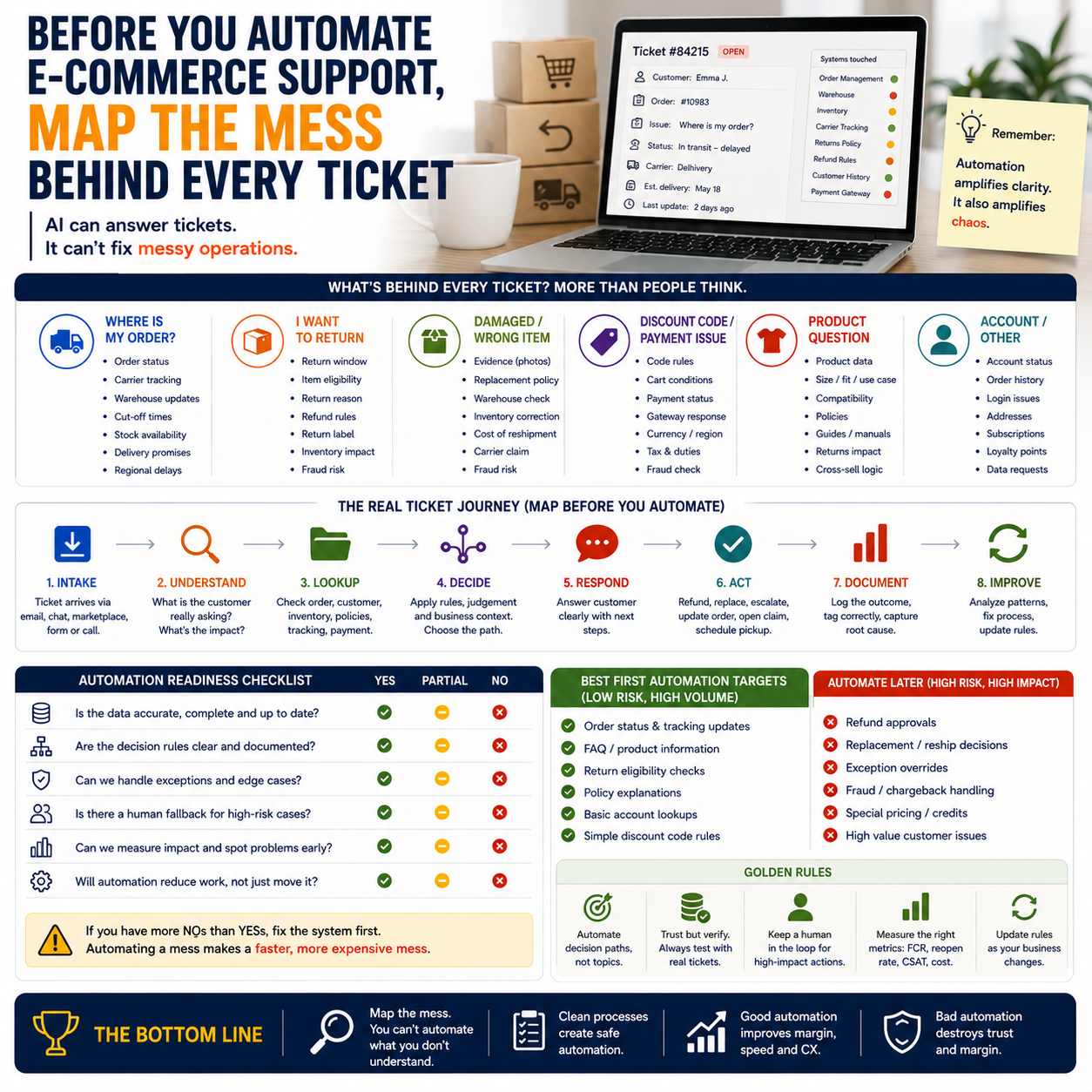
E-commerce support looks simple from the outside. A customer asks where an order is, wants a return, says a discount code failed, complains about damaged goods, or asks whether a product fits a specific use case. But each of those tickets pulls data from a different part of the business.
One “Where is my order?” message may require order status, carrier tracking, fulfilment delay logic, warehouse cut-off times, stock availability, shipping country rules and refund policy. If those systems are not clean, an AI layer does not remove the mess. It just replies faster from messy inputs.
That is the trap.
The funding announcement for Mimir describes a company focused on automating e-commerce operations, including customer support. That direction is commercially logical because support is repetitive, expensive and close to revenue leakage. The operator lesson is sharper: the support inbox is usually the best diagnostic tool for finding broken workflows before buying more software.
If your team answers the same support question twenty times a week, the answer may not be “install a chatbot.” It may be that your order confirmation email is unclear, your tracking integration is late, your returns policy is buried, your product page omits sizing information, or your warehouse status does not sync quickly enough with your storefront.
Do not automate tickets; automate decision paths
A support automation project should begin by separating tickets into decision paths, not topics. Topic labels such as “shipping,” “returns” and “product question” are too blunt. Operators need to know what decision the support agent is making and whether that decision can be safely standardized.
For example, “return request” is not one workflow. It may contain several different paths:
- Return within policy window: eligible, low-risk, can be automated if order and delivery data are reliable.
- Return outside policy window: requires commercial judgment, especially for repeat customers or expensive products.
- Damaged item: needs evidence handling, replacement rules and fraud controls.
- Wrong item shipped: requires inventory correction, warehouse feedback and possibly expedited replacement.
- Cross-border return: may involve higher postage costs, customs friction and product margin checks.
The same applies to shipping tickets. “Where is my order?” can be automated if tracking is available and accurate. “My parcel has not moved for five days” needs a different escalation rule. “The carrier says delivered but I never received it” needs a risk process, not a friendly automated reply.
Small teams should build automation around the decision path that already works manually. If the human agent has to improvise every time, the workflow is not ready. Automating improvisation creates inconsistent customer promises at scale.
The first cost question is not software price
The obvious cost of support automation is the subscription fee, implementation time and possibly integration work. That is only the visible layer. The more important cost is error cost.
A cheap automated workflow can become expensive if it approves refunds too freely, sends replacement products without proper checks, misreads stock status, promises delivery dates the warehouse cannot meet, or gives customers instructions that generate second tickets.
For small e-commerce operators, the cost model should include four buckets:
Visible operating cost
This includes the AI support tool, helpdesk platform, integration connectors, setup labour, maintenance, and the time needed to write, test and revise support logic. If you already use tools such as Shopify, WooCommerce, Gorgias, Zendesk, Klaviyo, ShipStation or marketplace dashboards, the question is whether the automation layer can read the right data without forcing staff to check multiple systems manually.
Margin leakage cost
This is where many operators undercount. A support answer can create a financial event. A refund, discount, return label, replacement shipment, free upgrade or goodwill credit affects margin. Automation should not be allowed to trigger those actions unless the business rules are explicit.
A simple rule helps: if a reply can spend money, it needs a margin-aware threshold. That threshold may depend on product cost, customer history, order value, shipping region, return rate and fraud signals.
Second-contact cost
If automation gives incomplete answers, customers come back. A ticket that should have taken one human response becomes one automated response plus one angry follow-up plus a manual cleanup. Your dashboard may show fewer first-line tickets handled by humans, while total handling time rises quietly.
Watch the re-open rate. It tells the truth.
Operational correction cost
Bad support automation can hide the root cause. If AI keeps apologizing for delayed shipments but nobody fixes warehouse cut-off communication, the business gets smoother wording around the same broken operation. That is not productivity. It is camouflage.
Where AI support makes sense for a small e-commerce team
The strongest starting point is low-discretion, high-volume work where the answer depends on reliable structured data. These workflows are boring. That is why they are good automation targets.
Good first candidates include order tracking, delivery status explanation, return eligibility checks within a clear policy window, invoice or receipt requests, basic product availability questions, address-change requests before fulfilment, and simple cancellation requests before the order is picked.
These workflows share three traits. The data source is known. The policy is stable. The financial risk is limited.
A small team should not begin with emotional complaints, high-value refund disputes, complex product advice, chargeback-related conversations, damaged-item investigations or VIP customer cases. These are not impossible to automate later, but they require tighter controls and better exception logic.
There is also a brand risk. Some stores sell low-consideration products where customers mainly want speed. Others sell expensive, technical, personal or gift-related products where support quality influences conversion and repeat purchase. The more consultative the sale, the more careful the boundary between automation and human support must be.
The vendor problem: automation tools need vendor intelligence too
The Definic funding item is about vendor intelligence rather than e-commerce support automation, but it connects to the same operator problem: small teams are being asked to choose more software, faster, with less internal procurement expertise.
Buying an AI support tool is not just a feature comparison. It is a vendor-risk decision. Operators should ask: can the vendor integrate with the store stack, handle data securely, provide logs for disputed actions, support the required languages, manage EU data expectations, and allow human review before financial actions are taken?
A slick demo can hide weak operational fit. The demo usually shows the happy path: customer asks a clean question, the tool reads perfect data, the answer is accurate, and everyone saves time. Real stores are messier. Tracking data arrives late. Customers use vague wording. Products have variants. Marketplaces have different rules. Warehouse notes live outside the helpdesk. Staff override policies for good customers.
Before signing, ask the vendor to walk through five ugly tickets from your real support history. Remove personal data, but keep the operational complexity. If the tool cannot explain what it would do, what it would not do, where it would escalate, and which data source it used, the system is not ready for live financial decisions.
The automation boundary should be written like a refund policy
Many small companies treat AI automation settings as a technical configuration. That is too loose. The boundary should be written as an operating policy that support, operations and finance can understand.
Start by defining three zones.
- Green zone: automation can answer and act without approval. Example: provide tracking link, send invoice, explain published return policy, confirm cancellation if the order is not yet processed.
- Amber zone: automation can draft or classify, but a human approves the action. Example: replacement shipment, partial refund, damaged-item response, late delivery compensation.
- Red zone: automation must not decide. Example: chargeback threat, legal complaint, repeated refund pattern, high-value order dispute, suspected fraud, public review escalation.
The useful point is not the labels. The useful point is that each zone connects to a cost and risk level. If an automated action can trigger stock movement, payment movement or a customer promise that operations must honour, it needs a rule.
The boundary must also include language control. AI replies should not invent delivery guarantees, promise exceptions, imply warranties that do not exist, or use apologetic discounts as a default. A warm tone is not a substitute for commercial discipline.
What most people miss
The unpopular truth is that some support work should stay manual longer than founders want. Not because humans are better at everything. Because manual work is sometimes the cheapest way to discover the actual shape of the problem.
If a store has recently changed fulfilment provider, expanded to a new country, launched a new product category or introduced subscriptions, support tickets are market feedback and operations feedback at the same time. Automating too early can flatten those signals into neat categories before the team understands them.
Manual handling is also useful when the business rules are still being negotiated. A founder may not yet know whether to offer free returns on a bulky product, whether to replace damaged goods without return, or whether a specific shipping region is profitable after support costs. Those are margin decisions. Letting software standardize them too early can lock in bad economics.
There is a better sequence: manually handle the messy cases for a defined period, document the decision logic, calculate the cost of each outcome, then automate the paths that become predictable. Manual first does not mean inefficient. It means you are using human judgment to build the rulebook before the machine enforces it.
A practical scenario: the eight-person store with a rising support queue
Consider a small EU-based e-commerce seller with eight people, selling through its own store and one marketplace. The team gets a growing number of tickets after weekend promotions. Most messages involve delivery timing, discount codes, return requests and product compatibility questions. The founder wants AI support because the team is tired and response times are slipping.
The wrong move is to connect an AI tool and let it answer everything from day one. The better move is to export the last 500 support tickets, group them by decision path, and mark each path with three attributes: data reliability, financial exposure and customer sensitivity.
Order tracking may score well because the carrier integration is stable. Discount-code complaints may be more complex because promotions differ between the storefront and marketplace. Product compatibility may require human judgment because a wrong answer can create returns. Return requests may be split: within-policy simple returns can be automated, damaged goods need review, cross-border returns need margin checks.
After that mapping, the store may discover that only a portion of tickets should be fully automated immediately. That is still valuable. Removing repetitive tracking and invoice requests can free humans for the expensive edge cases. The goal is not maximum automation coverage. The goal is lower total operational drag without increasing refund leakage or customer confusion.
The metrics that decide whether automation is working
Response time is not enough. It is easy to improve response time while making worse decisions faster.
Small operators should monitor a compact dashboard tied to commercial outcomes. Track first-contact resolution, re-open rate, refund rate by ticket category, replacement shipment rate, average handling time for human escalations, percentage of tickets escalated from automation, customer complaints about incorrect answers, and support cost per order.
Two metrics deserve special attention.
Escalation quality shows whether the automation is handing humans the right cases with enough context. A good escalation includes the customer issue, order data, relevant policy, previous messages and the suggested next action. A poor escalation simply says “customer unhappy” and forces staff to investigate from scratch.
Financial action rate shows whether automation changes business economics. If refunds, credits or replacements rise after automation goes live, the tool may be resolving tickets by spending money. That may be acceptable in some cases, but it must be visible.
Do not judge the tool in the first week only. Early performance often reflects setup quality and the easiest ticket categories. Review again after the system has handled messy orders, delayed shipments, stockouts and angry customers.
The 30-day support automation audit for e-commerce operators
Use this before connecting an AI system to live customer conversations. It is designed for small teams that need speed but cannot afford uncontrolled operational promises.
- Days 1-3: Export real tickets. Pull recent support conversations from the helpdesk, store inbox, marketplace messages and social channels if those generate service requests. Remove personal data before using them in vendor tests.
- Days 4-6: Classify by decision path. Do not stop at categories such as shipping or returns. Mark what decision was made: answer only, refund, replacement, escalation, policy exception, warehouse check, product advice or fraud review.
- Days 7-9: Attach cost exposure. For each path, note whether the reply can create a refund, return label, replacement shipment, discount, chargeback risk, lost sale or manual warehouse task.
- Days 10-12: Check data reliability. List the systems the automation would need: order platform, carrier tracking, inventory, CRM, payment status, subscription tool, marketplace dashboard or returns portal. If the data is not reliable, the workflow is not ready for full automation.
- Days 13-16: Define green, amber and red zones. Decide which actions can be automatic, which need human approval, and which must always stay manual. Write this as an operating policy, not just tool settings.
- Days 17-20: Test vendors with ugly tickets. Use real historical examples with edge cases. Ask each vendor to show data sources, escalation logic, action limits and audit logs. Reject demos that only handle clean questions.
- Days 21-24: Launch one narrow workflow. Start with a low-risk path such as tracking updates, invoice requests or cancellation before fulfilment. Keep humans monitoring replies daily.
- Days 25-27: Measure second-contact behaviour. Check whether customers reply again because the first answer was incomplete or wrong. Re-open rate matters more than cosmetic response speed.
- Days 28-30: Decide the next workflow by evidence. Expand only if the first workflow reduces human work without increasing refunds, replacements, complaints or manual cleanup. If the numbers are mixed, fix the workflow before adding more automation.


