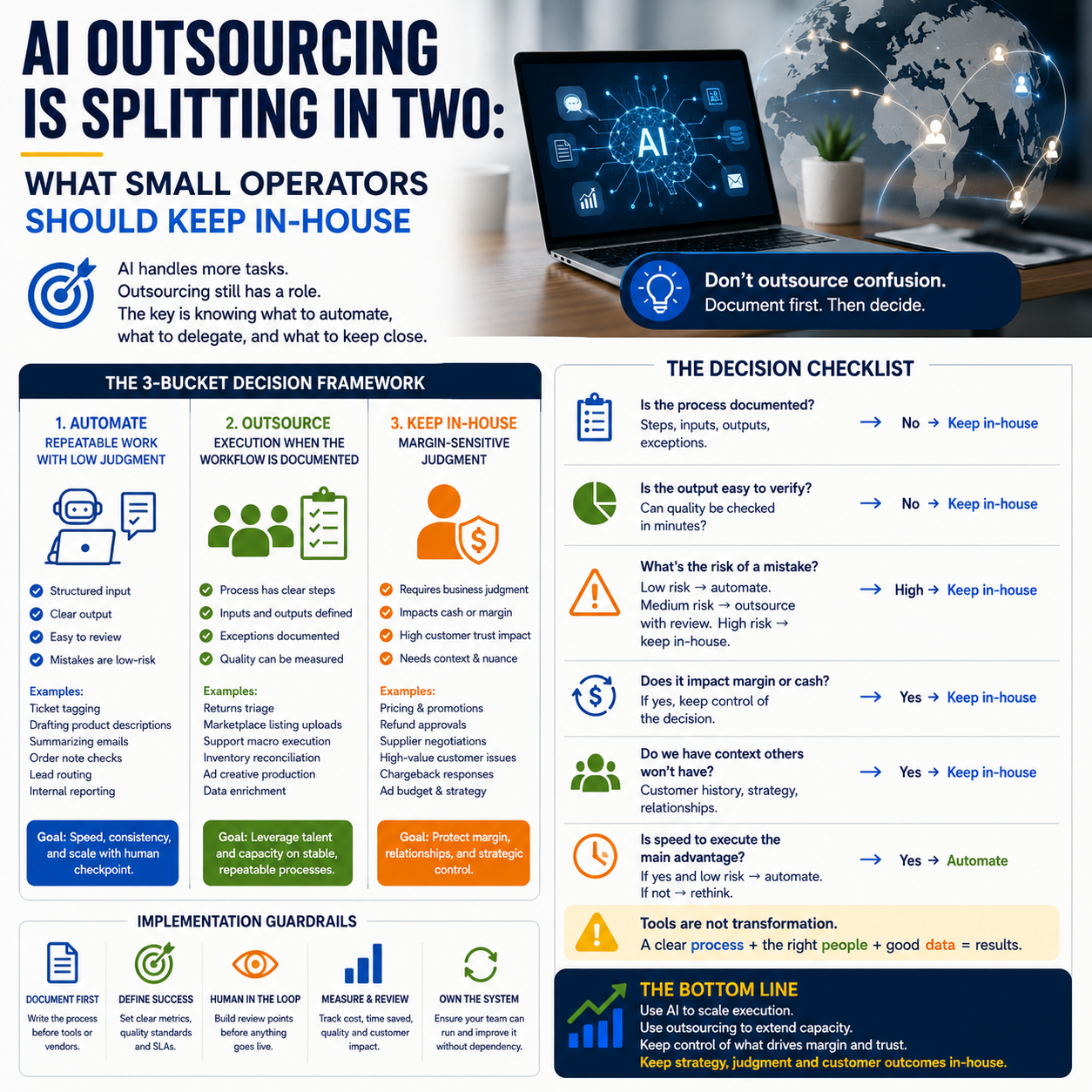
Two AI signals landed in the same week and they point in opposite directions. Anthropic is working with Tata Consultancy Services to scale enterprise AI deployments, while Opendoor’s India exit has reopened the argument about AI, offshore teams and operating models. For small operators, the lesson is not to copy large companies. It is to stop treating outsourcing and automation as the same decision.
If you run a small e-commerce business, agency, marketplace operation, support desk or digital service company, the useful question is narrower: which work should be handled by AI, which work should be outsourced, and which work should stay close to the owner because it controls margin, customer trust or process knowledge?
The real decision is not AI versus people
Large companies can afford to separate strategy, vendor management, data governance, implementation and support across multiple teams. A small operator cannot. That changes the outsourcing equation completely.
When an enterprise buys AI implementation support through a consultancy, the internal cost is absorbed across departments. A small business feels every hour twice: once as cash paid to a vendor, and again as management time spent explaining messy workflows that were never documented properly.
That is the trap. Many small businesses outsource because the process feels boring, repetitive or technical. But if the process is not understood internally first, outsourcing turns into paid confusion. Automation makes it worse because the tool will execute the confusion faster.
The practical decision is not whether AI will reduce headcount or whether offshore teams are still useful. The decision is whether a workflow is stable enough to be externalized. If the answer is no, keep it close until the steps, exceptions, data inputs and failure points are visible.
Start there.
Three buckets for deciding what to automate, outsource or keep inside
Small operators need a blunt sorting system. Do not start with tools. Start with control.
Bucket 1: Automate repeatable work with low judgment
This includes tasks where the input is structured, the output can be checked quickly, and mistakes are annoying rather than commercially dangerous. Examples include tagging support tickets, drafting first-pass product descriptions from supplier data, summarizing customer emails, checking order notes for missing information, routing leads by form response, or generating internal reports from a fixed data source.
These tasks are good AI candidates because the business does not need a specialist opinion every time. The operator needs speed, consistency and a human checkpoint before anything customer-facing or financially binding goes live.
The cost model is simple: compare the monthly tool cost plus review time against the current labor time. If the workflow still requires heavy correction, it is not automation yet. It is assisted drafting.
Bucket 2: Outsource execution when the workflow is already documented
Outsourcing works best when the business can hand over a process that has rules. Not vibes. Rules.
For a small e-commerce seller, that might mean a documented returns triage process, marketplace listing upload checklist, customer support macro library, weekly inventory reconciliation routine or ad creative production pipeline. For an agency, it might be client reporting assembly, CRM cleanup, meeting note processing or lead list enrichment.
The vendor should not be discovering the operating model from scratch. If they are, you are not buying execution. You are buying process design, and that costs more whether the invoice says so or not.
Bucket 3: Keep margin-sensitive judgment in-house
Some work looks repetitive from the outside but carries business judgment inside it. Refund approvals, supplier negotiation, pricing changes, chargeback responses, customer complaints from high-value buyers, product bundling decisions and ad budget shifts all fall into this category.
These decisions touch cash, trust or positioning. They should not be pushed into an AI workflow or outsourced queue until the decision boundaries are clear. Even then, escalation rules matter more than speed.
A small business can use AI to prepare context for these decisions. It should be careful about letting AI make the decision itself.
Why the enterprise AI services boom matters to small businesses
The Anthropic and TCS partnership is aimed at enterprise deployments, not small shops. But it signals something small operators should notice: AI implementation is becoming a services market, not only a software market.
That means more agencies, consultants, freelancers and offshore teams will sell AI workflow setup. Some will be useful. Some will package basic prompt templates as transformation work. Small operators will need a sharper buying filter.
The old software buying question was: does this tool have the feature I need? The new AI services question is: can this provider map my workflow, define failure cases, connect the right data sources, and leave me with a system my team can operate without them every week?
If the answer is no, the operator may be creating dependency. That dependency has a cost. It appears later as change requests, rework, broken automations, unclear ownership, duplicated tools and staff who do not trust the system.
For small companies, implementation quality matters more than model branding. A better model connected to a chaotic process will still produce chaotic output.
The hidden cost is management bandwidth, not software
Small business AI budgets are often discussed as subscription costs: CRM add-ons, chatbot platforms, automation tools, AI writing software, helpdesk upgrades, data connectors and workflow builders. That misses the heavier cost.
The expensive part is owner or manager attention.
Every AI or outsourcing project needs someone to define the workflow, explain exceptions, approve test outputs, decide what happens when the system fails, maintain prompts or SOPs, audit results and update rules when the business changes. In a small company, that person is often the founder, operations lead or one overloaded manager.
This is why cheap automation can become expensive. A €40 tool that requires six hours of founder cleanup every month is not cheap. A low-cost outsourcing arrangement that creates daily clarification messages is not low-cost. A chatbot that reduces simple tickets but escalates angry customers without context may raise the real cost of support.
Before outsourcing or automating a workflow, estimate three costs:
- Setup cost: mapping the process, cleaning data, writing rules, connecting tools and testing outputs.
- Review cost: checking work until quality is predictable.
- Failure cost: refunds, wrong orders, missed leads, brand damage, duplicated labor or lost customer trust when the workflow breaks.
The third cost is the one operators underprice. It is also the one vendors rarely put on the proposal.
What most people miss
The unpopular answer is that some work should become more manual before it becomes automated.
That sounds backwards. It is not. A messy workflow often needs a short period of deliberate manual handling so the operator can see the real exceptions. Which customers ask for refunds after delivery? Which supplier descriptions cause returns? Which support tickets look simple but actually indicate product confusion? Which leads are low quality even though the form data looks promising?
If a small business automates too early, it locks in a shallow understanding of the workflow. The system handles the obvious cases and hides the edge cases until they become expensive. A human operator working manually for two weeks may discover more useful rules than a rushed automation project discovers in two months.
This is especially true in support, returns, lead qualification and content production. These workflows carry market feedback. If they are fully outsourced or automated too quickly, the business loses the signal.
For example, an e-commerce seller might want AI to answer product questions. That can work for sizing tables, shipping windows and basic compatibility questions. But if customers keep asking whether a product fits a specific use case, that is not just a support issue. It may be a product page issue, a bundling issue or a returns risk. Automating the reply may reduce tickets while leaving the margin leak untouched.
Do not automate away the evidence.
A practical scenario: the small store support queue
Consider a small online store with a lean team handling customer messages, returns, order edits and product questions. The owner is tempted to outsource the inbox or install an AI support assistant because the daily queue is eating time.
The wrong move is to hand the whole inbox to a vendor or chatbot. The better move is to split the queue by commercial risk.
Low-risk tickets can be assisted quickly: order status, delivery estimates, invoice requests, address correction before dispatch, warranty document links and basic product specifications. AI can draft responses, tag the ticket and suggest the next action. A person can review until accuracy is proven.
Medium-risk tickets need rules: return eligibility, damaged item claims, late delivery complaints, discount requests and product compatibility questions. These can be outsourced or AI-assisted only after the business defines thresholds. For example, which order values require owner approval? Which categories have high return risk? Which claims need photos? Which customers should be escalated because they are repeat buyers?
High-risk tickets stay close: chargebacks, angry public complaints, supplier defects, legal threats, wholesale inquiries, high-value refund decisions and anything exposing a product quality pattern. AI can summarize the history, but the decision should remain with someone who understands margin and reputation.
This split creates a better system than a broad instruction like “automate customer support.” It also gives the business cleaner metrics: response time by ticket type, refund approval rate, repeat issue frequency, AI draft correction rate and escalation quality.
The vendor question small operators should ask before buying AI help
As enterprise AI deployment becomes more service-led, small operators will see more offers from consultants, agencies and automation specialists. The useful buyer test is not whether they know the latest model. It is whether they can reduce operational ambiguity.
Ask for a workflow map before asking for a demo. A credible provider should be able to show where data enters, where AI is used, where humans approve, where exceptions go, how errors are logged and who owns maintenance.
Push for plain evidence:
- What existing tools will the workflow touch: Shopify, WooCommerce, Help Scout, Zendesk, Gmail, Airtable, Notion, Make, Zapier, Google Sheets, Slack, CRM or accounting software?
- Which fields are required for the automation to work?
- What happens when a field is missing or contradictory?
- Which outputs are customer-facing and which are internal only?
- How will the business measure false positives, bad drafts, wrong routing or missed escalations?
- What can the team edit without calling the provider?
If the provider cannot answer these questions, the business is not buying implementation. It is buying a black box.
Metrics that show whether AI outsourcing is working
A small operator does not need a corporate dashboard. It needs a few numbers that reveal whether the workflow is saving time without creating hidden damage.
For support and admin workflows, monitor correction rate. If humans heavily rewrite most AI outputs, the system is not ready for scale. For outsourced execution, monitor clarification frequency. If the vendor keeps asking the same questions, the SOP is weak or the vendor is not following it.
For e-commerce workflows, watch refund rate by product, return reason frequency, order edit errors, response time by ticket category and the percentage of tickets escalated after first response. For sales workflows, watch lead acceptance rate, meeting quality, duplicate records, wrong segmentation and time from inquiry to first qualified response.
The metric that matters most is not raw time saved. It is clean handoff rate: the percentage of tasks that move from input to completed output without rework, escalation or customer friction.
That number tells the truth.
30-day AI outsourcing audit for a small operator
Use this before hiring an AI consultant, moving work offshore, or connecting a new automation tool to customer-facing operations.
- Days 1-3: Pick one workflow only. Choose a workflow with enough volume to matter but low enough risk to test safely. Good choices: ticket tagging, product data cleanup, internal reporting, order note review or lead routing. Avoid refunds, pricing and complaint handling as the first project.
- Days 4-7: Record the manual process. Capture real examples, edge cases, required fields, decision rules and failure points. Do not polish the process yet. Observe it as it is.
- Days 8-10: Split the workflow into automate, outsource and keep-in-house tasks. Mark anything involving cash, customer anger, supplier disputes or pricing judgment as human-controlled until rules are tested.
- Days 11-15: Build a small test lane. Run AI or outsourced support on a narrow slice of work. Keep outputs internal first if possible. Review every result.
- Days 16-20: Measure rework, not enthusiasm. Track how many outputs needed correction, escalation or clarification. If the review burden is high, fix the process before expanding.
- Days 21-24: Write escalation rules. Define order value thresholds, customer types, complaint triggers, missing-data rules and categories that always go to a human.
- Days 25-27: Decide ownership. Assign one person to maintain prompts, SOPs, vendor instructions, tool permissions and error logs. If nobody owns it, the system will decay.
- Days 28-30: Expand only if clean handoff improves. Scale the workflow only when it reduces rework and protects the business signal. If it merely moves mess from one place to another, keep it manual and redesign the process.


