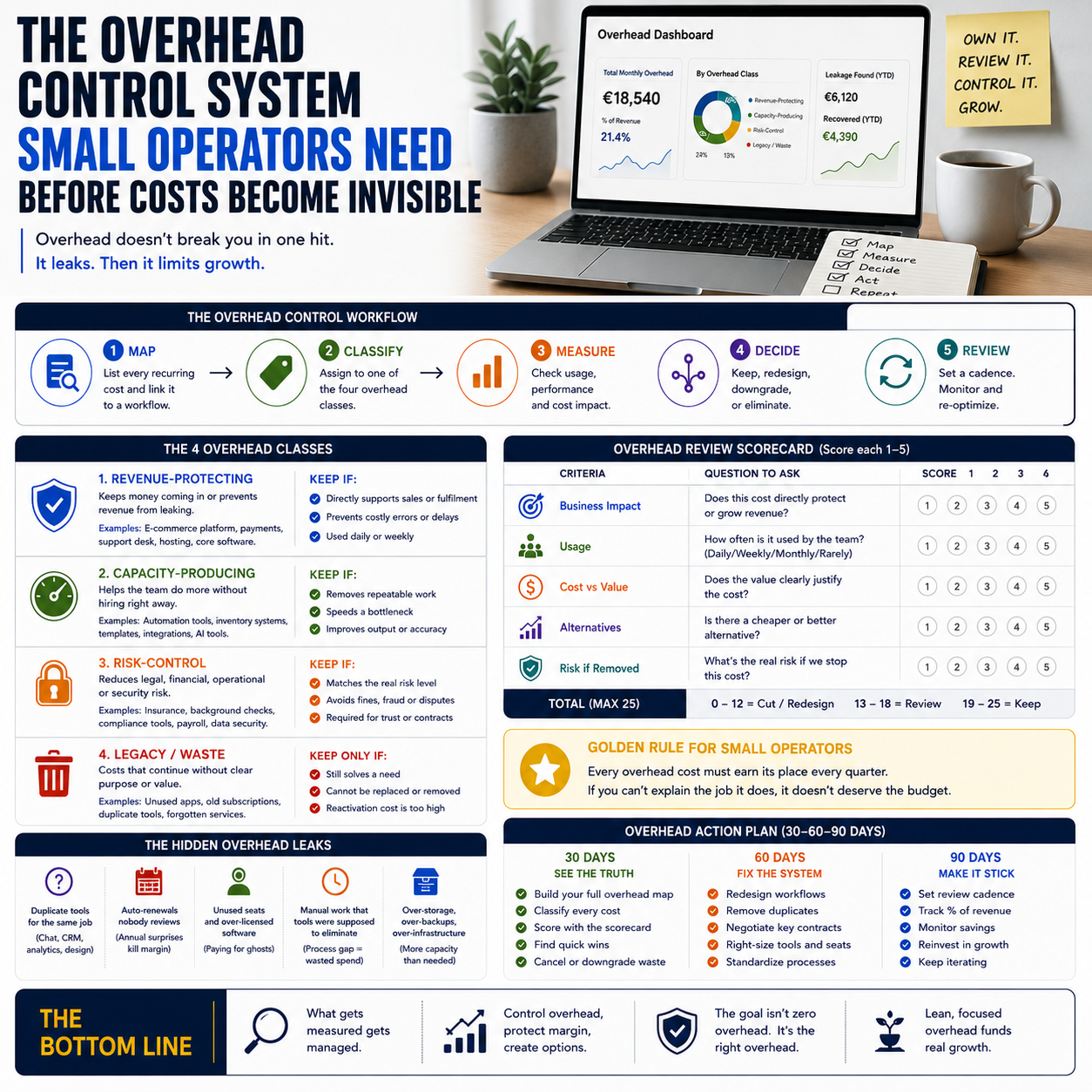
Overhead does not usually break a small business in one dramatic event. It leaks through software renewals, unused workspace, payment tools, admin labour, hiring checks, insurance, subscriptions, utilities, storage, and outsourced services that nobody has re-priced in months.
For a founder, e-commerce seller, small service business owner, or digital operator, the real problem is not knowing that overhead exists. The problem is deciding which costs deserve to stay, which should be redesigned, and which are hiding inside messy workflows.
The margin problem is not overhead itself; it is unmanaged fixed behaviour
Most small companies treat overhead as a finance category. That is too late in the process. By the time a cost appears in bookkeeping, the operational decision has already happened: somebody bought a tool, added a contractor, expanded storage, subscribed to another platform, kept a workspace, or built a process that now requires admin time every week.
Overhead becomes dangerous when it behaves like a fixed commitment but was never reviewed as one. A monthly app at a modest price may be harmless for a profitable team using it daily. The same app becomes margin drag if it supports a workflow that has already moved elsewhere. A background screening process may be necessary for certain hires. It becomes wasteful if the same level of screening is applied to every low-risk contractor without a decision rule.
This is where small operators need a control system, not a lecture about cutting expenses. Cutting the wrong overhead can slow fulfilment, weaken hiring, damage customer response time, or create compliance exposure. Keeping the wrong overhead can make revenue growth look healthier than it really is.
The operating question is sharper: does this cost protect revenue, produce capacity, reduce risk, or simply exist because nobody owns it?
Build an overhead map around workflows, not accounting labels
Accounting categories are useful for reporting, but they are often poor tools for operational control. A bookkeeping line called software subscriptions might include the e-commerce platform, a support desk, an email tool, an abandoned design app, a duplicated analytics product, and an automation platform that saves ten hours a week. Those costs should not be judged together.
Start by mapping overhead to workflows. For a small e-commerce operator, this may include order capture, fulfilment, customer support, returns, product content, paid acquisition reporting, inventory control, finance admin, and hiring. For a service business, the map may include lead intake, proposal generation, delivery scheduling, client communication, invoicing, contractor coordination, and document storage.
Every recurring cost should be attached to one of those workflows. If a cost cannot be attached, it goes into a temporary review bucket. Not because it is automatically bad, but because nobody can currently explain its job.
That single exercise changes the conversation. Instead of asking whether the business should spend less on software, you ask whether the current support workflow requires three tools, whether the reporting workflow has two dashboards showing different numbers, or whether the hiring workflow has a screening step that is sensible for cash-handling roles but excessive for a short project-based contributor.
Now the business can make decisions. Not guesses.
The four overhead classes that matter to small operators
A practical overhead system needs simple classifications. Too many categories slow down the review and create false precision. Four classes are enough for most small teams.
1. Revenue-protecting overhead
These costs keep money coming in or prevent revenue from leaking. Examples include the e-commerce platform that processes orders, payment infrastructure, core hosting, domain management, customer support software, bookkeeping needed for invoicing, and operational tools that prevent missed fulfilment or late responses.
These costs should not be cut casually. They should be monitored for performance, duplication, and pricing drift. If the support desk is used daily and keeps refund disputes under control, the issue is not whether to cancel it. The issue is whether the workflow around it is clean: clear ownership, response targets, tags, escalation rules, and reporting.
2. Capacity-producing overhead
This class includes costs that let a small team do more without immediately hiring. Automation tools, inventory systems, scheduling software, templates, AI-assisted content workflows, and integration platforms often belong here.
The mistake is assuming every automation tool belongs in this category. A tool produces capacity only if it removes a repeatable task, reduces error handling, speeds a bottleneck, or improves output consistency. If it merely adds another dashboard for the founder to check, it is not capacity. It is admin decoration.
3. Risk-control overhead
Some overhead exists because the business is exposed to operational, legal, financial, reputational, or security risk. Insurance, background screening, secure document storage, payroll support, access management, and specialist compliance support can sit here.
Risk-control overhead needs proportionality. A business hiring staff who handle payments, customer data, premises access, or vulnerable customers may need more robust checks than a business hiring a one-off designer for a limited asset project. The cost should match the risk profile of the role, access level, geography, and contract type.
This is where many small firms either overspend or underprotect themselves. They buy a generic process because it feels safe, or they skip checks because the process feels bureaucratic. Both are weak operating decisions.
4. Legacy overhead
Legacy overhead is the silent margin killer. It includes old subscriptions, duplicate tools, unused storage, services tied to a previous business model, rented space no longer needed, premium plans bought for features nobody uses, and consultant retainers that have become routine rather than useful.
Legacy overhead survives because it does not create enough pain to attract attention. It is often too small to trigger a crisis and too fragmented to appear as one obvious waste line. But in a small business, five modest unused costs can equal the profit from several orders, a week of ad testing, or a contractor budget.
The cost decision should include labour, not just invoices
A low invoice can still be expensive if it creates manual work. A higher invoice can be cheap if it removes recurring labour and reduces mistakes. Small operators often compare tools by subscription price and ignore the human cost attached to the workflow.
Use a rough but explicit internal labour rate. It does not need to be perfect. If the founder values operational time at a realistic hourly rate, then a tool that saves four hours a month has a different economic profile than one that saves fifteen minutes. If a part-time operations assistant spends several hours reconciling messy exports because two systems do not connect, that admin time belongs in the cost of the current setup.
For example, imagine a small online retailer using separate tools for orders, shipping labels, customer messages, and inventory updates. The visible software cost may look manageable. But if order exceptions require manual checking every morning, returns are handled from a shared inbox, and stock updates are corrected by hand after promotions, the true overhead is not only subscriptions. It is decision fatigue, error correction, delayed fulfilment, and founder attention diverted from pricing or sourcing.
That does not automatically mean the retailer should buy a larger platform. It means the comparison must include the workflow cost. A cheaper stack with three manual reconciliation points may be more expensive than a higher-priced stack with fewer errors. Or the opposite may be true if volume is low and the team still needs flexibility.
Context decides.
Where automation helps and where it hides waste
Automation is useful when the process is stable, rules-based, repeated often, and expensive to handle manually. Invoice reminders, order status notifications, stock alerts, support triage, recurring report generation, document routing, and lead intake qualification are natural candidates.
But overhead control should come before automation expansion. If a workflow is unclear, automating it can lock waste into the business. The team may end up paying for software that moves bad data faster, creates false confidence, or makes exceptions harder to spot.
Before adding an automation tool, ask three operational questions:
- Is the task frequent enough to justify setup, maintenance, and monitoring?
- Are the rules stable enough that automation will not create constant exception handling?
- Will the tool replace manual work, reduce risk, or improve speed in a measurable way?
If the answer is vague, do not automate yet. Fix the workflow first. A manual checklist is often superior during the discovery phase because it exposes edge cases. Once the team knows the real pattern, automation becomes much safer.
What most people miss
The fashionable advice is to reduce overhead by automating more and cutting anything that looks non-essential. That sounds efficient. It can be reckless.
Some overhead is a shock absorber. A human review step in hiring, refunds, supplier changes, payment disputes, or high-value orders may look inefficient on a spreadsheet. But if that step catches fraud, bad-fit hires, margin-damaging returns, or supplier mistakes, removing it can create larger losses than the saved cost.
The unpopular move is this: keep certain manual controls deliberately. Not because the business is old-fashioned, but because the process has risk, ambiguity, or low volume. A small team does not need to automate every approval. It needs to know which approvals are worth human judgment.
Background screening is a good example. A blanket process for every role may be wasteful. No process at all may be careless. A better system uses a role-based trigger: deeper checks where the person will access money, customer data, keys, sensitive systems, or regulated environments; lighter verification where the risk is lower. That is overhead with logic, not overhead by habit.
The same applies to software. A founder may be tempted to cancel an expensive operations tool because the invoice stands out. But if that tool prevents missed orders or enables a small team to handle peak volume, it may be protecting revenue. The cost to attack first may be the quiet cluster of small unused tools nobody defends because nobody uses them.
The monthly overhead review should be short, sharp, and owned
An overhead system fails when it becomes a finance ritual with no operating owner. The review should be monthly, limited, and tied to decisions. It is not a meeting to complain about expenses. It is a control point for margin and workflow design.
The owner could be the founder, operations lead, finance manager, or a disciplined assistant with authority to gather data. The point is ownership. Every recurring cost must have a named owner who can explain why it exists and what workflow it supports.
Use three review lenses:
- Utilisation: Is the tool, service, space, or process actually used? By whom, how often, and for what workflow?
- Replacement cost: If removed, what manual work, risk, delay, or lost capability appears?
- Decision trigger: What event would make this cost too high, too low, unnecessary, or worth upgrading?
For example, a support tool might be worth keeping while monthly ticket volume is high and response tracking matters. If volume drops and customer communication moves into a CRM, the tool needs review. A warehouse storage cost might be acceptable during seasonal stock build-up but poor after product rationalisation. A premium analytics subscription might be justified during paid acquisition scaling but wasteful if campaigns are paused.
The review should produce decisions: keep, renegotiate, downgrade, consolidate, automate, manualise, or cancel after a risk check. Without a decision verb, the review is theatre.
Metrics that reveal overhead trouble before cash gets tight
Small businesses often discover overhead problems when cash flow tightens. That is late. A better approach is to track simple operating ratios that expose drift earlier.
Do not drown the business in dashboards. Track a small set and review trend direction:
- Recurring overhead as a percentage of gross profit: This is more useful than comparing overhead only to revenue, because gross profit reflects the money available after direct delivery costs.
- Software spend per active workflow: If one workflow has multiple tools and no clear owner, inspect it.
- Admin hours per order, project, client, or ticket: Rising admin time is often hidden overhead before it becomes a new hire request.
- Unused subscription count: Track tools with no meaningful usage in the last billing period.
- Exception rate: Count orders, invoices, hires, returns, or support cases requiring manual correction. High exception rates often explain why overhead keeps growing.
- Cost owner coverage: The percentage of recurring costs with a named owner and workflow purpose.
These metrics are not meant to impress anyone. They help a small operator see whether overhead is supporting the business model or compensating for broken processes.
A practical scenario: the founder with a bloated digital stack
Consider a small digital product and e-commerce operator selling templates, paid downloads, and a small catalogue of physical accessories. The business uses a storefront, payment provider, email platform, helpdesk, design software, automation connector, analytics tool, cloud storage, project management app, accounting software, review app, shipping integration, and three old subscriptions from earlier experiments.
The founder thinks the issue is software cost. But the review shows a different picture. The helpdesk is valuable because it contains refund history and customer issue tags. The shipping integration prevents fulfilment errors. The accounting tool is necessary. The automation connector is used for only two simple tasks that the storefront can now handle natively. The review app has not produced useful operational data in months. Two design subscriptions overlap. The analytics tool produces reports nobody uses because paid ads are currently paused.
The decision is not to slash software broadly. The decision is to consolidate design tools, cancel the unused review product, replace the automation connector with native platform rules, pause the analytics upgrade, and keep the helpdesk until support volume or CRM structure changes.
That is how overhead control protects the business. It cuts waste without damaging the workflows that keep orders moving.
30-day overhead control checklist for a small operator
Use this as an operating sequence, not a finance exercise. The aim is to create a repeatable control system that protects margin without cutting useful capacity.
- Days 1-3: Export every recurring payment. Pull card statements, bank transactions, app store billing, PayPal or Stripe-related subscriptions, hosting invoices, workspace costs, insurance, contractors, retainers, storage, screening services, and professional tools. Do not rely only on accounting categories.
- Days 4-6: Attach each cost to one workflow. Use workflow names such as order fulfilment, customer support, hiring, content production, inventory control, finance admin, sales reporting, returns, lead intake, or data security. Anything that does not fit goes into review.
- Days 7-10: Assign one owner per recurring cost. The owner must answer what the cost does, who uses it, what breaks if it disappears, and what cheaper or better alternative exists.
- Days 11-14: Mark the cost class. Use only four labels: revenue-protecting, capacity-producing, risk-control, or legacy. If people argue over the label, the cost needs deeper review.
- Days 15-18: Check usage and duplication. Look for inactive seats, overlapping tools, premium plans bought for unused features, old trial conversions, and services attached to discontinued products or channels.
- Days 19-22: Compare invoice cost with labour cost. Estimate the manual hours each tool saves or creates. If a cheap tool creates weekly reconciliation work, treat that labour as part of the cost.
- Days 23-25: Set decision verbs. Each reviewed item must receive one action: keep, cancel, downgrade, renegotiate, consolidate, automate, manualise, or review after a specific trigger.
- Days 26-28: Protect risk controls before cutting. Before removing insurance, screening, access management, backups, or compliance-related services, identify the specific risk being accepted. If nobody can define it, pause the cut until the exposure is clear.
- Days 29-30: Build the monthly dashboard. Track recurring overhead versus gross profit, unused subscription count, admin hours per order or project, exception rate, and percentage of costs with named owners. Review it monthly in one short operating meeting.


