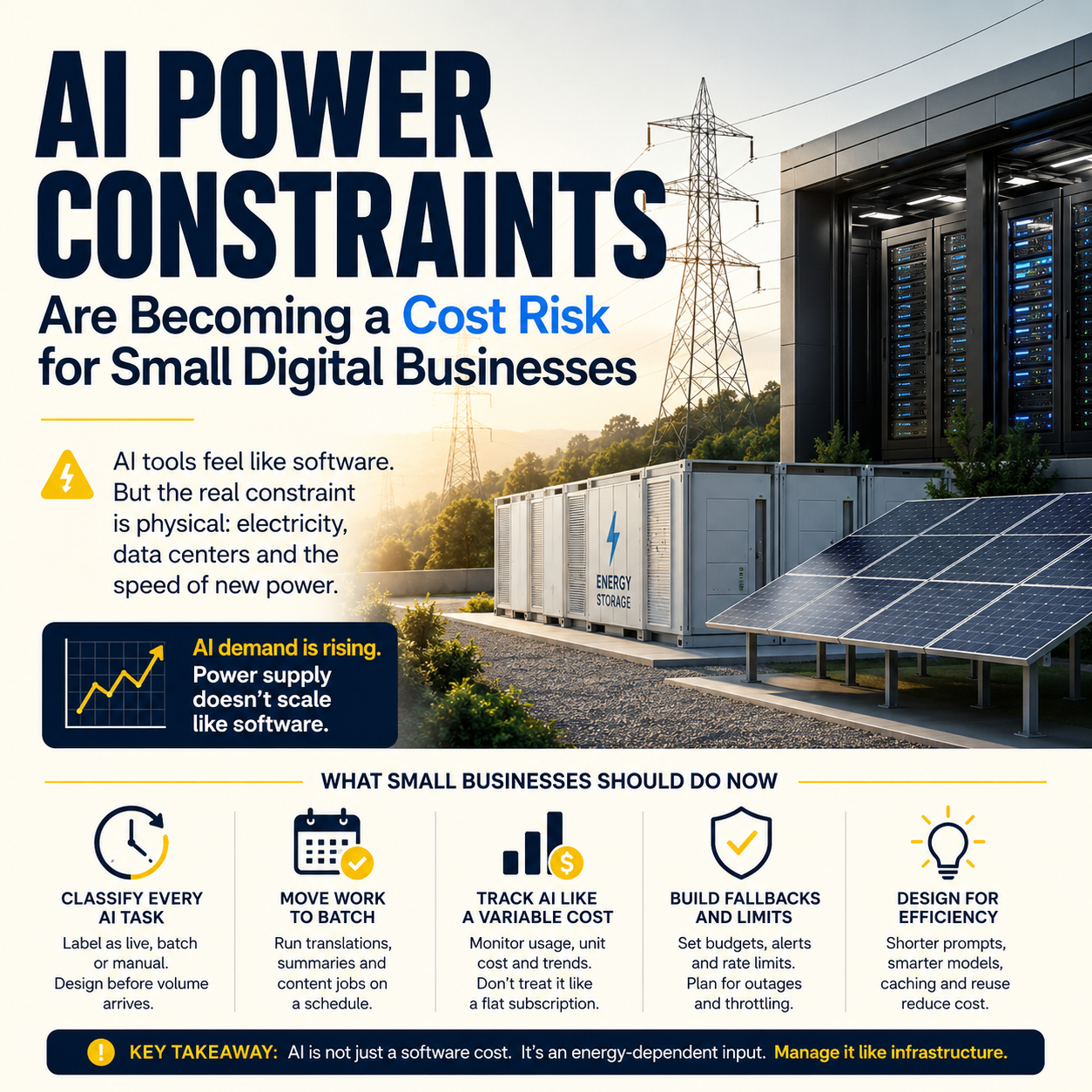
AI tools look like software subscriptions, but the constraint underneath them is physical: electricity, data centers and the speed at which new power can be built. Recent reporting on startups trying to supply energy for AI demand shows why small digital businesses should stop treating AI usage as a flat monthly cost.
For founders, e-commerce operators and automation builders, the practical issue is not whether solar plants, batteries or fusion reactors win. The issue is whether your workflows depend on cheap, unlimited inference. That assumption is weak.
The hidden dependency inside every AI automation budget
Most small businesses buy AI through friendly interfaces: a chatbot subscription, a writing assistant, a customer support tool, an image generator, a coding assistant or an automation platform with AI steps built in. The bill usually arrives as seats, credits, tokens, tasks or usage tiers. That makes AI feel like SaaS.
Operationally, it behaves more like metered infrastructure.
The TechCrunch report on Ambrosia Energy is useful because it points to the pressure behind the interface. The company wants to build solar-and-battery power plants quickly to serve AI-related electricity demand. Another report on Avalanche Energy describes progress on a compact fusion reactor prototype, still deep in the experimental category. These are not small-business tools. But they expose the same business fact: AI supply is tied to energy supply, and energy supply does not scale like a landing page.
That matters if your company is building around AI-heavy operations. A small e-commerce seller using AI for 30 product descriptions a month has little exposure. A marketplace operator using AI to classify listings, moderate messages, translate content, rewrite feeds and answer support tickets every hour has a different risk profile. The second business has an operating cost that can move when model pricing, rate limits, latency or vendor packaging changes.
Do not model that as “AI subscription: fixed”. Model it as variable production input.
Where small operators actually feel the energy bottleneck
You will not receive an invoice line called “data center electricity shortage”. The pressure appears elsewhere. Vendors tighten free plans. Token allowances shrink. Image generation gets bundled into higher tiers. Fast models become premium options. API calls get throttled. Bulk jobs move to batch windows. Response times become inconsistent at peak demand.
That is the layer small businesses need to watch.
If your workflow depends on AI at a low volume, the risk is tolerable. If AI sits inside order handling, lead qualification, customer support, fraud review, product enrichment or content production, the cost needs the same discipline as payment processing fees or advertising spend. It should have a usage owner, a budget, a failure mode and a fallback.
Consider a small cross-border e-commerce operator selling through its own store and marketplaces. The team uses AI to translate product descriptions, answer basic product questions, generate marketplace titles, summarize returns messages and flag unusual customer complaints. None of this sounds exotic. But the total number of AI calls can rise with catalog size, order volume, languages, support tickets and marketplace rules. The cost does not grow in a clean straight line unless the workflow is designed that way.
The decision is not “use AI or avoid AI”
The useful decision is narrower: which tasks deserve live AI, which tasks can run in batches, and which tasks should not use AI at all.
Live AI is expensive operationally because it must respond when the customer, employee or system needs it. Customer support chat, order exception handling and fraud triage may need speed. Product description rewriting usually does not. Translation of an entire catalog can run overnight. Review analysis can run weekly. Supplier email summarization can run twice a day.
Once you separate live, batch and manual work, the cost picture changes. Many small teams accidentally build everything as live AI because the tool makes it easy. That is convenient during testing and sloppy during operations.
Use live AI only where delay damages revenue or trust
A live AI step is justified when waiting creates a real operational problem: a buyer abandons checkout, a support queue piles up, a fraud case blocks shipment, or a sales lead goes cold. In those cases, speed has commercial value.
For lower-risk tasks, live AI creates unnecessary exposure. A product feed can be enriched in a scheduled job. A weekly bundle of customer reviews can be summarized in one batch. A set of support macros can be refreshed monthly. The difference is not philosophical. It is cost control.
Batch work should be designed before volume arrives
Batch processing is not just a technical preference. It gives the business more control over timing, model choice, review steps and retries. It also makes failures less dramatic. If a batch product-description job fails at 2 a.m., the customer does not see a broken chat response at checkout.
Small operators should document every AI task with one label: live, batch or manual. If the team cannot label it, the workflow is not ready for scale.
What most people miss
The popular advice is to automate as much as possible because AI lowers labor cost. That advice is too crude. In small businesses, automation can increase fragility faster than it reduces workload.
The unpopular move is to keep some work manual until the volume is stable, the error cost is known and the unit economics are visible. Manual review is not a failure. It is a measurement tool.
For example, a small seller may want AI to automatically rewrite supplier descriptions into marketplace-ready copy. At first, that sounds efficient. But if the catalog contains regulated claims, compatibility details, sizing nuances or warranty language, bad automation can create returns, listing removals or customer disputes. The cheaper workflow may be: AI drafts the text, a human approves only high-risk fields, and low-risk fields are published automatically after a rule check.
That hybrid workflow is less glamorous. It is often better.
The same applies to customer support. A fully automated support bot may reduce tickets, but if it mishandles refund exceptions, delivery promises or angry customers, it can move costs from labor into refunds, chargebacks and bad reviews. The right question is not “can AI answer this?” The right question is “what happens when AI answers this incorrectly at volume?”
Build an AI cost map before adding more tools
Small teams often adopt AI in fragments. Marketing adds a content tool. Support adds a chatbot. Operations adds an automation platform. The founder uses a coding assistant. The store manager uses AI translation. Each tool looks affordable alone. Together, they create blind spots.
An AI cost map should list every AI-powered workflow, not every vendor. One vendor may support several workflows, and one workflow may use several vendors. The workflow is what matters because that is where business value and operational risk sit.
For each workflow, capture five fields:
- Trigger: What causes the AI step to run? A ticket, order, product import, scheduled job, employee prompt or customer message?
- Volume driver: What makes usage grow? Orders, SKUs, languages, tickets, ad campaigns, reviews, suppliers or staff headcount?
- Failure cost: What happens if the output is wrong, late or unavailable?
- Fallback: Can a human, template, rule-based script or cheaper model handle the task?
- Metric: Which number proves the workflow is worth keeping?
This exercise often reveals that the most expensive AI step is not the most valuable one. A team may spend heavily generating content variants that produce no measurable uplift while underinvesting in support triage that reduces refund delays. Without workflow-level measurement, subscription spend hides that imbalance.
The model-choice trap for operators
Many businesses default to the strongest available model for every task. That is like hiring a senior lawyer to alphabetize invoices. Some tasks need reasoning quality. Many need extraction, formatting, classification or rewriting within strict rules.
Use a tiered model policy. A stronger model can handle ambiguous customer complaints, complex product compatibility questions or high-value B2B lead responses. A cheaper model or rule-based script can classify standard return reasons, format product attributes, summarize low-risk reviews or draft internal notes.
The policy should be written plainly enough for non-technical staff to use. For example: high-risk customer-facing outputs need human approval; internal summaries can use cheaper models; product claims must not be generated without source data; refund decisions cannot be made by AI alone. This is not bureaucracy. It prevents expensive tools from becoming default tools.
Watch three operating metrics: AI cost per order, AI cost per support ticket resolved and AI cost per published SKU. If these numbers are not tracked, the business cannot tell whether AI is improving margins or simply adding a new expense category.
A practical scenario: the small store with expanding AI usage
Imagine a small online store with 2,000 SKUs, three languages and a two-person operations team. The team starts using AI for product descriptions because supplier data is inconsistent. Then it adds AI-generated marketplace titles. Then it adds customer email drafts. Then it connects AI to a helpdesk for first-response suggestions. None of the decisions is reckless.
The risk appears when volume changes.
A seasonal campaign doubles support tickets. A supplier adds 800 new products. A marketplace changes title requirements. The team suddenly runs more AI calls, reviews more outputs and handles more exceptions. If the workflows were built casually, the team now has three problems at once: rising usage costs, inconsistent quality and unclear ownership.
A better setup would separate the work. Product enrichment runs in weekly batches with approval for claims and compatibility fields. Marketplace titles are generated from a controlled template plus AI variation only where allowed. Support drafts are suggested to staff, not sent automatically, for refund, delivery and damaged-item cases. Internal summaries use a cheaper model. Only urgent customer-facing tasks use the premium model.
That is an operations design choice, not a technology preference.
How the energy signal should change vendor selection
The energy infrastructure stories are not a reason to panic about AI. They are a reason to ask harder vendor questions. If AI demand keeps pushing against power and data center capacity, vendors will keep adjusting packaging. Small businesses need contracts and workflows that can survive those adjustments.
When choosing an AI-enabled tool, ask how usage is metered. Seats are simple, but AI features may sit behind credits. Credits may not map cleanly to business activity. A “message” may cost more depending on length, model, attachments or retries. An automation run may include multiple hidden AI calls. A chatbot conversation may consume far more than one response.
Also ask whether the tool allows model selection, usage caps, audit logs, exportable prompts and fallback rules. If the answer is no, the tool may be easy to start and hard to control. Small teams do not need enterprise complexity, but they do need a brake pedal.
The strongest vendor for a small operator is not always the one with the most advanced model. It is often the one that exposes enough controls to manage cost, quality and failure.
30-day AI usage audit for small digital operators
Use this audit before adding another AI tool or expanding an existing workflow. It is designed for small e-commerce teams, service businesses, marketplace operators and automation builders that already use AI in daily work.
- Day 1-3: List workflows, not tools. Write down every place AI touches operations: product content, ads, email, support, translations, reporting, coding, analytics, lead handling, document processing and internal search.
- Day 4-7: Label each workflow. Mark it as live, batch or manual-assisted. Any live workflow must have a business reason for speed.
- Day 8-10: Identify the volume driver. Connect each workflow to the activity that increases usage: orders, SKUs, languages, tickets, campaigns, suppliers, files or staff prompts.
- Day 11-14: Add a failure rating. Use three levels: low risk for internal drafts, medium risk for staff-reviewed customer content, high risk for automatic customer-facing or financial decisions.
- Day 15-18: Set usage caps. Put monthly limits on non-critical workflows. If a tool cannot cap usage, assign a human owner to check it weekly.
- Day 19-21: Create fallback paths. Define what happens if the AI feature is unavailable, too slow or too expensive. Use templates, rules, cheaper models or manual queues.
- Day 22-25: Assign model tiers. Reserve stronger models for high-risk or high-value tasks. Move formatting, classification and routine summaries to cheaper options where quality is acceptable.
- Day 26-28: Choose three metrics. Track AI cost per order, AI cost per resolved ticket and AI cost per published SKU, or equivalent metrics for your business model.
- Day 29-30: Cut or redesign one workflow. Pick the AI workflow with the weakest value-to-risk ratio. Remove it, batch it, downgrade the model or add human review where mistakes are expensive.


