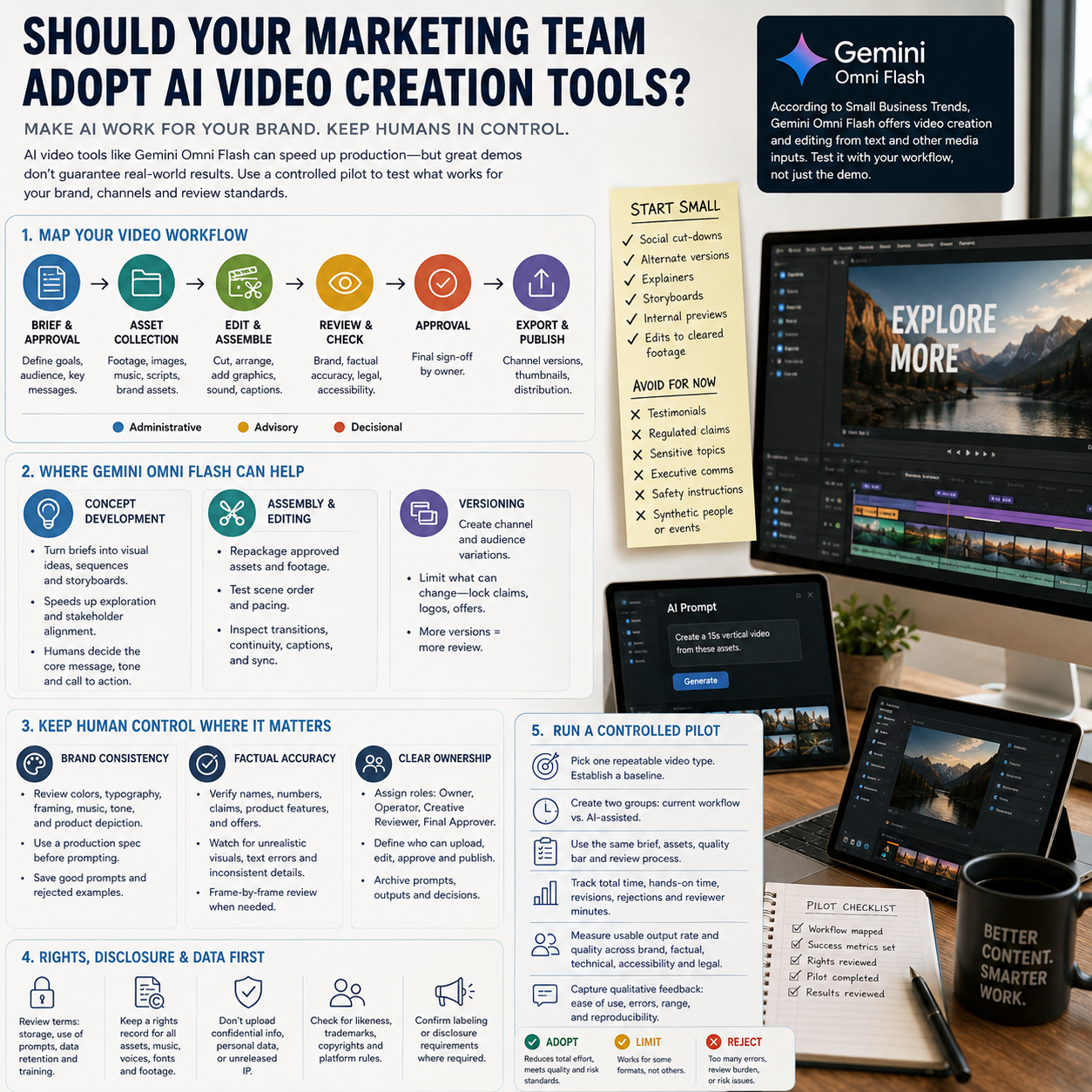
AI video creation can look like an easy productivity win for a small marketing team: produce more variations, edit assets faster, and reduce dependence on specialist software. But adoption should not be decided by the quality of a few impressive demonstrations. The practical question is whether a tool such as Gemini Omni Flash can create usable, brand-safe video while reducing the team’s total workload rather than merely shifting effort into prompting, review, and correction.
Small Business Trends reports that Gemini Omni Flash combines video creation and editing capabilities, including work from text and other media inputs. Those product-specific claims make it worth evaluating, but they do not establish how it will perform with your brand, channels, approval rules, or source material. A controlled pilot should test those conditions before the tool becomes part of the standard production process.
Start with the workflow bottleneck, not the tool
Map the current path from campaign brief to published video. Record who writes the concept, gathers assets, edits footage, adds captions, reviews claims, approves the brand treatment, and exports channel-specific versions. The right adoption decision depends on which stage consumes time and whether AI can streamline it without creating a larger review burden downstream.
For many small teams, the best initial candidates are bounded, repeatable assignments: social cut-downs based on approved campaign material, alternate versions of an existing concept, simple product explainers, draft storyboards, internal previews, or edits to already cleared footage. These tasks have defined inputs and an obvious reference against which reviewers can compare the output.
Higher-risk uses include testimonials, regulated product claims, sensitive social topics, executive communications, safety instructions, and videos in which realistic generated people or events could be mistaken for authentic footage. A technically polished result can still misrepresent a customer, product, location, or outcome. Such assignments require stricter review and may remain unsuitable for generation altogether.
Do not begin with the team’s most important launch. Select work that occurs frequently enough to measure but is reversible if the output fails. The pilot must answer a workflow question, such as whether the tool can turn approved copy and assets into usable short-form variants faster than the present method.
Decide where Gemini Omni Flash fits
According to the supplied Small Business Trends report, Gemini Omni Flash is positioned around creating and editing video with multimodal inputs. Treat this as a capability to investigate, not proof of production readiness. The team should test distinct stages rather than assigning the system an undefined role as an end-to-end creator.
Concept development
The tool may help turn a written brief into rough visual directions, sequences, or draft scenes. This can accelerate discussion between a marketer and an editor, especially when the alternative is describing every shot verbally. A human creative owner should still decide the core message, audience, emotional tone, and call to action. Otherwise, rapid generation can produce many executions of a weak idea.
Assembly and editing
AI-assisted creation or editing may be valuable when repackaging approved assets, testing scene order, or producing format variations. Give the system only material cleared for the project, and preserve the original files outside the AI workflow. Editors should inspect transitions, continuity, pacing, cropping, captions, and synchronization rather than assuming a successful export is a finished deliverable.
Versioning
Producing alternatives for different channels, audiences, or durations is a plausible efficiency opportunity. Yet each variation creates another review object. Limit the number generated and define what is allowed to change—for example, aspect ratio and opening frame—while locking approved claims, logos, disclaimers, and product depictions.
Keep human control over brand and factual accuracy
Brand consistency involves more than applying a logo. Review whether colors, typography, framing, music, voice, humor, product appearance, and calls to action match the brand system. Generated video can look coherent while introducing small deviations that weaken recognition across a campaign.
Create a compact production specification before prompting: approved message, prohibited claims, required wording, visual references, audience, channel, duration, and elements that must remain unchanged. Save successful instructions and rejected examples. This turns prompt writing from an individual improvisation into a documented operating process.
Every output should receive at least two kinds of review. The creative reviewer checks narrative, pacing, visual quality, accessibility, and brand fit. The subject or campaign owner verifies names, numbers, product behavior, offers, demonstrations, captions, and spoken claims. If the video concerns a regulated or contract-sensitive subject, add the appropriate legal or compliance reviewer.
Teams should also watch for visual anomalies: unstable objects, implausible movement, inconsistent packaging, distorted text, altered trademarks, or scenes that imply a feature the product does not have. Review the complete video frame by frame where necessary, not only the thumbnail and opening seconds.
Resolve rights, disclosure, and data questions before publishing
Before uploading business material, examine the tool’s current terms and organizational settings. Determine how prompts, footage, customer information, product designs, and generated outputs may be stored or used. Do not submit confidential launches, personal data, unreleased intellectual property, or third-party material unless your organization has confirmed that the arrangement is acceptable.
Maintain a rights record for every pilot asset. It should identify the source of footage, images, music, voices, fonts, logos, and scripts; the permission or licence covering each item; and any restrictions on modification or commercial use. AI-assisted editing does not erase the conditions attached to source media.
Check generated content for resemblance to protected characters, recognizable people, competitor branding, or copyrighted creative work. Confirm whether platform rules or applicable laws require labeling or disclosure, particularly when synthetic people, voices, events, or realistic demonstrations are involved. Because these obligations vary by location and use, the marketing team should not substitute a tool’s availability for legal clearance.
Run a controlled pilot with measurable gates
Use a small batch of comparable videos, with some completed through the current workflow and others using Gemini Omni Flash. Give both groups the same brief, approved assets, quality threshold, and review process. Avoid comparing an AI-assisted draft with a manually produced premium campaign; the tasks must be equivalent.
Assign explicit responsibilities: a campaign owner defines the goal, an operator manages prompts and versions, a creative reviewer controls brand quality, and a final approver accepts publication risk. One person may hold several roles in a small team, but the decisions should remain distinct. Establish who can upload assets, who can approve generated material, and where prompts and outputs are archived.
Track total elapsed time and hands-on production time separately. Also count revision rounds, reviewer minutes, rejected outputs, technical corrections, and the proportion of generated videos that become publishable with only acceptable edits. “Usable output” should mean meeting the same brand, factual, technical, accessibility, and compliance standards as existing content—not simply producing a playable file.
Include qualitative findings: Did operators need specialist prompt skills? Were errors easy to detect? Could another employee reproduce the workflow? Did generation improve creative range, or did outputs converge on generic styles? Record exceptions and failed attempts rather than showcasing only the strongest result.
Adopt the tool for a defined workflow only if the pilot reduces total production effort while maintaining quality and risk controls. Continue testing if value appears limited to certain formats. Reject or restrict it when revision workload offsets creation time, outputs repeatedly violate brand rules, rights cannot be documented, or reviewers cannot reliably identify errors. The sound decision is not whether AI video works in general, but whether this specific process produces enough approved, usable content to justify changing how your team operates.