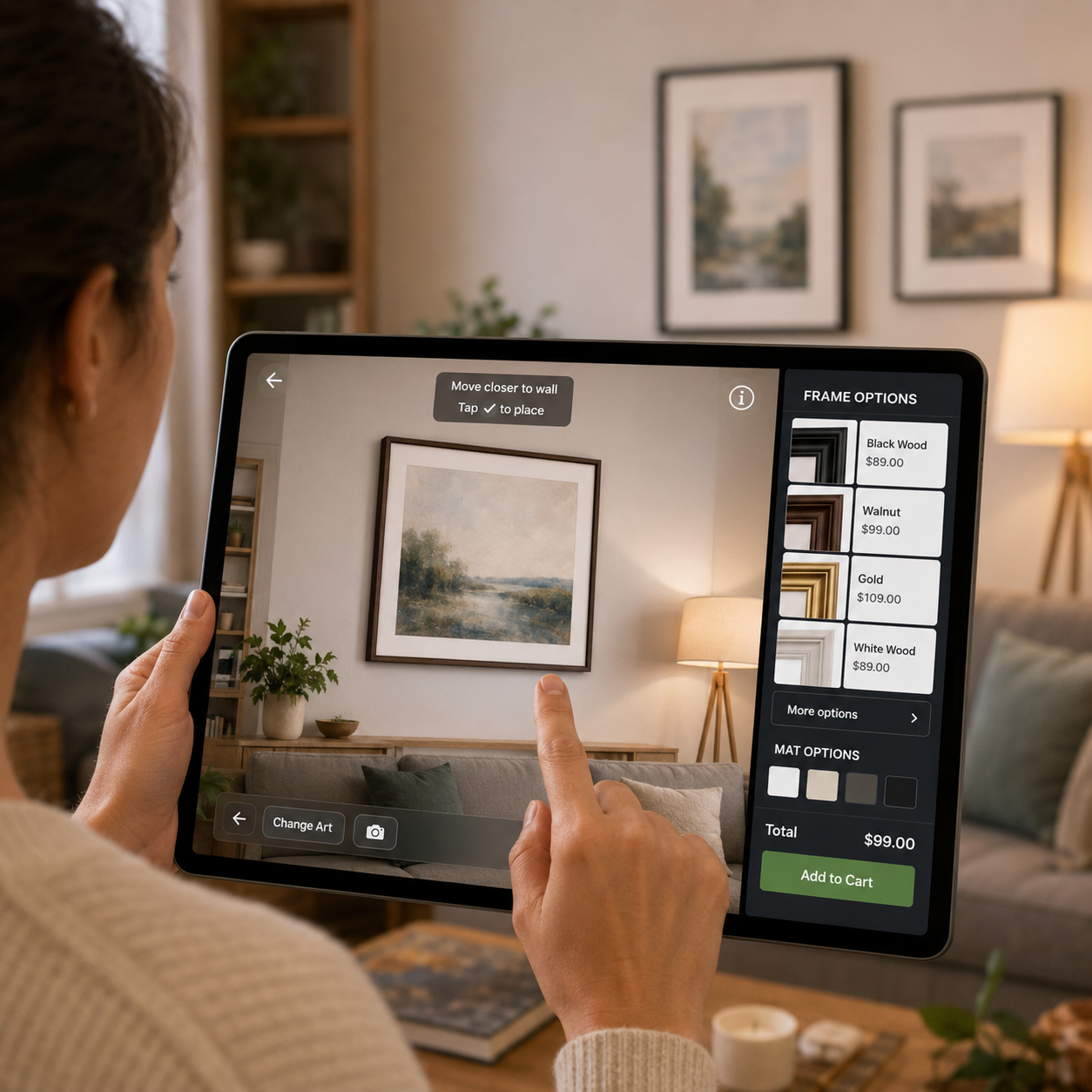
Interactive visualization is most useful when an online shopper cannot confidently answer a question that would be easy to resolve in a store: How will this product look, fit, or coordinate in the intended space? Michaels’ digital frame builder illustrates that problem clearly. According to Retail Dive, the retailer introduced a tool through which shoppers can configure framing choices and use 3D and augmented-reality capabilities to preview the result in their spaces.
The reported Michaels initiative is the starting point here, not proof that visualization automatically raises sales. The source does not establish a performance improvement that other retailers can assume. The practical question for operators is narrower: when does a spatial preview remove enough uncertainty to justify its technical, merchandising, and experience costs?
Why custom framing is a strong visualization use case
Framing combines several characteristics that make ordinary product photography insufficient. Buyers must assess proportions, understand the relationship between artwork and frame, coordinate colours and materials, and imagine the finished configuration on a particular wall. The product is also customized, so shoppers cannot necessarily inspect an exact preassembled version.
Retail Dive reports that Michaels’ digital frame builder enables shoppers to configure a frame and visualize it using 3D and AR. This connects two normally separate stages of the journey: specifying the product and judging its likely appearance in context. The value proposition is therefore not merely novelty. It is the possibility of making an abstract configuration feel more concrete before purchase.
That distinction matters. A rotating 3D model may reveal construction and finish, while an AR placement view addresses scale and environmental fit. A configurator answers a different question again: which combination is being purchased? Retailers should not group all three capabilities under a vague “immersive commerce” objective. Each should resolve a defined source of hesitation.
Select products by uncertainty, not visual appeal
The best candidates are not necessarily the most photogenic or expensive products. Operators should identify products where uncertainty is both consequential and visually resolvable.
Useful selection criteria include:
- Spatial dependence: Size, proportion, orientation, or placement materially affects the decision. Furniture, wall décor, lighting, and large home accessories are obvious candidates.
- Configuration complexity: Buyers choose among components, dimensions, colours, finishes, or layouts whose combined result is difficult to imagine.
- Context sensitivity: Confidence depends on compatibility with a room, wall, body, existing object, or other surroundings.
- High cost of a wrong choice: Returns, remakes, delivery charges, installation, or customer-service intervention make mistakes expensive.
- Limited physical inspection: The exact configuration is unavailable in stores or exists only after an order is placed.
Conversely, AR may add little when the product is standardized, inexpensive, familiar, easy to return, and adequately represented by images and dimensions. It can also be the wrong answer when uncertainty concerns quality, comfort, durability, or tactile feel rather than appearance or placement.
A practical starting point is to review search terms, product-page exits, return reasons, chat transcripts, reviews, and pre-purchase questions. Repeated questions such as “Will it fit?”, “What does this combination look like?” or “How large will it appear?” indicate a potentially visual problem. Questions about longevity or material quality call for different content.
Treat configuration accuracy as a prerequisite
A polished preview cannot compensate for unreliable product data. Before commissioning 3D assets, retailers need a dependable relationship between the visualization, selectable options, pricing, inventory, and order submitted to production or fulfilment.
For configurable products, every valid combination should obey the same rules across the product information system, commerce platform, configurator, preview, cart, and downstream order systems. If the image shows one finish while the cart records another, the tool increases rather than reduces risk. The same is true if an attractive configuration cannot be manufactured, stocked, or delivered.
Operators should assess four dependencies before launch:
- Asset readiness: Are dimensions, textures, colours, geometry, and variant relationships accurate enough to support realistic rendering?
- Rules integration: Can the system prevent incompatible options and update price, lead time, and availability as choices change?
- Environmental reliability: Does AR behave acceptably across supported devices, browsers, lighting conditions, and room surfaces?
- Operational ownership: Who updates models when assortments change, audits visual accuracy, handles defects, and approves new configurations?
Colour fidelity deserves an explicit warning. Screens, lighting, cameras, and rendering engines vary, so previews should not imply perfect material or colour reproduction. Clear scale guidance, dimensions, close-up photography, samples where appropriate, and concise limitations can complement the visualization.
Design the preview around a buyer decision
Adding a “View in your room” button is not an experience strategy. The preview should appear at the moment when it can answer the shopper’s next question, without blocking customers who are already ready to buy.
For a journey resembling custom framing, a sensible sequence is to upload or select the item, choose relevant dimensions and framing components, see the configuration update immediately, then optionally place the result in the intended environment. Persistent summaries should show selected options, total price, dimensions, and availability. Moving between configuration and AR should not reset choices.
Mobile permissions, camera access, loading time, and unfamiliar controls can create abandonment. Provide a clear explanation before requesting access, retain a conventional product view, and offer an obvious route back to configuration or checkout. Customers should be able to complete the purchase without AR.
Usability testing should include more than technically confident employees. Observe whether target customers understand how to start, whether they interpret scale correctly, and whether the tool changes a decision or simply entertains them. Test lower-powered devices and slower connections as well as ideal conditions.
Measure confidence separately from engagement
Time spent in a 3D viewer is not evidence of commercial value. A longer session could mean deeper consideration, confusion, slow rendering, or difficulty leaving the experience. Measurement should connect exposure and successful use to funnel outcomes.
Instrument at least these events: preview offered, preview launched, model loaded, configuration changed, AR permission requested and granted, placement completed, return to product page, add to cart, checkout started, purchase completed, cancellation, return, and customer-service contact. Track technical failures and load times alongside commercial events.
Compare eligible shoppers who use the tool with carefully designed control groups, recognizing that users may already have higher intent. Where possible, run an experiment that changes availability of the experience rather than merely comparing self-selected users and non-users.
The principal measures should include product-page-to-cart conversion, configuration completion, checkout completion, and abandonment at each interaction step. Operators should also monitor order accuracy, configuration-related contacts, cancellations, returns attributed to size or appearance, and margin after fulfilment and return costs. Segment results by product family, device, traffic source, new versus returning customer, and complexity of configuration.
Set guardrails as well as success metrics. A preview that helps desktop conversion but produces high mobile load failures may need redesign rather than wider rollout. Likewise, increased conversion can be offset by more returns if the rendering creates unrealistic expectations.
A disciplined route from pilot to rollout
Begin with a narrow assortment where spatial or configuration uncertainty is documented and the underlying product data is stable. Define the customer question the preview must answer, establish baseline funnel and post-purchase measures, and decide in advance what result would justify expansion.
During the pilot, verify visual accuracy and ordering logic before promoting the feature heavily. Review recordings, support contacts, failed sessions, and customer feedback alongside headline conversion. If shoppers launch the tool but rarely complete placement, investigate permissions, instructions, speed, and device compatibility. If they complete the experience without changing purchase behaviour or reducing costly mistakes, the underlying uncertainty may not be important enough.
Michaels’ frame builder offers a useful model because configuration and spatial judgment are central to the purchase. The broader operator lesson is not that every catalogue needs AR. It is that interactive visualization earns its place when it answers a consequential visual question, reflects the purchasable product accurately, and improves the full economics of the journey without introducing greater friction.