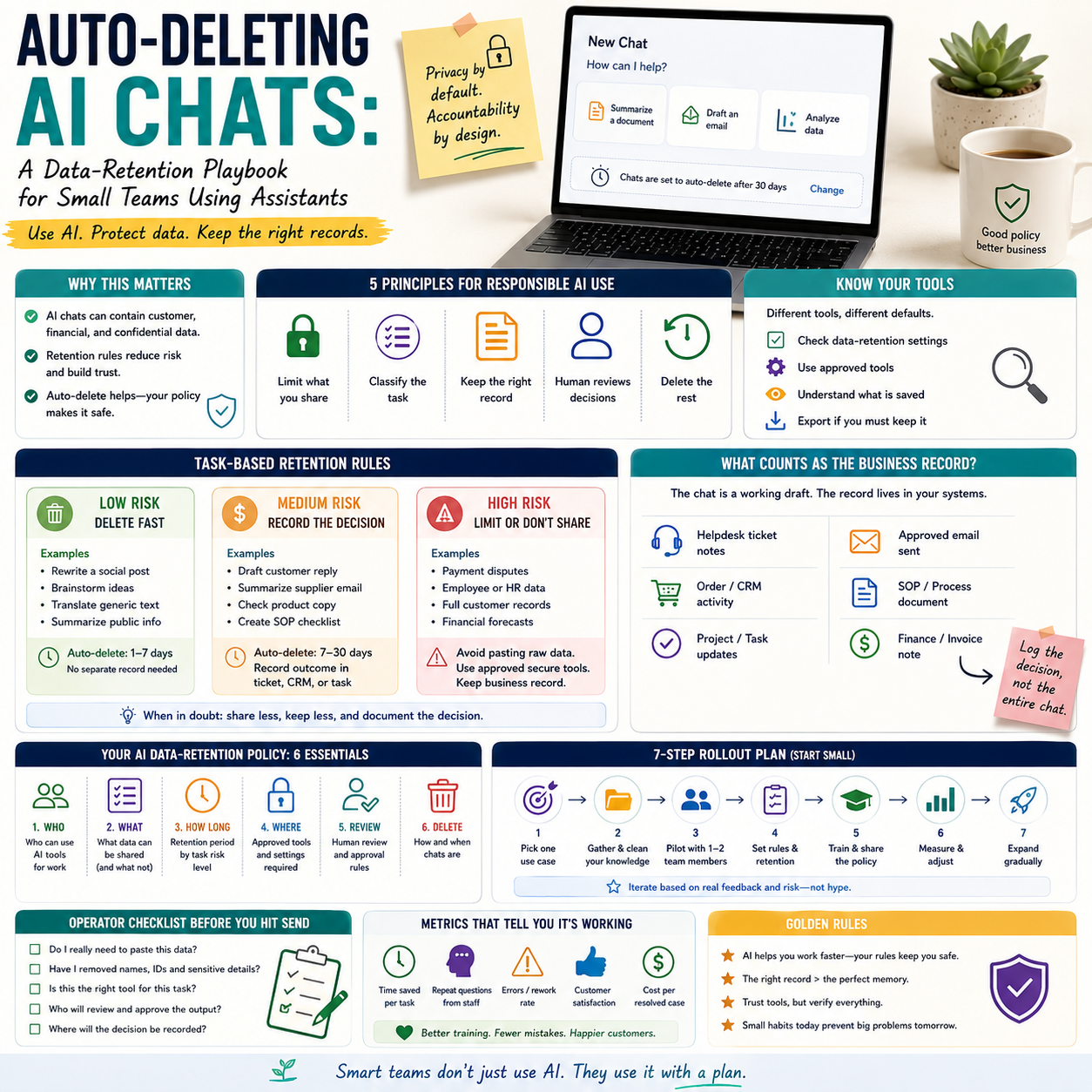
Apple’s reported Siri revamp, including possible auto-deleting chats, points to a practical problem many small companies have not solved: what happens to business data after an employee asks an AI assistant for help? For a small e-commerce seller, agency, consultant or operations team, the issue is not whether AI assistants are useful. The issue is whether the team has rules for what can be entered, how long prompts are retained, and who checks the output before it reaches a customer, supplier or financial file.
This is a data-retention and workflow problem, not a technology trend. If AI assistants become more private by default, operators still need their own policy because staff may use multiple tools across phones, browsers, customer support systems and internal documents.
The operator problem: AI chats are becoming business records
Small teams often treat AI chats like temporary scratchpads. A support manager asks an assistant to rewrite a difficult customer reply. A founder pastes a supplier email and asks for negotiation points. A marketplace seller asks an AI tool to compare refund claims. A finance assistant asks for help categorising expenses or explaining a payment dispute.
Those prompts may contain order numbers, customer names, email addresses, pricing assumptions, supplier terms, refund history, internal margins or employment details. Even when the AI output looks harmless, the input can become a sensitive business record. The question for an operator is simple: should that record exist after the task is finished?
TechCrunch reported that Apple’s Siri revamp could include auto-deleting chats, with privacy expected to be a major theme. That matters because it signals a broader direction: AI assistants will increasingly compete on what they remember, what they forget and how much user control they provide. But small companies cannot rely only on vendor defaults. A team may use Siri on phones, browser-based assistants, AI features inside email tools, helpdesk software, CRM platforms and spreadsheet add-ons. Each tool may handle retention differently.
The practical business decision is not whether to ban AI. It is whether the company should define different retention rules for different kinds of work.
Where auto-delete helps, and where it creates a new risk
Auto-deleting chats can reduce exposure when employees use AI for quick drafting, summarising or translation. If a conversation disappears after a short period, the company lowers the chance that sensitive prompts remain available in a personal account, shared device or vendor history.
But automatic deletion can also remove useful audit trails. If an employee uses AI to draft a refund response, change a product description, prepare a supplier counteroffer or summarise a customer complaint, the business may later need to know what information was used and what was approved by a human. This is especially relevant for teams where one person handles customer support, operations and admin without a formal review process.
For small operators, the right answer is not full memory or full deletion. The right answer is task-based retention.
What most people miss
The risk is not only that an AI provider stores something. The more common operational risk is that nobody inside the business knows which AI tool was used, what data was pasted, whether the answer was checked, and whether the final action was based on the AI output or on human judgement.
Auto-delete can clean the vendor-side history, but it does not create a business process. If a staff member uses an assistant to decide whether a customer should receive a refund, the important record may belong in the order system, helpdesk ticket or CRM note, not in the AI chat. The AI conversation can disappear, but the business decision still needs a trace.
This means operators should separate two things: the working prompt and the business record. The working prompt can often be deleted quickly. The business record should live in the system of record, with only the necessary information retained.
A retention map for common small-business AI tasks
A useful policy starts by grouping AI use cases by business risk. This does not need to be a legal document. It can be a one-page operating rule that staff can follow without asking for permission every time.
Low-risk tasks: delete fast, keep no separate record
These are tasks where the prompt contains no customer data, no confidential numbers and no binding business decision. Examples include rewriting a generic product care instruction, drafting a social caption from public product details, brainstorming email subject lines without customer segments, or translating a non-sensitive internal note.
For these tasks, auto-delete is helpful. The company does not need an archive of every wording experiment. The operating rule can be: use approved tools, do not paste personal or confidential data, and let the chat history expire or delete it manually at the end of the session.
Medium-risk tasks: delete the prompt, record the decision elsewhere
These tasks involve business context but not highly sensitive material. Examples include summarising a supplier message, drafting a response to a customer complaint, turning a support ticket into a proposed reply, or checking whether a product page has unclear delivery wording.
For these tasks, the AI chat should not become the official record. The final decision should be recorded in the operational system: the helpdesk ticket, order note, supplier thread, CRM activity or project management task. The AI prompt can be deleted after the human has reviewed the output and saved only the necessary business action.
High-risk tasks: do not paste raw data unless the tool is approved for it
These include prompts involving payment disputes, employee matters, health information, full customer lists, detailed margin files, contracts, tax documents, identity documents, marketplace account issues or legal claims. A small company should not allow staff to paste this material into general-purpose AI tools without a clear vendor agreement, admin control and retention setting.
The safer workflow is to remove identifiers, use internal templates, or work inside a tool that the business has approved for that category of data. If that is not possible, the task should remain manual or be handled by a person with authority to assess the risk.
The cost side: privacy settings are cheaper than cleanup
Small companies often view AI governance as enterprise overhead. In practice, the costs are ordinary operating costs: time spent cleaning up mistakes, customer trust damage, duplicated work, staff uncertainty and avoidable exposure of private data.
A basic retention setup can be lightweight. The direct costs may include a paid AI plan with admin controls, a password manager for approved accounts, staff training time, and a short monthly review of tool settings. The indirect cost is the time needed to redesign a few workflows so staff do not paste sensitive records into whichever assistant is closest.
The alternative cost appears later. A customer asks why their order details were used in an AI-generated response. A supplier negotiation draft leaks sensitive margin assumptions into a personal tool account. A support agent cannot explain why an incorrect policy was applied because the AI chat was deleted and no ticket note was made. A founder discovers that staff are using different AI tools with different data settings.
For a small operator, the goal is not to build a compliance department. The goal is to prevent cheap AI convenience from creating expensive operational ambiguity.
A practical workflow for e-commerce and service teams
Consider a small e-commerce business with two support agents, a founder and a freelance marketer. The team uses AI to rewrite support replies, summarise product reviews, draft marketplace responses and produce product page improvements. Without a policy, each person may use a personal account, keep chat histories indefinitely, and paste customer messages directly into prompts.
A better workflow would look like this:
Approved tool list: the team names the AI tools allowed for customer-facing work and disables or avoids tools that do not provide acceptable history controls for business use.
Prompt redaction rule: staff remove names, email addresses, phone numbers, order IDs and payment details unless the tool is approved for that data type.
Ticket-first process: the original customer issue stays in the helpdesk. The AI tool is used only to draft or improve wording. The final answer is saved in the ticket.
Retention setting: chat history is disabled, auto-deleted where available, or manually cleared after the task for low-risk and medium-risk work.
Human approval boundary: AI can suggest a reply, but it cannot approve refunds, change delivery promises, make warranty exceptions or accuse a customer of misuse.
This workflow is small enough for a team of three. It also prevents the most common failure: confusing a helpful draft with an approved business action.
The human boundary: what AI can draft but not decide
Auto-deleting chats increases the need to define which decisions require a human note. If the AI conversation disappears, the business must know where the decision was captured.
For customer support, the boundary might be: AI can rephrase, summarise and suggest tone, but a person must decide refunds, replacements, account warnings and exceptions to policy. For marketing, AI can draft product copy from approved specifications, but a person must confirm claims, delivery promises, compatibility details and pricing. For finance operations, AI can explain categories or help format notes, but a person must approve payment terms, write-offs and supplier disputes.
This is especially important when AI assistants become more integrated into phones and operating systems. Staff may not think of a voice assistant as a business system, but if they dictate a supplier issue, customer complaint or pricing question, they are still moving business data into an AI workflow.
Trust is now a vendor-selection criterion, not a brand feeling
The wider AI market is also being shaped by trust questions. TechCrunch’s coverage of the Elon Musk-OpenAI trial noted that trust became a major issue in the final days of the case. Small businesses do not need to follow every legal argument to understand the operating lesson: AI vendors are not interchangeable once customer data, internal files and business decisions flow through them.
When selecting tools, small teams should compare practical trust controls rather than broad claims. The useful questions are:
Can an admin disable chat history or set automatic deletion?
Can the company separate personal use from business use?
Can staff export, review or remove stored conversations?
Does the tool explain whether prompts may be used to improve models?
Are there workspace controls, permission levels or audit features?
Can the business set rules by role, such as support, marketing or finance?
A cheaper tool without basic controls may still be fine for public-content drafting. It may be unsuitable for customer support, order operations or financial analysis. The decision should be based on the data category, not the excitement around the tool.
Metrics that show whether the policy is working
A retention policy becomes useful when it can be checked. Small teams do not need complex dashboards, but they should monitor a few signals monthly.
AI-assisted ticket share: how many support replies involved AI drafting? This helps the owner understand how embedded the workflow has become.
Exception decisions with notes: refunds, replacements, discounts and complaints should have human notes in the helpdesk or order system, not only in an AI chat.
Unapproved tool use: ask staff which AI tools they used during the month. The answer often reveals shadow workflows before they become a problem.
Prompt incidents: track any case where personal data, supplier terms, margin data or sensitive documents were pasted into the wrong tool. The point is not blame; it is workflow repair.
Rewrite error rate: review a sample of AI-assisted customer messages for incorrect promises, wrong policy references, missing context or tone problems.
These checks turn privacy from a vague concern into an operational control.
AI chat retention checklist for the next 30 days
Small teams can handle this without a long policy project. The practical sequence is:
List the AI tools currently used: include phone assistants, browser tools, email add-ons, helpdesk AI features, spreadsheet assistants and personal accounts used for work.
Classify tasks into low, medium and high risk: use the categories above and attach real examples from support, marketing, finance and operations.
Choose retention defaults: fast deletion for low-risk drafting, system-of-record notes for medium-risk decisions, and restricted tools for high-risk data.
Write one redaction rule: staff should know exactly what to remove before using AI, such as names, emails, phone numbers, order IDs, payment details and supplier-specific pricing.
Set the human approval boundary: define which actions AI can never approve, including refunds, warranty exceptions, financial commitments and policy changes.
Review tool settings: check whether chat history can be disabled, auto-deleted or managed by an admin. If not, limit the tool to low-risk work.
Audit five real workflows: pick recent support replies, product copy edits or supplier drafts and verify where the final decision was stored.
The decision for operators is narrow but important: do not wait for AI assistants to become smarter before setting data-retention rules. The more useful these assistants become, the more likely staff are to feed them real business context. That is exactly when deletion settings, system-of-record notes and human approval boundaries start to protect both speed and control.


