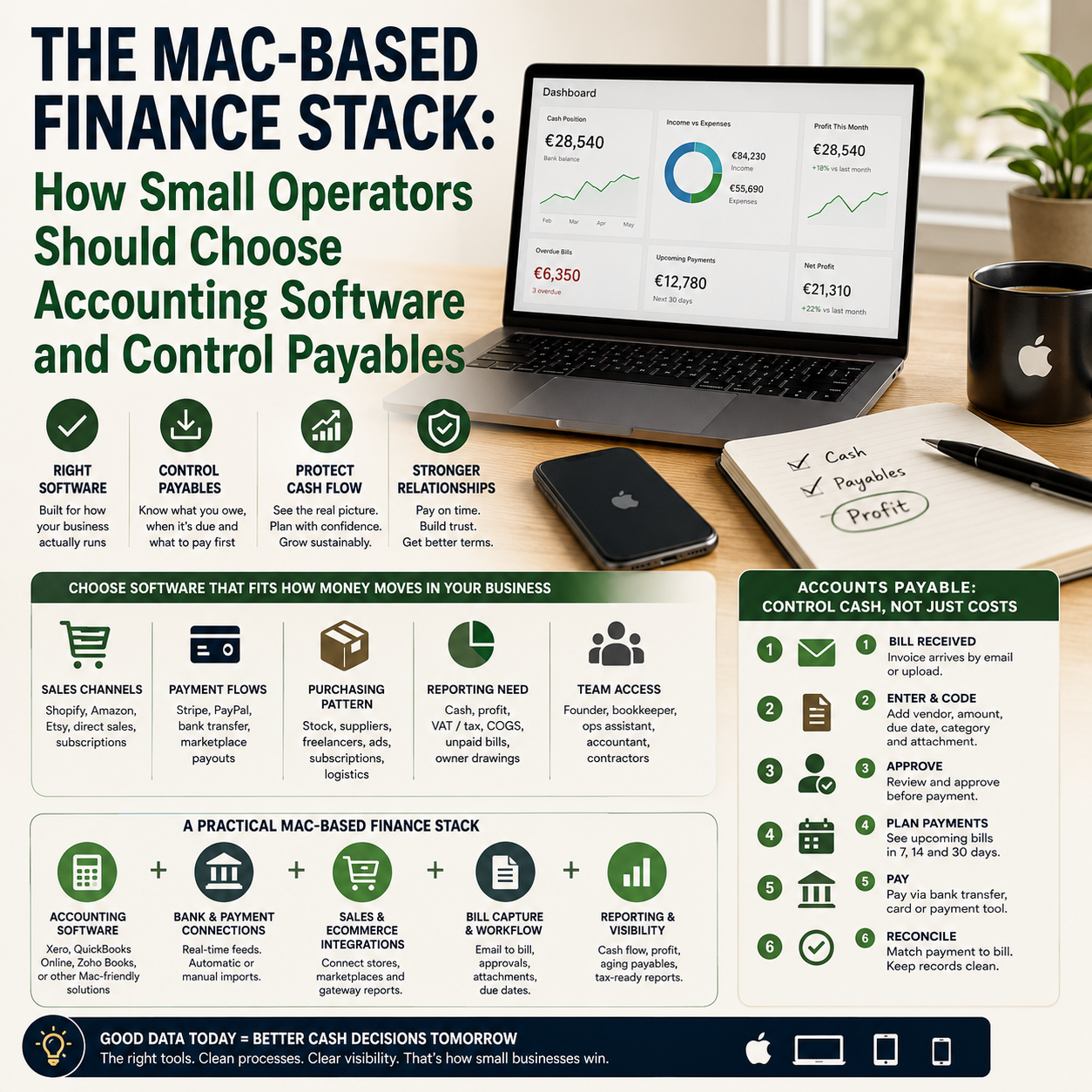
For a Mac-based small business, accounting software is not just a place to store receipts. It becomes the control point for supplier bills, stock purchases, contractor payments, tax records, cash timing and management reports. The wrong choice usually shows up later as messy payables, duplicate data entry, late supplier payments or a founder who still needs spreadsheets to know what cash is safe to spend.
This guide is for small e-commerce sellers, solo founders, digital operators and small service businesses that run mainly on Apple devices and need a finance setup that works without turning bookkeeping into a second job.
The real decision is not Mac compatibility, it is operating fit
Many business owners start with the question: “Which accounting package works on a Mac?” That is too narrow. The better question is: “Which system can handle how money actually moves through this business?”
A Mac-friendly accounting package can still be a poor fit if it cannot connect cleanly with payment processors, e-commerce platforms, bank feeds, inventory tools, payroll systems or invoice approval workflows. A small Shopify seller has different finance pain points from a consulting studio, even if both use MacBooks.
Before comparing software names, map the operating model:
Sales channels: Shopify, WooCommerce, Amazon, Etsy, direct invoicing, subscriptions or offline sales.
Payment flows: Stripe, PayPal, bank transfer, card terminals, marketplace payouts or mixed settlement schedules.
Purchasing pattern: stock orders, packaging, freelancers, software subscriptions, advertising spend, logistics providers or professional services.
Reporting need: cash position, profit by channel, VAT or sales tax records, cost of goods sold, unpaid bills and owner drawings.
Team access: founder only, bookkeeper, operations assistant, accountant or remote contractors.
The article from Small Business Trends on accounting packages for Mac users is useful as a starting point because it confirms the practical issue: Mac users have several accounting software options, but the choice depends on finance workload rather than device preference alone. For Make Business readers, the operational filter matters more than the feature list.
Accounts payable is where weak accounting setups become expensive
Accounts payable is the money your business owes to suppliers, vendors, contractors, tax authorities or service providers. In a small company, AP often looks informal: invoices arrive by email, receipts sit in inboxes, subscriptions charge cards automatically and supplier payment dates live in someone’s memory.
That may work when the business has ten transactions a month. It breaks when orders increase, advertising spend rises, inventory purchases become larger or multiple people start approving costs.
The Small Business Trends article on accounts payable highlights why AP matters for cash flow and supplier relationships. The operator-level issue is more specific: AP is not only an accounting category. It is a cash control system.
If a business does not know what bills are due in the next 7, 14 and 30 days, the bank balance becomes misleading. A founder may see available cash and assume it can be used for ads, stock or wages, while supplier invoices are already committed but not yet paid. That is how profitable small businesses still run into short-term cash pressure.
What most people miss
Most small teams think late bookkeeping is the problem. Often, the real problem is that payables are not captured early enough. If supplier invoices only enter the accounting system after payment, the business cannot forecast cash. It can only record history.
Good AP workflow starts when a bill arrives, not when the card is charged or the bank transfer is made. That means the accounting package must support a process for entering bills, attaching documents, assigning due dates, coding expenses and marking approval status before money leaves the account.
Build the finance stack around three workflows, not one software screen
A practical Mac-based finance stack should support three workflows: money in, money out and management visibility. If one of these is handled manually in spreadsheets, the accounting software will not give the founder a reliable view of the business.
Workflow 1: Sales and settlement
E-commerce and digital businesses rarely receive money in the same clean format as the sales report. Marketplace payouts may combine several orders, fees, refunds and reserves. Stripe and PayPal settlements may arrive net of processing fees. Shopify sales may not match bank deposits on the same day.
The accounting package should either integrate directly with the sales channel or accept clean imports from a connector tool. The operator decision is whether the software can reconcile gross sales, payment fees, refunds and deposits without manual rebuilding every month.
For a simple service business, bank feed and invoice matching may be enough. For a product seller, the software also needs a method for handling cost of goods sold, inventory purchases and marketplace fees. Otherwise, profit reporting becomes unreliable.
Workflow 2: Bills, approvals and payment timing
This is the accounts payable workflow. A small business does not need enterprise procurement software, but it does need a consistent path for supplier invoices.
A workable AP flow looks like this:
Supplier invoice arrives in a shared finance inbox or upload folder.
The bill is entered into the accounting system with supplier, amount, category, due date and attachment.
The founder or manager approves it before payment if it is above an agreed threshold.
The bill appears in an upcoming-payments view grouped by due date.
Payment is made through bank transfer, card or payment tool.
The bank transaction is matched to the bill, not entered as a new expense.
This prevents two common errors: paying bills twice and recording payments without the original supplier document.
Workflow 3: Founder dashboard
The founder does not need every accounting report every week. They need a small dashboard that answers operating questions:
How much cash is available after bills due in the next 14 days?
Which supplier costs are rising?
Are marketplace fees, ad costs or shipping costs reducing margin?
Which customers or platforms owe money?
Are recurring software subscriptions still justified?
If the accounting software cannot support these answers directly, it should at least export reliable data into a lightweight reporting layer such as a spreadsheet, Looker Studio dashboard or finance reporting tool. The point is not to build a complex BI system. The point is to stop making spending decisions from a bank balance alone.
Mac-first does not always mean desktop-first
Mac users often prefer software that feels native, fast and uncluttered. That is understandable, but many small businesses are better served by cloud accounting even if they work entirely on Apple hardware.
The decision comes down to collaboration and integrations. A desktop-style accounting package may feel comfortable for a solo operator, but it can create friction when an accountant needs access, a bookkeeper works remotely, documents are stored in cloud folders or bank feeds require online connection.
A cloud accounting system can be more practical when the business uses:
Remote bookkeeping support.
Multiple payment processors.
E-commerce platform integrations.
Automated receipt capture.
Recurring invoices or subscriptions.
Role-based access for assistants or managers.
That does not mean every business should use the same cloud tool. A freelancer with a few invoices a month can choose a simpler package than a product seller managing suppliers, refunds, advertising spend and stock purchases. The issue is not whether the product runs well on macOS. The issue is whether it reduces finance admin without reducing control.
The cost model: subscription price is only the visible cost
Small business owners often compare accounting tools by monthly subscription price. That is useful, but incomplete. The real cost includes setup, cleanup, integrations, bookkeeper time, payment errors and reporting gaps.
When evaluating a Mac accounting package, calculate four cost layers.
Software and add-ons
This includes the accounting subscription, payroll module, receipt capture, invoice automation, e-commerce connectors, inventory add-ons, bank payment tools and reporting extensions. A cheap base plan may become expensive if every operational need requires a separate add-on.
Bookkeeping time
If a tool saves money on subscription but requires manual imports, spreadsheet reconciliation or repeated corrections, it may cost more through bookkeeper hours. For a founder doing the work personally, the cost is even more direct: time taken away from selling, operations or product decisions.
Error cost
Duplicate supplier payments, missed invoices, unrecorded refunds, incorrect sales tax coding and unreconciled marketplace fees can distort profit. The cost is not always a penalty or fine. Sometimes it is a bad decision, such as increasing ad spend on a product line that is less profitable than the reports suggest.
Switching cost
Changing accounting systems later can be painful. Data migration, chart of accounts cleanup, staff retraining, integration rebuilding and accountant review all take time. A growing operator should choose a system that can handle the next stage of complexity, not only the current month’s workload.
A practical scenario: the small seller with clean sales and messy bills
Consider a small online seller using a MacBook, Shopify, Stripe, PayPal, a fulfillment partner, two packaging suppliers and several software subscriptions. Sales reporting looks clean inside Shopify. The founder thinks the finance process is under control because the bank feed imports transactions into accounting software.
The problem appears when cash gets tight before a stock reorder. The bank balance looked healthy, but several supplier bills were sitting in email and had not been entered as accounts payable. Packaging costs were recorded only when paid, fulfillment invoices were posted to a broad expense category and software subscriptions were scattered across card transactions.
In this setup, the accounting package is technically working, but the workflow is not. The fix is not simply “better bookkeeping.” The fix is to redesign the AP process:
Create a dedicated supplier invoice inbox.
Enter bills when received, with due dates.
Separate fulfillment, packaging, software, ads and professional services in the chart of accounts.
Review unpaid bills every week before approving ad spend or stock orders.
Reconcile marketplace and payment processor fees separately from gross sales.
This gives the founder a more accurate cash picture. It also makes supplier negotiations easier because payment timing becomes visible. If a packaging supplier offers a discount for earlier payment, the founder can decide based on forecast cash rather than instinct.
Automation boundaries: what to automate and what to keep human
Finance automation is useful when it removes repetitive handling. It is risky when it approves spending without context. Small businesses should automate capture, routing and matching before they automate judgement.
Good automation targets include:
Bank feed imports.
Receipt scanning and document attachment.
Recurring bill templates for predictable subscriptions.
Invoice forwarding from email to accounting software.
Payment reminders for unpaid customer invoices.
Matching payments to existing bills where supplier, amount and date align.
Human review should stay in place for:
New suppliers.
Large stock purchases.
Unusual payment requests.
Expense categories that affect margin reporting.
Refund patterns or chargeback issues.
Any payment request that changes bank details.
This boundary matters because small teams are vulnerable to invoice fraud and internal confusion. Automation should make the finance queue visible and structured. It should not remove approval from payments that can damage cash flow.
The metrics that tell you whether the setup is working
A finance stack should be judged by whether it improves decisions. For a Mac-based small business, track a few operating metrics rather than waiting for annual accounts.
Unpaid bills due in 7, 14 and 30 days: shows committed cash outflow.
Average time from invoice receipt to entry: shows whether AP is captured early enough.
Unreconciled bank transactions: shows whether bookkeeping is falling behind.
Supplier spend by category: reveals cost creep in logistics, software, packaging, contractors or ads.
Gross sales versus net deposits: helps explain payment fees, refunds and marketplace deductions.
Recurring subscription total: prevents silent margin leakage through unused tools.
Bookkeeping close time: measures how many days after month-end the business has usable numbers.
If these metrics cannot be produced without manual reconstruction, the accounting setup is not yet an operating system. It is only a record archive.
Decision criteria before choosing or switching software
Use this sequence before buying a Mac accounting package or moving from one system to another.
List the transaction sources: bank accounts, cards, Stripe, PayPal, marketplaces, Shopify, WooCommerce, payroll, POS and loan accounts.
Map the payable sources: stock suppliers, contractors, software, shipping, rent, professional services, tax payments and advertising platforms.
Test bank and payment integrations: do not assume the connection works well in your country, bank or payment setup.
Check bill entry and approval flow: the system should show unpaid bills by due date, with attachments and supplier history.
Confirm accountant access: ask your accountant or bookkeeper which tools they can support efficiently.
Review reporting by business model: product sellers need margin and inventory-related reporting; service businesses may need project, client or contractor cost tracking.
Price the full stack: include add-ons, connector tools, receipt capture, payroll, inventory and reporting.
Run one month in parallel if switching: compare sales, fees, bills, payments and bank reconciliation before fully migrating.
The right choice is the package that gives the owner earlier visibility over cash commitments, cleaner reconciliation and fewer manual workarounds. For a Mac-based operator, that may be a cloud accounting tool with strong integrations, a Mac-friendly package for a simple service business, or an accounting system paired with AP automation and reporting add-ons. The device matters, but the workflow decides whether the finance system earns its place.


