Tax season rarely fails because the owner does not know that taxes exist. It fails because invoices, receipts, payment fees, refunds, payroll notes and bank transfers are scattered across tools that were never designed as one operating system.
For a solo founder, e-commerce seller or small service business, the better question is not which accounting app has the longest feature list. It is which finance workflow will still be used when orders are late, customers are asking questions and the owner is doing three jobs at once.
The real decision is not software; it is how much finance work your business can tolerate
Small businesses often choose accounting software as if they are buying a filing cabinet. They compare dashboards, tax labels, receipt upload options and pricing pages. Those details matter, but they are secondary to the operating pattern of the business.
A local consultant paid by bank transfer has a different finance workload from a Shopify seller using Stripe, PayPal, Klarna, marketplace payouts and cross-border shipping tools. A creator selling digital products has different reconciliation problems from a repair business buying parts daily. The simplest accounting tool for one operator can become a manual cleanup project for another.
The useful decision is this: how many finance events does the business produce every week, and where do they originate?
Low event volume: a small number of invoices, predictable expenses, one bank account and limited card use.
Medium event volume: regular card payments, recurring subscriptions, contractor payments, customer refunds and several income channels.
High event volume: online orders, marketplace fees, payment processor fees, refunds, chargebacks, inventory purchases and frequent advertising spend.
The Small Business Trends guide to easy home accounting software is useful as a starting point because it frames the market around usability. But business operators should not read “easy” as “basic.” Easy should mean fewer abandoned tasks, fewer uncategorised transactions and fewer end-of-year surprises.
Choose accounting software by failure points, not features
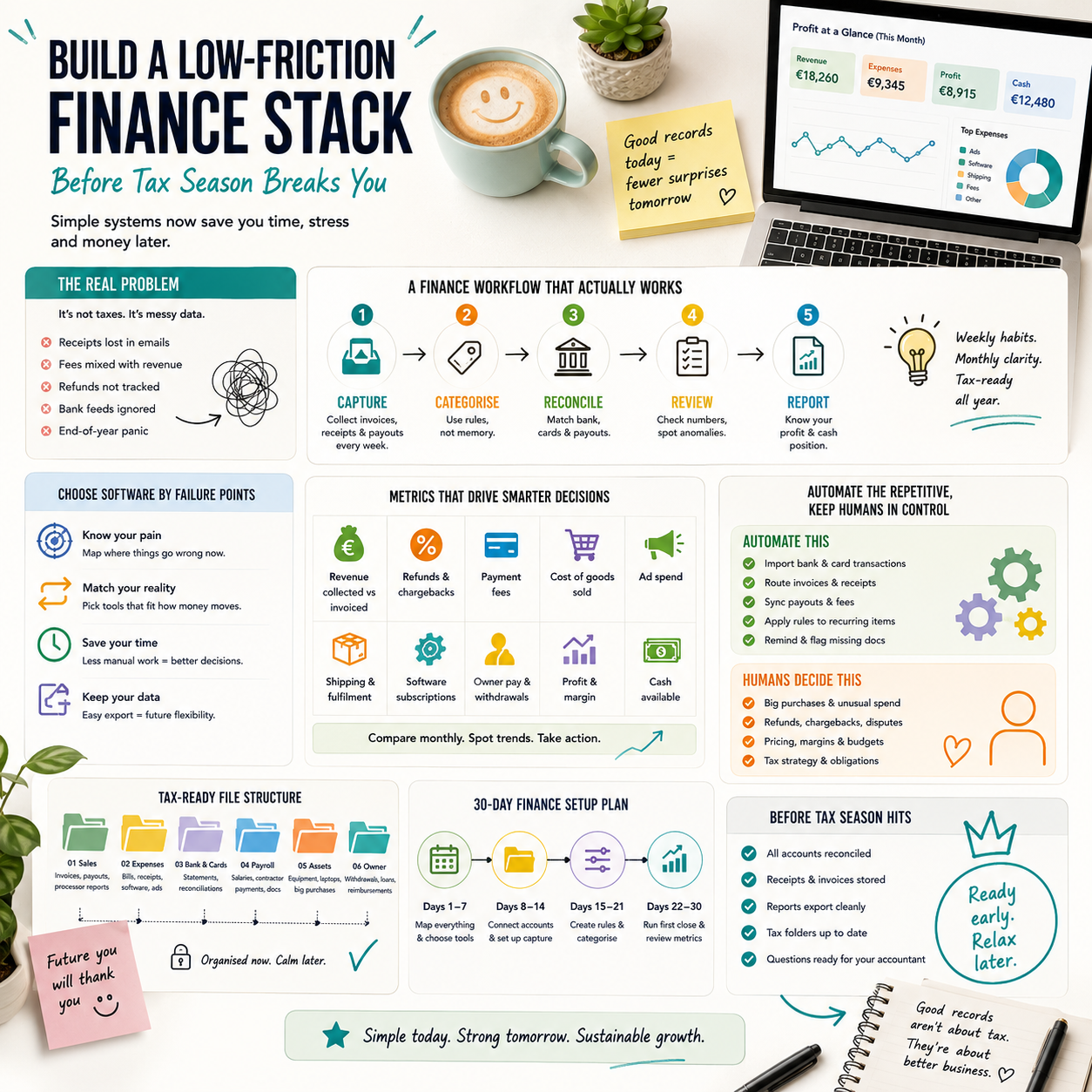
Most small business finance stacks break at predictable points. The bank feed disconnects. Payment processor fees are recorded as income errors. Receipts sit in email inboxes. Owners delay categorisation because the rules are unclear. Tax folders are created only after the accountant asks for documents.
Before selecting software, map the failure points you already have. If the owner regularly forgets to save receipts, receipt capture matters more than a polished profit chart. If marketplace payouts arrive net of fees, transaction-level imports matter more than invoice templates. If the business has multiple people spending money, approval and documentation rules matter more than a cheap monthly plan.
What most people miss
The hidden cost of accounting software is not the subscription. It is the time spent correcting a system that does not match how money actually moves through the business.
A low-cost tool can become expensive if the owner spends two evenings every month splitting payment fees, matching deposits and trying to remember what a card charge was for. A more capable tool can still be wasteful if the business only needs invoices, bank reconciliation and a simple expense trail.
For a small team, the best finance stack is the one that reduces interpretation. The owner should not need to ask, “What was this payment?” every time the bank feed refreshes. Categories, naming rules and supporting documents should make the transaction understandable without memory.
A practical finance workflow for a small digital operator
Consider a small e-commerce operator selling through a website and one marketplace. Payments come through a card processor, PayPal and marketplace payouts. The operator buys packaging, pays for ads, subscribes to several software tools and issues occasional refunds. This is not a complex finance department. It is a normal modern microbusiness.
The finance workflow should be designed around weekly control and monthly closure, not annual cleanup.
Weekly capture: stop documents from becoming detective work
The weekly task is not full bookkeeping. It is capture. Every purchase, payout, refund and unusual adjustment needs a trace.
Forward supplier invoices to a dedicated finance inbox.
Upload paper receipts immediately or once per week from a mobile app.
Tag unusual payments in the bank feed before the reason is forgotten.
Export or sync marketplace payout reports before platform filters or reporting layouts change.
Save ad platform invoices because card charges alone rarely explain campaign-level spend.
This is where automation helps. Rules can route supplier emails into folders. Receipt apps can attach images to transactions. Bank feeds can suggest categories. But the owner still needs a short review rhythm because automation cannot reliably understand unusual business context.
Monthly closure: make the month hard to reopen
At the end of each month, the goal is to close the period well enough that the owner does not need to reconstruct it later. This does not require a corporate finance process. It requires a repeatable checklist.
Confirm all bank and card accounts are connected and reconciled.
Check that processor fees are separated from gross sales where needed.
Review refunds, chargebacks and discounts as separate lines rather than hiding them inside revenue.
Match major supplier invoices to payments.
Label owner withdrawals, director loans or personal reimbursements clearly.
Export a profit and loss report and compare it with cash movement.
The point is not to produce perfect management accounts. The point is to avoid running the business from a bank balance that hides future tax liabilities, unpaid invoices, inventory commitments and platform fees.
Tax readiness should be designed as a folder structure, not a panic event
The candidate articles on business tax help and filing dates point to the same operational lesson: tax deadlines become expensive when the business has not maintained evidence. Dates matter, but the bigger operational issue is whether the records are ready before the deadline appears.
This article is not giving tax advice. Tax obligations depend on jurisdiction, entity type, revenue model, payroll status and local rules. But every small operator can build a tax-ready document system without deciding tax treatment themselves.
A practical structure can be simple:
Sales records: invoices, marketplace statements, payment processor exports and refund reports.
Expense evidence: supplier invoices, receipts, software subscriptions, ad invoices and shipping bills.
Bank and card statements: monthly PDFs or exports for every account used by the business.
Payroll and contractor files: payment records, invoices, agreements and local compliance documents where applicable.
Asset purchases: laptops, equipment, furniture and other items that may need different treatment from routine expenses.
Owner transactions: capital contributions, withdrawals, reimbursements and personal expenses accidentally paid by the business.
The folder structure should mirror how an accountant or tax preparer will ask questions. If the business waits until year-end to create this structure, the owner pays in time, stress or professional cleanup fees.
The cost model: subscription price versus cleanup cost
Small operators often compare finance tools by monthly subscription. That is visible, but it is rarely the full cost. A more useful cost model has four lines.
Tool cost: accounting software, receipt capture, payroll add-ons, inventory integrations or connector tools. This is the easiest cost to see.
Owner time: the hours spent categorising, searching for documents, fixing imports and answering accountant questions. For a founder, this is not free time; it competes with sales, fulfilment, hiring and product work.
Professional cleanup: bookkeeper or accountant time needed to repair unclear records, reconcile old transactions or separate business and personal spending. Cleanup is usually more expensive than maintenance because it requires interpretation.
Decision errors: underpricing products because fees are not visible, overspending on ads because refunds are ignored, or assuming profit exists because cash temporarily looks healthy.
The right finance stack is not always the cheapest. It is the one that minimises the combined cost of tools, owner time, professional help and bad decisions. For a one-person service business, that may be a very simple accounting app with strong bank reconciliation. For an e-commerce seller, it may justify integrations that import payout details properly because manual reconciliation would distort margins.
Where automation belongs, and where a human still needs to decide
Automation should remove repetitive handling, not judgment. A small business finance workflow can safely automate several tasks:
Importing bank and card transactions.
Routing invoices from email into a finance folder.
Applying rules to recurring software subscriptions.
Matching bank deposits to known payment processors.
Reminding the owner to upload missing receipts.
Generating monthly reports for review.
Human review is still needed where context changes the meaning of a transaction. A laptop could be a business asset, a personal purchase, a reimbursement or part of a client project. A payment to a contractor may need supporting documentation. A refund spike may signal a product issue, not just an accounting adjustment. A large ad charge may be normal during a campaign or a sign that a budget cap failed.
The best setup uses automation to surface exceptions. Instead of reviewing every transaction from scratch, the owner reviews uncategorised items, unusual amounts, missing receipts, duplicate charges, negative margin orders and large changes from the previous month.
Metrics that make bookkeeping useful to operators
If accounting only exists for tax filing, the owner will naturally postpone it. The workflow becomes more durable when it produces operating metrics the business actually uses.
For a service business, useful monthly metrics may include unpaid invoices, owner compensation, contractor cost as a share of revenue, software spend and cash runway. For an e-commerce operator, the finance stack should make it easier to see gross sales, refunds, payment fees, shipping cost, ad spend, product cost, marketplace fees and contribution margin.
A small dashboard does not need to be complex. It can start with a monthly review table:
Revenue collected and revenue invoiced.
Refunds and chargebacks.
Payment processing fees.
Advertising spend.
Shipping and fulfilment cost.
Software subscriptions.
Taxes set aside or expected liabilities, reviewed with local professional guidance.
Cash available after known obligations.
The important habit is comparison. Look at this month against the previous month and against the same season last year if the business has that history. Sudden changes should trigger operational questions: did returns increase after a supplier change, did a payment provider fee change, did a marketplace promotion reduce margin, did a subscription renew at a higher tier?
Decision rules for choosing the first or next accounting setup
A small business owner does not need to run a long software procurement process. But the decision should be structured enough to avoid choosing a tool that creates cleanup work later.
Use these decision rules:
If you have one bank account, few invoices and simple expenses: prioritise ease of use, bank reconciliation, invoice creation, receipt storage and clean reports. Do not overbuy features you will not maintain.
If you sell online through processors or marketplaces: prioritise payout reconciliation, fee visibility, refund tracking and integrations. A simple tool that only imports net bank deposits may hide margin problems.
If multiple people spend company money: prioritise receipt capture, user permissions, spending rules and a monthly review process. The risk is not only missing receipts; it is unclear accountability.
If you work with an accountant: ask which tools reduce cleanup time and which reports they need. Do not choose software in isolation and then discover your adviser must rebuild the records elsewhere.
If your business is growing across borders: do not rely on a consumer-style setup. Payment, tax, currency and marketplace records become harder to interpret as channels multiply.
The decision should also consider exit cost. If the business outgrows the tool, can it export clean data? Can invoices, contacts, receipts and transaction histories be retrieved? A cheap setup that traps data can become expensive when the business needs better reporting.
Thirty-day rollout for a finance stack that owners will actually use
Use the first month to build the habit before adding complexity.
Days 1-3: list every place where money enters or leaves the business: bank accounts, cards, PayPal, Stripe, marketplaces, ad platforms, payroll tools, subscriptions and cash payments if any.
Days 4-7: choose the accounting tool based on transaction sources and reporting needs, not only price. Connect only the accounts you can review properly.
Week 2: create the tax-ready folder structure and finance inbox. Start forwarding invoices and saving processor reports immediately.
Week 3: build rules for recurring transactions, but leave exceptions for review. Do not automate categories you do not understand.
Week 4: run the first monthly close: reconcile accounts, review missing receipts, separate fees and refunds, export reports and write down three questions for your accountant or bookkeeper.
After the first close: measure the workflow itself: time spent, number of uncategorised transactions, missing receipts, unexplained deposits and manual corrections. Those are the metrics that tell you whether the finance stack is working.
The goal is a finance system that survives ordinary business pressure. If it only works when the owner has a quiet afternoon, it is not an operating system; it is a backlog waiting to happen.


