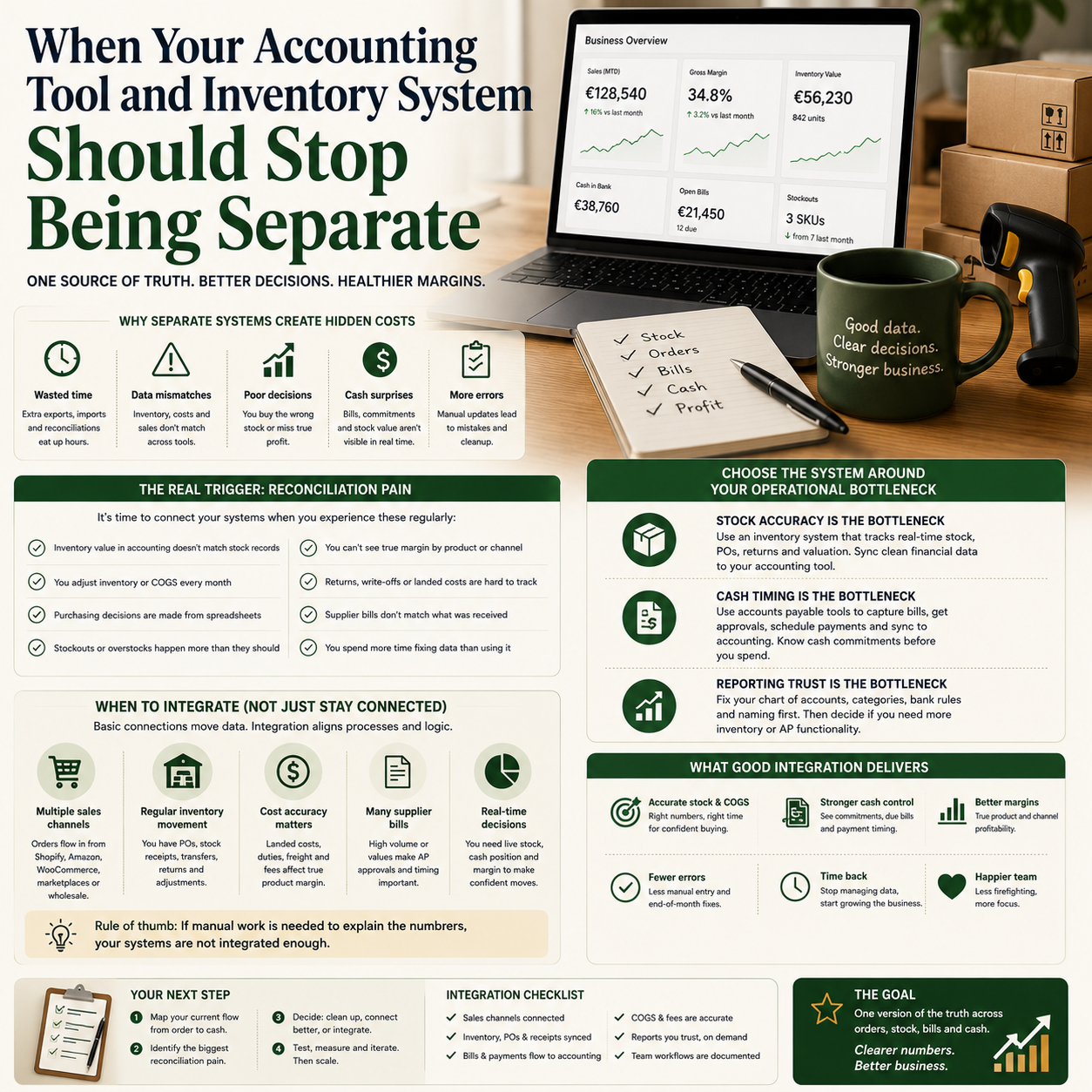
For a small product business, accounting software is not just where invoices go after the work is done. It becomes part of the operating system: stock decisions, supplier payments, cash timing, margin control and order fulfilment all depend on whether the numbers move cleanly between tools.
The decision is not simply whether to choose QuickBooks, an alternative, an inventory platform or an accounts payable tool. The real question is when separate tools start creating operational drag that costs more than an integrated setup.
The trigger point is not revenue, it is reconciliation pain
Many small companies wait too long to connect accounting and inventory because they use revenue as the deciding factor. Revenue is a weak signal. A business can have modest revenue but complex stock movements, multiple marketplaces, recurring supplier payments, returns, damaged goods and landed costs. Another business can have higher revenue but a simple service model with limited operational complexity.
The better trigger is reconciliation pain. If the owner or bookkeeper spends regular time explaining why the inventory value in one system does not match the accounting records, the tool setup is already affecting management decisions. The same applies when purchasing decisions are made from a spreadsheet because the accounting system only shows historic costs, not live stock availability or committed supplier orders.
SmallBizTrends has recently covered accounting and inventory management software, accounting alternatives similar to QuickBooks, and accounts payable software for small businesses. Read together, these topics point to a practical operator question: should the finance stack be built around one central accounting platform, or should the business add specialised tools for inventory and payables?
The answer depends less on brand preference and more on what needs to be trusted daily: cash, stock, supplier commitments or margin.
Where separate tools quietly create cost
The cost of a disconnected finance stack rarely appears as a line item. It shows up as duplicated work, delayed decisions and avoidable corrections. A small e-commerce seller might export orders from Shopify, update stock in a warehouse tool, enter supplier bills in accounting software and then maintain a spreadsheet for reordering. Each extra step creates a place where timing differences and human edits can distort the operating picture.
The most common hidden costs are not software subscriptions. They are:
Bookkeeping cleanup time: transactions have to be reclassified, matched or adjusted after the month closes.
Owner review time: the founder spends time checking reports instead of using them.
Stockout and overstock risk: purchasing decisions are made from stale data.
Supplier payment mistakes: duplicate bills, late approvals or missed discounts happen because payables are not controlled through a clear workflow.
Margin blindness: landed costs, returns and inventory write-offs are not visible early enough.
This is why a cheaper tool can become expensive if it forces manual controls around every operational process. A small business does not need enterprise software, but it does need a finance stack where the same product, bill, payment and order data do not have to be interpreted three different ways.
Choose the system around the operational bottleneck
The first decision is not which software has the longest feature list. It is which part of the business creates the most financial uncertainty. A service business with many supplier invoices has a different problem from a product seller with seasonal inventory. A small manufacturer has a different problem from a digital product operator. The tool stack should follow the bottleneck.
If stock accuracy is the bottleneck
When the main problem is stock accuracy, accounting software alone may not be enough. The business needs reliable product records, stock movements, purchase orders, returns handling and inventory valuation. The accounting system should receive clean financial entries, but the inventory workflow may need a dedicated layer if the product catalogue, fulfilment channels or supplier lead times are becoming complex.
This is common for small e-commerce sellers running across Shopify, WooCommerce, Amazon, Etsy or wholesale orders. If inventory is adjusted manually after orders, the owner is not managing stock; they are constantly repairing stock records. The operational priority should be a workflow where orders reduce available stock automatically, purchase orders increase incoming stock, and accounting receives cost and sales information without manual re-entry.
If cash timing is the bottleneck
If the business has regular supplier bills, subcontractors or inventory purchases, accounts payable may be the bigger risk. An AP workflow matters when bills arrive through email, approvals happen in chat, and payment timing is decided from memory. In that situation, the owner may technically have accounting software, but not a controlled payable process.
Accounts payable software can be useful when it creates a structured path: bill capture, approval, coding, payment scheduling and accounting sync. The value is not automation for its own sake. The value is knowing what cash is already committed before making a new purchase or taking money out of the business.
If reporting trust is the bottleneck
Some businesses do not need advanced inventory or AP features yet. Their real problem is that reports are not trusted. The chart of accounts may be messy, bank rules may be inconsistent, product categories may be unclear, and payment processors may be recorded in a way that hides fees. In that case, switching tools may not solve the problem. The first step is cleaning the accounting structure and defining how revenue, fees, discounts, refunds, stock adjustments and supplier costs should be recorded.
A QuickBooks alternative or a different accounting platform may be the right move if the current system cannot support the workflow. But replacing software before fixing the operating logic often transfers the same confusion into a new interface.
The three-stack model for small operators
Most small businesses can think in terms of three possible stack designs. None is automatically best. Each has a cost profile and an operational tradeoff.
One core accounting platform with built-in inventory: This works when product volume is manageable, sales channels are limited and the owner wants fewer tools. The advantage is simpler administration. The risk is outgrowing the inventory functions and creating workarounds that become hard to unwind.
Accounting platform plus dedicated inventory system: This suits operators with multiple sales channels, warehouse processes, purchase orders, bundles, variants or frequent returns. The advantage is better operational control. The risk is integration complexity. The business must decide which system is the source of truth for products, stock quantities, cost values and order status.
Accounting platform plus AP automation: This works when supplier bills and payment approvals create cash-flow risk. The advantage is stronger payment control. The risk is paying for workflow automation before the approval rules, categories and payment policies are clear.
A small business should not buy all three layers because they sound useful. It should add the layer that removes the biggest operational uncertainty.
A practical scenario: the owner cannot explain gross margin by product line
Consider a small online seller with its own website and one marketplace channel. The owner has accounting software, a spreadsheet for reordering, and a folder of supplier invoices. Sales look healthy, but the owner cannot confidently explain gross margin by product line after shipping adjustments, marketplace fees, returns and damaged stock.
This business does not simply have an accounting problem. It has an operating data problem. Orders are being recorded, but the flow from purchase cost to sale to refund to stock adjustment is fragmented. If the owner responds by changing only the accounting tool, the margin issue may remain. If they add inventory software without connecting it properly to accounting, they may create a second version of the truth.
The better sequence would be:
Define product categories that match management decisions, not just website navigation.
Decide how purchase costs, freight, marketplace fees, refunds and stock write-offs should be recorded.
Choose whether the accounting platform can handle inventory at the required level.
If not, add an inventory system and define exactly what data it sends to accounting.
Review gross margin by product group monthly, not only total profit.
The practical decision is not which tool has the best dashboard. It is whether the owner can see which products are funding the business and which ones are consuming cash through slow movement, returns or poor cost tracking.
What most people miss
The biggest mistake is treating accounting, inventory and accounts payable as separate administrative categories. In a small business, they are connected decisions. A purchase order affects future cash. A supplier bill affects margin. A stock adjustment affects inventory value. A delayed payment can protect cash but damage supplier reliability. A refund changes revenue and stock if the item is resellable.
Another missed point is that automation does not remove the need for rules. It enforces whatever rules already exist. If product SKUs are inconsistent, supplier names are duplicated, fee categories are unclear and staff are allowed to bypass approval steps, automation will make the mess faster.
Before buying software, the owner should document the business rules that the system must follow. For example:
Who can approve supplier bills above a chosen threshold?
When is inventory considered received: when ordered, delivered or checked?
How are damaged goods recorded?
Where are payment processor fees posted?
How are bundles, samples and replacements handled?
Which report is used for reorder decisions?
These rules are not bureaucracy. They are the difference between a tool that supports decisions and a tool that becomes another inbox.
Implementation risk: the integration is only as good as the data owner
Small teams often underestimate the human ownership required after integration. Connecting tools does not mean nobody owns the workflow. It means the business needs clear ownership for data quality, exceptions and review cycles.
For a product business, someone must own SKU discipline. Someone must check whether new products are created correctly across systems. Someone must review unmatched transactions. Someone must monitor negative stock. Someone must decide how returns and damaged items are treated. If these responsibilities are left vague, the system may appear automated while errors accumulate silently.
There is also a timing risk. Accounting reports are usually reviewed after a period closes. Inventory decisions happen daily. Supplier payments may be scheduled weekly. If the sync frequency between systems does not match the operating rhythm, the business may still make decisions from stale data. A daily order sync may be enough for one shop. A seller with fast-moving stock may need tighter inventory updates.
The owner should also budget for setup work, not only subscription fees. Setup may include chart-of-accounts cleanup, product mapping, supplier records, opening stock balances, bank feed rules, payment processor mapping, user permissions, approval rules and test transactions. Skipping this work to save time usually pushes the cost into later cleanup.
The metrics that show whether the stack is working
A finance and inventory stack should be judged by operational metrics, not by whether the dashboard looks modern. For a small operator, useful metrics include:
Month-end close time: how many working days it takes to produce usable financial reports.
Manual journal volume: how often the bookkeeper must correct data that should have flowed correctly.
Inventory variance: differences between recorded stock and counted stock.
Stockout frequency: how often sellable demand is lost because reorder signals were late.
Overstock exposure: money tied up in slow-moving products.
Bill approval cycle time: how long supplier invoices wait before approval and scheduling.
Unmatched transaction count: bank, marketplace or payment transactions that need manual attention.
Gross margin by product group: whether the business can identify margin pressure below the total company level.
If a new tool does not improve at least two or three of these measures, it may be adding complexity without improving control.
When not to switch software yet
There are cases where changing software is the wrong first move. If the owner cannot explain the current workflow, a new platform will not fix the decision logic. If the business has no consistent SKU naming, switching inventory tools may make migration harder. If supplier bills are late because approvals are informal, AP software helps only after authority and thresholds are defined.
It may be better to run a short cleanup sprint first. Clean the chart of accounts. Remove duplicate suppliers. Standardise product names and SKUs. Decide how fees and refunds should be recorded. Build a basic monthly review pack. After that, the owner can see whether the current software is truly limiting the business or whether the process was the constraint.
A tool switch makes sense when the current system cannot support the required workflow even after cleanup. Examples include lack of useful inventory tracking, weak purchase order handling, poor marketplace integration, limited approval controls, or reporting that cannot separate product lines, channels or cost categories in a usable way.
Operator checklist before adding accounting, inventory or AP software
Before committing to a new platform or integration, the owner should work through a practical checklist. This should be done with the person who handles bookkeeping and the person who manages orders or purchasing, because finance and operations see different failure points.
List the top five recurring manual finance tasks and estimate how often they happen.
Identify which data is most often wrong: stock quantity, product cost, supplier bill status, payment matching, refund treatment or sales channel fees.
Decide the source of truth for products, stock levels, supplier records and financial categories.
Map the order-to-cash workflow from customer order to bank reconciliation.
Map the purchase-to-pay workflow from reorder decision to supplier payment.
Define approval rules for bills, purchases and stock adjustments.
Check whether current software can support those rules without spreadsheets.
Estimate setup work separately from monthly subscription cost.
Run test transactions before migrating live operations.
Choose three operating metrics to review after the first full month.
The right stack is the one that reduces decision delay. For a small business, accounting, inventory and payables software should make cash commitments, stock exposure and product margin easier to see before the owner has already made the next buying decision.