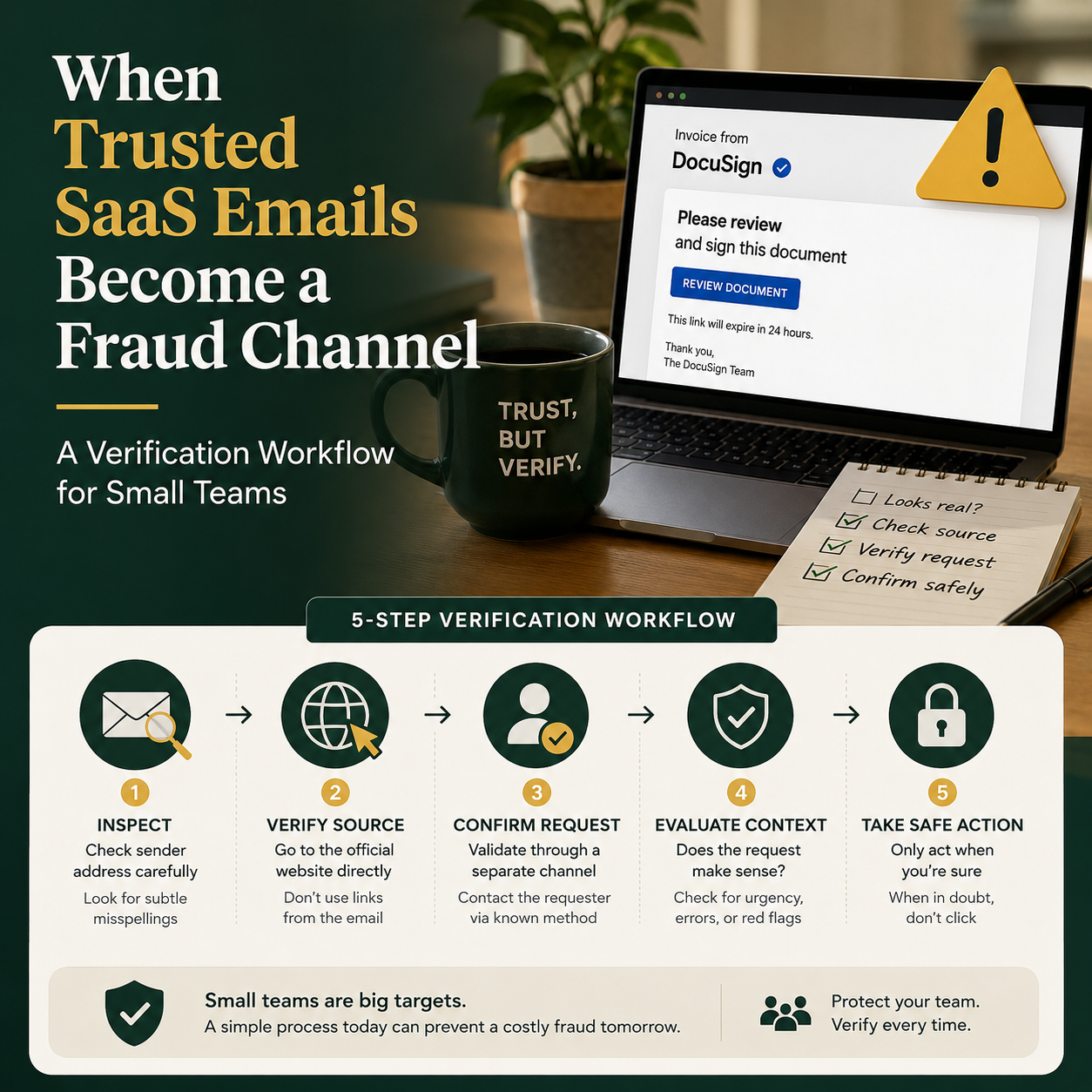
A phishing email is easier to spot when it comes from a strange domain. It becomes an operational problem when it appears to come from a real platform your team already uses. TechCrunch reported that scammers abused an internal Microsoft account to send spam links from a legitimate Microsoft email address, which is exactly the kind of edge case that breaks ordinary security habits inside small companies.
For a founder, e-commerce operator or small service business, the lesson is not “be careful with email.” The useful question is: what should your team do when the sender looks real, the brand is familiar, and the message asks someone to click, verify, pay, reconnect or reset something?
The risk is not phishing awareness; it is misplaced operational trust
Most small businesses do not get breached because nobody has heard of phishing. They get exposed because everyday workflows train staff to obey platform messages quickly. A Shopify alert, Microsoft account notice, booking platform notification, payment processor email, marketplace warning or CRM sync failure can all feel urgent because ignoring it may delay orders, block access or interrupt customer service.
The Microsoft case matters because it shows a weakness in the way teams judge email risk. Many people use the sender address as the first filter. If the domain looks legitimate, the message moves from “suspicious” to “probably fine.” That shortcut is understandable, but it is not enough when attackers can exploit trusted infrastructure, compromised accounts, misconfigured systems or platform messaging features.
Small teams are especially exposed because they often run with shared urgency and loose ownership. One person handles ads, another fulfills orders, someone else manages customer support, and the founder still approves payments when needed. If a realistic account alert lands in the wrong inbox, the person receiving it may not know whether it is expected. That uncertainty creates the opening.
The operational fix is not to ask everyone to become a cybersecurity analyst. The fix is to redesign how sensitive messages are verified before action is taken.
Map the messages that can cause money, access or customer damage
Do not start by trying to secure every email equally. Start with the message types that can trigger a business loss. A small business should maintain a short list of high-risk platform events and assign a verification method to each one.
Examples include:
- Password reset, account recovery or multi-factor authentication changes.
- Payment method updates for advertising, SaaS, marketplace or supplier accounts.
- Bank detail changes from suppliers, contractors or agencies.
- Domain, hosting, email or DNS warnings.
- Marketplace policy warnings that threaten account suspension.
- Customer refund requests that arrive outside the normal order system.
- Integration reconnect requests for CRM, email marketing, inventory, booking or payment tools.
This list should be specific to the business. An e-commerce seller may care most about marketplace account access, payment processors, inventory integrations and ad accounts. A small agency may care more about client file access, invoicing changes and shared document links. A local service business using booking software may care about calendar access, customer data exports and payment terminal settings.
The point is to separate normal communication from operational control. A newsletter from a SaaS vendor does not need the same response as a message asking someone to reconnect an integration or update billing details. The second category needs a controlled path.
Build a two-channel rule for platform alerts
The simplest practical rule is this: if an email asks for an action that changes access, money, data or platform settings, do not complete the action from the email link. Verify it through a second channel first.
That second channel does not need to be complicated. It can be the platform’s official app, a bookmarked admin URL, a password manager entry, a support portal, or an internal ticket created by the person who received the message. What matters is that the team does not let the email itself define the path to action.
For example, if a message says a Microsoft account needs attention, the staff member should not click the email link. They should open the saved Microsoft admin portal or account page from a password manager or company bookmark and check whether the same alert appears there. If it does not, the message should be treated as unverified. The same logic applies to payment processors, advertising platforms, marketplaces, booking tools and helpdesk systems.
This is a workflow design issue, not just a security instruction. If the approved portal links are hard to find, people will click email links. If only the founder knows which admin panel is real, staff will improvise. If urgent alerts are handled in chat with no record, the team loses visibility.
What most people miss
The dangerous part is not always the first click. It is the chain of decisions after the first click. A fake page may ask for a login, then a verification code, then a payment method, then a backup email. Each step feels like a normal platform flow. By the time someone is unsure, they may already have handed over credentials or approved a session.
Small businesses should therefore design the stop point before the employee is under pressure. The rule should be visible and boring: no credentials, verification codes, payment changes or integration reconnections from an email link. Open the known system separately. If the alert is real, it will be visible there or support will confirm it through the normal account channel.
Assign ownership so alerts do not bounce around the company
Many small teams fail on alert handling because nobody owns the account. A message arrives in a shared inbox, someone forwards it to the founder, the founder is in meetings, and then a junior team member clicks because the issue looks urgent. The team did not make a bad technical decision; it had no operating model.
Each important platform should have an owner and a backup. This can be very simple:
- Microsoft, Google Workspace or email hosting: owner is the operations lead or founder.
- Payment processor and banking tools: owner is the founder or finance person.
- Shopify, WooCommerce, Amazon, Etsy or other sales channels: owner is the e-commerce operator.
- Advertising accounts: owner is the marketer or agency manager.
- CRM, booking, helpdesk and email marketing: owner is the person responsible for customer operations.
The owner is not responsible for doing everything manually. They are responsible for deciding whether an alert is real, approving sensitive changes, and keeping the official login route documented. The backup prevents delays when the owner is unavailable.
This matters because modern small businesses are increasingly stitched together from many external tools. TechCrunch also reported on Fresha’s funding and valuation as a booking platform serving beauty and wellness businesses, while Truecaller is expanding into eSIM services. These are different stories, but they point to the same operator reality: more business functions sit inside third-party platforms, apps and account systems. More platforms means more notifications, more login surfaces and more chances for a trusted-looking message to trigger the wrong action.
The cost model: where to spend and where not to overbuy
A small company does not need an enterprise security stack to handle this specific risk. It does need a few low-friction controls that reduce the chance of a rushed mistake.
The first cost is a password manager with shared vaults. The value is not only strong passwords. The operational value is that staff use saved, verified login URLs instead of links in emails. If the password manager does not autofill on a suspicious domain, that warning is often more useful than a training slide.
The second cost is multi-factor authentication, preferably through an authenticator app or hardware key for the most sensitive accounts. SMS codes are better than nothing, but they are weaker when phone numbers, roaming, SIMs or account recovery are involved. The correct level depends on the account. A small team may decide that banking, email admin, domain registrar, payment processor and marketplace admin accounts deserve stronger protection than low-risk content tools.
The third cost is time: one short audit of high-risk platform notifications and one internal page listing official admin links, account owners and verification rules. This does not require a consultant if the business is small and the systems are understood. It does require someone to sit down and document the workflow instead of relying on memory.
What should a small business avoid overbuying? Do not start by purchasing complex monitoring tools if the team still clicks billing links from emails. Do not pay for awareness training while leaving shared admin access undocumented. Do not assume a security product will fix unclear ownership. Spend first on the controls that change daily behavior.
A practical scenario: the fake billing warning during a busy sales week
Consider a small online store running paid ads before a seasonal promotion. A team member receives an email that appears to come from a known platform and says billing verification is required to avoid service interruption. The sender looks legitimate. The message is urgent. The store is already under pressure because ad campaigns are running and order volume is high.
Without a workflow, the employee may click, sign in, enter a code and update payment details. If the page is fraudulent, the business may lose account access, expose a card, or give an attacker enough information to target other systems.
With a workflow, the response is different. The employee posts the message into an internal “platform alerts” channel or ticket queue. The ad account owner opens the platform through the password manager or saved admin bookmark. If there is a real billing issue, it is handled inside the platform. If there is no corresponding alert, the email is marked suspicious and reported or deleted. No credentials are entered through the message. No card details are changed from the email flow. The delay may be five minutes, but it prevents the team from letting urgency choose the process.
This is the kind of system small businesses can actually run. It does not require a security department. It requires a small number of rules that match how the company already works.
Metrics that show whether the workflow is working
If a verification process is not measured, it will fade. The goal is not to create bureaucracy. The goal is to see whether risky messages are being handled through the right path.
A small team can track a few practical indicators:
- Number of high-risk platform alerts received each month.
- Number verified through official admin portals rather than email links.
- Number of suspicious messages reported internally.
- Number of account owners and backups documented.
- Percentage of sensitive accounts using multi-factor authentication.
- Number of shared accounts replaced with named user access.
- Time taken to verify urgent billing, access or marketplace alerts.
These metrics do not need a dashboard at first. A shared spreadsheet or simple internal ticket label is enough. The important part is to make alert handling visible. If every suspicious message disappears into private inboxes, the business cannot learn from patterns or identify which platforms generate the most risk.
Human judgment stays in the approval layer, automation belongs in routing
Automation can help, but it should not be trusted to make every judgment. Email filters, security gateways and platform warnings can reduce noise, yet the Microsoft example shows why sender-based trust can fail. A message may pass basic checks and still be unsafe.
Use automation for routing and reminders. For example, high-risk keywords such as “billing failed,” “account suspended,” “verify login,” “reset password,” “payment method,” or “integration disconnected” can trigger an internal label or forward a copy to the platform owner. A helpdesk or shared inbox rule can turn such messages into tickets. A Slack or Teams workflow can ask the recipient to select the affected platform and confirm whether they verified it through the official portal.
Keep human approval for actions that change money, access or customer data. A person should still decide whether to update a payment method, reset an admin account, reconnect a data integration, approve a refund outside the normal system, or change a supplier’s bank details. The automation should slow down risky actions just enough to force the correct path.
The small-team verification checklist to implement this week
Use this as a lightweight rollout sequence, not a theoretical policy document.
Set up the control points
- List the 10 to 20 platforms where a bad click could affect money, access, customer data or sales operations.
- Assign one owner and one backup for each platform.
- Save official admin URLs in a shared password manager or internal operations page.
- Require multi-factor authentication on email admin, banking, payment, domain, marketplace and advertising accounts.
- Remove shared admin logins where named user access is available.
Define the email handling rule
- Do not click email links for password resets, billing updates, account recovery, payment changes or integration reconnections.
- Open the platform from the saved admin URL and check whether the same alert exists there.
- If the alert is not visible in the platform, ask the account owner to verify it through the official support or account channel.
- Record suspicious messages in a shared location so the team can see repeat attempts.
- Review the alert log monthly and update the platform list when new tools are added.
The business decision is simple: treat trusted-looking platform emails as prompts to verify, not as instructions to act. That one change turns a fragile habit into an operating system small teams can follow under pressure.


