AI agents are being sold as workers, but most small teams are not ready to manage them like workers. The useful shift is not simply better prompting; it is building a feedback loop from real operational activity. Recent startup signals around AI learning from production data and AI-powered after-sales systems point to the same business problem: automation only becomes reliable when it is trained, checked and improved against actual work.
For a small e-commerce seller, agency owner, SaaS founder or operations manager, the practical question is not whether AI agents are impressive. It is whether your business has enough operational memory to let an agent act without creating hidden cost, customer risk or cleanup work.
The wrong first question: which AI agent should we buy?
Many small teams start with the tool decision. They compare AI assistants, helpdesk copilots, workflow agents, browser agents, CRM automations or custom GPT-style setups. That is understandable, but it often leads to expensive trial-and-error because the business has not defined what the agent is allowed to learn from.
The more useful first question is: where does the business already produce repeatable operational evidence?
That evidence might be support tickets, order edits, refund reasons, failed deliveries, product questions, abandoned cart notes, stock adjustment logs, CRM deal notes, invoice disputes, supplier emails or internal task comments. These records show how the business actually behaves under pressure. They include exceptions, not just the ideal process described in a standard operating procedure.
The EU-Startups report on Overmind describes a devtool that enables AI to learn from production data and turn real-world agent behaviour into continuous improvement. That matters beyond software engineering because it identifies a wider operator problem: agents should not be improved only from what the owner wishes happened. They should be improved from what actually happened.
The ClearOps funding report points in a similar direction from a different sector: industrial after-sales. Although industrial OEM after-sales is not the same as a small online store, the operational pattern is familiar. Parts, service requests, customer history, warranties, documentation and exception handling all live across systems. The business value comes from connecting those records so that post-sale work becomes less dependent on one experienced person remembering the answer.
The operator version of production data
Small companies often hear the phrase production data and assume it means developer logs or enterprise analytics. For an operator, production data is simply the trace left behind when work gets done.
In a small business, it can include:
- Every customer question that required a human answer.
- Every order that had to be edited, split, cancelled or manually checked.
- Every refund where the reason was unclear or disputed.
- Every supplier delay that changed a customer promise.
- Every sales lead that stalled because pricing, scope or timing was uncertain.
- Every AI-generated response that a human corrected before sending.
This is the material an agent needs if it is going to help with real operations rather than produce polished but risky text. A prompt library can capture preferred wording. An operations log captures business judgment.
What most people miss
The valuable part is not the data volume. It is the decision trail.
A small e-commerce store may have only a few hundred support tickets a month. That is not massive data. But if those tickets show which delivery complaints deserve a refund, which need a carrier claim, which need a replacement shipment, and which can be solved with a tracking explanation, they contain a decision system.
An AI agent that sees only the latest message may answer quickly but miss margin, policy or fraud context. An agent that sees the operational trail can be designed to ask better questions before acting. That difference is where automation becomes a management decision rather than a novelty.
Build an AI agent operations log before expanding automation
Before letting an AI agent touch more systems, create a simple operations log. This can live in Airtable, Notion, Google Sheets, a helpdesk field, a CRM custom object or a lightweight internal database. The tool matters less than the discipline of capturing decisions in a consistent format.
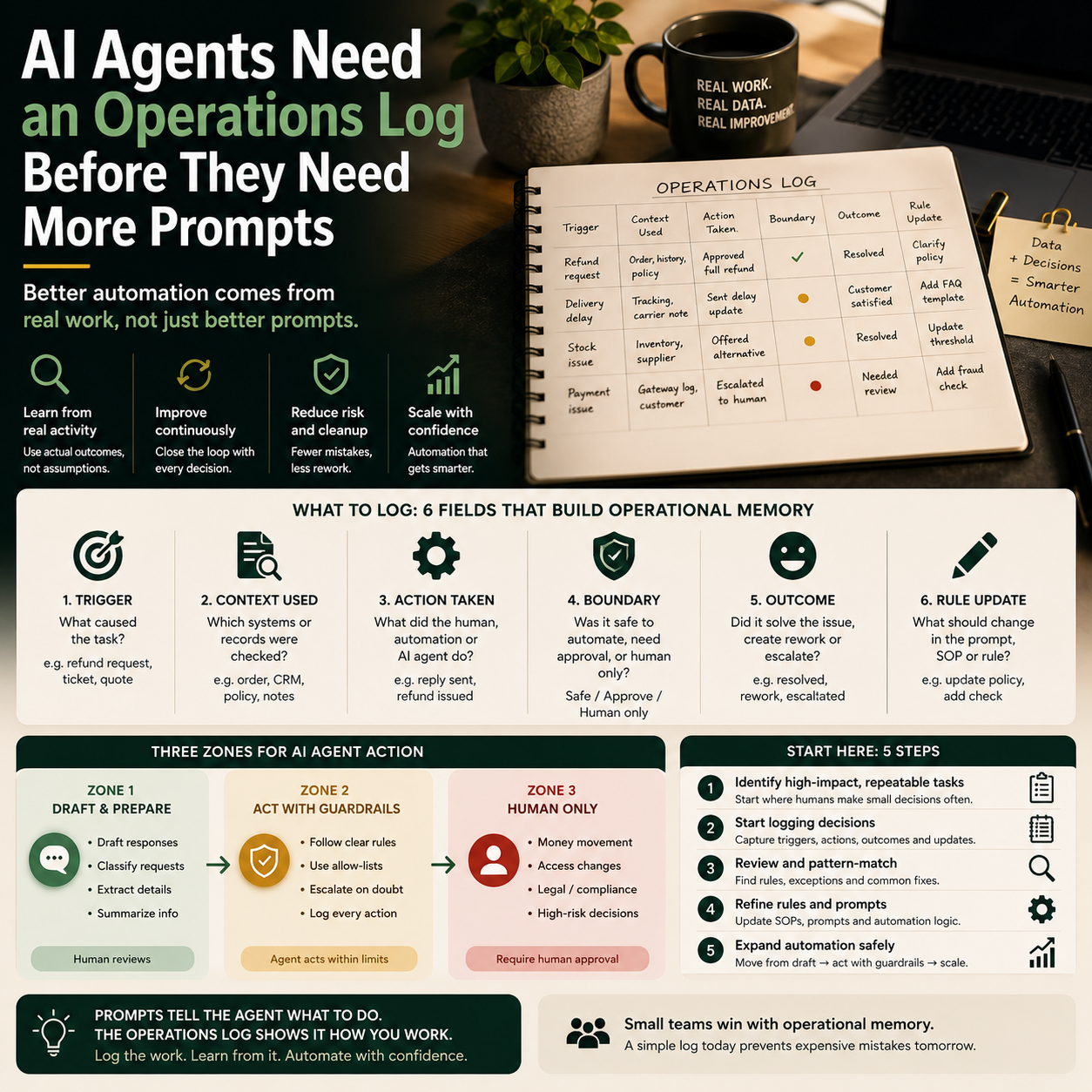
For most small teams, the log should include six fields:
- Trigger: what caused the task to appear, such as a refund request, stock issue, support ticket or quote request.
- Context used: which systems or records were checked before acting.
- Action taken: what the human, automation or AI agent did.
- Boundary: whether the task was safe to automate, needed approval or required human ownership.
- Outcome: whether the action solved the issue, created rework or escalated.
- Rule update: what should change in the prompt, SOP, automation rule or policy.
This log should not become a bureaucratic reporting exercise. It should focus on tasks where automation is likely to be added: customer support, order handling, lead qualification, internal reporting, inventory updates, product content, email replies and recurring admin.
The best starting point is not the most exciting process. It is the process where human staff already make repeated small decisions and where mistakes have a visible cost.
Where small teams should and should not let agents act
An AI agent can be useful in different ways depending on the risk of the task. Small teams should separate work into three zones rather than treating automation as either fully manual or fully autonomous.
Zone 1: Draft, classify and prepare
This is the safest starting zone. The agent drafts a response, classifies a ticket, prepares a quote outline, groups refund reasons, extracts order details or checks whether information is missing. A human still sends, approves or changes the final action.
This zone works well when the business lacks time but cannot afford mistakes. It is especially useful for small teams where one person handles customer support, fulfilment questions and supplier follow-up.
Zone 2: Act inside narrow rules
Here the agent can take limited action when the rule is clear. For example, it might tag a customer ticket, update an internal status, create a draft replacement order, assign a support priority, send a tracking link or add a lead to a follow-up sequence.
The rule should include a limit. For example: do not issue refunds above a set value, do not promise delivery dates not confirmed by the carrier, do not change paid orders without human approval, do not send discount codes to customers with open disputes.
Zone 3: Escalate by default
Some tasks should remain human-led until the business has enough evidence. These include chargeback disputes, high-value refunds, legal complaints, supplier contract changes, account cancellations from major customers, unusual fraud signals and anything involving sensitive personal or financial information.
The agent can still help by summarising context and preparing options. But it should not own the decision.
A practical scenario: the store that wants AI support without margin leakage
Consider a small Shopify or WooCommerce seller that receives daily questions about late deliveries, damaged items, wrong sizes and return eligibility. The owner wants to reduce support time by using an AI agent in the helpdesk.
If the owner starts with prompts only, the agent may write polite replies but miss the business rules that protect margin. It might offer a replacement when the carrier claim process should be used. It might approve a return outside the allowed window. It might apologise for a delay without checking whether the order has already been delivered. Each answer sounds helpful, but the operational cost appears later.
A better rollout starts with a two-week logging period. Every support ticket is tagged by trigger: late delivery, damaged product, size issue, address error, missing item, return request, pre-purchase question or unclear. For each ticket, the team records what they checked: order status, carrier tracking, return policy, customer history, product page, supplier note or warehouse message.
After two weeks, patterns appear. The owner may find that the AI should not answer from the customer message alone. It needs order status and policy context first. The first automation should therefore be a preparation workflow, not a fully autonomous reply workflow.
The agent can then produce a draft response with a recommended action, while the human selects approve, edit or escalate. Every edit becomes part of the operations log. After another review cycle, the owner may allow the agent to send low-risk replies, such as tracking explanations or return instruction emails, while keeping damaged goods and refund decisions under human approval.
This is slower than connecting an AI tool and hoping it works. It is also less expensive than cleaning up bad refunds, confused customers and inconsistent promises.
The cost is not only the AI subscription
Small businesses often compare AI tools by monthly subscription price. That is too narrow. The real cost of an AI agent rollout includes setup time, system access, review time, rework, customer risk and policy maintenance.
There are four cost lines operators should budget for:
- Process mapping: time spent identifying the exact task, inputs, rules and escalation points.
- Data cleanup: fixing messy tags, missing order notes, inconsistent refund reasons or unclear CRM stages.
- Human review: checking drafts, measuring errors and deciding what the agent may do next.
- Exception handling: correcting cases where the agent misunderstood context or acted too broadly.
The cost is justified only if the agent reduces a specific operational burden without increasing hidden losses. A support agent that saves ten hours but creates avoidable refunds may be a bad investment. A reporting agent that saves only two hours but improves cash visibility before purchasing stock may be worth keeping.
The operator should attach each AI workflow to one measurable business pressure: support backlog, response time, refund leakage, order errors, quote turnaround, invoice follow-up, stock update delay or manual reporting time.
The metric dashboard for agent reliability
Small teams do not need enterprise observability software to manage AI agents, but they do need a reliability dashboard. A basic version can be maintained weekly.
Track these metrics for each agent-assisted workflow:
- Automation coverage: percentage of cases where the agent could complete or prepare the task.
- Human edit rate: percentage of outputs changed before approval.
- Escalation rate: percentage of cases moved to a human because rules were unclear or risk was too high.
- Rework rate: percentage of cases that required correction after the agent acted.
- Policy conflict count: number of times the agent suggested something against the business rule.
- Cost exposure: refunds, discounts, replacements or credits connected to agent-assisted decisions.
The most important signal is not whether the agent produces fluent output. It is whether the human edit rate falls without the rework rate rising. If edits fall because staff stop checking carefully, the metric is misleading. If edits fall because the agent now has better context and clearer boundaries, the workflow is improving.
How to use source-of-truth systems without overbuilding
One reason AI agents fail in small businesses is that the tool is connected to too many systems before the rules are ready. Another reason is the opposite: the agent has no access to the information needed to make a useful recommendation.
The practical middle ground is to define a source-of-truth map for each workflow.
For customer support, the source of truth may be the helpdesk, order platform, carrier tracking and return policy. For lead qualification, it may be the CRM, pricing sheet, service capacity calendar and proposal template. For inventory decisions, it may be the store backend, supplier lead times, sales velocity report and cash budget.
Do not give an agent broad access just because an integration is available. Give it access to the minimum context required for the decision it is allowed to support.
For many small teams, the first useful integration is not a complex agent platform. It is a structured workflow that pulls the right context into one review screen: customer message, order status, policy rule, previous interactions and recommended next action. That can be built with helpdesk automation, Zapier, Make, Airtable, Retool, internal admin tools or native e-commerce app integrations depending on the stack.
The human boundary should be designed, not improvised
Agent reliability is not only a technical issue. It is a management issue. If the team does not know when to override the agent, the business has not automated a process; it has created a new source of judgment debt.
Each AI workflow should have a written boundary statement. For example:
- The agent may draft responses for all delivery tickets, but only a human may approve refunds.
- The agent may classify inbound leads, but only a human may change deal value or close probability.
- The agent may prepare supplier follow-up emails, but only a human may confirm revised delivery promises to customers.
- The agent may summarise monthly expenses, but only a human may approve payment or categorisation changes used for accounts.
This prevents the common small-team problem where automation authority expands informally. One staff member trusts the agent more than another. A rushed owner lets it send more replies during a busy week. A workflow that started as draft-only quietly becomes action-taking without a review of risk.
The boundary should be reviewed after enough logged cases show stable performance. Until then, the default should be controlled expansion rather than sudden autonomy.
Rollout sequence for a small business AI agent
Use this sequence when adding an AI agent to customer support, operations, sales admin or internal reporting:
- Pick one painful workflow: choose a repeated task with visible cost, such as support backlog, refund review, quote preparation or order exception handling.
- Log real cases for two weeks: capture trigger, context checked, action taken, outcome and rule update.
- Define the source-of-truth map: list the systems the agent needs and the systems it must not touch.
- Start in draft mode: let the agent prepare, classify or summarise while humans approve actions.
- Measure edits and rework: do not expand automation until the human edit rate improves without more corrections later.
- Add narrow actions: allow the agent to act only where rules are explicit and financial exposure is low.
- Review exceptions weekly: update prompts, SOPs, helpdesk macros, CRM fields or store policies based on real failures.
- Keep high-risk decisions human-owned: refunds above limits, chargebacks, major customer issues, legal complaints and supplier commitments should remain controlled.
The lesson from AI systems that learn from production behaviour is directly relevant to smaller operators: the agent is only as useful as the operational feedback loop around it. Before buying another AI tool, build the log that tells the business what good work looks like, where the risk sits and which decisions are ready to automate.


