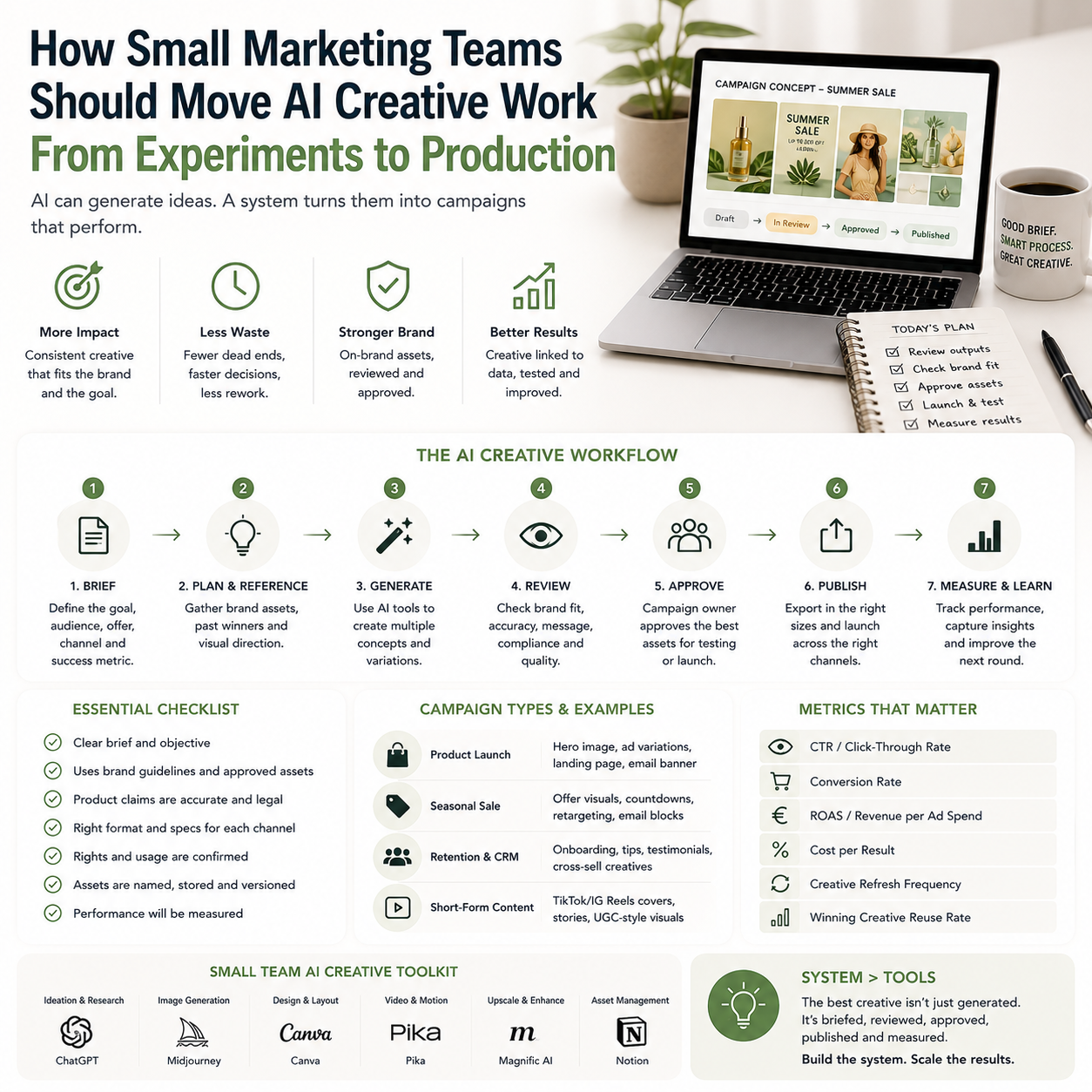
Magnific’s €10 million fund for creative teams is a useful signal because it points to the real bottleneck in AI marketing: not image generation, but production discipline. Small teams do not need more random AI tests. They need a repeatable way to brief, generate, review, approve, publish and measure creative without weakening brand control or wasting hours in tool switching.
For e-commerce sellers, agencies, local service brands and small in-house marketing teams, the decision is not whether AI can make visuals. The decision is whether AI-generated creative can be trusted inside the same operational system as paid ads, product launches, email campaigns and seasonal promotions.
The problem is not AI output; it is campaign readiness
Many small teams already have access to tools that can generate images, variations, mockups, short videos, ad concepts and product visuals. The operational problem starts after the first impressive output appears. Someone has to decide whether the asset matches the brand, whether it can be used across channels, whether it needs legal or rights review, whether it fits the campaign objective, and whether it can be tracked against a commercial result.
That is why the Magnific announcement matters beyond one company’s funding programme. It reflects a shift from AI as a creative toy to AI as a production layer. A production layer has rules, file naming, approvals, reusable prompts, version control, brand references, channel specifications and post-campaign feedback. Without those, AI content becomes another messy folder of experiments that nobody can confidently reuse.
The small business risk is hidden cost. A founder may think AI creative is cheap because the tool subscription is modest compared with a designer, photographer or agency. But the real cost appears in review time, rework, inconsistent brand assets, rejected ads, duplicated concepts and campaigns that cannot be analysed because every asset was created differently.
Who should build an AI creative workflow now
This is mainly for small teams that publish visual marketing frequently but cannot justify a large creative department. Typical examples include a Shopify or WooCommerce store launching new product collections, a beauty or wellness business running local promotions, a B2B founder producing paid social assets, or a small agency handling campaign variations for multiple clients.
If your business creates one brand campaign every few months, a lightweight manual process may still be enough. If your team needs weekly assets for Meta ads, TikTok-style short videos, marketplace listings, landing pages, email headers, product bundles or seasonal offers, then AI creative needs operating rules.
The clearest trigger is repeat volume. Once the same person is generating similar campaign assets every week, the work should stop being treated as experimentation. That is the moment to define what AI is allowed to produce, where human review is mandatory, and which metrics decide whether the workflow is actually saving money.
Separate creative generation from creative approval
The most common small-team mistake is letting the person who generates the AI asset also decide that it is ready for use. That may work for a quick internal mockup, but it is risky for customer-facing campaigns. AI tools can produce attractive images that are slightly off-brand, visually misleading, inconsistent with product reality, or unsuitable for a specific ad placement.
A practical workflow separates four roles, even if the same two people cover them:
- Brief owner: defines the product, offer, audience, channel and commercial goal.
- AI operator: creates the first batch of outputs using saved prompts and brand inputs.
- Brand reviewer: checks visual consistency, claims, product accuracy and tone.
- Campaign owner: approves the asset for a specific placement and tracks performance.
In a small business, this does not need bureaucracy. It can be a checklist in Notion, Airtable, Google Sheets, Trello or ClickUp. The point is to avoid silent approval. Every asset should have a visible status: draft, needs edit, approved for test, approved for campaign, retired.
What most people miss
The expensive part is not generating ten versions. The expensive part is deciding which one is safe, useful and measurable. AI lowers the cost of producing options, which increases the burden of choosing. If a team does not create a review system, it may spend more time debating assets than it previously spent briefing a designer.
This matters especially for small e-commerce operators. A product image that looks polished but misrepresents texture, size, packaging, colour or included accessories can create refund pressure and support tickets. A lifestyle image that feels premium but does not match the actual customer experience can damage trust. A paid ad visual that performs well but attracts the wrong buyer can make campaign numbers look healthy while margin suffers.
Build the workflow around campaign types, not tools
Tool-first adoption creates sprawl. One person tests an image model, another uses a video tool, a freelancer sends files from a third platform, and nobody knows which version is approved. A better approach is to map the recurring campaign types first.
For a small online store, campaign types might include product launch, clearance sale, bundle promotion, seasonal collection, abandoned cart creative, landing page hero image and paid social test. For a local service business, they might include appointment promotions, staff-led education, before-and-after concepts, gift card offers and retargeting visuals. For a small agency, the campaign type could be client onboarding creative, monthly ad refresh, email campaign support or landing page variant production.
Each campaign type should have a simple asset specification. For example, a product launch may require one landing page hero, three square ad creatives, two vertical story creatives, one email header and one marketplace-safe product support image. The AI tool is then used to fill a known production need, not to create random outputs.
A practical campaign board setup
A small team can manage this with a board containing these fields:
- Campaign name
- Product or offer
- Target channel
- Asset format
- Prompt version
- Source product references
- Reviewer
- Approval status
- Published URL or ad ID
- Performance note after launch
The prompt version field is more important than it looks. If one asset works, the team needs to understand what input helped create it. If an asset fails review, the team needs to avoid repeating the same prompt mistake. Saved prompt patterns become operating knowledge, not just creative notes.
The cost model: where AI saves money and where it adds work
AI creative can reduce external production costs in specific cases: first-draft concepts, campaign variations, background treatments, ad format resizing, moodboards, product staging ideas, and rapid testing of creative directions before commissioning final work. It can also reduce waiting time when a small team needs assets faster than a freelancer or agency can deliver.
But the costs do not disappear. They move into different areas:
- Tool subscriptions: image generation, editing, video, storage, project management and possibly brand asset management.
- Review time: someone must check product accuracy, claims, brand fit and channel suitability.
- Prompt maintenance: useful prompts need to be stored, named and improved.
- Rework: AI outputs often need manual editing before publication.
- Training: the team must learn what good inputs look like and where the tool fails.
- Governance: rules are needed for customer images, licensed assets, logos, product representation and sensitive categories.
A founder should not ask only, “Is this cheaper than a designer?” A better question is: “Which parts of our creative pipeline are repetitive enough to standardise, and which parts still need expert human judgment?”
For many small teams, the right answer is not replacing a designer. It is using AI to reduce low-value variation work so that a designer, founder or marketer spends more time on offer clarity, brand direction and campaign analysis.
Where AI should stop before publishing
Human review should remain mandatory in several places. Product truth is the first boundary. If the asset shows the product in a way that could mislead the customer, it should not go live. This includes exaggerated size, incorrect colours, invented features, unrealistic use cases or packaging that does not exist.
Offer claims are the second boundary. AI-generated creative may introduce wording or visual cues that imply guarantees, discounts, certifications, medical outcomes or performance claims that the business cannot support. Even if the image looks harmless, the campaign owner should check the full landing page and ad copy together.
Brand consistency is the third boundary. A small business can lose recognition quickly when every campaign uses a different visual style. The team should define acceptable colour ranges, typography rules, product angles, background styles, logo placement and image mood. These should be included in briefs and review checklists, not stored only in someone’s head.
The final boundary is channel fit. An asset that looks strong on a desktop landing page may fail in a mobile ad placement. A vertical video still may crop badly in an email header. A marketplace support image may violate platform formatting expectations. AI outputs should be checked against the actual placement before approval.
A realistic small-team scenario
Consider a small e-commerce seller preparing a spring product bundle. The team has one founder, one marketing assistant and a freelance designer used only for higher-value work. Previously, the assistant would request several ad creatives from the designer, wait for files, then ask for resizing and small variations. The process worked, but it slowed down campaign testing.
With an AI-assisted workflow, the founder first writes a one-page campaign brief: bundle contents, target buyer, margin-sensitive discount limit, channels, deadline and what the image must not imply. The assistant uses saved prompts to generate moodboard directions and first-draft ad visuals using approved product references. The founder reviews for product truth and offer accuracy. The designer is then asked to polish only the two strongest directions and create final files for paid social and the landing page.
The difference is not that AI replaces the designer. The difference is that the designer is no longer paid to explore every weak direction or resize every early draft. The founder also gets faster visibility into what the campaign might look like before committing freelance budget.
After the campaign, the team records which creative direction produced useful traffic, which assets were rejected, which prompts created off-brand outputs, and which formats took too long to prepare. That information improves the next campaign. Without that feedback loop, the team is just generating more files.
The metrics that decide whether the workflow is working
AI creative should be judged by operational metrics as well as campaign metrics. A beautiful asset that takes three rounds of repair may not be a win. A rougher first draft that quickly becomes a usable test asset may be more valuable for a small business.
Track a small set of numbers:
- Time from brief to approved asset: measures speed, not just output volume.
- Review rejection rate: shows whether prompts and briefs are improving.
- Number of usable assets per campaign: separates productive variation from clutter.
- External design spend per campaign type: shows where AI is actually reducing paid production work.
- Creative fatigue interval: for paid ads, track how quickly assets need refreshing.
- Post-launch performance by creative direction: connect style and message to commercial results.
- Support or refund issues linked to visuals: catches misleading product representation.
These metrics do not need a complex analytics stack. A spreadsheet connected to campaign IDs, ad platform links and internal review notes is enough for many small teams. The important habit is connecting creative production to business outcomes, not judging AI work only by how impressive it looks during creation.
Use the Fresha signal carefully: vertical platforms are moving into operations
The Fresha funding news points to a related pattern: software platforms in specific sectors are increasingly bundling marketplace access, business management and AI-powered operational features. For small businesses, that means creative, booking, payments, customer records and marketing may become more connected inside vertical platforms.
This is useful, but it creates a decision problem. A beauty or wellness operator using a platform for bookings and customer management may be tempted to keep marketing creative inside the same ecosystem if the tools become available. That can reduce friction, but it may also limit portability of assets, data and campaign learning.
The practical question is whether a platform helps the business build reusable operating knowledge or traps work inside a closed workflow. If a tool makes it easy to generate campaign assets but hard to export, archive, compare or reuse them elsewhere, the team may gain short-term speed and lose long-term control.
Small operators should therefore document their campaign logic outside any single tool: briefs, prompt patterns, approved claims, brand rules, audience notes and performance results. Tool choice can change. The operating memory should belong to the business.
The rollout sequence for a small AI creative production system
Start with one recurring campaign type, not a full marketing overhaul. Choose the campaign where the team feels the most production pain: weekly paid ad refreshes, product launch visuals, email headers, seasonal promotions or client campaign variations.
Use this sequence:
- Define one campaign brief format: include product, offer, audience, channel, required formats, forbidden claims and approval owner.
- Create a reference folder: approved product photos, brand colours, logos, previous best-performing assets and examples of rejected styles.
- Write three reusable prompt patterns: one for concept exploration, one for channel-specific asset drafts and one for variation generation.
- Set a review checklist: product accuracy, brand fit, offer accuracy, channel dimensions, rights concerns and landing page consistency.
- Limit first-round output: cap the number of generated options so the team does not drown in choices.
- Approve assets for a specific use: do not label files generally approved if they were only checked for one channel.
- Record the result: after launch, note time saved, rework needed, spend avoided, campaign performance and any customer issues.
- Only then expand: move the workflow to another campaign type after the first one has two or three completed cycles.
The goal is not to make every visual with AI. The goal is to turn the repetitive parts of creative production into a controlled system, while keeping human judgment where mistakes are expensive: product truth, brand trust, offer clarity and campaign economics.