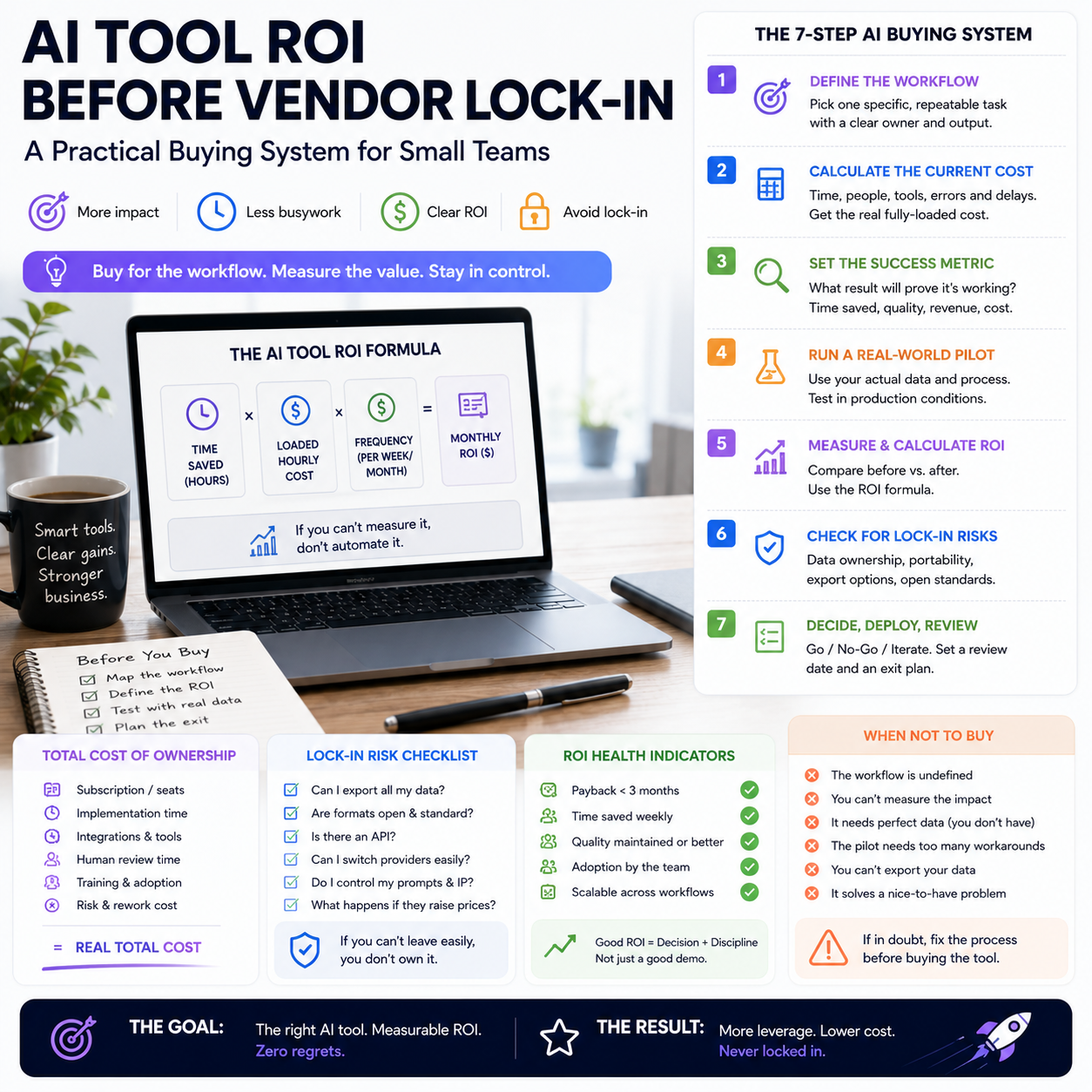
AI vendors are getting louder because the market is asking harder questions about returns. For a small business, that noise creates a purchasing risk: buying too early, integrating too deeply, and only later discovering that the tool saves time in demos but not in the messy workflow where margins are made.
The useful question is not whether AI is growing. The useful question is which AI workflow deserves a budget line, a process change and staff time in your business.
The operator problem behind AI vendor hype
Recent reporting on Anthropic describes rapid revenue growth while also noting that questions about AI returns remain part of the market conversation. Another report on Mira Murati’s return to public visibility points to a related dynamic: in a crowded AI market, staying quiet has a cost because companies need to remind buyers, investors and partners that they exist.
For small teams, this matters because vendor marketing cycles are not the same as operating cycles. A founder running a Shopify store, a service business using a CRM, or a small content operation does not need the most visible AI company. They need a workflow that reduces manual work, increases throughput, protects quality, or lowers a cost they can actually measure.
The practical risk is that many AI products are bought as subscriptions but adopted as experiments. Nobody owns the metric. Nobody calculates the before-and-after cost. Nobody decides when the tool should be removed. Three months later, the business has five AI subscriptions, two half-built automations, and no clear view of whether the monthly spend is buying time, revenue or confusion.
A better approach is to treat AI tools like operational equipment, not software toys. Before a small team adopts an AI product, it should know which task is being replaced or supported, what the current cost of that task is, what failure looks like, and how quickly the tool must prove itself.
Do not evaluate the model; evaluate the workflow
Small businesses often compare AI tools using the wrong unit of analysis. They test prompts, compare interface quality, read launch posts and ask which model is more advanced. That may be interesting, but it does not answer the operator question: does this tool improve the specific workflow where the business loses time or margin?
A useful AI buying test starts with a narrow workflow. Examples include:
- Turning support tickets into draft replies for human approval.
- Creating first-draft product descriptions from supplier data.
- Classifying inbound leads by urgency and service type.
- Summarising sales calls into CRM fields.
- Checking marketplace listings for missing attributes before upload.
- Generating draft internal SOPs from recorded screen walkthroughs.
Each of these workflows has a different cost structure and risk profile. A product description workflow may tolerate more editing as long as the total publishing time drops. A customer support workflow needs stricter controls because a bad answer can create refunds, chargebacks or damaged trust. A lead classification workflow may be valuable only if it changes response speed or conversion quality.
This is why buying one general AI subscription and telling the team to “use it more” rarely creates measurable operational value. The business has not defined where the tool belongs. If the tool can be used anywhere, it is often accountable nowhere.
Build a pre-purchase cost map before the free trial
Before starting a trial, document the current cost of the workflow. This does not need to be a complex finance exercise. It does need to be honest enough to stop wishful thinking.
For one task, write down:
- How many times the task happens per week.
- Who performs it now.
- How long one completed unit takes.
- The approximate hourly cost of the person doing it.
- What quality checks are required.
- What happens when the task is done badly.
- Which system receives the final output: CRM, CMS, helpdesk, spreadsheet, marketplace dashboard or accounting tool.
Suppose a small e-commerce operator publishes 80 new SKUs per month. Supplier data arrives in inconsistent formats. A team member spends time cleaning titles, writing descriptions, mapping attributes and checking for missing details before upload. An AI tool that produces polished copy but does not handle attributes, categories or marketplace constraints may look impressive while solving only the easiest part of the job.
The cost map forces a better question: does the AI tool reduce the whole publishing workflow, or only one visible step? If the person still has to check every field, correct formatting, add missing compatibility data and copy results manually between systems, the saving may be far smaller than the demo suggests.
What most people miss
The hidden cost is not the AI subscription. It is the human review layer, the integration gap and the process drift that appears when nobody defines the source of truth.
For example, if product data lives partly in supplier PDFs, partly in a spreadsheet and partly inside Shopify or WooCommerce, AI-generated descriptions may create a new version of the truth. The description says one thing, the attribute table says another, and the warehouse data says something else. The business then pays for cleanup through returns, customer questions or manual corrections.
Small teams should not ask only, “Can the tool create output?” They should ask, “Where does the output enter our operating system, who approves it, and what data is it allowed to change?” That is the difference between a useful automation and an expensive content generator.
The three-budget test: subscription, implementation and supervision
AI tools are often priced as monthly subscriptions, but the real operating cost has three parts.
Subscription cost
This is the visible spend: user seats, usage tiers, API calls, add-ons or higher plans needed for team features. A low monthly fee can become less attractive if the workflow requires multiple seats, higher limits or paid integrations.
Implementation cost
This is the time needed to connect the tool to the actual workflow. It may include prompt libraries, templates, Zapier or Make scenarios, API setup, helpdesk integration, CRM fields, CMS formatting rules, staff training and documentation. For small teams, implementation cost is usually paid in founder attention or senior operator time, which is often more expensive than the subscription.
Supervision cost
This is the ongoing review, correction and exception handling. AI can reduce production time while increasing review complexity. If every output must be checked by the most experienced person, the business may simply move the bottleneck to a more expensive part of the team.
A practical decision rule is simple: do not approve an AI tool based only on subscription price. Approve it only if the expected saving or revenue gain survives all three costs. If the workflow saves two hours per week but requires three hours of founder review, it is not saving the business time.
Where small businesses should avoid deep lock-in
Vendor lock-in is not only a technical problem. It can be operational. A small business becomes locked in when its templates, customer history, automations, staff habits or reporting depend on one tool in a way that is hard to unwind.
There are several places where small teams should be cautious:
- Customer support history: If AI-generated replies and classifications cannot be exported cleanly, switching helpdesk systems becomes painful.
- Product content: If descriptions, attributes and SEO fields are generated inside a closed system, the business may struggle to maintain consistency across Shopify, marketplaces and feeds.
- Sales workflows: If lead scoring logic sits inside one vendor’s black box, the team may not understand why certain leads are prioritised.
- Internal knowledge bases: If SOPs and policies are created inside a tool but not stored in a portable format, training becomes dependent on that vendor.
- Automation chains: If one AI tool triggers multiple downstream actions, a pricing change or outage can interrupt the whole process.
This does not mean small teams should avoid AI platforms. It means they should keep important business logic portable. Store approved prompts, workflow rules, product data definitions and review checklists somewhere the business controls. A simple shared document, Notion workspace, Google Drive folder or internal wiki can prevent the AI vendor from becoming the only place where the operating method exists.
A practical scenario: testing AI for customer support without damaging service quality
Consider a small online store receiving customer questions about delivery times, returns, sizing and order changes. The owner wants to use AI to reduce repetitive support work, but the risk is obvious: a wrong answer can create refunds, complaints or operational mess.
The operator should not begin by allowing AI to send replies automatically. A safer first workflow is draft-only support assistance.
The test might work like this:
- Select three common ticket types: delivery status, return instructions and product sizing.
- Create approved answer rules based on existing policies.
- Let the AI draft replies inside the helpdesk but require human approval.
- Track time to first draft, time to final reply, correction reasons and escalation rate.
- Block the AI from answering cases involving refunds, angry customers, damaged goods or legal complaints.
The business is not trying to prove that AI can write polite replies. It is testing whether AI reduces handling time without increasing errors. The most useful metric may be the percentage of drafts accepted with light editing, not the number of replies generated.
If most drafts require heavy correction, the problem may be poor instructions, messy policy documentation or the wrong tool. If drafts are accurate for delivery questions but weak on sizing, the business can keep AI in one lane and exclude the other. That is better than a broad rollout that creates hidden service risk.
The metrics that decide whether the tool stays
AI adoption should have a removal rule. Without one, tools survive because nobody wants to admit the experiment failed.
For each AI workflow, choose metrics before the trial starts. The right metrics depend on the job, but small teams can usually work with a short dashboard:
- Cycle time: How long from task start to approved output?
- Human review time: How much skilled time is still required?
- Error rate: How often does the output need correction for factual, policy or formatting reasons?
- Rework volume: How many tasks come back later because the AI-assisted output caused a downstream problem?
- Cost per completed unit: Subscription and usage cost divided by approved outputs, plus estimated labour.
- Adoption by the right users: Are the people responsible for the workflow actually using it, or is it only used by the founder?
The dashboard does not need advanced analytics. A shared spreadsheet is enough for a 30-day test. What matters is that the business measures the workflow after human review, not the raw AI output.
If an AI writing tool creates 200 product descriptions but only 60 are approved without major editing, the useful output is 60, not 200. If an AI support tool drafts 500 replies but creates a queue of complex review work for a senior employee, the volume number is misleading. Operators should measure approved work that moves through the system cleanly.
How to read AI market noise as a buyer
The visibility race among AI companies can still be useful for small businesses if it is interpreted correctly. When vendors become more public, raise expectations or prepare for major financial milestones, they are signalling that the market is moving fast and that customer acquisition matters. That does not automatically make their product a fit for your operation.
As a buyer, separate three signals:
- Company signal: Is the vendor likely to keep investing in the product, support and integrations?
- Workflow signal: Does the tool improve the specific process you are testing?
- Control signal: Can your business export data, preserve rules and switch tools if pricing or product direction changes?
A well-funded or highly visible vendor may be safer in some ways, especially if it offers better reliability, security features or integrations. But visibility can also push small businesses into buying more capability than they need. A local service business may not need the most advanced AI platform. It may need a reliable transcription-to-CRM workflow, a controlled email drafting process or a document summarisation tool with clear permissions.
The buyer’s job is not to predict which AI company wins. The buyer’s job is to avoid building a fragile process around a tool that has not proved operational value inside the business.
30-day AI buying checklist for a small team
Use this checklist before approving a new AI subscription or expanding an existing one.
- Name one workflow: Define the exact task, system and owner. Do not approve a general-purpose experiment without an operating location.
- Record the current baseline: Measure current time, labour cost, error points and output volume for at least a small sample.
- Set the human boundary: Decide what AI may draft, classify, summarise or suggest, and what it may not send, publish or change without approval.
- Estimate all three budgets: Include subscription, setup time and review time. If the tool needs integration work, name who will do it.
- Keep business rules portable: Store prompts, approval rules, data definitions and exception lists outside the vendor platform.
- Run a limited trial: Test one or two task types before expanding. Avoid connecting AI to every channel at once.
- Measure approved output: Count only work that passes review and moves through the business without causing rework.
- Choose a stop rule: Cancel, pause or redesign the workflow if the tool does not reduce cycle time, review load or cost per approved unit within the test period.
- Review lock-in risk: Confirm export options, integration dependencies and whether the team can continue the process if the vendor changes pricing or features.
- Assign one owner: One person should own the workflow metric, not just the software account.


