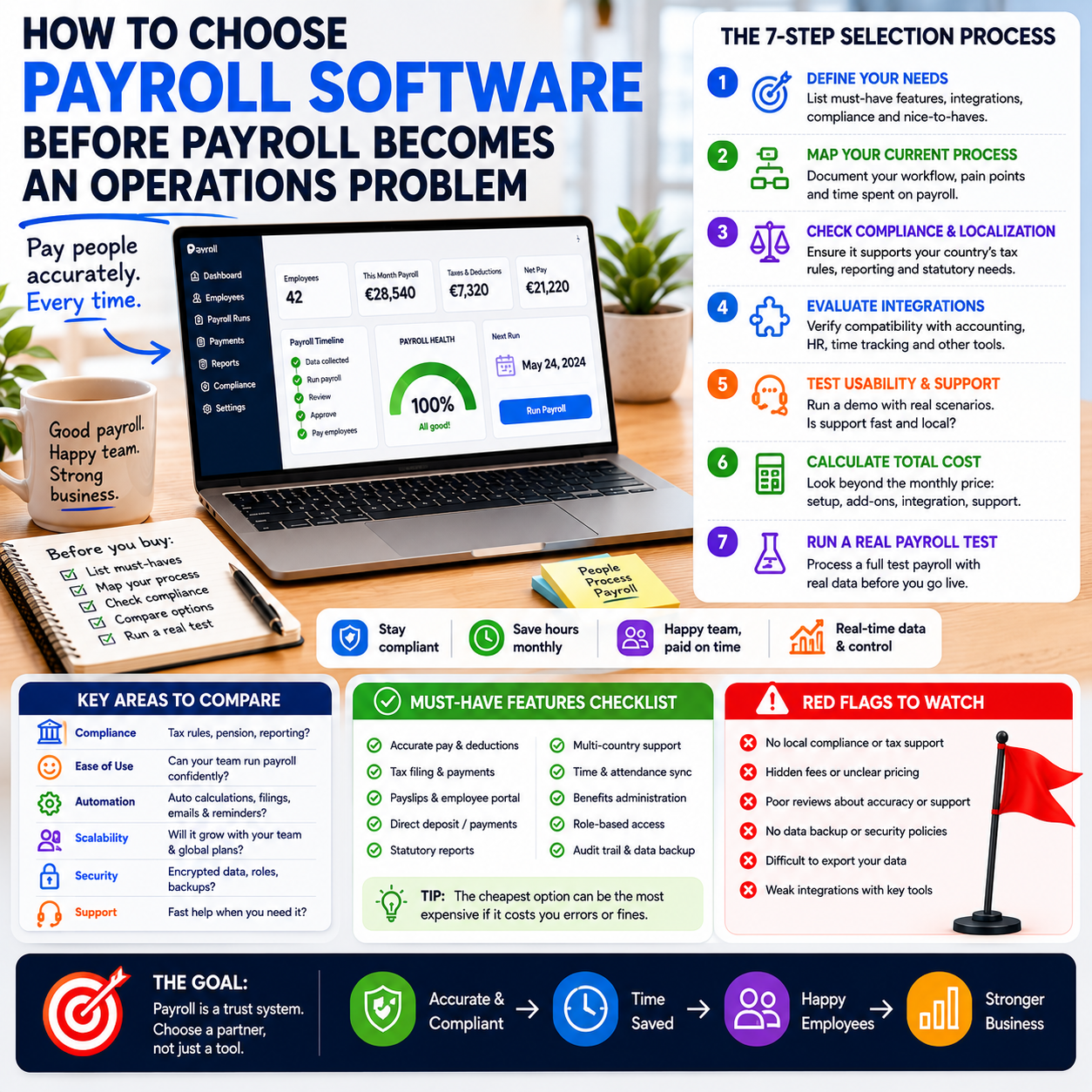
Payroll software is not just an admin tool once a business has employees, contractors, commissions, bonuses, benefits or multiple work locations. It becomes part of the operating system of the company: cash timing, compliance records, employee trust, finance reporting and founder workload all pass through it. The wrong choice usually does not fail loudly on day one; it fails later through manual fixes, missed approvals, unclear ownership and poor data moving between tools.
This guide is for small business owners, digital operators and small team managers who are deciding whether to keep payroll simple, outsource it, or move to a more structured payroll platform. The goal is not to rank tools. The goal is to define the decision logic before a company buys software that creates a different manual process in a prettier interface.
The real trigger is not headcount, it is payroll complexity
Many owners wait until they reach a certain number of employees before reviewing payroll software. Headcount matters, but complexity usually arrives earlier. A five-person business can have simple payroll if everyone is salaried, based in one location and paid on the same cycle. A three-person operation can already be messy if it uses hourly work, variable bonuses, sales commissions, contractor payments, reimbursements, tips, overtime, benefits or cross-border arrangements.
The trigger for reviewing payroll software should be operational friction. If the same person is collecting timesheets, calculating adjustments, approving payments, fixing errors, answering employee questions and sending figures to accounting, payroll is already a workflow problem.
Small business payroll articles often focus on provider lists or tax forms. Those are useful inputs, but the practical decision is wider: can the business run payroll repeatedly without relying on memory, spreadsheets and one person who knows every exception?
Use these questions before looking at product features:
- How many different pay types do we use: salary, hourly, overtime, commission, bonus, contractor, reimbursement?
- How many systems create payroll data: scheduling, time tracking, point of sale, CRM, e-commerce platform, accounting software?
- Who approves payroll changes before money leaves the bank?
- How often do we correct payroll after submission?
- Can someone else run payroll if the usual person is unavailable?
- Do employees have a clear way to view payslips, tax documents and personal details without emailing the owner?
If several answers are unclear, the business is not simply shopping for payroll software. It is redesigning a finance operation.
Map the payroll workflow before comparing providers
A provider comparison is only useful after the workflow is visible. Otherwise, the business buys based on features and then discovers that its real pain is approvals, missing data, timing or tool integration.
Start with a one-page payroll map. It does not need to be complicated. The map should show how payroll information enters the business, who checks it, who approves it, where it is paid from, where records are stored and how accounting receives the final data.
The minimum workflow to document
- Data capture: hours worked, salary changes, new starters, leavers, commissions, bonuses, reimbursements and deductions.
- Data validation: who checks errors before payroll is submitted.
- Approval: who has authority to approve the payroll amount and payment date.
- Payment execution: whether the provider initiates payments, exports a bank file or only calculates payroll.
- Employee access: where payslips, documents and personal details are managed.
- Accounting sync: how wage costs, taxes, benefits, liabilities and reimbursements reach the bookkeeping system.
- Record storage: where payroll reports and tax-related documents are kept for future filing and audits.
This workflow makes the buying decision clearer. A business that only needs clean payslips and basic accounting exports should not pay for enterprise-style HR modules. A business with variable shifts, frequent starters and leavers, or commission-heavy compensation may need stronger integrations and approval controls than a simple payroll calculator can provide.
Separate payroll calculation from payroll operations
One common mistake is assuming payroll software is solved if the platform can calculate wages and deductions. Calculation is only one part of the operating burden. The surrounding process is where small companies lose time and create risk.
Payroll operations include collecting accurate inputs, handling exceptions, preserving records, coordinating with accounting, answering employee questions and making sure the right person approves money movement. A low-cost tool may calculate correctly but still leave the owner handling every exception manually. A higher-priced provider may be worth it if it removes recurring admin, reduces correction work and gives employees self-service access.
The practical comparison is not cheap versus expensive. It is manual control versus automated control.
For example, a small e-commerce company with warehouse assistants, a customer support contractor and a founder on salary may start with a lightweight payroll tool. If warehouse hours come from one time-tracking app, contractor invoices arrive separately and support bonuses are pulled from the helpdesk system, the real issue is not payroll math. It is data routing. Without a clear process, the owner becomes the integration layer between every system.
In that case, the better system may be the one that connects to time tracking and accounting cleanly, even if it costs more per month. If the company avoids two hours of manual checking every pay cycle and reduces correction risk, the price difference may be justified.
The cost model should include hidden manual work
Payroll software pricing is usually shown as a monthly platform fee plus a per-employee or per-contractor charge. That is only the visible cost. The real cost model should include implementation time, corrections, accounting cleanup, employee support and dependency on one internal person.
For a small team, a simple cost model can be built without pretending to know exact future savings. List the recurring payroll tasks, estimate time spent on each, assign an internal hourly cost and compare that to the software and service fee.
What most people miss
Most buyers compare providers by headline features: automated payroll, tax support, direct deposit, employee portal, integrations and reports. The missed cost is exception handling. Payroll rarely consumes time because the normal month is normal. It consumes time because something changed: someone joined, someone left, a bonus was approved late, hours were entered incorrectly, a bank detail changed, a reimbursement was missed or the accounting export did not match the books.
A stronger payroll setup reduces the number of exceptions that reach the owner. That may come from employee self-service, automated reminders, approval cutoffs, better integrations or clearer audit trails. These controls are not glamorous features, but they decide whether payroll stays manageable as the team grows.
When evaluating cost, include these items:
- Monthly software fee and per-person charges.
- Setup or migration cost, including internal time.
- Time spent gathering payroll inputs each cycle.
- Time spent correcting payroll errors after submission.
- Bookkeeping cleanup caused by weak exports or manual journal entries.
- Employee support time for payslips, tax forms, bank details and address changes.
- Risk of delayed payroll if one person is unavailable.
This framing helps founders avoid a false saving. A cheaper tool that preserves manual admin may cost more than a better-integrated system once management time and error correction are included.
Integration is a finance control, not a convenience feature
For digital businesses and e-commerce operators, payroll touches several systems. Time tracking may live in a scheduling app. Commissions may come from a CRM. Bonuses may be calculated from support performance or marketplace operations. Payroll costs must then appear correctly in accounting and cash planning.
Weak integration creates two problems. First, the team re-enters data, which increases error risk. Second, management reports become slower and less reliable because payroll costs arrive late or in the wrong categories.
When comparing payroll providers, look at integration depth rather than just whether a logo appears on an integrations page. Ask what actually syncs:
- Do hours sync automatically or through a manual CSV upload?
- Can pay categories map to accounting categories?
- Are employer costs, deductions and liabilities posted clearly?
- Can departments, locations or projects be tracked?
- Can changes be reviewed before payroll is submitted?
- Is there an audit trail for edits?
An e-commerce seller with support, fulfilment and marketing staff may want payroll costs separated by function. If all wage costs land in one accounting line, the owner cannot see whether fulfilment labour is rising faster than order volume or whether support cost is increasing after a product change. Payroll data then becomes a compliance record only, not a management tool.
The decision is simple: if payroll is a material cost in the business, the software must support management reporting, not just payment processing.
Where automation should stop and human approval should remain
Payroll is a good candidate for automation, but not for blind automation. The business should automate data capture, reminders, standard calculations, recurring reports and employee document access. It should keep human approval around changes that affect money movement, unusual adjustments and final payroll submission.
A practical boundary looks like this:
- Automate: employee reminders for timesheet deadlines, recurring salary entries, standard deductions, payslip delivery, accounting exports and document access.
- Review: overtime spikes, commission changes, reimbursement claims, new bank details, new starters, leavers and off-cycle payments.
- Approve manually: final payroll total, unusual adjustments, one-time bonuses, back pay and payment release.
This matters because payroll automation can create quiet errors. If an incorrect input flows through a system without review, automation only makes the mistake faster. The best small-business setup is not fully manual or fully automatic. It is exception-based: routine items move automatically, unusual items are flagged before payroll is approved.
For a small team manager, this also protects trust. Employees may tolerate one honest payroll error if it is corrected quickly. They will not tolerate repeated errors caused by a system nobody checks.
A practical scenario: moving from spreadsheet payroll to a controlled process
Consider a small online retailer with eight people: the founder, two customer support staff, three warehouse staff, one marketing employee and one part-time finance assistant. The warehouse team uses time tracking. Customer support sometimes receives performance bonuses. The founder runs payroll after collecting hours, bonus notes and reimbursement messages from different places.
The current process works until it does not. One month, a reimbursement is missed. Another month, a warehouse shift correction arrives after payroll has been submitted. The finance assistant spends time fixing accounting entries because payroll costs are not mapped properly. Nobody is doing anything careless; the system is just dependent on memory and message threads.
The better process is not necessarily to buy the most advanced payroll suite. It is to redesign the workflow:
- Set a payroll input cutoff date for hours, bonuses and reimbursements.
- Move all payroll adjustments into one shared approval queue.
- Connect time tracking to payroll or create a standard export format.
- Map payroll categories to accounting categories before the first live run.
- Give employees self-service access for payslips and personal details.
- Require founder approval only for the final payroll summary and exceptions.
- Review payroll reports against cash planning before payment release.
In this scenario, the value of payroll software is not that it makes payroll digital. Payroll was already partly digital. The value is that it reduces scattered inputs, creates an approval trail and turns payroll cost into usable finance data.
Metrics that show whether the payroll system is working
A payroll system should be judged by operating metrics, not only by whether people were paid. Payment is the minimum requirement. The better question is whether payroll is becoming more reliable, less founder-dependent and more useful for financial management.
Track a small set of metrics after implementation:
- Payroll preparation time: hours spent from first input collection to final approval.
- Correction rate: number of payroll corrections or off-cycle fixes per pay period.
- Late input count: how many timesheets, bonus approvals or reimbursements arrive after cutoff.
- Employee payroll queries: number of questions about payslips, missing items or personal details.
- Accounting cleanup time: time spent adjusting payroll entries after export.
- Payroll cost visibility: whether wage costs can be viewed by team, location, channel or function where relevant.
- Approval timing: whether payroll is reviewed with enough time to catch errors before submission.
If the software is working, preparation time should fall, correction work should decrease and the owner should not be the only person who understands the process. If those things do not improve, the business may have bought software without fixing the workflow.
Decision criteria before you sign a payroll contract
Before committing to a provider, small teams should run a structured decision check. This prevents buying based on feature lists that do not match the business model.
- Choose a basic payroll tool if: the team is small, pay types are simple, there are few changes each month, accounting exports are clean enough and the owner can tolerate some manual oversight.
- Choose a more integrated payroll platform if: the business uses hourly labour, commissions, multiple pay types, frequent employee changes, department reporting or several connected systems.
- Consider outsourced payroll support if: the owner lacks time or confidence to manage filings, records, corrections and deadlines, especially where local rules are complex.
- Avoid switching yet if: the workflow is undocumented. Fix the process map first, or the same confusion will move into the new platform.
The provider should be able to show how a payroll run works from input to approval to payment to accounting. If the sales demo starts and ends with dashboard screenshots, ask for a sample payroll cycle using your actual pay types. A platform that cannot handle the messy parts of your process during evaluation will not magically handle them after purchase.
Payroll software rollout checklist for a small team
Use this sequence before the first live payroll run. It is designed to reduce implementation risk and avoid discovering setup gaps after employees are waiting to be paid.
- Document every pay type used in the business, including bonuses, overtime, commissions, reimbursements and contractor payments.
- List every source of payroll input: time tracking, scheduling, CRM, e-commerce reports, manual approvals, invoices and spreadsheets.
- Define the payroll cutoff date and communicate it to managers and employees.
- Assign one owner for payroll preparation and one separate approver for final payroll release where possible.
- Test employee records, bank details, pay rates and tax-related fields before the first live run.
- Map payroll categories to accounting categories and run a test export.
- Check whether payroll reports support the management view you need, such as labour by team, location, project or function.
- Create an exception list for items that must be reviewed manually before submission.
- Give employees access to payslips and personal detail updates, then explain where payroll questions should go.
- Run one parallel check against the old method before fully relying on the new process.
- After the first two payroll cycles, review preparation time, correction rate, late inputs and accounting cleanup time.


