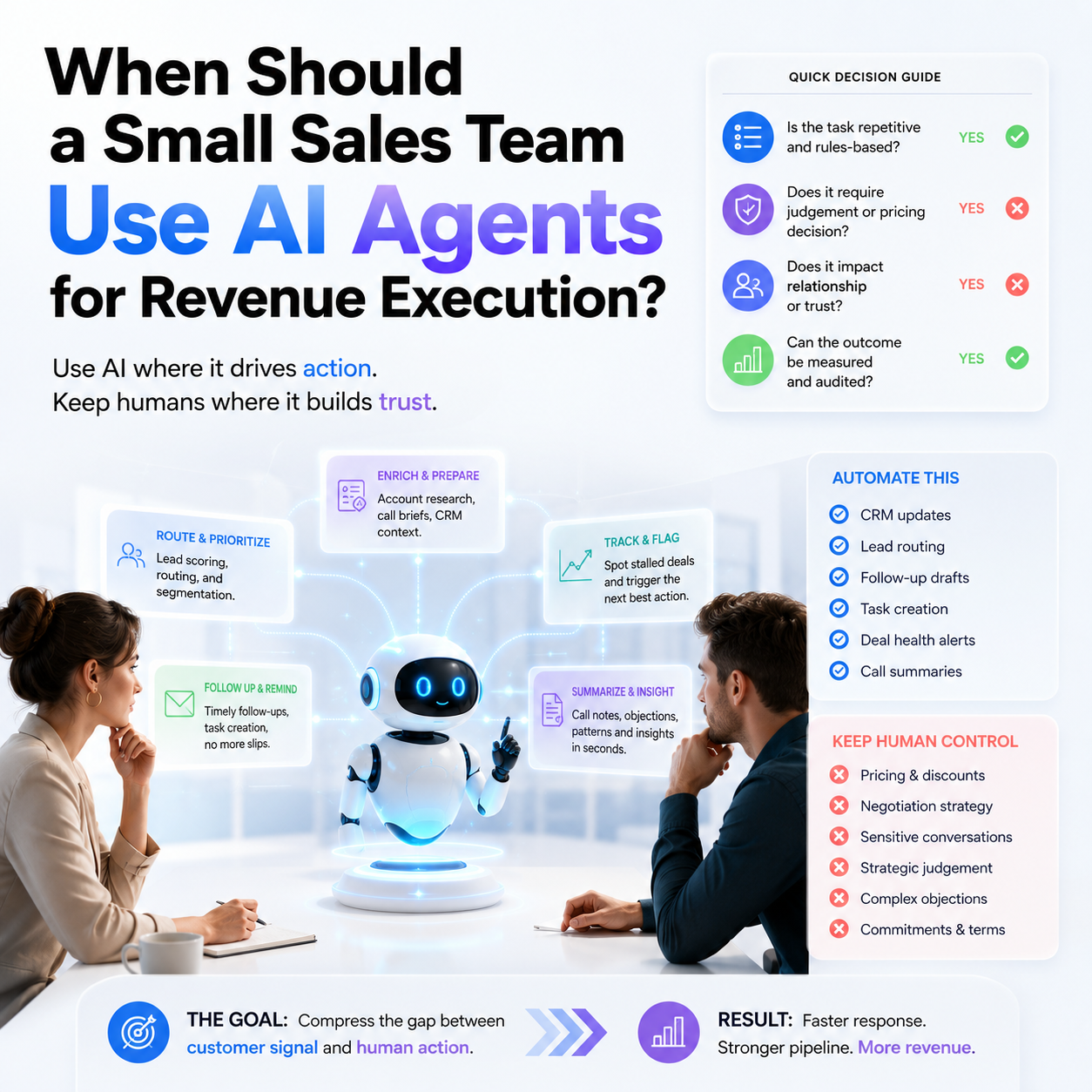
Airspeed’s €17.2 million Series A is not important because another AI sales company raised money. It is useful because it shows where go-to-market software is moving: away from passive dashboards and toward systems that execute parts of the revenue workflow. For a founder or small sales team, the question is not whether to buy the newest AI platform. The better question is which pieces of the sales operation are structured enough to automate without damaging trust, pricing discipline or pipeline quality.
This guide is for small B2B teams, founder-led sales operations, agencies, SaaS startups and service companies that already have some sales motion but still rely on manual follow-up, spreadsheet tracking, CRM notes and scattered customer context.
The real signal: AI is moving from sales content to sales execution
The Airspeed funding announcement describes the company as building an AI-powered execution layer for revenue teams. That phrase matters because it points to a shift in what sales tools are trying to do. Earlier AI use in sales often meant writing outreach emails, summarising calls or generating LinkedIn messages. Execution-layer software goes further: it tries to coordinate tasks, trigger follow-ups, prepare account context, route actions and reduce the manual work between a sales signal and a next step.
For a small business, this is not an abstract software category. Most small teams lose money in the gaps between systems. A lead fills in a form but nobody qualifies it quickly. A proposal is sent but follow-up depends on memory. A customer mentions a buying committee on a call but that information never becomes a CRM field. A trial user hits a usage threshold but sales does not act until the account has gone cold.
That is where revenue execution tools become relevant. They are not primarily about replacing salespeople. They are about compressing the delay between customer behaviour and operator action. If your current sales process depends on one person remembering every next step, AI agents may be useful. If your sales process is still undefined, AI will simply accelerate confusion.
Where a small team should draw the automation boundary
The first decision is not which AI sales tool to buy. It is which parts of the sales workflow can be trusted to software and which parts must remain human-controlled. Small teams have less room for reputational mistakes. A badly timed enterprise email from a large vendor may be ignored. A badly timed or inaccurate message from a founder-led company can look careless.
Use automation where the task is repetitive, rules-based and easy to audit. Keep human control where the task affects price, positioning, relationship quality or strategic judgement.
Good candidates for AI-assisted execution
- Preparing account briefs before calls using CRM notes, website activity and previous emails.
- Flagging stalled deals when no next step exists or a promised follow-up date has passed.
- Drafting follow-up messages from call notes, while leaving approval to the salesperson or founder.
- Routing inbound leads by geography, company size, product interest or urgency.
- Creating CRM tasks after demos, trials, proposal sends or support escalations.
- Summarising customer objections and mapping them to product, pricing or onboarding issues.
Tasks that should stay human-led
- Discount approval and pricing exceptions.
- Enterprise negotiation strategy.
- Handling angry customers or sensitive implementation risks.
- Deciding whether a lead is strategically valuable despite not matching the usual score.
- Changing positioning for a specific segment.
- Communicating contract, compliance or service-level commitments.
The boundary can move over time. A small team may begin with AI-generated reminders and call summaries, then later allow automated task creation or lead routing. What should not happen is allowing the tool to contact buyers independently before the company understands its own message quality, data quality and failure modes.
The workflow test before buying an AI revenue platform
Before evaluating an execution-layer tool, map one revenue workflow in detail. Choose one route from lead source to closed deal or lost opportunity. Do not map the entire business. Pick a workflow that happens often enough to matter.
For example, a small B2B software company might map this sequence:
- A visitor downloads a comparison guide.
- The contact enters HubSpot, Pipedrive, Salesforce or another CRM.
- The company domain is checked manually.
- A founder or salesperson decides whether to send a personal note.
- If the prospect replies, a call is booked.
- After the call, notes are written manually or not at all.
- A proposal is sent.
- Follow-up depends on someone remembering the deal.
This workflow reveals exactly where AI execution can help. It might enrich the account, identify whether the company fits the target segment, prepare the first call brief, draft the post-call email, create the next CRM task and flag the deal if it stalls. The founder is still responsible for judgement. The software handles the operational drag.
If you cannot describe the workflow this clearly, wait before buying. AI execution tools need event triggers, data inputs and rules. Without them, the product becomes an expensive note-taking layer attached to a messy CRM.
The cost is not only the subscription
Small teams often compare software by monthly licence price. That is too narrow for this category. The real cost includes CRM cleanup, integration time, playbook design, approval rules, staff training and the cost of errors.
A revenue execution tool usually touches sensitive parts of the business: lead data, customer communication, deal stages, notes, pipeline forecasts and sometimes email or calendar access. A cheap tool can become expensive if it creates duplicate records, sends irrelevant follow-ups, hides bad assumptions behind confident summaries or makes the CRM harder to trust.
Think about cost in five buckets:
- Subscription cost: seats, usage-based pricing, AI credits, integration tiers and support packages.
- Implementation cost: CRM field cleanup, workflow mapping, API setup, permissions and testing.
- Management cost: who reviews outputs, maintains prompts, audits failed automations and updates rules when the sales process changes.
- Data-quality cost: time spent fixing missing fields, duplicated companies, inconsistent deal stages and unclear lead sources.
- Failure cost: wrong follow-ups, premature outreach, poor segmentation, inaccurate summaries or customer confusion.
For a small team, the failure cost may matter more than licence cost. If the tool causes one high-value prospect to receive a careless message, the damage can exceed months of subscription fees. This does not mean avoid AI sales tools. It means introduce them first in internal execution tasks before allowing buyer-facing automation.
What most people miss
The biggest mistake is treating AI revenue execution as a sales productivity purchase. It is closer to an operations design project. The tool can only execute what the business has made explicit.
If your CRM has unclear stages, AI will not know what progress means. If your sales team disagrees on what makes a lead qualified, automated lead scoring will reproduce that confusion. If discounting is handled informally, AI-generated follow-up may push deals forward without protecting margin. If customer objections are never categorised, summaries will not become useful management information.
The companies that benefit are not necessarily the ones with the most advanced AI stack. They are the ones with clean enough sales operations for automation to improve consistency. A three-person team with a disciplined CRM, clear qualification rules and a simple offer can often get more value than a larger team with fragmented data.
This is also why the BlaBlaCar founder interview is useful as a secondary signal, even though it is from a different sector. Marketplace and community-led businesses often begin from a specific user problem, not from a tool stack. The lesson for small operators is that automation should not be added before the company understands the trust problem in the transaction. In revenue operations, the trust problem is simple: buyers want timely, relevant, accurate communication. AI should protect that, not merely increase activity.
A practical scenario: the founder still closes, AI runs the edges
Consider a founder-led B2B services company selling implementation packages to e-commerce brands. The founder handles discovery calls and closing. A part-time operator manages CRM admin. Leads come from referrals, partner webinars and the company website.
The company does not need a fully autonomous sales agent. It needs a cleaner execution system around the founder. A sensible setup could look like this:
- Inbound leads are tagged by source, company type and urgency.
- AI prepares a short account brief before the founder reviews the lead.
- The founder approves whether the lead deserves personal outreach.
- After a call, the tool drafts a summary, identifies open questions and creates the next task.
- Proposal follow-ups are suggested based on agreed dates, not sent automatically.
- Lost-deal reasons are categorised so the founder can see whether price, timing, fit or trust is the recurring issue.
This setup does not replace the founder’s judgement. It removes the parts of the process that cause leakage: forgotten follow-ups, weak notes, unclear next steps and inconsistent categorisation. It also creates better management data without hiring a full-time sales operations person.
The wrong version would be giving the system permission to send automated outreach to every inbound lead using generic messaging. That may increase activity, but it can reduce perceived quality. For high-ticket services, fewer better-timed interactions may beat more automated touches.
The decision rule: buy only when one bottleneck is measurable
A small team should not buy an AI revenue execution tool because the category is attracting funding. Buy when one revenue bottleneck is visible, costly and repetitive.
Good triggers include:
- Qualified inbound leads are not being followed up within the time window the team considers acceptable.
- Deals regularly stall because no next step is recorded.
- Sales calls produce useful information that never reaches the CRM.
- Founders spend too much time preparing for routine calls instead of selling or improving the offer.
- Pipeline reviews are based on memory rather than accurate deal status.
- Customer objections are repeated but not captured in a way product, pricing or onboarding teams can use.
Weak triggers include vague pressure to use AI, a desire to make the team look more modern, or frustration with sales performance when the real problem is poor positioning, weak demand or an unclear offer. Automation cannot fix a product-market mismatch. It can make a working sales motion more consistent.
Metrics that show whether the tool is working
Do not measure an AI revenue tool by how many messages it drafts. Activity volume is often the wrong metric. The system should be judged by whether it reduces leakage and improves management visibility.
Track a small set of operational metrics before and after rollout:
- Speed to first qualified response: how long it takes a suitable lead to receive a relevant reply.
- Deals with a clear next step: the percentage of open deals that have a dated, specific next action.
- CRM completeness: whether required fields such as segment, source, deal stage, expected close date and loss reason are filled accurately.
- Proposal follow-up discipline: whether proposals receive follow-up according to the agreed sales process.
- Founder preparation time: time spent researching accounts before calls.
- Human edit rate: how often AI-drafted messages or summaries require major correction.
- Bad automation incidents: wrong contact, wrong timing, irrelevant message, incorrect summary or duplicate task creation.
The human edit rate is especially useful. If every AI-generated output needs heavy rewriting, the workflow may not be mature enough or the tool may not understand your context. If nobody reviews the outputs, you will not know whether the system is improving operations or quietly lowering quality.
Rollout sequence for a small team
Use a staged rollout that limits customer-facing risk. The goal is to make the workflow reliable before expanding automation rights.
Stage 1: Internal visibility only
Connect the tool to the CRM and calendar, but use it only for internal summaries, reminders and account briefs. No buyer-facing messages should be sent automatically. During this stage, check whether the system understands your pipeline stages, contact records and call notes well enough to be useful.
Stage 2: Drafts with human approval
Allow the tool to draft follow-ups, recap emails and task lists. A founder, salesperson or operator approves each message. Track edits. If the same edits appear repeatedly, update the instructions or templates rather than correcting outputs one by one forever.
Stage 3: Rule-based task execution
Let the tool create CRM tasks, flag stale deals, assign owners and update non-sensitive fields. Keep pricing, discounting, proposal terms and customer promises outside automation unless there is a clear approval workflow.
Stage 4: Limited buyer-facing automation
Only after the earlier stages are stable should the team consider automated buyer-facing actions. Start with low-risk communication such as meeting reminders or document follow-up notices where wording is tightly controlled. Avoid automated strategic outreach to high-value prospects until the system has a strong audit trail.
Operator checklist before signing a contract
- Identify one sales workflow where delays or missed tasks cost real revenue.
- Confirm the CRM has consistent stages, required fields and ownership rules.
- Decide which actions require human approval before any message reaches a buyer.
- Calculate implementation time, not just software price.
- Ask how the tool handles permissions, audit logs, data access and integration failures.
- Define the first three metrics you will track during rollout.
- Run the tool on historical or low-risk deals before using it on strategic opportunities.
- Assign one person to review failed outputs and update the workflow rules.
- Set a stop condition: if CRM quality, response relevance or edit rate does not improve within the trial period, pause expansion.


