Dolfin, a Barcelona-based AI-native sales compensation platform, has raised a €2.1 million seed round to expand its product development and international reach. The more useful signal for small business operators is not the funding itself. It is that sales compensation is becoming a software and workflow problem earlier in a company’s life, not just an enterprise finance issue.
For a founder running a small sales team, a commission spreadsheet can feel harmless until it starts shaping the wrong behaviour, delaying payouts, or creating disputes that consume founder time. This article is for small B2B operators, agency owners, SaaS founders, marketplace operators and e-commerce teams with outbound or account-management roles who need to decide whether their current commission process is still good enough.
The real problem is not commission calculation, it is commission governance
Most small companies begin with a simple arrangement: close a deal, get a percentage. The first version may live in Google Sheets, Excel, a CRM export, or a payroll note. That is usually fine when one person sells, the founder approves every deal, and customers pay in a predictable way.
The process starts to weaken when sales activity becomes less linear. A lead may be sourced by one person, qualified by another, closed by a founder, renewed by an account manager and expanded by a customer success person. A payment may arrive late. A customer may downgrade. A discount may be approved in Slack but never recorded in the commission file. At that point, the spreadsheet is not only calculating payouts; it is quietly deciding who gets credit, which margin is acceptable, and how much friction the finance team has to absorb.
This is why sales compensation management has become a RevOps issue. Dolfin’s funding announcement points to demand for AI-native tools in this space, but small teams should not start by asking whether they need AI. They should ask whether they have a controlled compensation workflow.
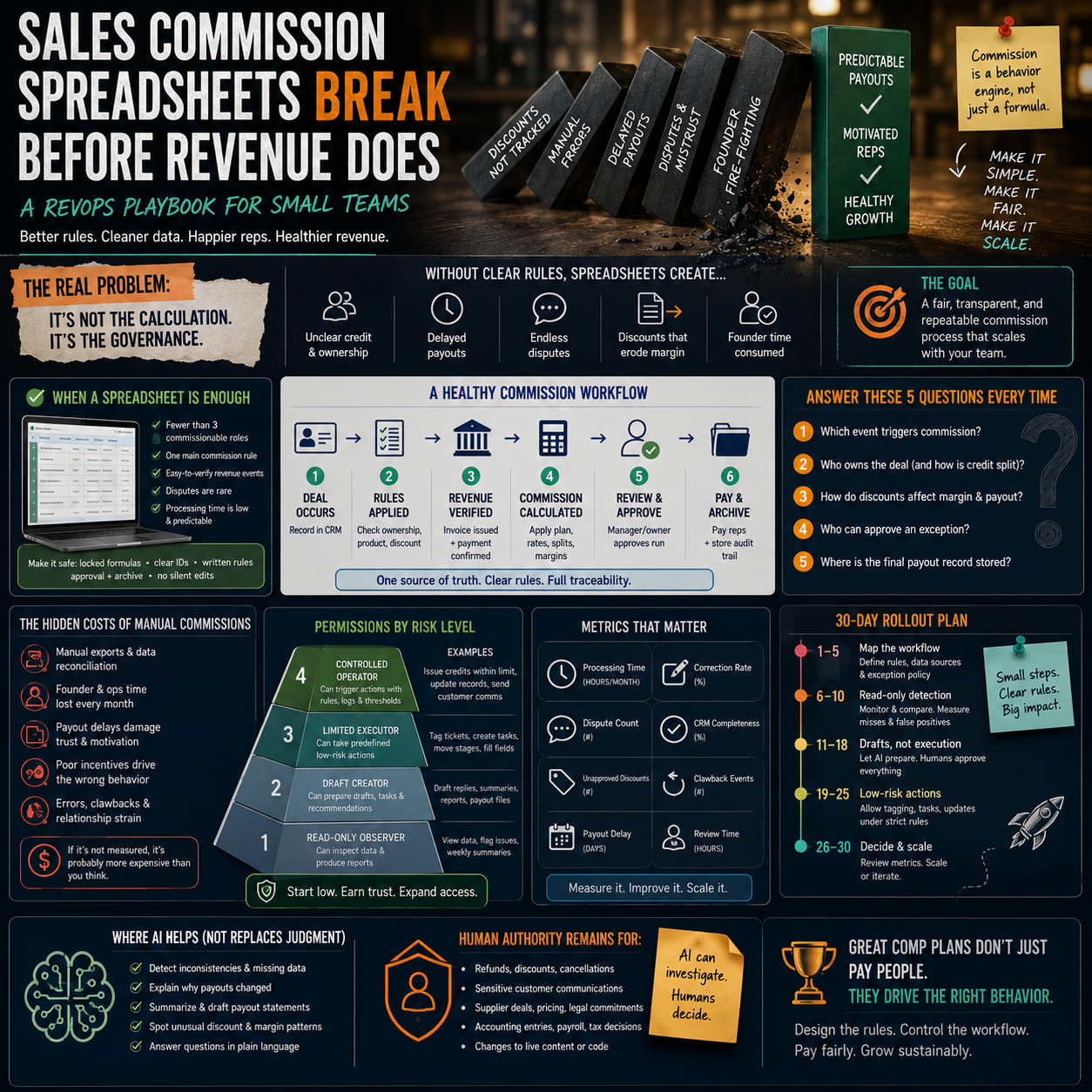
A controlled workflow answers five questions without the founder digging through email threads:
- Which revenue event triggers commission: contract signed, invoice issued, cash received, renewal completed or refund window passed?
- Who owns the deal if more than one person touched it?
- What happens when a discount reduces margin?
- Who can approve an exception?
- Where is the final payout record stored before payroll or contractor payment?
If those answers are scattered across memory, chat history and spreadsheet comments, the company has a governance problem even if the formulas still work.
When a spreadsheet is still the right tool
A commission spreadsheet is not automatically a bad system. For many small teams, it is the most practical option because it is visible, cheap and easy to adapt. Replacing it too early can create more admin than value.
Keep the spreadsheet if the plan is simple, the team is small, and the data path is reliable. A founder-led B2B service business with two salespeople, monthly invoicing and one commission rule may not need a dedicated platform. What it needs is a better version of the spreadsheet: locked formulas, clear payout dates, consistent deal IDs and a monthly approval tab.
The minimum safe version should include:
- A unique deal or invoice ID linked to the CRM or accounting tool.
- A written trigger rule, such as commission earned only after cash is received.
- A status column for pending, approved, paid, clawback or disputed.
- A column showing gross revenue and, if relevant, margin after discounts or delivery costs.
- A named approver and approval date.
- A read-only archive of each closed payout period.
The most common spreadsheet failure is not a broken formula. It is editing history. If a previous month can be changed without a trace, the company cannot confidently answer a dispute. That matters even in a small team because commission disputes are rarely about arithmetic alone. They are usually about trust, memory and whether the rule was applied consistently.
The point where manual commission work becomes expensive
Manual commission processing becomes expensive before it appears as a line item in the P&L. The cost shows up as founder time, finance rework, delayed sales meetings, uncomfortable disputes and salespeople discounting aggressively because the payout logic rewards revenue but ignores margin.
A practical way to assess the cost is to map the monthly process. Do not estimate it from memory. Track how many steps are required from closed deal to paid commission:
- Export deals from the CRM.
- Check invoice status in accounting software.
- Confirm payment receipt.
- Check discount approvals.
- Apply commission rules.
- Send payout summaries to reps.
- Handle corrections or objections.
- Send approved figures to payroll or contractor payment.
If this takes a few hours per month and produces no disputes, automation may not be urgent. If it takes a founder or operations manager half a day every cycle, involves several manual exports, or creates repeated corrections, the hidden cost is already material. The decision is not only whether software is cheaper than manual work. It is whether the manual process is making the sales system harder to manage.
What most people miss
Small teams often treat commission software as a payout tool. The larger value is plan discipline. Once compensation is systemised, vague rules become visible. That can be uncomfortable because it exposes contradictions in the sales model.
For example, a company may say it wants profitable growth but pay the same commission on a full-price annual contract and a heavily discounted monthly contract. It may say renewals matter but pay only new sales. It may expect salespeople to update the CRM but calculate payouts from invoices, giving reps little reason to keep opportunity data clean.
The compensation process is a behaviour engine. If it rewards the wrong event, the team will optimise around that event. The tool matters less than the rule design, but software can force the business to write down rules that were previously informal.
Design the rule stack before looking at platforms
Before reviewing sales compensation tools, write the rule stack in plain English. This prevents a small company from buying software to automate a confused plan.
The rule stack should cover the following layers.
Revenue recognition for commission
Decide which business event earns commission. For cash-sensitive small businesses, paying commission on signed contracts can create a cash-flow problem if customers pay late, cancel or dispute invoices. Paying after cash is received is slower for the salesperson but safer for the operator. Hybrid models are possible, such as partial commission on invoice and final commission on payment, but complexity should be justified by deal size and sales cycle length.
Margin protection
If salespeople can discount, the commission plan must say how discounts affect payout. A simple percentage of gross revenue can encourage low-margin deals. A small service business may need commission based on gross profit or may require manager approval before discounted deals remain commissionable at the standard rate.
Role credit
Write rules for sourced, assisted, closed, renewed and expanded revenue. If the founder still helps close important deals, decide whether the salesperson receives full credit, partial credit or credit only when specific sales stages were completed. Ambiguity here creates conflict quickly.
Exception handling
Every compensation plan needs an exception route. The mistake is letting exceptions happen through private messages. A cleaner process logs exception requests with the deal ID, reason, approver and final decision. This protects both the company and the salesperson.
A practical scenario: the five-person sales operation
Consider a small B2B software or service company with a founder, two salespeople, one account manager and one operations person. The CRM is HubSpot or Pipedrive. Invoices are issued through Xero, QuickBooks or another accounting tool. Payroll is handled monthly. The commission plan began as 10% of first-year revenue on new customers.
At first, this is easy. Then the company adds annual prepayment discounts, implementation fees, renewals and upsells. One salesperson sources a lead but the founder closes it. The account manager expands the customer after three months. A customer pays the first invoice but delays the second. Another customer receives a refund after onboarding fails.
If this company keeps using the original spreadsheet, the operations person must manually decide what counts. That person becomes the compensation system. This is risky because the logic depends on human interpretation rather than agreed rules.
A better workflow would look like this:
- CRM deal stages define source, owner, close date and product type.
- Accounting data confirms invoice issued, payment received, credit note or refund.
- The commission sheet or platform imports only deals with a valid deal ID and payment status.
- Discounts above a defined threshold require an approval field before commission is calculated.
- Renewals and expansions have separate rates or eligibility rules.
- Each rep receives a payout statement with deal-level detail before payroll is finalised.
- Disputes must be raised before a fixed cut-off date.
This does not require a large-company RevOps department. It requires a small number of rules, clean identifiers and a workflow that does not rely on the founder remembering the context of each deal.
Where AI can help, and where it should not decide
AI-native tools in sales compensation are interesting because compensation data is messy. Deal notes, approvals, discounts, CRM fields and payout rules often sit in different places. AI can help detect inconsistencies, explain payout calculations, flag missing data and help operations teams query compensation records without building complex reports.
For a small operator, the useful AI functions are practical:
- Flagging deals where the CRM owner and invoice customer do not match.
- Identifying commission records missing payment confirmation.
- Explaining why a payout changed from the previous month.
- Highlighting reps with unusual discount patterns.
- Helping draft payout statements in plain language.
But AI should not be the authority on who gets paid. The authority should be the written compensation plan and approved source data. If a tool suggests a correction, a human owner still needs to approve it. Commission affects income, trust and employment relationships. Automation should reduce errors and admin, not create a black box that reps cannot challenge.
The safest boundary is simple: AI may investigate, reconcile and explain; humans approve exceptions, rule changes and final payout runs.
Build-versus-buy decision for a small team
The decision to buy a dedicated compensation platform should be based on process pain, not the number of salespeople alone. A three-person sales team selling complex contracts may need better tooling before a ten-person team selling standard packages.
Stay with a controlled spreadsheet when:
- There are fewer than three commissionable roles.
- There is one main commission rule.
- Revenue events are easy to verify.
- Disputes are rare.
- Monthly processing time is low and predictable.
Move toward a specialist tool or a more automated RevOps setup when:
- Commission depends on multiple systems: CRM, invoices, payments, subscriptions or marketplace data.
- There are split credits, renewals, clawbacks or margin-based rules.
- Salespeople regularly ask for payout explanations.
- Finance or operations spends too much time reconciling commissions.
- Manual errors have already damaged trust.
- The company is hiring more sales roles and wants the plan to scale cleanly.
There is also a middle path. Many small companies can improve the process using existing tools before buying a platform. A CRM with required fields, a locked Google Sheet, a no-code automation tool such as Zapier or Make, and a monthly approval workflow can remove a large amount of chaos. The important point is that each commission line should be traceable back to a customer, invoice, payment and rule.
The metrics that show whether the compensation system is working
A commission process should be measured like any other operating workflow. If the only metric is total commission paid, the company will miss the real problems.
Track these operational metrics monthly:
- Commission processing time: hours from revenue export to approved payout file.
- Correction rate: number of payout lines changed after rep review.
- Dispute count: number of commission questions requiring manager or founder intervention.
- Unapproved discount count: deals where discounting affected margin without proper approval.
- CRM completeness: percentage of commissionable deals with required ownership, source and product fields completed.
- Clawback events: payouts reversed because of refund, cancellation or non-payment.
- Payout delay: days between planned and actual commission payment.
These numbers do not need to be perfect. They need to show whether the process is becoming more reliable or more fragile. A growing dispute count is often the earliest warning that the compensation plan has outgrown the operating system around it.
Commission workflow audit for the next payout cycle
Before changing tools, run one payout cycle as an audit. Use the current system, but document every manual step and every unclear decision. The goal is to find whether the company has a tooling problem, a rule problem or a data problem.
- List every commissionable role and the exact event that earns payout.
- Choose one source of truth for deal ownership and one for payment status.
- Add a unique deal or invoice ID to every commission line.
- Lock formulas and archive the approved payout period.
- Record all exceptions in one place with approver, reason and date.
- Calculate how many hours the payout run took from start to approval.
- Count corrections after reps reviewed their statements.
- Identify any deals where discounting, refunds or split ownership created uncertainty.
- Decide whether the next improvement should be rule rewriting, CRM field cleanup, automation between systems or specialist compensation software.
If the audit shows clean rules but heavy manual reconciliation, automation is the next move. If it shows unclear ownership, inconsistent discounts or arguments about eligibility, fix the compensation design first. Buying software before the rules are clear only makes a messy plan faster.


