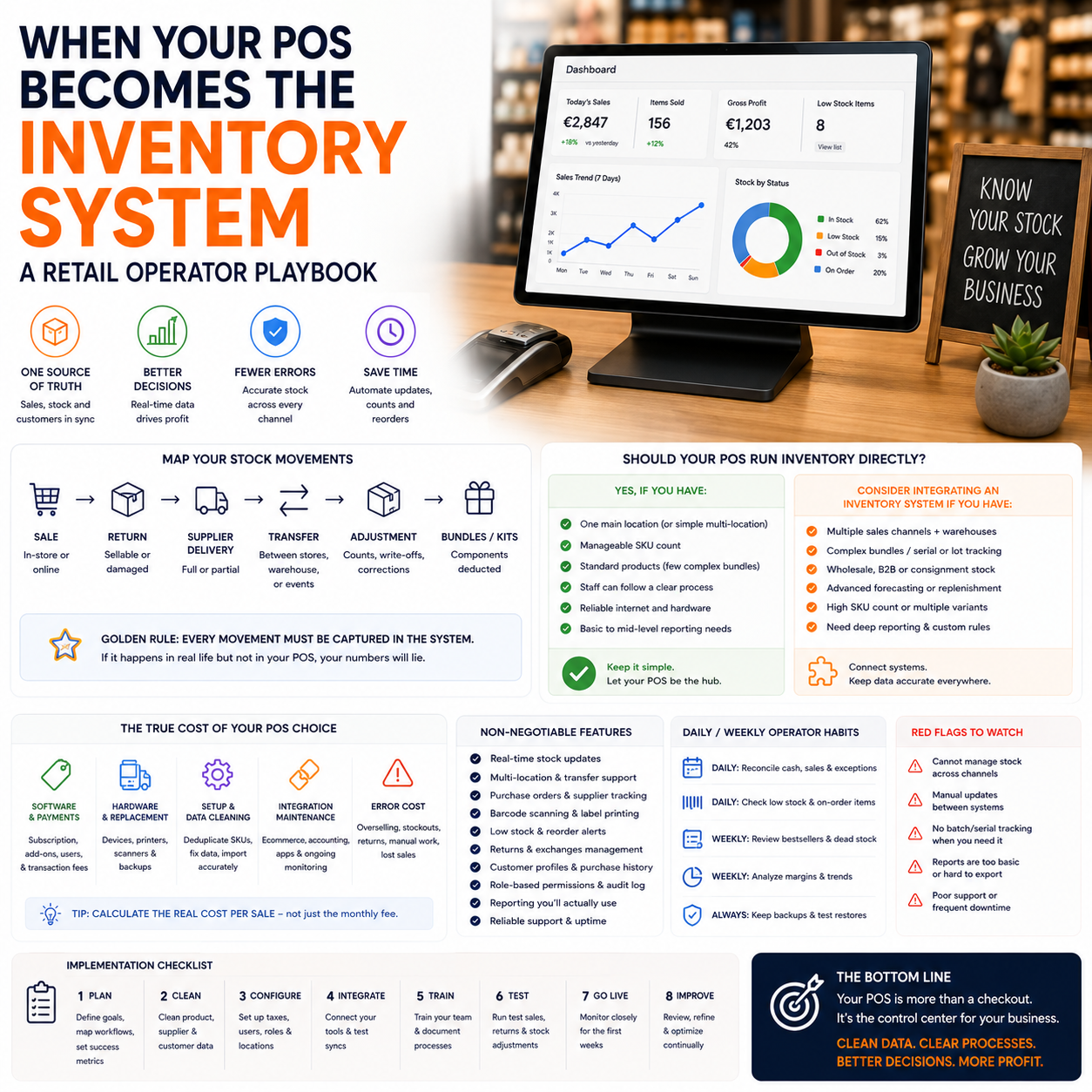
For a small retailer, the POS decision is not really about checkout speed anymore. It is about whether stock, purchasing, online orders, customer history and cash reporting sit in one operating system or remain scattered across spreadsheets, card terminals, ecommerce plugins and memory.
This matters most when the business has both physical and online sales, seasonal stock, multiple suppliers, or a small team that cannot afford daily manual reconciliation. The wrong setup creates stock errors, cash tied up in slow-moving products and customer service problems that are expensive to fix after the sale.
The real POS decision is operational control, not payment processing
A basic cash register records a sale. A modern POS can become the place where the retailer sees what sold, what is left, which supplier needs a reorder, which items are sitting too long, and whether ecommerce stock matches store stock. That is a very different business role.
The operator question is not, “Which POS has the most features?” It is, “Which system should be the source of truth for stock and sales decisions?” If the answer is not clear, the business usually ends up with duplicated data: Shopify or WooCommerce showing one inventory number, the store shelf showing another, and a spreadsheet somewhere trying to explain the difference.
The Small Business Trends article on POS systems frames the POS as the brain of the retail business, not just the checkout point. That is the right way to evaluate the tool. But the practical issue for owners is deciding how much of the business should be allowed to depend on it.
For a single-location retailer with limited SKUs, the POS can often handle sales, inventory counts, reorder alerts and basic customer data. For a retailer with ecommerce, pop-up events, wholesale orders, consignment stock or multiple storage locations, the POS may need to connect to dedicated inventory or asset tracking software instead of trying to do everything alone.
Where stock errors actually enter the business
Most inventory problems are not caused by one dramatic mistake. They usually come from small workflow gaps that repeat every day.
A product is sold in the shop, but the online store does not update quickly enough. A staff member accepts a return but puts the item back on the shelf without updating its condition. A supplier delivers a partial order, but the full purchase order is marked as received. A product bundle is sold online, but the individual components are not deducted from stock. A damaged item is removed physically but not written off digitally.
These are not “technology problems” in the abstract. They affect working capital. Every false stock number can lead to one of three outcomes: overselling, unnecessary purchasing, or missed sales because the system says an item is unavailable when it is actually on hand.
This is why a POS implementation should start with the stock movements that happen in the business, not with the software menu. A small retailer should map each stock event before choosing modules or integrations:
- Sale at the physical checkout
- Online order
- Click-and-collect reservation
- Supplier delivery
- Partial delivery
- Return to sellable stock
- Return to damaged or clearance stock
- Manual stock adjustment
- Transfer between shop, warehouse, event stand or storage room
- Bundle, kit or multi-pack sale
If the POS cannot handle these events cleanly, the owner either needs a stronger POS-inventory setup or a separate inventory tool that integrates reliably.
The cost is not only the monthly software fee
Retail software pricing can make systems look comparable when they are not. One POS may appear cheaper per month but require paid add-ons for advanced inventory, ecommerce syncing, extra registers, staff permissions or reporting. Another may cost more but reduce manual work and stock errors.
The real cost model should include five categories.
1. Software and payment-related costs
Start with the subscription, but do not stop there. Check whether inventory features are included or only available on a higher plan. Review the cost for additional locations, users, registers, barcode scanning, purchase orders, customer profiles and ecommerce integrations. If the POS is tied to a specific payment processor, compare payment fees against your current setup.
2. Hardware and replacement costs
A retailer may need tablets, receipt printers, cash drawers, barcode scanners, card readers, label printers and backup devices. Hardware also creates operational dependency. If the barcode scanner fails during a busy period, can staff still sell and update stock accurately?
3. Setup and data cleaning
Moving to a POS-led inventory system often exposes messy product data. Duplicate SKUs, inconsistent product names, missing supplier references, old variants and unclear tax categories all need cleaning. This setup work can be more expensive in staff time than the first year of software.
4. Integration maintenance
If the POS connects to an ecommerce platform, accounting software, inventory system or email tool, someone must monitor sync failures. A broken integration can quietly create wrong stock numbers for days before anyone notices.
5. Error cost
This is the cost most owners feel but rarely calculate. Oversold online orders create refunds, support time and customer disappointment. Overstock ties cash in shelves. Understock loses sales. Manual reconciliation consumes owner time that should be used for buying, pricing, merchandising or supplier negotiation.
A cheaper POS can be the expensive option if it pushes reconciliation back onto the owner every evening.
When the POS should run inventory directly
For many small retailers, using the POS as the inventory system is sensible. It keeps the operating model simple and reduces the number of systems staff must learn. This works best when the business has a relatively straightforward stock structure.
The POS can usually be the main inventory system when:
- The business has one physical store or one store plus a simple ecommerce channel
- Most products are sold as individual units rather than complex bundles
- Supplier orders are predictable and not heavily customized
- Stock counts can be done by category or cycle count without warehouse-level complexity
- The owner needs practical reporting more than advanced forecasting
- Staff turnover makes simple workflows more valuable than deep configuration
In this setup, the POS should handle product records, SKU-level inventory, reorder points, purchase orders, supplier information, sales reporting and returns. Ecommerce should sync to the POS rather than become a competing stock ledger.
The implementation risk is that owners switch on too many features at once. A better rollout is to first make every sale and return update stock correctly. Then add purchase orders. Then add reorder alerts. Then connect ecommerce. Reporting should come after the data is reliable, not before.
When a separate inventory tool is worth the extra system
The Small Business Trends guide to asset tracking and inventory management software points to a different need: some businesses outgrow simple POS inventory because they need tighter control over assets, locations, tracking and operational detail. For small retailers, the trigger is not size alone. It is complexity.
A separate inventory or asset tracking system may be justified when the retailer has multiple locations, warehouse storage, serialized products, rental items, repairs, B2B orders, kits, batch tracking, or stock that moves between channels frequently. It can also be necessary when ecommerce is the main revenue channel and physical retail is only one stock movement among many.
The downside is operational friction. A separate inventory tool creates another system to configure, another integration to maintain and another place where data can break. The business gains control only if the workflow is designed properly.
A practical rule: add a separate inventory system only when it removes more manual work than it creates. If the owner still needs spreadsheets to check whether the POS, ecommerce platform and inventory tool agree, the architecture is wrong.
The ecommerce sync problem: one stock number, many selling surfaces
The hardest part for hybrid retailers is not taking payments. It is promising stock accurately across the store, website, marketplaces, social commerce and events.
Imagine a small homeware retailer with a physical shop and a WooCommerce store. A popular lamp has three units left. One is on the shop floor, one is in the back room and one is already picked for a click-and-collect order. If the POS and ecommerce site both show three available, the next online buyer may purchase something the business cannot ship. If the website shows zero because the owner is afraid of overselling, the business loses online sales while stock is physically available.
The solution is not simply “sync inventory.” The operator needs rules:
- Which system owns the stock number?
- How often does the ecommerce platform update after a store sale?
- Are click-and-collect items deducted immediately or only after pickup?
- Is safety stock held back from online channels?
- How are damaged, display and reserved items separated from sellable stock?
- Who receives an alert when sync fails?
For small teams, safety stock can be useful. If the system shows five units, the online store might expose only four. That one-unit buffer can reduce overselling when store traffic and online orders happen at the same time. The tradeoff is that some stock may be hidden from online customers. The right buffer depends on sales velocity, product value and the cost of disappointing customers.
What most people miss
The most overlooked part of POS-led operations is staff behavior. Owners often buy software expecting cleaner inventory, but the software only records what the team does consistently.
If staff can complete a sale without scanning the correct SKU, inventory will drift. If returns can be accepted without condition codes, damaged stock will re-enter sellable inventory. If supplier deliveries are received in bulk without checking quantities, reorder reports will be wrong. If manual adjustments do not require a reason, stock losses become invisible.
This is why permissions and process design matter more than many feature comparisons. A small retailer should decide which actions require manager approval:
- Manual stock adjustment
- Refund without receipt
- Price override
- Discount above a set threshold
- Return to sellable inventory
- Deletion or merging of products
- Change to reorder points
These controls are not about mistrusting staff. They protect data quality. Bad inventory data leads to bad buying decisions, and bad buying decisions tie up cash.
A practical rollout for a retailer replacing spreadsheets
A small retailer moving from spreadsheets to POS-controlled stock should avoid a full “big bang” unless the product catalogue is tiny. The safer approach is a staged rollout that proves the workflow before the entire business depends on it.
Stage one: clean the product catalogue before migration
Do not import old spreadsheet chaos into a new system. Remove duplicate products, standardize naming, confirm SKUs, assign suppliers, check product variants and decide how bundles will be treated. If barcodes are missing, decide whether to use supplier barcodes or internal labels.
Stage two: run checkout and inventory together for a limited category
Pick one category with enough sales activity to test the process but not so much risk that mistakes become costly. Track whether every sale, return, delivery and adjustment updates inventory correctly. Staff should use the system in normal trading conditions, not only during a quiet training session.
Stage three: add purchasing logic
Once sales and returns are reliable, configure reorder points and supplier details. The owner should compare suggested reorders against real buying judgment. Early reorder alerts may be wrong because starting stock data is imperfect. Treat the first cycle as calibration.
Stage four: connect ecommerce only after store stock is stable
If ecommerce is connected too early, bad store inventory becomes bad online inventory. Before syncing, define safety stock, reservation rules, return handling and who owns order exceptions. Test with a small product group before exposing the full catalogue.
Stage five: review reports only after two or three trading cycles
Sales and margin reports are useful only when the underlying data is clean. After several purchasing and sales cycles, the owner can start using reports to adjust reorder points, discontinue weak products, identify shrinkage patterns and improve cash planning.
The dashboard a small retailer should actually check
A POS or inventory system can produce more reports than a small team can use. The practical dashboard should be narrow enough to review weekly and specific enough to change decisions.
Useful metrics include:
- Stock accuracy by category: compare system count with physical count during cycle checks.
- Oversold orders: track every time the business sells stock it cannot supply.
- Manual adjustments: monitor frequency, value and reason codes.
- Dead stock value: identify cash tied up in products that are not moving.
- Reorder alert quality: compare system-suggested reorders with actual owner decisions.
- Return condition split: separate sellable, damaged, opened, repaired and clearance items.
- Sync failures: record ecommerce or integration errors and the time taken to fix them.
- Gross margin by product group: use POS sales and cost data to see which categories deserve shelf space.
The point is not to admire reports. Each metric should trigger an action. High manual adjustments may mean staff training or theft risk. Rising dead stock may mean buying quantities are too large. Frequent oversells may mean sync timing or safety stock rules need changing. Weak reorder alerts may mean minimum stock levels were set without considering seasonality.
Decision criteria before you choose the system
Before signing up for a POS or inventory platform, a retailer should test the system against the business model rather than a feature list. The following criteria are specific enough to expose weaknesses during demos and trials:
- Can one product be sold in-store, online and through events without creating separate stock records?
- Can the system reserve stock for click-and-collect or unpaid orders?
- Can staff process returns into different conditions, not just “back in stock”?
- Can purchase orders handle partial deliveries?
- Can reorder points vary by location or channel?
- Can the owner restrict manual adjustments and price overrides?
- Does the ecommerce integration update quickly enough for the sales volume?
- Is there a clear log showing who changed stock and why?
- Can reports show margin by product group, not only revenue?
- What happens if the internet connection drops during trading?
If the vendor or setup partner cannot answer these questions in operational terms, the risk is that the retailer is buying a checkout tool and hoping it becomes a management system later.
POS-first inventory checklist for the next 30 days
For a small retailer already using a POS, the fastest improvement is not necessarily switching software. It is checking whether the existing system is being used as the operating record.
- List every place where stock is currently recorded: POS, ecommerce, spreadsheets, accounting software, supplier portals and notebooks.
- Choose the source of truth for inventory and remove duplicate manual updates where possible.
- Audit the top 50 selling SKUs for correct names, variants, costs, suppliers and barcodes.
- Run a physical count on one important category and compare it with the system count.
- Create reason codes for manual adjustments and require staff to use them.
- Define how returns move into sellable, damaged, repair or clearance status.
- Check whether online stock deducts immediately after purchase, payment, picking or fulfillment.
- Set a small safety stock rule for products that sell both online and in-store.
- Review the last month of refunds caused by unavailable stock and trace the workflow failure.
- Pick three weekly metrics only: stock accuracy, oversold orders and dead stock value.
If those ten actions reveal that the POS can support the workflow, the business may not need a separate inventory platform yet. If they reveal repeated gaps around locations, reservations, partial deliveries or ecommerce sync, the next decision is not “better reporting.” It is whether inventory control has outgrown the POS.


