Two AI signals from India are worth watching if you run a small digital business: video generation is getting priced by the second, and AI call screening is moving into everyday phone workflows. That does not mean every founder should automate content and calls tomorrow. It means the automation math is becoming testable.
For small e-commerce sellers, service firms, marketplace operators and automation builders, the decision is not whether AI is impressive. The decision is whether it removes a real bottleneck without creating a quality-control job that costs more than the original work.
The useful signal is not the funding round, it is the unit cost
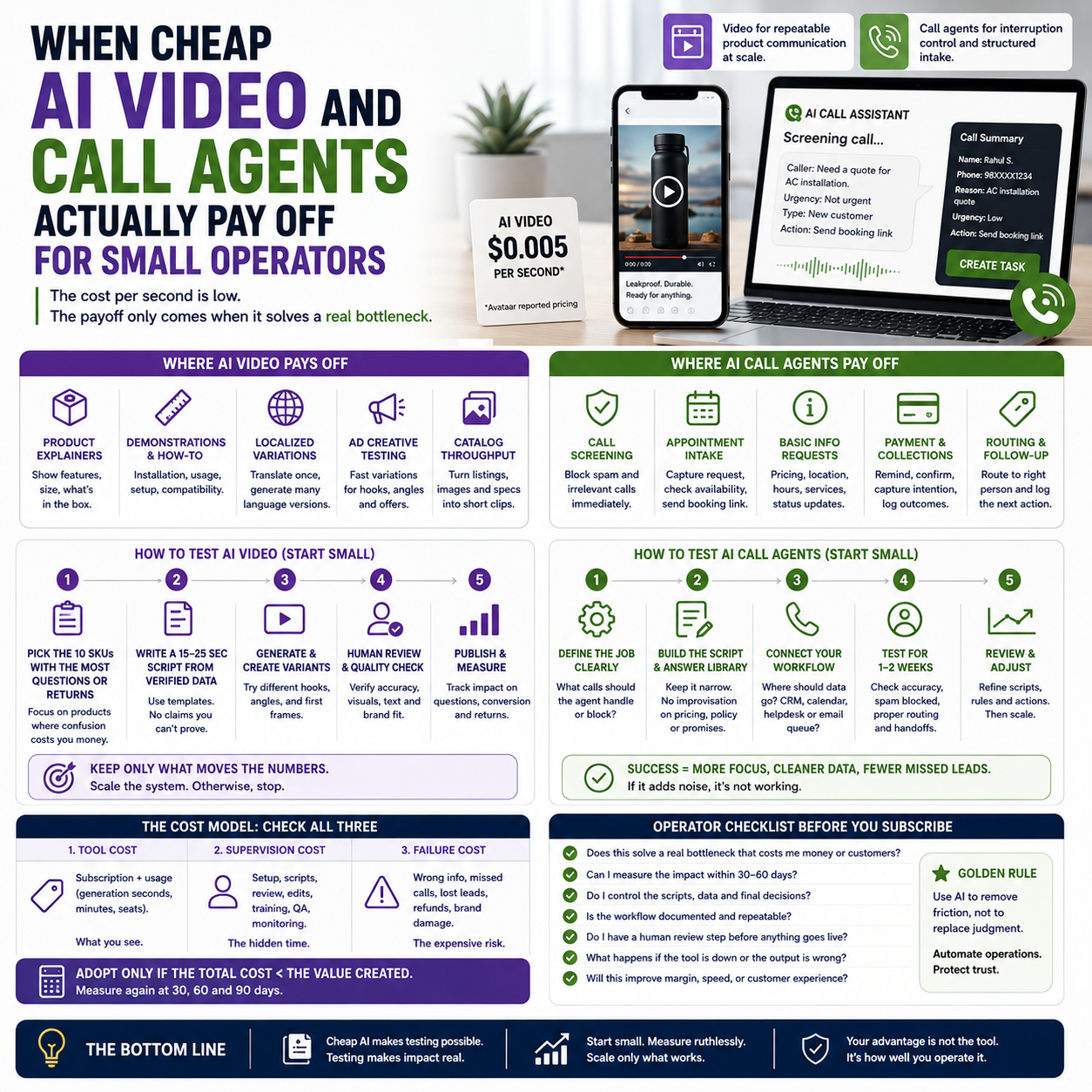
Avataar’s reported pricing of $0.005 per second of generated video is the part operators should pay attention to. At that price, a 20-second product clip has a direct generation cost of about $0.10 before editing, prompt work, review, localization, storage, approval and publishing. That is not a full production cost. It is only the visible meter.
This matters because small businesses usually make poor automation decisions when they compare an AI tool against a fantasy version of manual work. A founder may think, “A product video costs me €150, so AI at cents per second is nearly free.” Wrong comparison. The real comparison is between finished assets that can be used in ads, product pages, marketplaces or sales follow-ups without causing refunds, confusion or brand damage.
The same logic applies to AI call assistants. Equal AI’s call-screening assistant reportedly has more than a million monthly active users and raised $30 million. For a small business, the interesting point is not the round size. It is that phone triage is moving from enterprise contact-center software into consumer-style assistant behavior. That shift can make lightweight call filtering more accessible to solo operators and small teams.
But access is not value.
Where AI video fits: repeatable product communication, not brand storytelling
Cheap generated video is most useful where the message is structured, short and repetitive. Think product variation clips, marketplace explainers, size demonstrations, feature highlights, onboarding snippets and localized ad variations. These are not cinematic jobs. They are communication units.
A small e-commerce seller with 80 SKUs does not need a polished brand film for every product. The operator needs a way to explain texture, scale, use case, installation, compatibility or package contents without manually filming every item. If the AI system can generate acceptable clips from product images, prompts and templates, the value is in throughput.
The workflow should look more like catalog operations than creative production. Create a script pattern. Define allowed claims. Generate variants. Review against product truth. Publish only the clips that pass. Track whether the clip reduces pre-purchase questions, improves ad testing speed or lowers return reasons tied to misunderstanding.
If the video does not change a measurable operational outcome, it is decoration. Decoration is expensive even when generation is cheap.
A practical product-video scenario
Consider a Shopify or WooCommerce seller that sells replacement parts, accessories or home products with many similar listings. The team already has product photos and descriptions, but customers keep asking the same questions: “Will it fit?”, “How big is it?”, “What comes in the box?”, “How do I install it?”
A sensible AI video test would not start with 80 products. It would start with the 10 SKUs that create the most support tickets or avoidable returns. For each SKU, the operator writes a 15 to 25 second script using only verified product data. The AI video tool generates a clip. A human checks the output for wrong claims, misleading visuals, incorrect scale and strange localization. The clip is added to the product page or used as a short ad variation.
The test is judged on three metrics: support questions per product page view, conversion rate on pages with the clip, and refund or return reasons. If those metrics do not move, the operator stops. If they improve, the system expands to the next SKU cluster.
That is how small teams should treat cheap video generation: as an operational experiment attached to a cost center, not as a content trend.
Where AI call screening fits: interruption control, not customer service replacement
AI call screening is attractive for small service firms because phones are expensive in a hidden way. A call interrupts work, forces context switching and often creates unstructured notes that never enter the CRM. For a solo founder, trades business, agency owner or local service operator, the cost is not only talk time. It is lost production focus.
A call assistant can help if it handles a narrow job: identify the caller, understand the reason for the call, block obvious spam, capture urgency, and route the next action. That next action might be a callback, a booking link, a support ticket or a payment reminder. The assistant should not improvise pricing, promise availability, settle disputes or answer technical questions outside approved scripts.
The operational value comes from converting random calls into structured records. A good call-screening workflow should create entries such as: caller name, phone number, existing customer status, reason, urgency, requested service, promised follow-up and transcript link. Then it should push the record into the tool where work actually happens: CRM, helpdesk, calendar, spreadsheet, task board or email queue.
If the assistant only produces a transcript that nobody reads, it is not automation. It is another inbox.
The cost model small teams should use before subscribing
Small operators should calculate three costs before adopting AI video or call agents: tool cost, supervision cost and failure cost.
Tool cost is the easiest. With generated video, it may be priced by seconds, credits, monthly allowance or export quality. With call assistants, it may be priced by user, minute, number, feature tier or integration. This is the visible invoice.
Supervision cost is usually larger. Someone must write prompts, create templates, check facts, approve outputs, maintain scripts, fix failed automations and decide when the AI should escalate to a human. If the founder is doing this personally, the cost is founder time. Treat that as expensive, because it is.
Failure cost depends on the workflow. A bad product video can make a product look larger than it is, imply a feature that does not exist or create a compliance issue in ads. A bad call assistant can mishandle an angry customer, miss an urgent lead or create a record that is too vague to act on. The damage is not always dramatic. Often it is quiet leakage: wasted ad spend, more refunds, slower follow-up and weaker trust.
For a small business, the correct question is not, “Can this AI tool do the task?” The sharper question is, “What is the cheapest safe boundary where this tool can operate without creating more review work than it removes?”
What most people miss
The unpopular answer is that many small teams should automate less of the customer-facing moment and more of the boring handoff around it.
For example, do not let an AI call agent negotiate a service appointment if your pricing depends on context. Let it classify the call, capture the problem, confirm contact details and send the right booking or callback path. Do not ask AI video to invent persuasive product claims. Use it to convert verified product facts into short repeatable visual explanations.
Manual work is not the enemy when the decision is high-value, emotional or exception-heavy. Manual work is wasteful when it repeats the same capture, formatting, routing and publishing steps. The most profitable automation boundary is often smaller than the vendor demo suggests.
Small companies have one advantage over large ones: they can redesign a workflow quickly. They do not need a transformation program. They need a narrow rule: AI may prepare, classify, draft and format; humans approve, price, promise and resolve exceptions.
The implementation risk is workflow drift
Workflow drift happens when a tool is introduced for one narrow reason and slowly starts doing jobs nobody formally approved. A video generator starts making claims that were never checked against the product database. A call assistant starts answering questions based on old scripts. A team member bypasses review because the early outputs looked fine. Then the system becomes operationally messy.
Small businesses are especially exposed because they often lack formal QA, legal review, brand governance or data stewardship. That does not mean they should avoid AI tools. It means they need simple operating limits written down before the first test.
For AI video, define prohibited content: unverified claims, medical or financial promises, unrealistic product scale, fake user testimonials, warranty language, competitor comparisons and region-specific claims that have not been checked. For AI calls, define escalation rules: refund request, complaint, urgent operational issue, legal threat, high-value lead, vulnerable customer, payment dispute, technical uncertainty.
These rules do not need to be complex. They need to be enforced.
The metrics that decide whether the tool stays
Do not measure AI adoption by output volume. More clips and more screened calls can still mean a worse business if the review queue grows, errors increase or customers receive weaker answers.
For AI video, track metrics tied to the product page or campaign where the video is used. Useful indicators include support tickets per SKU, conversion rate for pages with video versus similar pages without video, return reasons linked to misunderstanding, time from product listing to usable video, and ad creative test velocity. The operator should also track rejection rate during review. If half the outputs are unusable, the tool is not cheap.
For AI call screening, track missed-call recovery, average time to first human response, percentage of calls correctly classified, number of spam or low-value calls filtered, booking completion after assistant handoff, and customer complaints related to the assistant. A transcript is not a metric. A correctly routed next action is.
The decision point should be set before the pilot. For instance: keep the video workflow only if it reduces repetitive product questions or improves campaign testing speed without increasing returns. Keep the call assistant only if it reduces interruption and improves follow-up discipline without losing qualified leads.
How to choose the first workflow without being pulled into tool hype
Start with the operational pain, then pick the AI capability. Not the other way round.
If your support inbox is full of product-fit questions, test AI video on product clarification. If your day is fragmented by unknown callers, test call triage. If your team already has clear scripts, structured product data and a CRM or helpdesk, AI can plug into a controlled system. If your internal information is messy, AI will expose the mess faster.
The best first workflow has four traits: high repetition, low creative ambiguity, clear review rules and a measurable business outcome. A product video explaining dimensions fits. A brand manifesto does not. A call assistant capturing callback requests fits. A bot handling angry refund disputes does not.
Operators should also avoid testing AI on their most valuable customer segment first. Begin where the downside is contained: a small SKU group, a secondary phone line, a limited geography, a specific campaign or a narrow service category. Expand only after the review process and metrics prove stable.
30-day operator test for AI video and call screening
Use this as a narrow rollout sequence. Do not buy an annual plan until the workflow survives this test.
- Days 1-3: Pick one bottleneck. Choose either product explanation videos or call triage. Do not test both at full depth at the same time unless someone owns the review process.
- Days 4-6: Define the safe boundary. For video, list claims the AI may use and claims it may never create. For calls, list what the assistant may collect and what must be escalated to a human.
- Days 7-10: Build the smallest workflow. Select 5 to 10 SKUs or one phone route. Connect outputs to the existing system: product page, ad account, CRM, helpdesk, calendar or task board.
- Days 11-17: Run with human approval. Every video and every call summary gets reviewed. Record rejection reasons. The rejection log is more valuable than the demo output.
- Days 18-24: Measure business movement. For video, check support questions, conversion movement, ad testing speed and return reasons. For calls, check interruption reduction, lead capture, classification quality and follow-up time.
- Days 25-27: Tighten scripts and rules. Remove weak prompts, ban risky phrases, improve escalation logic and standardize the fields that must be captured.
- Days 28-30: Decide one of three outcomes. Kill the workflow if it adds review burden without measurable benefit. Keep it narrow if it works only in one use case. Scale it only if the review load, error rate and business metric all make sense together.
The operator standard is simple: cheap AI is useful only when it turns messy work into controlled throughput. If it creates more checking, more uncertainty or more customer confusion, the invoice is lying.


