Small companies often treat hiring as the expensive part and onboarding as a calendar invite. That is backwards for remote teams, small service firms and digital operators where one unclear role can slow down sales, fulfillment, support and founder time at once.
The useful business question is not whether onboarding is important. It is whether your first 30 days give a new hire enough context, access, workflow discipline and feedback to produce without becoming another task for the founder to manage manually.
The real cost is not the hire; it is the unmanaged first month
For a small business owner, a bad first month has a different cost profile than it does inside a large company. There is no spare department to absorb confusion. If a new operations assistant, customer support agent, marketplace manager, sales coordinator or franchise location manager does not understand the workflow, the founder usually pays twice: once in salary, then again in rescue work.
The source signal from Small Business Trends focuses on the need for a softer landing for new hires, especially during the first 30 days. That point matters because many small businesses already spend money and time on recruitment, job boards, interviews, assessments and trial tasks, but then hand the new person a messy inbox, half-documented processes and a vague instruction to “ask if you need anything.” In a remote or digital operation, that setup fails quickly because uncertainty hides inside tools.
The operational risk is not only employee turnover. It is stalled throughput. Orders wait because access to the order management system was not granted. Customer replies vary because tone and refund rules were never explained. Marketing tasks are repeated because naming conventions are missing. The founder believes the employee is slow; the employee is often navigating an undocumented business.
A 30-day onboarding system should therefore be treated as an operating asset, not an HR formality. It is a repeatable workflow that protects margin, customer experience and founder focus whenever the business adds capacity.
Who should build this before the next job post goes live
This playbook is for small team managers, solo founders making their first operations hire, e-commerce sellers hiring remote support, digital agencies bringing in account coordinators, and service businesses that operate with cloud tools rather than a physical office. It is also relevant to people evaluating online or work-from-home franchise models, because those businesses often sell a system, but the owner still has to train people to execute local sales, administration, fulfillment and customer communication.
If the role depends on repeated workflows, shared tools and consistent judgment, onboarding should be designed before the hire starts. That includes roles such as:
- Customer support agent handling email, chat, returns or booking questions.
- Marketplace or e-commerce assistant managing listings, order exceptions and product data.
- Sales development or appointment-setting support for a service business.
- Operations coordinator managing suppliers, contractors, schedules or CRM updates.
- Remote franchise operator or admin assistant following a franchisor system but adapting it to local execution.
The common factor is not job title. It is dependency. If one new person needs access to five tools, has to make small customer-facing decisions, and must understand how the business earns money, then informal onboarding becomes expensive.
Design the first 30 days around output, not orientation
The mistake is to make onboarding a content dump: company history, brand deck, tool logins, a video call with the founder and a long document nobody maintains. A better 30-day structure starts with the output the role must reliably produce by the end of the month.
For an e-commerce support hire, the 30-day output might be: handle standard customer emails, tag exceptions correctly, process returns under defined rules, escalate payment disputes, and update a daily issue log. For a service business sales coordinator, it might be: qualify inbound leads, book calls, update CRM stages, send follow-up templates, and flag unusual objections.
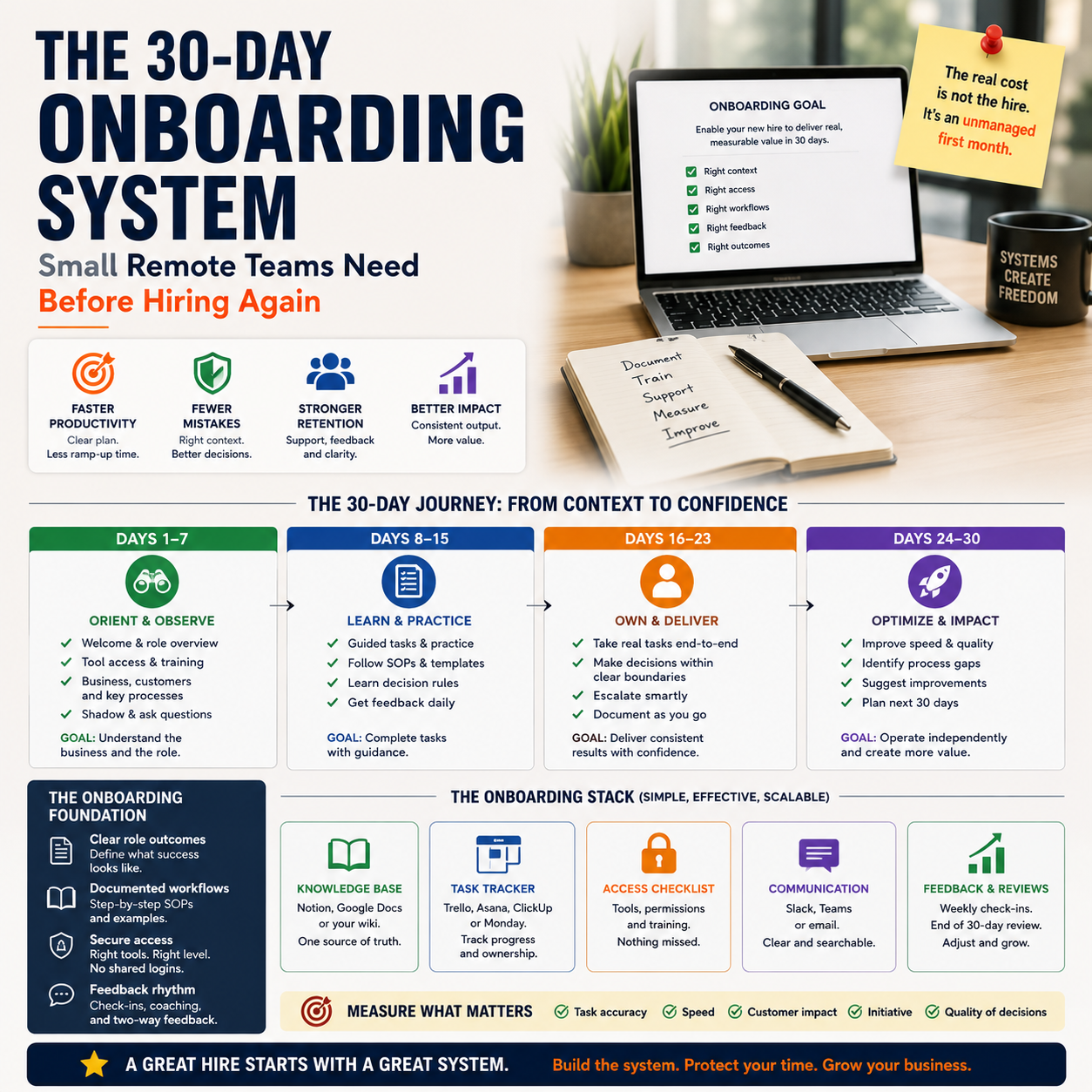
Once the output is defined, the onboarding plan becomes easier to build. The first month should not be a vague ramp-up. It should move through controlled stages of observation, guided execution, limited ownership and measured independence.
What most people miss
Most founders document tasks but fail to document judgment. A new hire can learn where the refund button is, but still not know when a refund is better than a replacement, when to ask for photos, when to protect margin, or when to preserve a customer relationship. That gap creates inconsistent decisions.
Good onboarding captures the decision rules behind the task. For example, a support workflow should not only say “reply to return requests.” It should explain which requests can be approved immediately, which require manager review, which product categories have different handling costs, and which customer situations deserve a goodwill response. That is where small companies protect both cash and reputation.
The onboarding stack: simple tools, strict ownership
A small business does not need enterprise HR software to onboard properly. It needs one source of truth, one task tracker, one access checklist and one feedback rhythm. The stack can be lightweight as long as ownership is clear.
A practical setup could look like this:
- Knowledge base: Notion, Google Docs, Confluence, Slite or a shared Drive folder with controlled structure.
- Task board: Trello, ClickUp, Asana, Monday or the company project management system.
- Access control: Password manager such as 1Password, Bitwarden or Dashlane, plus a written tool-access checklist.
- Communication: Slack, Microsoft Teams, email or a simple daily check-in thread.
- Workflow evidence: Loom recordings, screen captures, saved customer examples and annotated SOPs.
The tool choice matters less than the rule: no onboarding step should live only in the founder’s head. Every repeat question from the new hire is either a training issue, a documentation issue or a process design issue. Treat those questions as system bugs, not interruptions.
Access also needs discipline. Many small teams give broad permissions because it is faster. That creates avoidable risk. A new employee rarely needs full admin access to the store, payment processor, ad account, email platform and CRM on day one. Access should match the onboarding stage. Observation access first, execution access second, admin access only when necessary.
A 30-day sequence that does not overload the founder
The founder’s time is usually the bottleneck, so the onboarding plan must reduce live explanation. The following sequence works for remote roles where the employee needs to understand tools, workflow and decision rules without sitting beside the owner.
Days 1 to 3: context, access and shadowing
The goal is not productivity yet. It is orientation to the business model and operating rhythm. The new hire should understand what the company sells, who the customer is, where revenue comes from, which problems are expensive, and how work moves through the system.
Deliverables for this stage:
- All core tool access requested and confirmed.
- Role scorecard reviewed, including expected outputs by day 30.
- Three to five recorded workflow walkthroughs watched.
- One live shadowing session or recorded review of real work.
- A written list of unclear terms, systems and customer scenarios.
This is also the right time to explain margins and constraints at a basic operating level. A support person does not need the full P&L, but they should know which products are expensive to reship, which services have limited capacity, and which customer promises create operational pain.
Days 4 to 10: guided execution on low-risk tasks
The new hire starts doing real work, but only in areas where mistakes are contained. For an e-commerce assistant, that might mean tagging support tickets, drafting replies for approval, checking order exceptions, or updating product attributes in a staging document before changes go live. For a service business coordinator, it might mean CRM cleanup, call notes, follow-up drafts and lead source tagging.
The founder or manager should review work in batches, not through constant chat interruptions. A daily review window works better than scattered corrections. Each correction should update either the SOP or the decision rule. If the manager gives the same explanation twice, it belongs in the knowledge base.
Days 11 to 20: controlled ownership
This is where onboarding becomes operationally useful. The employee owns a defined slice of the workflow with clear escalation rules. They might handle standard customer replies under a refund limit, process certain order exceptions, prepare weekly marketplace listing changes, or manage the first stage of inbound lead qualification.
The key is to define the boundary. A new hire should know exactly what they can decide, what they can draft but not send, what requires approval, and what must be escalated immediately. Boundaries reduce both overconfidence and hesitation.
Days 21 to 30: measured independence
The final third of the first month should test whether the role is becoming a productive system component. This is not about perfection. It is about whether the person can complete the recurring workflow, use the right tools, make ordinary decisions, escalate exceptions and improve the documentation as they learn.
By day 30, the manager should have enough evidence to decide whether to continue, adjust the role, add training, reduce scope or end the engagement before more cost accumulates.
The metrics that reveal whether onboarding is working
Small companies often measure hiring emotionally: “seems good,” “asks too many questions,” “not proactive enough.” That is unreliable. Onboarding needs a small dashboard tied to the role.
For a customer support hire, useful metrics might include:
- Number of tickets drafted or resolved by category.
- Percentage of replies requiring manager correction.
- Number of escalations, separated by valid and avoidable escalations.
- Average time from ticket assignment to first draft or response.
- Documentation gaps added to the knowledge base.
For an e-commerce operations assistant:
- Order exceptions reviewed per day.
- Listing updates completed without rework.
- Inventory or supplier issues identified before customer complaints.
- Errors caught during review before going live.
- Time saved for the founder on recurring admin work.
For a remote franchise or service business admin role:
- Leads entered with complete source and status data.
- Follow-ups sent on schedule.
- Appointments booked using the correct qualification rules.
- Customer issues routed to the right owner.
- Missed handoffs between sales, delivery and admin.
The metric most founders should watch closely is correction rate. If work volume rises but corrections remain high, the business has not gained capacity. It has created review burden. If correction rate falls while task volume rises, onboarding is converting salary into operating leverage.
Where automation helps and where it should stay out
Automation can make onboarding faster, but it should not replace human judgment too early. The right use of automation is to remove repetitive coordination: access reminders, training task checklists, scheduled check-ins, SOP links, form submissions and review queues.
A simple onboarding automation could trigger when a hire is added to the team workspace. It creates a 30-day task board, sends the access checklist, assigns required training videos, schedules day 3, day 10 and day 30 review prompts, and asks the new hire to submit questions through a form. That form can feed a documentation backlog so the founder can see which parts of the business are unclear.
AI tools can also help convert recorded walkthroughs into draft SOPs. A founder can record a screen share of processing a return, qualifying a lead or updating a product listing, then use transcription and summarization to create a first version of the process. But the founder still needs to edit the decision rules. AI can describe clicks. It cannot know your refund tolerance, supplier constraints, customer lifetime value or cash pressure unless you provide that context.
Do not automate approval authority before trust is earned. A new support hire should not automatically issue refunds, change subscriptions, edit live listings or modify ad campaigns without review simply because the workflow can be automated. Automation should tighten the process, not hide risk.
A practical scenario: the remote support hire in a small online store
Consider a founder running a small online store with growing support volume. The founder hires a remote part-time support assistant because customer emails are eating into product sourcing and marketing time.
A weak onboarding plan would give the assistant access to the helpdesk, a few canned replies and instructions to ask questions. The predictable result is constant interruption. The assistant does not know when to refund, when to reship, how to handle damaged goods, how to tag complaints, or which issues should be logged for supplier review.
A stronger plan starts before the first day. The founder builds a support map with five ticket categories: shipping delay, damaged item, return request, address change and product question. Each category has example replies, allowed actions, escalation rules and margin notes. The assistant gets view-only access to payment and order systems at first, then limited execution rights after completing reviewed drafts.
During days 4 to 10, the assistant drafts replies but the founder approves them. Each correction becomes a note in the SOP. During days 11 to 20, the assistant handles shipping delay and product question tickets independently, while damaged items and refunds remain under review. By day 30, the founder checks correction rate, response time, escalation quality and whether recurring issues are being tagged properly.
The business decision after 30 days is concrete. If the assistant handles standard tickets with low correction and clean escalation, the founder can expand hours or scope. If the assistant is accurate but slow, more templates or better categorization may fix it. If the assistant repeatedly ignores decision rules, the issue is fit, not training volume.
The 30-day onboarding checklist for the next hire
Use this checklist before the next remote or operations hire starts. It is designed for small teams that need productivity without turning the founder into a full-time trainer.
- Define the day-30 output in one paragraph: what work should this person complete without constant supervision?
- List the tools required for observation, execution and administration separately.
- Create a role scorecard with three to five measurable outputs.
- Record at least three real workflow walkthroughs using actual examples, not clean demos.
- Write escalation rules for money, customer complaints, public reviews, refunds, data changes and unusual requests.
- Prepare a task board with day 1, day 3, day 10, day 20 and day 30 checkpoints.
- Set a daily review window for the first two weeks so questions do not scatter across the day.
- Track correction rate, avoidable escalations and documentation gaps from the first real task.
- Convert repeated questions into SOP updates within 24 hours.
- Decide by day 30 whether to expand scope, continue training, redesign the role or stop the engagement.
The rule is simple: if the first 30 days cannot be described as a workflow, the hire will probably become a management tax. Build the workflow first, then let the person prove whether they can operate inside it.