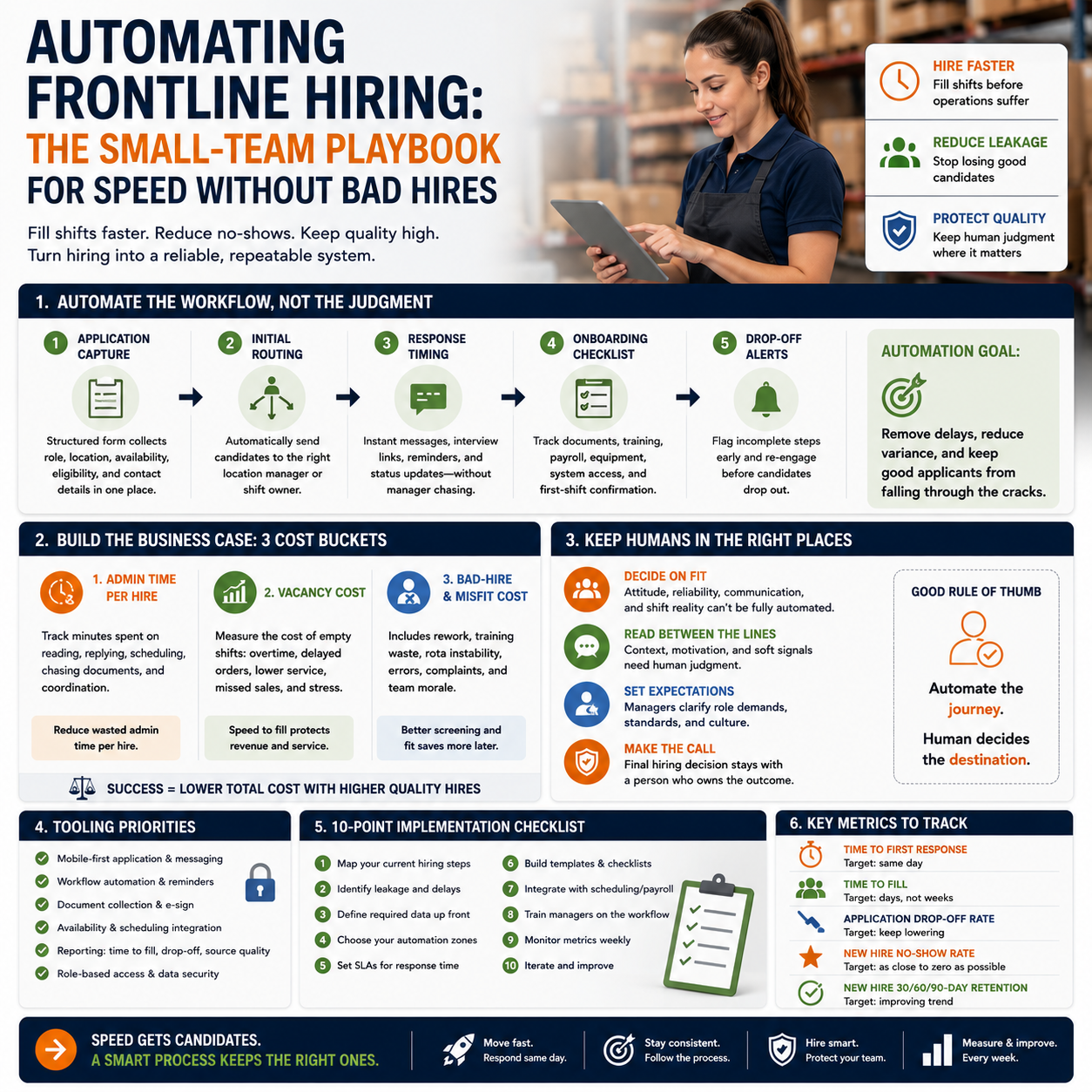
Frontline hiring is where small operators feel automation pressure first. The work is repetitive, response windows are short, and every unfilled shift or delayed onboarding step has an immediate operational cost.
Orbio raising $21 million to automate hiring and onboarding for frontline workers is not just startup news. It points to a real decision for small service businesses, logistics teams, retailers, hospitality operators, warehouse teams, and local multi-site businesses: which parts of hiring should become a system, and which parts should stay deliberately human?
The real problem is not hiring volume. It is hiring leakage.
Small teams often describe their hiring problem as a shortage of applicants. Sometimes that is true. More often, the problem is leakage between steps: slow replies, unclear availability checks, missing documents, forgotten onboarding tasks, inconsistent manager follow-up, and applicants dropping out before anyone knows whether they were suitable.
That matters because frontline hiring does not behave like senior hiring. A founder hiring a head of operations can afford a slower, judgment-heavy process. A business filling warehouse shifts, retail floor roles, delivery coordination, customer support cover, cleaning crews, or seasonal packing work cannot let applicants sit untouched for days while managers compare notes in a chat thread.
Speed changes the funnel.
Automation is useful here only if it removes delay and variance. If it simply adds a chatbot on top of a broken process, it creates a faster mess. The operational decision is not whether AI hiring tools are modern. The decision is whether your current hiring workflow has enough repeatable steps to automate safely.
Where automation actually belongs in a small hiring workflow
The highest-value automation is usually not candidate assessment. It is coordination. Small businesses lose time in the handoffs that sit around the decision, not always in the decision itself.
For a small operator, the practical automation layer usually starts with these workflow parts:
- Application capture: collecting role, location, availability, work eligibility where relevant, expected hours, contact details, and preferred start date in one structured form rather than scattered emails or direct messages.
- Initial routing: sending applicants to the right location manager, shift owner, or department based on role, geography, language, availability, or required documents.
- Response timing: triggering same-day messages, interview booking links, reminder texts, and status updates without waiting for a manager to remember.
- Onboarding checklist control: tracking signed documents, training tasks, uniform or equipment needs, payroll setup, system access, and first-shift confirmation.
- Drop-off alerts: flagging people who started but did not complete a required step within a set time window.
Notice what is missing from that list: fully automated hiring decisions. For most small teams, that should not be the first target. A bad hire in a thin team can cost more than the hours saved by over-automating selection. The earlier win is making sure no viable applicant gets lost because the business runs hiring from inbox memory.
The cost case: compare admin hours, vacancy cost, and bad-hire risk
Do not buy a hiring automation tool because it promises to make recruitment easier. Build a simple cost model first. The tool only makes sense if it removes measurable drag from your operation.
Start with three cost buckets.
1. Admin time currently spent per hire
Track how many minutes your team spends on each step: reading applications, replying, scheduling, chasing documents, answering repeated questions, checking completion, and coordinating the first day. Do this for the last 10 hires if possible. If you cannot get historical data, track it for two weeks.
The number does not need to be perfect. It needs to be honest. If a store manager spends 20 minutes per applicant answering the same three questions and another 15 minutes chasing availability, that is not a recruitment problem. It is a workflow design problem.
2. Vacancy cost
Vacancy cost is not always visible in accounting software. It appears as missed orders, overtime, delayed fulfilment, lower service capacity, exhausted managers, higher error rates, or agency cover. An e-commerce warehouse with missing pick-and-pack staff may not see the cost as a hiring line item. It shows up as late dispatches and support tickets.
Attach the cost to the bottleneck. If one unfilled evening shift forces the owner to pay overtime, slow shipping, or shut off next-day delivery for a product line, the cost is operational. Hiring automation becomes worthwhile when reducing delay protects fulfilment, opening hours, customer response times, or production capacity.
3. Bad-hire and misfit cost
This is where small teams should be careful. If automation makes it easier to push unsuitable people through the process, the business pays later. Rework, manager time, rota instability, customer complaints, training waste, and team morale all become the bill.
The correct cost comparison is not “software subscription versus recruiter hours.” It is “software subscription plus process control versus current leakage, delay, and rework.” That is a harder calculation, but it is the only one that matters.
The human boundary: what a manager should still decide
Automation should compress the path to a decision. It should not pretend that all decisions are the same.
A small business should keep human judgment in places where context matters: attitude under pressure, fit with shift reality, ability to handle customer conflict, reliability signals that are not captured in a form, and whether a person understands the physical or scheduling demands of the role. This is especially important when managers work directly beside the new hire.
Keep humans close to the work.
A practical boundary looks like this: automate collection, routing, reminders, eligibility filters, schedule matching, and checklist tracking. Keep the final screen, role expectation conversation, and first-week feedback loop with the manager. If the business has recurring high-volume roles, the system can recommend next steps. It should not silently replace accountability.
What most people miss
The fashionable advice is to automate as much of hiring as possible because frontline recruitment is repetitive. That is only half right. Some repetition is operationally useful because it forces managers to notice what is changing on the floor.
For example, if every applicant for a warehouse role asks whether heavy lifting is required, that may not be a question to automate away. It may reveal that the job advert is unclear, the role has become harder than the business admits, or the pay no longer matches the work. If a café owner automates all early conversations and only sees people after they have accepted interview slots, they may miss that weekend availability has collapsed in the local labour pool.
Manual friction can be a sensor.
The wrong automation system removes that sensor. The right system captures the questions, objections, abandoned steps, and decline reasons so the owner can adjust pay, shift design, advert wording, location routing, or workload. Do not automate the signal out of the process. Instrument it.
A practical scenario: the small e-commerce warehouse hiring for seasonal volume
Consider a small e-commerce seller preparing for a seasonal spike. The team needs temporary packing support, customer support cover, and one person to help with returns processing. The owner currently posts roles, receives messages across email and social channels, asks managers to reply, and tracks onboarding in a spreadsheet.
The common mistake is to buy a tool and copy the same workflow into it. That gives the team cleaner chaos.
A better operating design would split the hiring process into five gates. Gate one captures structured availability, expected hours, start date, location, and whether the person can work the required peak period. Gate two routes applicants by role type. Packing roles go to the warehouse lead. Customer support cover goes to the support manager. Returns processing goes to the operations owner because product judgment is involved.
Gate three automates interview booking and reminders. Gate four controls onboarding: identity or right-to-work steps where legally required, payroll information, training materials, warehouse safety instructions, system login needs, and first-shift schedule confirmation. Gate five runs the first-week feedback check. That last step stays human because a temporary worker who struggles with accuracy in returns processing may create margin leakage even if they are punctual and pleasant.
The owner does not need an enterprise HR stack to do this. Depending on the business, a lightweight stack could include a form tool, an applicant tracking tool suited to hourly roles, calendar scheduling, automated SMS or email reminders, a shared onboarding checklist, and a dashboard in a spreadsheet or simple database. The system should be boring. Boring systems get used.
Tool selection: choose around bottlenecks, not feature lists
The Orbio announcement reflects growing investor interest in AI agents for frontline workforce processes. For small businesses, the correct response is not to chase every new hiring agent. It is to map the bottleneck first, then choose the least complex tool that fixes it.
If your bottleneck is missed replies, you need automated messaging and status control. If your bottleneck is poor applicant quality, you need sharper role design, screening questions tied to the actual job, and better manager feedback. If your bottleneck is onboarding, you need checklist enforcement and document completion tracking. If your bottleneck is shift matching, you need availability capture and scheduling integration.
Do not buy assessment features when your problem is calendar coordination. Do not buy AI screening when your job advert is vague. Do not buy a full platform when a form, calendar link, message automation, and disciplined checklist would remove most of the pain.
The tool stack should be judged on operational fit:
- Does it reduce manager response time without hiding applicant context?
- Can it separate roles, locations, shifts, and hiring owners cleanly?
- Does it show where applicants abandon the process?
- Can onboarding tasks be assigned and verified before the first shift?
- Can the business export or retain the data it needs if it changes tools?
- Does the system work for applicants on mobile devices?
The last point matters for frontline hiring. A process designed around desktop documents and long email threads will lose people who are applying between shifts, from a phone, or during short breaks.
The labour risk behind automation pressure
The broader AI layoff discussion matters for small operators because it changes the labour market mood. When workers see automation linked with job cuts, they become more sensitive to how hiring systems treat them. A cold, opaque process can damage trust before the person ever joins the team.
That does not mean small businesses should avoid automation. It means the process must show basic respect: clear role requirements, quick status updates, realistic pay and shift information, and no fake personalisation. A bad automated message is worse than a short manual one because it tells the applicant the business wants efficiency without responsibility.
There is also an internal risk. Managers may resist a tool if they think it is designed to replace their judgment or expose every delay. Owners should position the system around operational consistency: fewer missed applicants, cleaner onboarding, less repeated admin, and better visibility into where hiring fails. If managers do not trust the workflow, they will route around it through texts, spreadsheets, and side conversations. Then the business has two hiring systems, one official and one real.
The metrics that expose whether hiring automation is working
A small business does not need a complex HR analytics suite. It needs a handful of metrics that tie hiring to operations.
- Time to first response: how long it takes to acknowledge and move a suitable applicant to the next step.
- Application-to-interview booking rate: whether the process is converting interest into scheduled conversations.
- Interview no-show rate: whether reminders, timing, role clarity, or applicant fit need attention.
- Onboarding completion before first shift: whether documents, training, payroll, access, and equipment are ready on time.
- First-week retention or completion: whether the process is setting accurate expectations.
- Manager admin time per hire: whether the system is actually removing repeated work.
- Abandonment point: where applicants disappear from the workflow.
These metrics should be reviewed by role. A delivery support role may fail at availability matching. A customer support role may fail after applicants see required weekend hours. A warehouse role may fail when training is delayed. Blending all roles into one hiring metric hides the fix.
30-day rollout checklist for a small operator
Use this sequence if hiring is frequent enough to create operational drag but not large enough to justify a heavy HR transformation project.
- Days 1-3: map the current funnel. Write down every step from job post to first completed shift. Include who owns the step, where information is stored, and what commonly gets delayed.
- Days 4-6: identify the top two leakage points. Choose from slow replies, scheduling delays, unclear availability, weak screening questions, missing documents, poor onboarding, or first-week misfit. Do not automate anything else yet.
- Days 7-10: standardise the intake form. Capture role, location, shift availability, start date, required documents where relevant, contact preference, and deal-breaker requirements. Keep it short enough for mobile completion.
- Days 11-14: set response rules. Define which applicants receive an automatic booking link, which require manager review, and which receive a polite rejection or holding message. Assign ownership by role and location.
- Days 15-18: build the onboarding checklist. Include payroll setup, access, training, equipment, first-shift time, manager contact, and any role-specific preparation. Every task needs an owner and a deadline.
- Days 19-23: pilot on one role only. Choose a recurring role with enough volume to test the system. Do not roll it across every job until managers have used it under real conditions.
- Days 24-27: review failure points. Check abandoned applications, no-shows, incomplete onboarding tasks, manager complaints, and applicant questions. Adjust the workflow before adding more automation.
- Days 28-30: decide the next automation layer. If response time is fixed, move to onboarding automation. If onboarding is fixed, improve shift matching. If applicants still fail after interviews, keep selection human and redesign the role brief.
Operating rule: automate the delay, not the judgment. If the system shortens response time, prevents onboarding gaps, and shows where people drop out, it is doing useful work. If it hides context, pushes weak fits through faster, or makes managers less accountable, shut that layer down and rebuild the workflow.


