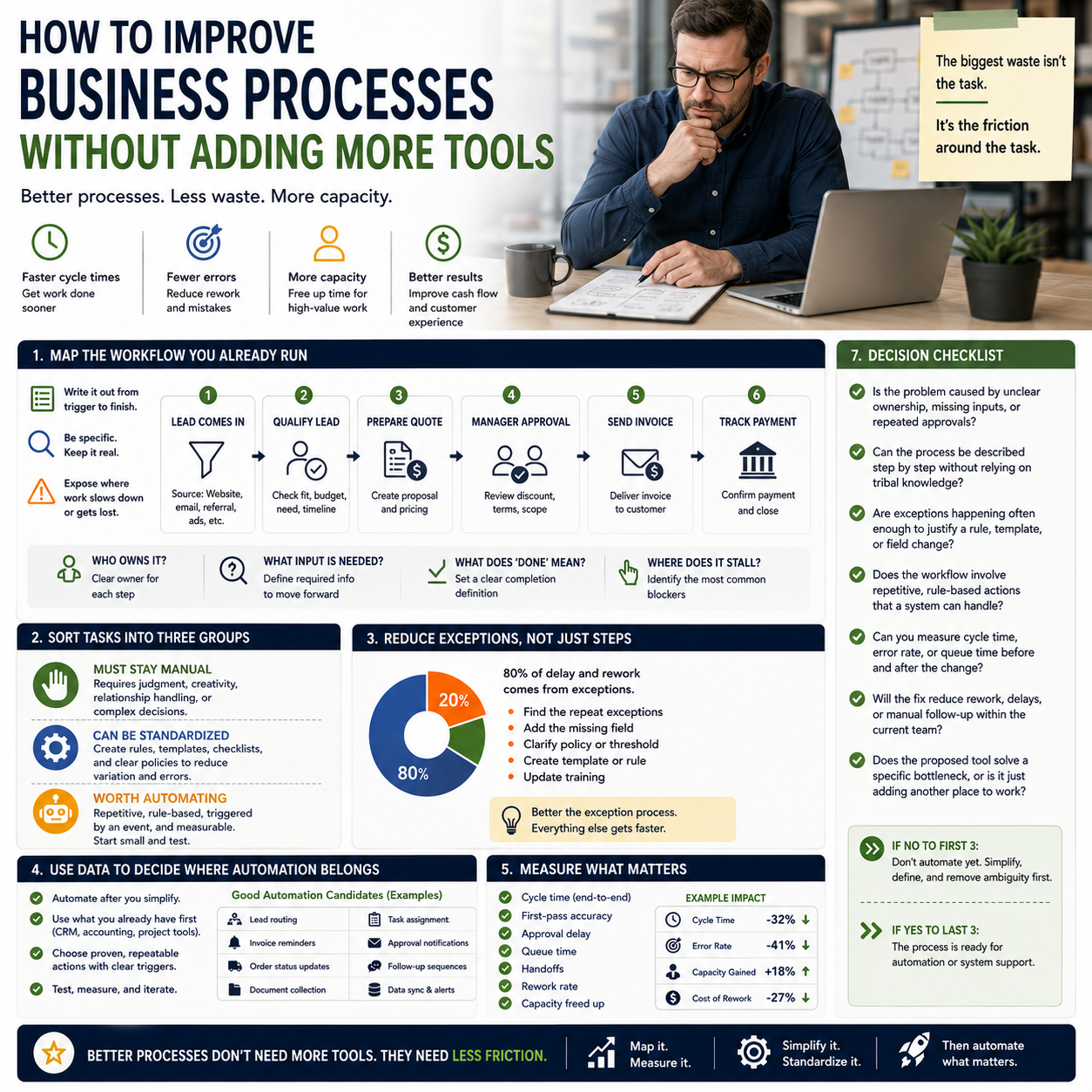
Most process problems do not start with a missing app. They start with unclear ownership, duplicated work, slow approvals, and handoffs that nobody monitors. For small businesses, the fastest gains usually come from tightening the workflow you already have before adding another layer of software.
What process improvement should actually target
If a task keeps slipping, the question is not always “what tool fixes this?” The better question is “where does the work slow down, repeat, or get lost?” Good process improvement removes friction from the steps that affect cash flow, response time, order accuracy, or staff capacity.
The strongest use case is operational: reducing rework in customer support, shortening quote-to-invoice time, cleaning up fulfillment handoffs, or making sure approvals do not sit in someone’s inbox for days. In a small team, every unnecessary step creates a visible cost because the same people are already covering multiple roles.
Start by mapping the workflow you already run
Before changing anything, write out the process in plain language from trigger to finish. Keep it concrete. For example: lead comes in, sales qualifies it, quote is prepared, manager approves discount, invoice is sent, payment is tracked. The value of this exercise is not documentation for its own sake; it is exposing where work depends on memory instead of a repeatable handoff.
Once the process is mapped, identify four things: who owns each step, what input they need, what “done” means, and where it most often stalls. Many small businesses discover that the bottleneck is not production or sales but approval timing, missing information, or unclear thresholds for escalation.
Use the map to separate tasks into three groups: tasks that must stay manual, tasks that can be standardized, and tasks that are worth automating. That distinction prevents the common mistake of forcing automation onto a process that is still unstable.
What most people miss
The biggest source of process waste is often not the task itself but the exception handling around it. A business may have a clean workflow for standard orders, yet spend hours each week managing special cases, missing fields, corrections, and back-and-forth messages. If you only optimize the ideal path, the real operating cost stays hidden.
That is why process improvement should track exceptions separately. If the same exception keeps appearing, the fix may be a form field, a policy threshold, a template, or a rule in your system—not a bigger team. In practice, the businesses that improve fastest are the ones that reduce the number of decisions employees need to make on routine work.
Use process data to decide where automation belongs
Automation works best when a process is already predictable. If you automate a messy workflow, you usually speed up the mess. The right order is: simplify first, standardize second, automate third.
A practical way to choose automation candidates is to look for work that is repetitive, rule-based, and tied to a clear trigger. Examples include lead routing, invoice reminders, order status updates, document collection, or task assignment after a form submission. These are better automation targets than “improve productivity” or “make the team faster,” because they can be measured and tested.
For smaller operators, the real decision is often whether to use lightweight automation inside existing tools or adopt a dedicated system. If the team already uses a CRM, project tracker, or accounting platform, start with the automations already available there. New software should solve a gap, not create one more system to maintain.
Measure the parts that affect money and capacity
Process work should be measured with operational metrics, not vanity metrics. The useful measures are cycle time, first-pass accuracy, approval delay, queue time, and the number of handoffs. For service businesses, track how long it takes from request to delivery. For e-commerce, track order error rate, refund rate, and time from purchase to shipment. For back office workflows, track how long documents sit before review or approval.
The point is to connect process changes to business outcomes. If a workflow is faster but still creates errors, that is not a win. If a team reduces rework and frees up time for higher-value work, you have a real improvement. Good operators measure whether the change reduces delay, lowers error rates, or opens capacity without adding headcount.
It also helps to compare the time spent on routine work versus exception work. If exceptions keep growing, the process is not stable enough to automate broadly. If routine work is dominating the team’s week, standardization and automation will likely deliver a meaningful return.
Practical decisions for founders and operators
Before buying a new workflow tool or redesigning a process, use this checklist to decide what to do next:
- Is the problem caused by unclear ownership, missing inputs, or repeated approvals?
- Can the process be described step by step without relying on tribal knowledge?
- Are exceptions happening often enough to justify a rule, template, or field change?
- Does the workflow involve repetitive, rule-based actions that a system can handle?
- Can you measure cycle time, error rate, or queue time before and after the change?
- Will the fix reduce rework, delays, or manual follow-up within the current team?
- Does the proposed tool solve a specific bottleneck, or is it just adding another place to work?
If the answer to the first three questions is no, do not automate yet. Tighten the workflow, define the decision points, and remove the ambiguity first. If the answer to the last three is yes, the process is ready for automation or system support.