Many small businesses want to automate work before they have written down how that work actually happens. That is usually where the mess starts: owners buy software, teams improvise, and the same task gets handled three different ways. A solid business process description gives you a cleaner map of the work before you spend money on tools or try to scale the team.
This is not about bureaucracy. It is about making decisions with enough clarity to know what should be standardized, what should stay flexible, and what can safely be handed to software or a contractor.
Why process descriptions should come before automation
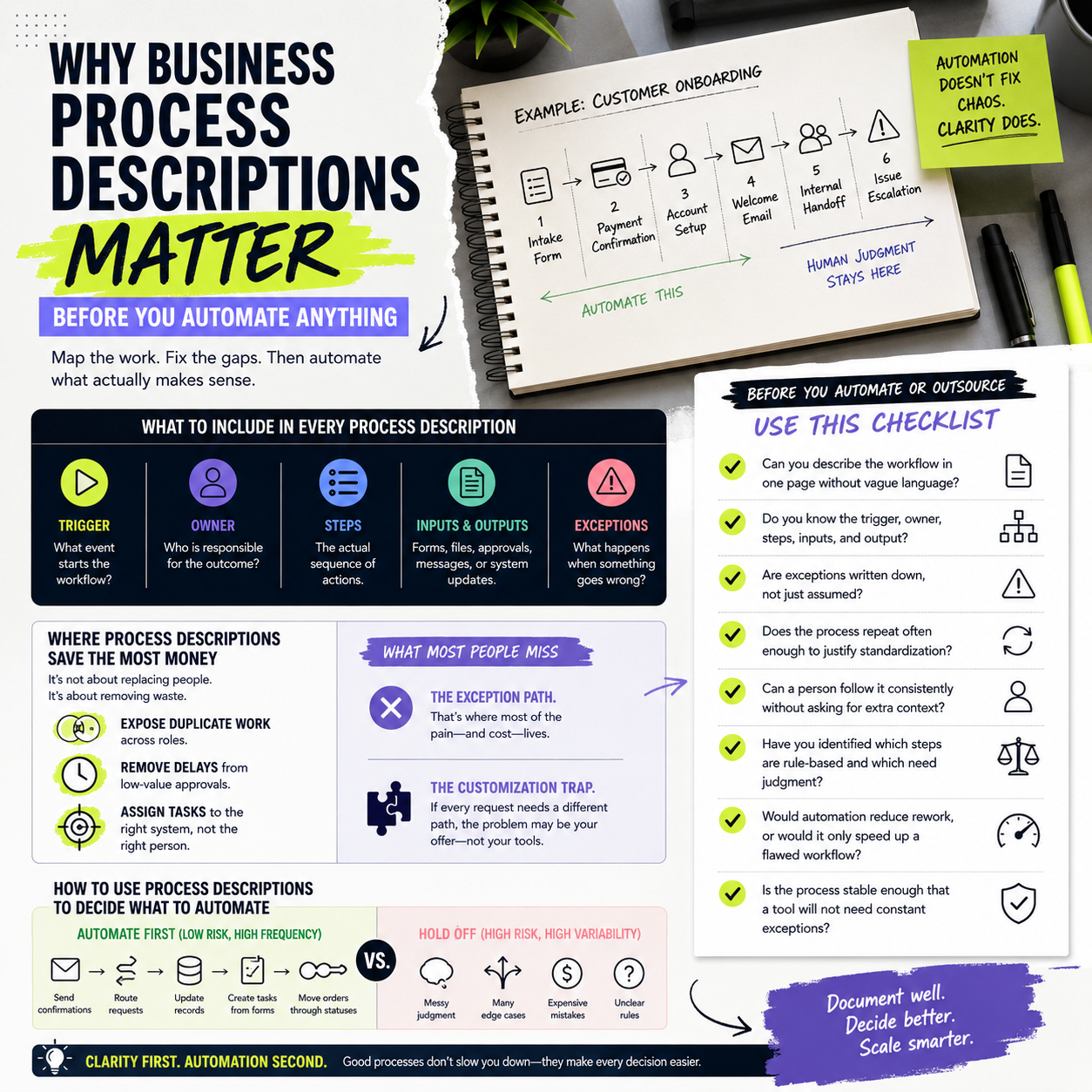
A process description turns an informal task into something you can evaluate. For example, “customer onboarding” may sound simple until you separate the steps: intake form, payment confirmation, account setup, welcome email, internal handoff, and issue escalation. Once those steps are visible, you can see where delays happen and where software can help.
Without that map, automation often locks in bad habits. Teams automate exceptions, duplicate approvals, or unclear handoffs and then spend months untangling the result. The goal is not to document everything perfectly. The goal is to make the work visible enough to improve it.
What should be written into the process description
A useful process description is short, specific, and operational. It should answer who starts the process, what triggers it, what input is required, and what “done” means. It should also show where the process stops and the next team or tool takes over.
For founders and operators, that usually means documenting five items:
- The trigger: what event starts the workflow
- The owner: who is responsible for the outcome
- The steps: the actual sequence, not just a summary
- The inputs and outputs: forms, files, approvals, messages, or system updates
- The exception path: what happens when something is missing, late, or wrong
This level of detail is enough to compare the current process with the version you want to run later. It also makes handoffs easier to train, audit, and improve.
Where process descriptions save the most money
The biggest savings usually come from removing rework rather than from replacing staff. If your team keeps asking the same question, fixing the same mistake, or chasing the same missing detail, the process is already expensive even if no one has quantified it.
Process descriptions help you find three common cost leaks. First, they expose duplicate work across roles. Second, they show which approvals add delay without adding value. Third, they make it easier to assign a task to the right system instead of the right person. That matters for businesses with lean teams, because every manual step competes with growth work.
What most people miss
Many teams document the “happy path” and ignore exceptions. That is a mistake, because exceptions are where most operational pain lives. If your process description does not show what happens when a payment fails, inventory is out of stock, a customer sends incomplete information, or a supplier misses a deadline, then your workflow is still too vague to automate safely.
Another missed point is that a process description can reveal whether the business model itself is too customized. If every order or client request needs a different path, the issue may not be software. It may be that the offer is too broad for the current team structure.
How to use process descriptions to decide what to automate
Not every repeatable task should be automated. Some tasks are repetitive but still need judgment. Others are simple enough to automate now. A process description helps you separate the two.
Start with tasks that are frequent, rule-based, and low-risk. Examples might include sending confirmations, routing requests, updating records, creating tasks from forms, or moving an order through status changes. These are the workflows where automation can reduce manual effort without creating major downside if something goes wrong.
Hold back on automating anything that depends on messy judgment, unusual exceptions, or expensive mistakes. In those cases, use the process description to standardize the human workflow first. Then automate only the parts that are stable.
How to keep the process useful after the first draft
A process description should not live in a forgotten folder. It should be treated as a working document that changes when the business changes. New tools, new channels, new team members, and new customer promises can all break a workflow that used to work fine.
The easiest way to keep it useful is to review it when one of three things happens: the team keeps making the same mistake, the process starts taking longer than expected, or you are about to introduce a tool that depends on it. That review should not be long. It only needs to confirm whether the steps, owner, and exception path still match reality.
A simple checklist before you automate or outsource
- Can you describe the workflow in one page without using vague language?
- Do you know the trigger, owner, steps, inputs, and output?
- Are exceptions written down, not just assumed?
- Does the process repeat often enough to justify standardization?
- Can a person follow it consistently without asking for extra context?
- Have you identified which steps are rule-based and which need judgment?
- Would automation reduce rework, or would it only speed up a flawed workflow?
- Is the process stable enough that a tool will not need constant exceptions?
If the answer to most of these questions is no, document the process before buying software or assigning it to someone else. That is usually the lowest-risk way to improve operations, protect margins, and avoid building automation on top of confusion.


