AI security is not a future enterprise problem. It is already showing up in small companies through browser assistants, meeting tools, customer support bots, spreadsheet copilots and staff experiments with AI agents. The operational question is no longer whether a tool is impressive, but whether it should be allowed to touch your customer data, order history, inbox, files, payments, code or ad accounts.
Recent reporting on how even Google is navigating AI security in real time is a useful warning for smaller operators: if large technical teams are still adjusting their controls, a small business cannot rely on informal judgment alone. The practical response is not to ban AI. It is to create a lightweight approval workflow before tools become embedded in daily operations.
The risk is not the chatbot; it is the permissions around it
Most small companies think about AI risk at the wrong layer. They ask whether an AI tool gives accurate answers, writes useful copy or saves time. Those questions matter, but they are not where the largest operational exposure sits.
The bigger issue is what the tool can access and what it can do after access is granted. A writing assistant with no access to live systems is a different risk from an AI agent connected to Gmail, Shopify, WooCommerce, Google Drive, Slack, Notion, Stripe, Meta Ads, customer support tickets or a CRM. Once a tool can read, summarize, classify, send, update or trigger actions, it becomes part of the operating system of the business.
For a small team, this matters because access is often granted casually. One employee installs a browser extension. Another connects an AI meeting note-taker. A founder tests an agent with a shared inbox. A freelancer uses a tool to process customer exports. None of these may feel like a security decision at the time, but each one changes the company’s data boundary.
The business problem is simple: AI adoption is happening faster than internal permissions, documentation and review habits. That gap is where avoidable risk appears.
Decide which AI tools are allowed to touch operational systems
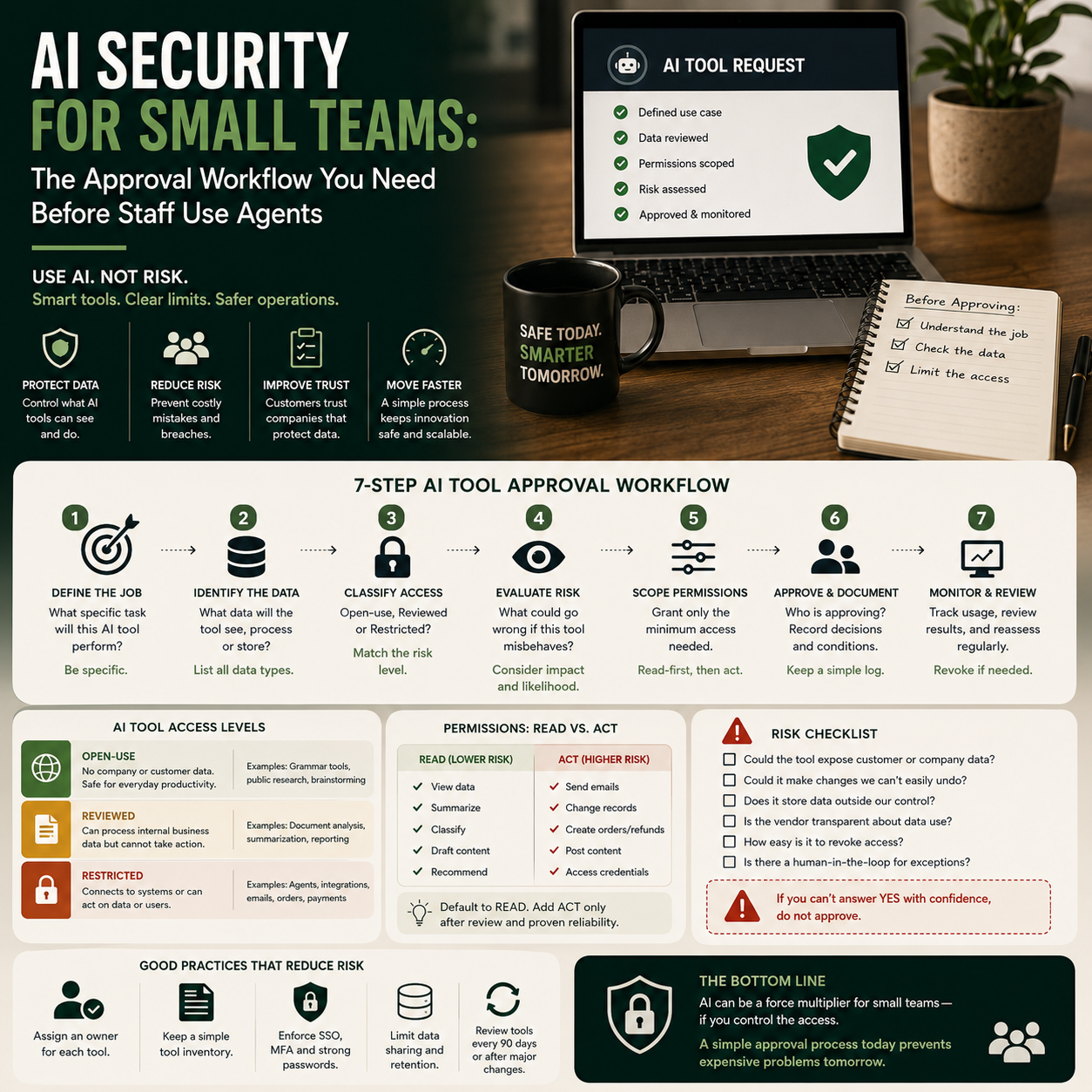
A small company does not need an enterprise procurement department. It does need a clear distinction between three types of AI usage.
- Open-use tools: AI tools that staff may use without approval because no company, customer, financial or confidential data is entered.
- Reviewed tools: AI tools that may process business information but cannot directly change live systems or send external messages.
- Restricted tools: AI tools or agents that connect to operational platforms, customer records, payment systems, advertising accounts, code repositories or shared inboxes.
This classification gives the founder or operations lead a decision point before a tool becomes business-critical. For example, using AI to rewrite a product description from a public product page may be open-use. Using AI to analyze a CSV export of customer orders is reviewed. Connecting an agent to your e-commerce backend so it can update product listings, refund orders or answer customers is restricted.
The most important rule: do not evaluate AI tools only by brand reputation or feature set. Evaluate them by access level. A less famous tool with no permissions may be safer than a well-known tool connected to half your stack.
The founder’s approval workflow before connecting an AI agent
The workflow below is designed for a small business where one founder, operator or team lead needs a realistic process that does not slow everything to a halt. It should take minutes for low-risk use and longer only when a tool wants sensitive access.
Step 1: Write down the job the tool will perform
Before approving a tool, describe the operational job in one sentence. Not “use AI for support” or “automate marketing”. Be specific: “summarize support tickets and suggest draft replies”, “classify new leads by urgency”, “turn supplier emails into purchase tasks”, or “flag product pages missing delivery information”.
This prevents tool-first adoption. If the job is vague, the approval should stop. Vague use cases tend to expand quietly, and the permissions requested by the tool may become broader than the business need.
Step 2: List the data the tool will see
For each AI tool, record whether it will see public content, internal documents, customer data, payment-related information, employee information, supplier pricing, contracts, ad account data or login credentials. This does not need to be complicated. A simple internal table is enough.
The key question is whether the same task can be done with less sensitive data. If a support bot only needs order status, it may not need full customer history. If an AI assistant is summarizing sales calls, it may not need access to the full CRM. If a content tool is rewriting product descriptions, it may not need margin data or supplier terms.
Step 3: Separate reading from acting
Reading data is one risk. Taking action is another. Many AI tools now move from analysis into execution: sending emails, creating tasks, changing records, posting content, updating product pages, generating invoices or triggering workflows through automation platforms.
For small teams, the safest default is read-only first. Let the tool observe, summarize, classify or draft before it can act. Action permissions should be added only after the output has been reviewed for a defined period and the team knows what mistakes look like.
A customer support agent, for example, can begin by drafting replies inside a helpdesk without sending them. Later, it may be allowed to send responses only for low-risk categories such as delivery tracking or return policy links. Refunds, complaints, chargeback mentions and legal threats should remain human-handled unless the company has a very controlled process.
Where small companies usually underestimate the cost
The direct subscription fee is rarely the full cost of AI adoption. A tool that costs little per month can still create operational cost if it adds review work, creates customer mistakes, leaks data into unmanaged systems or produces errors that need cleanup.
Operators should price AI tools against four cost lines.
- Subscription and seat cost: the monthly fee, extra user seats and any usage-based charges.
- Setup time: connecting apps, writing prompts, configuring automations and testing outputs.
- Review cost: the human time needed to approve drafts, check classifications, monitor logs and correct mistakes.
- Error cost: refunds, customer support escalations, incorrect product information, ad waste, compliance issues or staff time spent undoing wrong actions.
This is why a cheap agent can become expensive if it is connected too widely. The useful business question is not “How much does this tool cost?” but “Which human review work does it reduce, and which new review work does it create?”
For an e-commerce seller, an AI product listing assistant may save time by drafting descriptions. But if it invents compatibility claims, delivery promises or warranty wording, the review cost moves to operations and customer support. For a service business, an AI inbox assistant may reduce admin time, but if it misroutes a high-value lead or sends an incomplete reply, the cost appears in missed revenue rather than software spend.
A practical scenario: adding AI to customer support without handing it the business
Consider a small online retailer with a shared inbox, a helpdesk, a Shopify or WooCommerce store, and two people handling customer messages. The founder wants to reduce repetitive support work around order status, delivery timing, returns and product questions.
A weak implementation would connect an AI support tool directly to the inbox, let it read every message, generate replies and send them automatically. That may look efficient, but it creates several risks at once: the tool sees all customer messages, it may answer outside policy, it may promise exceptions, and it may mishandle angry or legally sensitive messages.
A controlled implementation would be staged differently. First, the AI tool is connected in draft-only mode. It can read selected support categories but cannot send replies. The team reviews its suggested responses for two weeks and tags errors by type: wrong policy, missing context, tone issue, order-specific mistake or unnecessary escalation.
Second, the business creates a narrow automation lane. The tool may draft replies for order tracking, return instructions and “where is my invoice?” messages. It cannot handle refund approval, damaged goods claims, chargeback language, medical or safety complaints, bulk orders, supplier issues or messages from marketplaces with strict seller rules.
Third, the company measures whether the AI is actually helping. The metrics are not abstract. Track first response time, number of replies reviewed per hour, percentage of drafts accepted without edits, escalation rate, repeat contact rate and customer complaints caused by incorrect replies. If review time stays high, the tool may not be saving money even if it feels modern.
What most people miss
The hidden security issue in small companies is not one dramatic breach. It is permission sprawl. AI tools get tested, connected, forgotten and then remain attached to business systems long after the experiment ends.
This is common because small teams move quickly. A founder approves a tool during a busy week. A contractor connects a plugin for one project. An employee tests a browser assistant to summarize documents. Months later, nobody is sure which tools still have access to the company’s Google Workspace, Slack, store admin, helpdesk or CRM.
That creates two operational problems. First, the company cannot manage risk because it does not know the access map. Second, offboarding becomes weak. If a freelancer or former employee used an AI tool connected through their own account, the business may not fully control the data trail or permissions.
The fix is basic but often skipped: maintain an AI access register. It should include the tool name, owner, purpose, connected systems, data type, permission level, approval date, renewal date and removal process. For a small team, this can be a spreadsheet. The discipline matters more than the format.
Smartglasses and ambient AI make the same problem physical
The renewed attention around AI-powered smartglasses is relevant for operators even if most small businesses will not buy them immediately. Wearable AI changes the location of data capture. Instead of staff typing prompts into a tool, the device may capture voice, images, meetings, screens, products, customers or workplace conversations.
That creates a different policy question for small retailers, showrooms, workshops, agencies and service teams: where is AI-assisted recording or visual capture allowed? A smart device used for stock checking or remote assistance may be useful. The same device used around customer conversations, payment terminals, private documents or employee discussions may create trust and operational issues.
Small businesses should avoid treating ambient AI devices as ordinary hardware purchases. They are input devices for business data. Before staff use them in a workplace, decide whether they are allowed in customer areas, warehouses, supplier meetings, finance discussions, product development sessions or screens where personal data is visible.
This is not about rejecting new hardware. It is about recognizing that AI security is moving from software permissions into physical workflows.
The dashboard that tells you whether AI is controlled or drifting
A small company needs only a few metrics to know whether AI adoption is under control. The goal is not to build a security bureaucracy. The goal is to spot drift before it becomes expensive.
- Approved AI tools: count tools currently allowed, grouped by open-use, reviewed and restricted.
- Connected systems: list which tools can access email, documents, store admin, helpdesk, CRM, payments, ads or code.
- Draft acceptance rate: for AI-generated replies, listings, reports or tasks, track how often humans approve without major edits.
- Error categories: record the common mistakes the AI makes, not just whether output is “good” or “bad”.
- Human review time: measure whether AI reduces work or simply shifts work into checking and cleanup.
- Access review age: flag tools that have not been reviewed in the last quarter.
- Automation incidents: track wrong sends, incorrect updates, customer complaints, policy breaches or manual rollbacks caused by AI-assisted workflows.
If these numbers are not visible, the business is probably running AI by trust and memory. That may work when one founder tests one tool. It fails when a team, freelancers and connected apps start adding AI into daily work.
Approval checklist before the next AI tool gets connected
Use this checklist before an AI assistant, agent, plugin, meeting tool, browser extension or wearable AI device is allowed into business workflows.
- What exact operational job will the tool perform?
- Which systems will it connect to?
- What data will it read?
- Can the same task be done with less sensitive data?
- Is the tool read-only, draft-only or allowed to take action?
- Who owns the tool internally?
- Who reviews mistakes and how often?
- What actions are blocked from automation?
- How will access be removed if the tool is no longer used?
- Which metric will prove that the tool is saving time or reducing errors?
The operating rule is simple: no restricted AI tool should enter the business without an owner, a purpose, a permission level and a review date. If those four items are missing, the company is not adopting AI; it is accumulating unmanaged access.