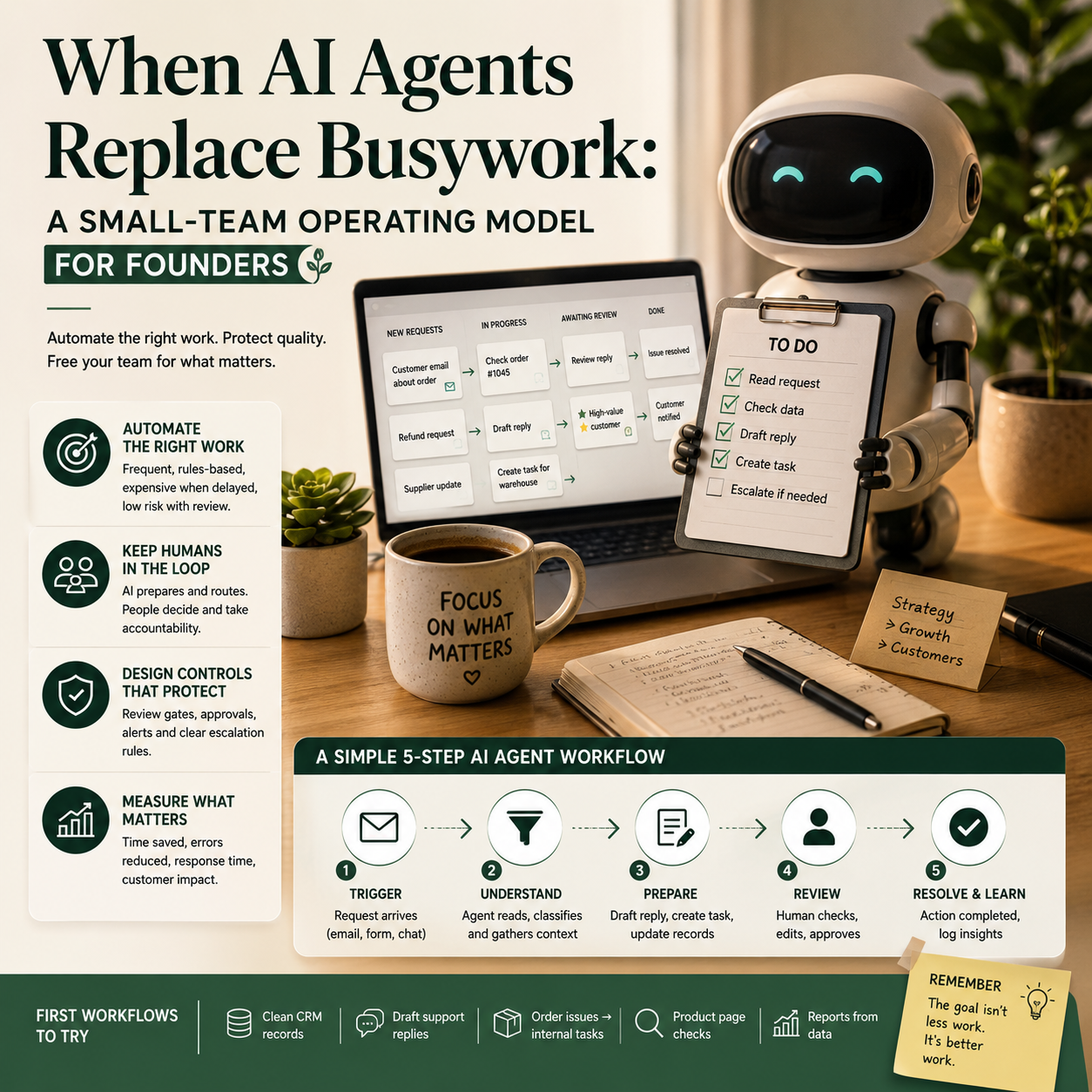
ClickUp’s reported move to replace hundreds of roles with thousands of AI agents is not just a large-startup employment story. For small teams, the useful question is more practical: which work should be handed to agents, which work should remain human-owned, and what controls prevent automation from quietly damaging operations?
The wrong lesson is to copy a mass-replacement strategy. The better lesson is to redesign work around accountable workflows, because small businesses do not have spare management layers to catch broken handoffs, wrong customer replies, duplicated tasks or invisible quality loss.
The decision is not “AI or people”; it is which workflow can survive automation
Small teams often start with AI in the wrong place. They test it on visible tasks such as writing posts, drafting emails or summarising meetings. Those uses may save time, but they rarely change the cost structure of the business unless they are connected to a repeatable workflow with a clear trigger, input, owner and measurable output.
The ClickUp story matters because it points toward a different model: software companies are not only adding AI features; they are rethinking the labour needed to run internal operations. That does not mean a five-person business should replace staff with agents. It does mean founders should stop treating AI as a side tool and start asking where routine operational work is currently trapped inside people’s inboxes, spreadsheets and chat threads.
The best early targets are workflows that are frequent, rules-based and expensive when delayed, but not catastrophic if reviewed before completion. Examples include cleaning CRM records, preparing draft customer support replies, turning order issues into internal tasks, checking whether product pages are missing required fields, summarising supplier updates, or generating first-pass reports from ad spend and sales data.
The worst targets are workflows where the cost of a bad answer is high and hard to detect: refund disputes, legal wording, final pricing decisions, account suspensions, supplier negotiations, sensitive HR messages, or customer complaints that require judgement. AI can support those workflows, but it should not own them end to end without a review gate.
Where a small business should look first: the work between tools
Most small companies do not suffer because one task takes too long. They suffer because work sits between systems. An order issue appears in Shopify or WooCommerce, a customer asks about it in email, a supplier update arrives by spreadsheet, a team member logs a note in Slack, and nobody has a single operational view of what needs to happen next.
This is where AI agents can be useful. Not as magical employees, but as routing and preparation layers. An agent can read a support request, match it to an order, classify the issue, check whether the item has shipped, draft a reply, create a task for the warehouse or supplier, and flag the case if the customer is high-value or the order is delayed beyond a threshold.
For an e-commerce operator, this is more useful than asking AI to “improve customer service” in the abstract. The workflow has a trigger, a data source, a decision point and a measurable result. If the average time from customer email to correct internal action drops, the agent has value. If the agent creates messy tasks that humans must repair, it is not saving money.
The same logic applies to service businesses. A lead enters a form, AI enriches the record from provided fields, drafts a qualification summary, creates a CRM task, prepares a proposed discovery-call agenda, and alerts the owner only when the lead matches agreed criteria. The owner is not replaced. The owner is protected from low-value sorting work.
The cost model founders should use before adding agents
AI-agent projects become wasteful when founders calculate only the software subscription cost. The real cost includes setup time, workflow design, data cleanup, review time, error handling, staff training and maintenance when tools change their interfaces or policies.
A practical cost model should separate four buckets:
- Tool cost: the monthly fee for AI, automation, CRM, helpdesk, project management or integration software.
- Build cost: the time spent mapping the workflow, writing prompts, connecting tools, testing outputs and documenting handoffs.
- Review cost: the human time required to approve, correct or reject agent outputs.
- Error cost: refunds, rework, customer churn risk, wrong internal tasks, duplicated work or missed exceptions.
The decision should not be based on whether the agent feels impressive in a demo. It should be based on whether the workflow’s total cost per completed action falls without increasing operational risk. A support agent that drafts replies may look useful, but if staff spend the same amount of time checking every detail because the system cannot reliably access order status, the saving is mostly cosmetic.
A better first calculation is simple: choose one workflow and measure how many times it happens per week, how long it currently takes, who handles it, what errors occur, and what must be reviewed. Then automate only the preparation and routing layer first. After two or three weeks, compare the human time saved against the time spent correcting outputs.
What most people miss
The main risk is not that AI gives one wrong answer. The bigger risk is that it creates operational noise at scale. A human doing repetitive admin may be slow, but they often notice context: a repeat customer sounds unusually frustrated, a supplier update contradicts last week’s promise, a refund request hints at a product-page issue. An agent may process each item separately and miss the pattern unless the workflow is designed to capture it.
Small businesses should therefore avoid measuring only output volume. More draft replies, more created tasks or more generated summaries are not automatically better. The better metric is clean throughput: how many items moved from trigger to correct next action without rework.
This is also where human ownership matters. Every AI-assisted workflow needs a named human owner, not because the owner must do the task manually, but because someone must maintain the rules, inspect failures and decide when the workflow should change. Without that owner, agents become another layer of unmanaged software.
A practical boundary map: replace, assist or block
Before deploying agents, founders should sort workflows into three groups. This prevents a common mistake: automating a task just because the tool can do it.
Work AI can replace after testing
These are tasks where the output is structured, the rules are stable and errors are easy to detect. Examples include tagging support tickets, extracting invoice data for review, creating task cards from approved forms, checking product listings for missing fields, preparing meeting summaries, or drafting weekly KPI notes from connected dashboards.
The review rule can be light. A person checks samples, exceptions and trend reports rather than every item. This is where small teams may see real time savings.
Work AI should assist but not own
This includes customer replies, sales follow-ups, refund recommendations, ad-performance interpretation, hiring shortlists, supplier communication and product-description changes. AI can prepare drafts, compare options or surface missing information, but a human should approve the final action.
This category often delivers the best return for small teams because it reduces blank-page work while keeping judgement close to the business owner or manager.
Work AI should be blocked from completing
Some actions should require human control by default: issuing large refunds, changing product prices, sending legal or compliance language, terminating accounts, approving supplier payments, changing payroll data, deleting records, or making promises about delivery dates when stock data is uncertain.
AI may prepare context for these decisions, but it should not execute them. For a small company, one badly automated decision can consume more management time than the automation saved in a month.
The ClickUp signal for small teams: management work is becoming system design
The reported ClickUp layoff and agent strategy reflects a broader operational shift: companies are trying to convert repeatable coordination work into software-managed flows. The small-business version should be less aggressive and more controlled. The aim is not to boast about the number of agents in use; it is to reduce the number of unresolved handoffs.
This changes the founder’s job. Managing a small team increasingly means designing the work system: what enters the workflow, what data is required, what the agent may do, when a human is notified, how exceptions are logged, and which metric proves the system is working.
That is why project-management and operations tools matter. If tasks are vague, customer records are incomplete and product data is inconsistent, adding AI agents may simply accelerate confusion. The businesses that gain the most will be the ones with clean fields, clear statuses and boring but reliable operating rules.
The Stord funding news points to a related pressure in e-commerce operations. Fulfilment, logistics and order infrastructure are becoming more software-driven because merchants want faster, more reliable execution without building everything themselves. For smaller sellers, the same pattern applies internally: do not build complex AI systems where a specialist platform already handles the workflow better. Use agents where your own handoffs, data checks and communication loops create avoidable labour.
Scenario: a five-person online seller adds agents without losing control
Consider a small online seller with one founder, two customer-support staff, one operations assistant and one part-time marketer. The store sells across its own site and marketplaces. The recurring pain is not marketing ideas; it is order exceptions. Customers ask where parcels are, suppliers send stock updates, marketplace messages need fast replies, and the founder keeps getting pulled into routine questions.
A poor automation plan would connect an AI chatbot to every customer channel and let it answer freely. That may reduce visible inbox volume while creating hidden risk: wrong delivery promises, inconsistent refund wording and annoyed customers who need a human anyway.
A better plan starts narrower. The team chooses one workflow: “Where is my order?” messages. The agent is allowed to do five things. It reads the message, identifies the order number or asks for it, checks order status in the commerce platform, checks tracking data where available, drafts a reply using approved language, and creates an internal task only if the order is delayed, missing tracking or marked delivered but disputed.
The agent is not allowed to issue refunds, promise replacement shipments or blame the carrier. Those require human approval. For the first two weeks, support staff review every draft. After the error patterns are known, the team allows automatic replies only for low-risk cases, such as orders shipped on time with valid tracking and no complaint language. Everything else remains human-reviewed.
The metric is not “number of AI replies sent.” The dashboard tracks average first-response time, percentage of messages correctly classified, number of drafts edited before sending, number of escalations, repeat contacts about the same order, and refunds linked to communication errors. If repeat contacts rise, the agent may be fast but unclear. If staff edit nearly every draft, the prompt or data access is not ready.
This is the level of specificity founders should demand. If the workflow cannot be described this clearly, it is probably too early to automate execution.
The tool stack should stay boring
Small teams do not need a complicated agent architecture to start. They need a reliable chain of systems. A typical stack may include the commerce platform, helpdesk, CRM or customer database, project-management tool, automation connector and AI layer. The exact brands matter less than whether each system has clean fields and stable permissions.
The most important setup choices are practical:
- Give the agent access only to the data needed for the workflow.
- Use approved response blocks for customer-facing language.
- Create separate statuses for “AI drafted,” “human approved,” “exception,” and “failed automation.”
- Log every automated action so mistakes can be traced.
- Keep destructive actions, such as refunds or record deletion, behind human approval.
Founders should also budget for maintenance. Product names change, shipping policies change, suppliers miss deadlines, marketplace rules shift and internal processes evolve. An agent that was accurate in June may create errors in September if nobody updates its instructions and data sources.
Metrics that show whether agents are helping or just moving work around
A small business should track agent performance like an operations project, not like a novelty tool. The dashboard can be simple, but it must expose rework and risk.
Useful metrics include:
- Clean completion rate: the percentage of items handled correctly without human repair.
- Review time per item: how long staff spend checking drafts or outputs.
- Exception rate: how often the workflow falls outside the agent’s permitted rules.
- Reopen or repeat-contact rate: whether customers come back because the first answer did not solve the issue.
- Escalation accuracy: whether the right cases reach a human quickly.
- Error cost: refunds, credits, wasted labour or customer complaints linked to automation mistakes.
If the agent reduces first-response time but increases repeat contacts, the system is not improving operations. If it creates many tasks but managers ignore them, the workflow is producing clutter. If staff do not trust the outputs, adoption will fail even if the software works technically.
Rollout sequence for a founder before replacing any task
Use this sequence before giving an agent ownership of a workflow:
- Pick one repeatable workflow: choose a task with volume, clear inputs and a known owner.
- Write the human version first: document how a good employee handles the task, including exceptions.
- Define forbidden actions: list what the agent cannot do without approval.
- Connect only necessary data: avoid broad access that increases risk without improving output.
- Run in draft mode: let the agent prepare work while humans approve every action.
- Measure rework: track edits, corrections, escalations and customer follow-ups.
- Automate low-risk cases only: expand permissions where the agent has proved reliable.
- Assign an owner: one person must maintain prompts, rules, permissions and failure logs.
- Review monthly: remove agents that create noise, widen only the workflows with clean completion and low error cost.
The useful lesson from AI-agent adoption is not that small companies should rush to remove people. It is that founders should stop letting routine coordination live undocumented inside human memory. Once the workflow is visible, parts of it can be automated, parts can be assisted, and the judgement-heavy parts can stay exactly where they belong.