AI is moving from novelty buttons into workflow control points. The useful question for a small digital business is not whether AI can summarize, classify or generate. It is whether that output changes a process enough to justify cost, quality control and support risk.
Studocu’s use of NLP and AI around study materials is a useful signal because the product is not just adding a chat box. The operational idea is tighter: convert messy content into usable actions such as notes, explanations, practice questions and lecture material. That is the part small operators should study.
The real decision: feature, workflow, or product line
Most small businesses approach AI from the wrong entry point. They start with a tool list. Then they ask where it might fit. That usually creates disconnected automations: a summarizer here, a chatbot there, a content generator somewhere else. The stack grows, but the operating model barely improves.
The better question is: where does information currently get stuck? For a digital operator, that may be product descriptions waiting for cleanup, support tickets waiting for classification, supplier files needing standardisation, customer calls needing notes, or user-generated content needing moderation. AI has value when it reduces a specific bottleneck or converts raw material into a next action.
Studocu’s example is useful because the raw material is not already clean. Study documents, long readings, lecture content and difficult terms all require interpretation before they become useful. That mirrors many small-business workflows. A customer email is not a task until it is classified. A supplier PDF is not inventory data until it is extracted. A call transcript is not a sales follow-up until next steps are identified.
This is the operator-level distinction:
- AI feature: A single capability added to an existing interface, such as summarise, rewrite or translate.
- AI workflow: A sequence where AI output triggers review, routing, storage or action.
- AI product line: A monetised customer-facing experience where AI output becomes part of the value proposition.
Small teams should usually start at workflow level, not product level. Productising AI too early creates support obligations before the team understands failure patterns. A workflow can stay internal while the business measures accuracy, review time and exception rates.
Start inside the machine.
Where AI belongs in a small company stack
For a small e-commerce seller, service business or digital publisher, AI should sit between messy input and operational decision. That is where margin is usually lost. Staff time disappears into interpreting messages, copying data, fixing inconsistent content and deciding which request matters first.
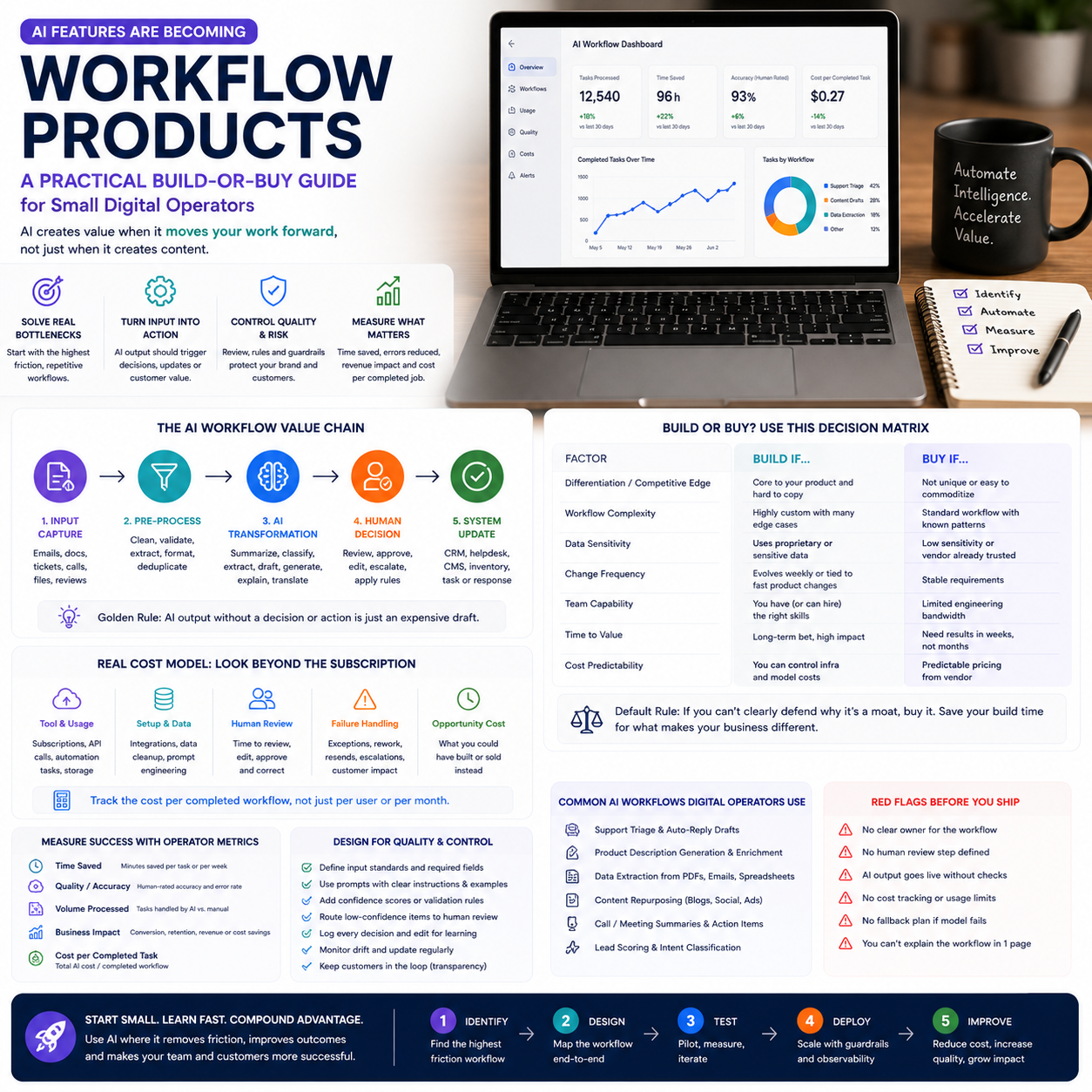
A practical AI workflow has five layers:
- Input capture: Email, forms, support tickets, product feeds, call transcripts, uploaded documents or customer reviews.
- Pre-processing: Cleaning, deduplication, language detection, file conversion and basic validation.
- AI transformation: Summarisation, classification, extraction, drafting, question generation or explanation.
- Human decision point: Approval, correction, escalation or rejection.
- System update: CRM entry, helpdesk tag, CMS draft, inventory field, task assignment or customer response.
The mistake is treating the third layer as the whole project. It is not. The transformation is only valuable if the surrounding layers are designed. Without input rules, AI receives inconsistent material. Without review rules, errors leak. Without system updates, staff still copy and paste output manually.
For example, a small online course seller could use AI to convert webinar transcripts into lesson summaries, quiz questions and support article drafts. That sounds simple. The useful version is more controlled: transcripts go into a shared folder, the system checks audio-to-text quality, AI generates three outputs, an editor reviews only flagged sections, approved material enters the CMS as drafts, and questions with low confidence go into a human review queue.
That is a workflow. Not a toy.
Cost is not just the AI subscription
Many small teams budget AI by looking at the monthly software price. That is too narrow. The real cost model includes setup, usage volume, review time, failure handling and customer support. If the AI feature touches customers directly, add reputational risk and refund risk to the calculation.
There are four cost buckets operators should separate before buying or building:
Direct tool and usage cost
This includes subscriptions, API calls, transcription minutes, storage, automation platform tasks and integration tools. A low subscription price can still become expensive if the workflow processes thousands of records or requires multiple paid tools to complete one job.
Small teams should calculate cost per completed workflow, not cost per tool. If a product description workflow uses a feed importer, AI rewriting, translation, image tagging and CMS publishing automation, the unit is one approved product page. Not one AI generation.
Human review cost
Review time is often the largest hidden cost. If AI drafts a response in ten seconds but a team member spends three minutes checking it, the business has not automated the process. It has changed the shape of labour. That may still be worth it, but only if the review is faster than original production and produces fewer errors.
Track review time per item for the first month. Do not estimate it. Time it. If the workflow is internal, a rough manual log is enough. If it is customer-facing, use helpdesk or project management timestamps.
Exception handling cost
AI systems fail unevenly. They may handle standard cases well and break on edge cases: mixed-language tickets, poorly scanned PDFs, unusual product attributes, ambiguous customer complaints or regulated claims. A workflow without an exception lane will dump these cases back into the team without context.
Exception cost includes rework, escalation, customer clarification and manager intervention. It should be visible in a dashboard, even if the dashboard is only a spreadsheet at first.
Maintenance cost
Prompts, templates, taxonomy, product categories and policy rules change. If nobody owns the workflow, accuracy decays. A small team does not need an AI department, but it does need an owner who checks outputs, updates instructions and removes broken automations.
The maintenance question is blunt: who fixes the workflow when it starts producing acceptable-looking but wrong output?
What most people miss
The unpopular answer is that some processes should stay partly manual longer than founders want. Not because AI is weak, but because the business has not yet learned the decision rules well enough to automate them.
If a process is inconsistent, politically sensitive, margin-critical or legally risky, AI should first be used as a diagnostic layer, not an execution layer. Let it label, summarise and surface patterns. Do not let it decide, publish, refund, approve, reject or send without a human gate.
This is especially true in small businesses where one bad workflow can hit cash flow quickly. A large company can absorb a few thousand poor recommendations or support mistakes. A small operator may see the damage in chargebacks, bad reviews, wasted ad spend or supplier disputes.
There is another uncomfortable point. Manual work is sometimes the cheapest way to discover the workflow. If your team cannot write down how a good support response is chosen, what makes a product description compliant, or when a lead deserves a callback, automation will only hide the confusion behind polished output.
Before automating, run a manual sample. Take 50 real items: tickets, product pages, invoices, reviews, transcripts or leads. Process them by hand. Record the decision criteria. Identify the repeatable parts and the judgement-heavy parts. Then automate only the repeatable parts first.
This slows the launch. Good.
A practical scenario: turning customer questions into reusable operating assets
Consider a small e-commerce business selling technical accessories across several EU markets. The team receives repeated customer questions about compatibility, delivery times, returns and installation. The owner wants an AI chatbot because support volume is rising. That may be the wrong first move.
A better first workflow would use AI internally to classify incoming questions and turn repeated answers into approved knowledge-base drafts. The system does not answer customers automatically at first. It helps the team build reusable support assets and measure where demand clusters.
The workflow could look like this:
- Support tickets enter the helpdesk as usual.
- An automation sends new tickets to an AI classifier.
- The classifier assigns intent labels such as compatibility, shipping, return, installation, warranty or stock status.
- Tickets with low confidence are marked for manual classification.
- For repeated questions, AI drafts a knowledge-base answer using approved product data and policy text.
- A team member reviews the draft, corrects it and publishes only approved answers.
- The helpdesk macro library is updated from the approved knowledge-base entry.
This gives the owner three useful outcomes before exposing AI to customers. First, the business learns which support categories create the most workload. Second, it builds a controlled answer library. Third, it creates measurable review data: classification accuracy, draft acceptance rate, average handling time and repeated-question volume.
After that, a customer-facing chatbot becomes a more rational decision. The business can feed it approved content instead of hoping a general tool understands policies, products and edge cases. The risk falls because the knowledge base already exists.
This is how small teams should think: AI first as an operating lens, then as an assistant, then possibly as a customer-facing product.
Build, buy, or assemble: the operator’s choice
Small teams rarely need to build AI infrastructure from scratch. But they do need to decide whether to buy a finished tool, assemble a workflow from existing tools, or build a custom layer using APIs. Each choice has a different risk profile.
Buy when the workflow is standard and not a source of differentiation. Examples include meeting notes, basic helpdesk drafting, document summarisation or internal search across company files. Buying is faster and usually safer if the vendor already handles permissions, logging and integrations.
Assemble when the workflow crosses several tools but does not require proprietary engineering. This is common for small digital operators. A form triggers an automation; AI extracts fields; a human reviews; approved data enters a CRM, CMS or spreadsheet. The stack may include a helpdesk, automation platform, database, AI service and task manager.
Build when the workflow is core to the product, affects customer experience directly, or requires a proprietary dataset. If the AI output is what customers pay for, relying entirely on a generic tool may limit control. But building also introduces model monitoring, security, uptime and support responsibilities.
The wrong choice is buying a customer-facing AI layer before the business has internal process discipline. That creates a glossy interface over weak data. Customers will find the gaps faster than the team can patch them.
The metrics that show whether AI is actually working
AI projects often get judged by activity: number of drafts generated, tickets tagged, documents processed or prompts used. Those numbers are easy to produce and mostly useless. Operators need metrics tied to cost, speed, quality and risk.
Use a small dashboard with these fields:
- Input volume: How many items entered the workflow.
- Automation completion rate: Percentage that moved through without technical failure.
- Human review time: Average minutes spent checking each output.
- Acceptance rate: Percentage of AI outputs approved with minor or no edits.
- Exception rate: Percentage routed to manual handling.
- Error severity: Low, medium or high based on business impact.
- Cost per approved output: Tool cost plus estimated labour cost per usable result.
- Downstream effect: Reduced handling time, faster publishing, fewer repeated tickets, better lead routing or fewer data-entry errors.
The acceptance rate matters more than generation volume. If AI produces 1,000 drafts and only 200 are usable, the workflow is not productive. It is noisy. If it produces 200 drafts and 170 are approved quickly, that is a real operating asset.
Exception rate is equally important. A high exception rate is not always bad during testing; it shows the boundaries. But if exceptions remain high after rules and prompts are improved, the process may not be a good automation target yet.
Implementation risks small teams underestimate
The main risk is not that AI will fail dramatically. The bigger risk is that it will be plausible enough to pass a rushed review. That is where small businesses get hurt: wrong product claims, inconsistent policy answers, misclassified leads, inaccurate summaries or incomplete customer histories.
There are five controls worth installing early:
- Approved source rules: AI should use defined documents, product data or policy text where possible.
- Confidence thresholds: Low-confidence outputs must go to human review, not customers.
- Change logs: Keep records of prompt changes, workflow edits and approval rules.
- Role permissions: Not every employee should be able to alter prompts or publish AI-generated material.
- Sampling audits: Review a random sample of approved outputs every week during rollout.
Small teams should also avoid connecting AI directly to irreversible actions at the start. Do not let it issue refunds, cancel orders, approve supplier payments, change inventory records or send sensitive customer messages without a review gate. Those actions can come later, if the workflow earns trust.
Automation should be promoted like an employee. First observe. Then assist. Then handle simple cases. Then handle higher-risk cases with supervision. Only later should it operate independently in a narrow lane.
30-day rollout sequence for an AI workflow product
| Day range | Operator action | Output to create | Metric to watch | Stop condition |
|---|---|---|---|---|
| Days 1-3 | Select one workflow with repeated inputs and visible labour cost. Avoid high-risk customer-facing actions. | Workflow map showing input, AI task, review point and system update. | Current handling time per item. | The team cannot define what a good output looks like. |
| Days 4-7 | Process a manual sample of real items and write decision rules from actual work, not assumptions. | Rule sheet with examples of accepted, rejected and escalated outputs. | Number of repeatable patterns found. | Most items require unique judgement. |
| Days 8-12 | Build a limited internal AI workflow using existing tools. Keep output away from customers. | Prototype automation with logging and manual approval. | Technical completion rate. | Outputs cannot be traced back to inputs. |
| Days 13-18 | Run live items through the workflow while staff continue normal operations. | Review queue with approved, edited and rejected outputs. | Acceptance rate and review time. | Review takes as long as doing the work manually. |
| Days 19-23 | Fix prompts, source material, categories and exception rules based on real errors. | Versioned prompt and updated escalation rules. | Exception rate by category. | Errors are high-severity or hard to detect. |
| Days 24-27 | Connect approved outputs to the operating system: CMS drafts, CRM notes, helpdesk macros or task records. | Controlled system update step with permission limits. | Cost per approved output. | The integration creates duplicate work or data conflicts. |
| Days 28-30 | Decide whether to scale, hold, or kill the workflow. | Go, hold or stop decision with owner assigned. | Labour saved, quality trend, exception rate and maintenance burden. | No measurable improvement in speed, cost or quality. |


