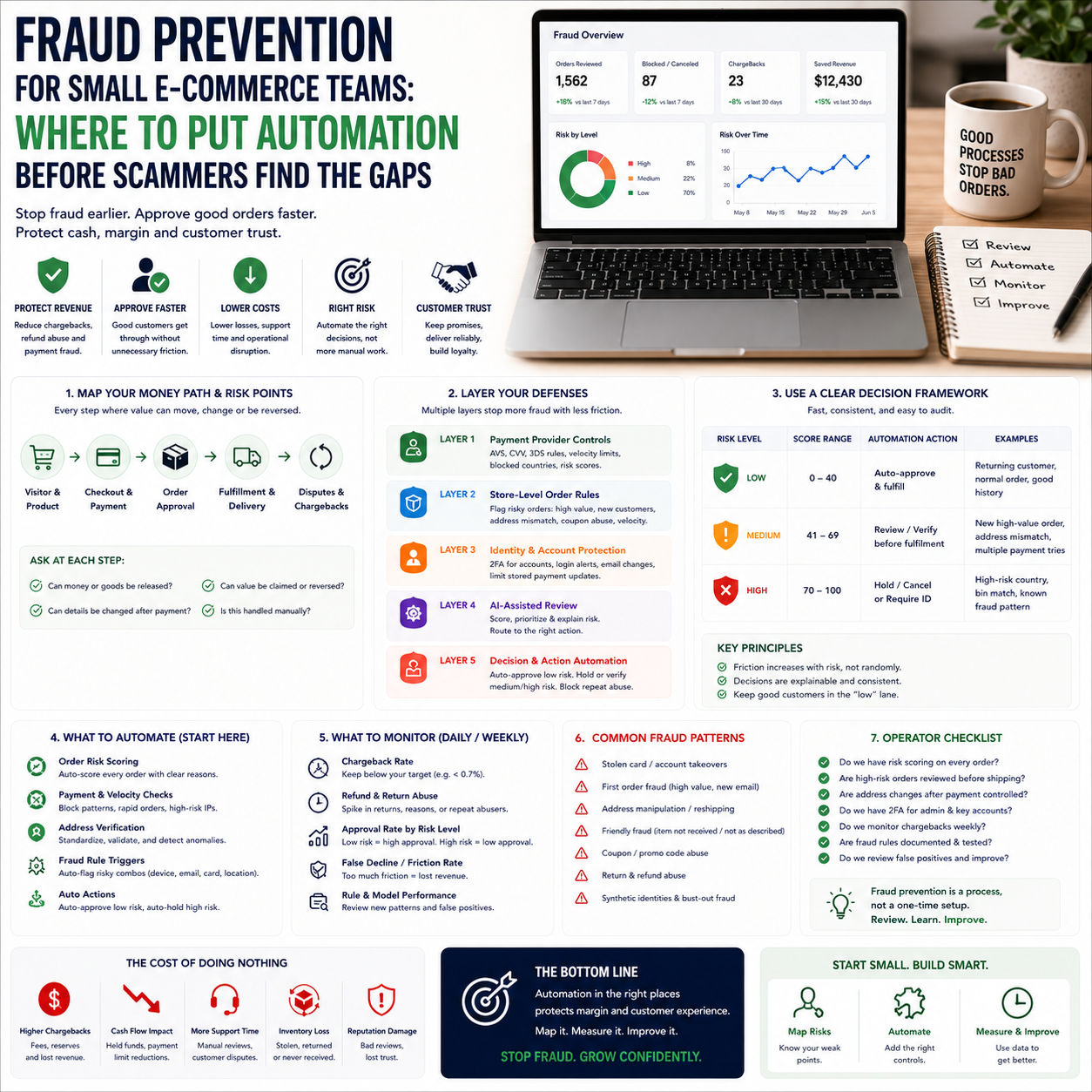
Fraud prevention is moving from back-office clean-up to live operational control. For a small e-commerce team, the question is not whether AI fraud tools are interesting. The question is where automation should sit in the order flow before chargebacks, account takeovers and false declines start eating margin.
Recent European startup activity around fraud detection, identity checks and AI-enabled financial crime points to a clear shift: fraud is becoming faster, more automated and harder to spot through manual review alone. Small operators do not need an enterprise security department. They need a workflow that protects cash, keeps good customers moving and does not bury the team in alerts.
The operator problem is not fraud detection. It is decision delay.
Most small e-commerce businesses discover fraud through symptoms: payment disputes, repeated refund requests, suspicious delivery changes, customer support complaints, marketplace warnings or a payment provider suddenly holding funds. By then, the operational damage has already happened. Stock has moved. Payment fees have been incurred. Support time has been spent. In some cases, a genuine customer has been blocked because the team panicked and tightened controls too broadly.
The practical decision is where to place friction. Too little friction and the business becomes easy to exploit. Too much friction and legitimate buyers leave, especially on mobile checkout or during high-demand sales periods. That is the real trade-off.
Fraud-prevention startups are increasingly building tools around behavioural signals, identity verification, suspicious transaction detection and AI-assisted investigation. That matters for small operators because fraud is no longer limited to obviously fake orders. The weak point may be a stolen account, a manipulated refund process, a reshipping address, a synthetic identity, a compromised business email or a customer support agent being pushed into changing order details after payment.
That is where small teams get caught. They protect the checkout but ignore the workflow around it.
Map the money path before buying another tool
A small e-commerce operator should start with the movement of value, not with the fraud software market. Draw the path from visitor to payment to fulfilment to refund. Then mark every place where a human or system can approve, change, release or reverse value.
For a Shopify, WooCommerce or marketplace-led seller, the fraud surface usually includes checkout, customer account login, payment approval, address changes, coupon abuse, refund requests, return labels, chargebacks, manual payment links and customer support overrides. Some stores also have loyalty points, store credit or gift cards. Those are money too. Treat them as cash equivalents.
The workflow should answer four questions:
- Which events can release stock or money?
- Which events can change delivery destination after payment?
- Which events allow a customer to receive value before risk is settled?
- Which events are handled manually without a second check?
This mapping exercise is not glamorous. It is cheaper than installing a sophisticated tool and then discovering that the fraudster simply uses customer support to bypass it.
Where AI fraud tools actually fit in a small stack
AI fraud tooling is useful when it reduces decision time on repetitive risk signals. It is weak when the business has not defined what counts as a risky event. A fraud model cannot fix a messy refund policy, undocumented support permissions or a team habit of approving urgent customer requests without verification.
For a small e-commerce team, the useful stack is usually layered:
Layer 1: Payment-provider risk controls
Start with the controls already inside the payment provider. Many businesses underuse them. These may include address verification, card verification checks, velocity limits, 3D Secure rules, blocked countries, risk scores and dispute monitoring. The advantage is low setup cost and tight connection to payment outcomes. The limitation is that payment tools usually see the transaction better than they see the full customer journey.
Layer 2: Store-level order rules
This is where Shopify apps, WooCommerce plugins, marketplace rules or custom automations can flag orders before fulfilment. Examples include first-time buyers placing unusually large orders, mismatched billing and delivery locations, multiple failed payment attempts followed by success, repeated use of discount codes, delivery to freight forwarders, or requests to change the shipping address after payment.
The goal is not to block everything. The goal is to route risky orders into a short review queue before stock leaves the warehouse.
Layer 3: Identity and account protection
If the business has customer accounts, subscription billing, B2B pricing, store credit or loyalty balances, account takeover becomes a direct margin risk. Basic controls include multi-factor authentication for admin users, passwordless login where appropriate, alerts for email or address changes, limits on stored payment method changes, and review triggers for high-value account actions.
Small teams often treat login security as an IT issue. It is an operations issue. A compromised account can generate refunds, support tickets, fulfilment errors and chargebacks in one afternoon.
Layer 4: AI-assisted review and case management
This is where dedicated fraud-prevention startups and AI tools can help: summarising signals, spotting unusual patterns, prioritising cases and connecting payment, identity and behavioural data. But the tool must feed a decision queue, not an inbox full of vague warnings.
A useful alert says: hold fulfilment, verify address, request customer confirmation through the original email, or cancel and refund before dispatch. A weak alert says: suspicious activity detected. That helps nobody during a busy shipping day.
The cost question: chargebacks are not the only loss
Small operators often calculate fraud cost too narrowly. A chargeback is visible. The hidden costs are more painful because they leak through operations.
There is the cost of goods shipped and not recovered. Payment processing fees may not be returned. Warehouse handling time is wasted. Customer support time goes into disputes. Marketplace account health can suffer. Good customers may be delayed because the team overcorrects. Promotions may be abused. Refund policy loopholes may become repeatable scripts.
The financial model should separate four buckets:
- Direct loss: product cost, shipping, payment fees and chargeback fees.
- Operational loss: support time, warehouse handling, manual reviews and admin work.
- Revenue loss: false declines, abandoned checkouts and delayed fulfilment for legitimate customers.
- Platform risk: payment holds, marketplace penalties, higher reserve requirements or account restrictions.
This is why blindly tightening fraud rules can damage the business. If every slightly unusual order gets blocked, conversion drops and support volume rises. If every risky order is approved, losses rise and payment providers may respond. The operator needs thresholds, not fear.
The human review queue should be small, sharp and boring
Manual review is not a failure of automation. It is a control point. The mistake is letting manual review become a dumping ground for every order the system does not understand.
A good review queue has clear entry rules. For example: high-value first-time orders, post-payment address changes, multiple cards used from one account, mismatched customer details on express shipping, refund requests within a defined risk window, or unusual bulk orders for easily resold products.
Each reviewed case should have a limited set of outcomes:
- Approve and release fulfilment.
- Approve only after customer verification.
- Cancel and refund before dispatch.
- Escalate to payment provider or marketplace process.
- Block account or payment method if abuse is confirmed.
Do not ask staff to invent judgement from scratch. Give them a checklist. The smaller the team, the more important this becomes. A founder may be able to spot suspicious behaviour by instinct. A part-time support agent needs a process.
What most people miss
The unpopular point: not every fraud problem should be automated immediately. If the business has low order volume, a messy refund process or unclear support authority, automation may hide the real issue. It can create the impression of control while the leak continues elsewhere.
Manual review is sometimes superior for margin control when the pattern is new, the product is expensive, or the abuse route depends on human conversation. For example, if scammers are pushing support agents to change delivery addresses after payment, a fraud score at checkout will not catch the final move. The fix is a rule: no address changes after payment unless the customer re-verifies through the original account or the order is cancelled and repurchased.
That is not sophisticated. It works.
Automation should be introduced after the business understands the decision it wants the system to make. Automating confusion produces faster confusion. For small teams, the best first automation is often not an AI model. It is a hold rule, a support permission limit, an order tag, or a Slack alert when a risky action happens.
A practical scenario: the high-risk product launch
Consider a small online retailer preparing to sell a limited batch of high-demand electronics or collectible items. The product is easy to resell, inventory is limited, and fulfilment will happen quickly. This is exactly the kind of moment where fraud controls need to be set before launch day, not after the first dispute.
The operator should not simply turn on maximum fraud protection and hope for the best. That may block legitimate customers and slow down revenue. Instead, the store can set a launch-specific workflow.
Before launch, define risk triggers: first-time customer, order value above normal range, delivery to freight forwarder, multiple cards tried, billing and shipping mismatch, express delivery request, or more than one order to the same destination using different accounts. Then decide which triggers block fulfilment and which only tag the order.
During launch, allow payment capture but hold fulfilment for flagged orders until review. Use an order tag such as fraud-review-launch. Route those orders to one person, not the whole team. Give that person authority to approve, cancel or request verification. Customer support should not be allowed to change addresses on flagged orders. Warehouse staff should only ship when the fraud-review tag is cleared.
After launch, compare outcomes: how many orders were held, how many were approved, how many were cancelled, how many support tickets were created, how many disputes arrived, and whether any good customers complained about delays. That review is the basis for the next automation rule.
Metrics that tell you whether the system is working
Fraud dashboards can become decorative quickly. The metrics that matter for a small operator are the ones that change decisions.
Track these weekly during normal trading and daily during campaigns:
- Fraud loss as a share of gross sales: not for vanity reporting, but to decide whether controls need tightening.
- Manual review rate: if too high, the rule set is too broad or the business is attracting risky traffic.
- Approval rate after review: if most reviewed orders are approved, the trigger may be noisy.
- Time to review: delays can hurt fulfilment promises and customer trust.
- Chargeback reason patterns: separate stolen card claims from product complaints and refund disputes.
- False decline indicators: support messages from legitimate customers, failed payments followed by successful alternative payment, or abandoned high-value carts.
- Post-payment change requests: especially address changes, email changes and urgent shipping requests.
The operator should also review fraud by product type, campaign, country, payment method and traffic source. If one paid campaign produces many suspicious orders, that is not only a fraud problem. It is a traffic quality problem.
Tool selection: buy for the workflow, not the demo
When assessing fraud tools, small teams should ignore impressive dashboards until the workflow questions are answered. The buying decision should be based on integration points, actionability and review effort.
Ask vendors or app providers specific questions:
- Can the tool hold fulfilment automatically, or does it only display a score?
- Can it tag orders inside the store platform?
- Can it distinguish checkout risk from account takeover risk?
- Can it trigger different actions for different product categories?
- Can support staff see the reason for a hold without accessing sensitive payment data?
- Can it export cases for dispute handling?
- Can rules be adjusted by an operator without developer work?
- Does it help reduce false positives, or only block more orders?
A low-cost rule-based setup may be enough for a store with simple products and modest volume. A dedicated AI fraud platform makes more sense when the business has high-value products, cross-border sales, frequent promotions, account balances, subscription billing or a growing review queue. The trigger is not company size. It is the cost of a wrong decision.
30-day fraud workflow build for a small e-commerce team
Use this as an operating plan, not a theory exercise. The aim is to build one controlled fraud workflow that the team can actually run.
- Days 1-3: Map value release points. List every action that releases stock, money, credit, refunds, account access or delivery changes. Include checkout, admin, support, warehouse and marketplace processes.
- Days 4-6: Pull recent problem cases. Review chargebacks, refunds, failed payments, suspicious support tickets and cancelled orders. Group them by pattern, not by customer story.
- Days 7-10: Define hold triggers. Choose a short list of risk events that will pause fulfilment. Keep the first version narrow: high-value first-time orders, post-payment address changes, repeated payment attempts, mismatched details on express shipping, and risky products.
- Days 11-14: Create the review queue. Add order tags, saved views, internal notes and responsibility rules. Decide who reviews, what evidence they check, and what outcomes they can choose.
- Days 15-18: Lock support overrides. Write the rule for address changes, refund exceptions, store credit, gift cards and urgent delivery requests. Support staff need scripts and limits, not vague warnings.
- Days 19-22: Connect automation. Use payment-provider rules, store automation, fraud apps or workflow tools to tag, hold or alert on the selected triggers. Do not automate cancellation until the team has reviewed enough cases to trust the rule.
- Days 23-26: Measure review quality. Track held orders, approval rate, cancellation rate, review time, customer complaints and disputes. Remove noisy triggers quickly.
- Days 27-30: Decide the next control. If the queue is small and accurate, automate more actions. If the queue is large and messy, fix policy and data capture first. If account changes are the issue, invest in login and identity controls before adding more checkout filters.


