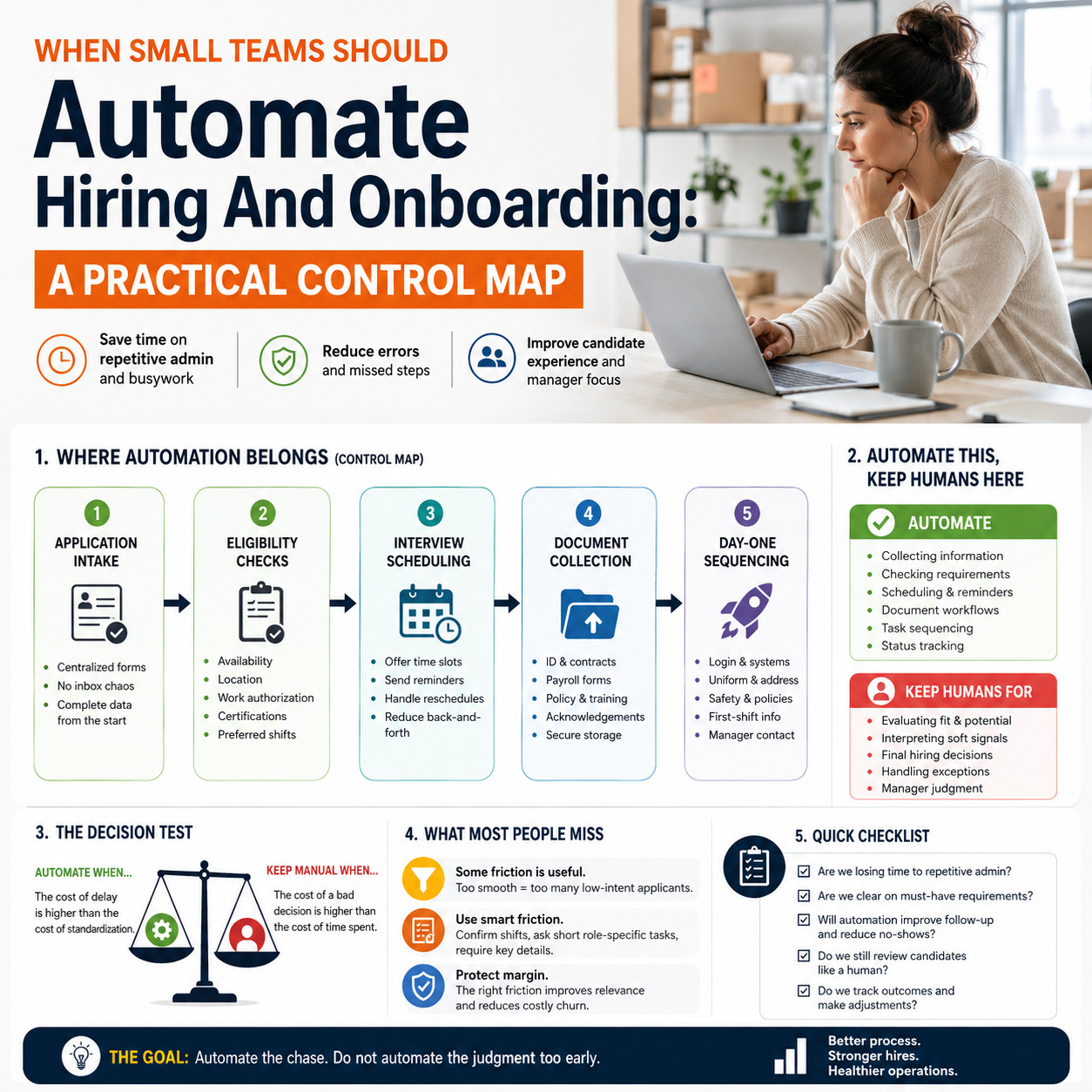
AI hiring tools are moving from enterprise HR departments into the operational layer of businesses that hire fast, repeatably and under pressure. The useful question is not whether automation can screen candidates or send onboarding tasks. It is where automation reduces admin load without damaging hiring quality, compliance discipline or manager judgment.
That matters for small operators more than it first appears. A bad hire in a 12-person warehouse team, support desk, retail operation or fulfillment unit is not an HR inconvenience. It hits shift coverage, customer response times, refunds, overtime and owner attention.
The real decision is not AI versus people
The recent funding of Orbio, a company focused on automating hiring and onboarding for frontline workers, points to a broader shift: repetitive people operations are becoming workflow software. At the same time, the wider AI layoff discussion shows the uncomfortable part of this shift. Automation is often sold as efficiency, but inside a working business it changes who owns quality control.
For a small business owner, the decision should be narrower and more practical: which parts of hiring are structured enough to automate, and which parts still need a human decision because the cost of being wrong is high?
Do not start with the tool. Start with the failure pattern.
If managers are losing hours chasing documents, resending shift instructions, answering the same onboarding questions and manually copying details between spreadsheets, automation can remove waste. If the problem is poor role definition, low pay, weak supervision or unclear performance expectations, automation will simply move bad inputs faster.
That is the trap.
Where automation actually belongs in a small hiring workflow
Small teams usually do not need a heavyweight HR system. They need fewer handoffs, fewer missed steps and a cleaner record of what happened. The strongest use cases sit around repeatable administrative work, not judgment-heavy selection.
Good automation zones include:
- Application intake: collecting applicant details through a form instead of email threads, WhatsApp messages or scattered marketplace replies.
- Basic eligibility checks: availability, location, language requirements, work authorization questions where appropriate, required certificates and preferred shifts.
- Interview scheduling: offering time slots, reminders and rescheduling rules without manager back-and-forth.
- Document collection: contracts, identification files, payroll forms, policy acknowledgements and training confirmations.
- Day-one task sequencing: sending login instructions, uniform requirements, address details, supervisor contact, safety notes and first-shift expectations.
These are not glamorous tasks. That is exactly why they are suitable for automation. The work is repetitive, rules-based and painful when missed.
Where automation becomes risky is in ranking people, rejecting applicants or interpreting soft signals. Small businesses often have thin data, informal roles and fast-changing needs. A scoring model may appear efficient while quietly filtering out people who would perform well in the actual operating environment.
The cost model: admin hours saved versus mistakes amplified
A small company should evaluate hiring automation like any other operational investment: saved time, avoided rework, reduced leakage and new failure modes. The subscription price is only the visible part.
The direct costs usually include software fees, setup time, integration work, manager training and maintenance of templates or workflows. The indirect costs include applicant drop-off if the process becomes too rigid, poor screening rules, duplicate systems and loss of manager visibility.
For an e-commerce operator hiring warehouse assistants before seasonal demand, the calculation is not abstract. If the owner or operations lead spends evenings chasing paperwork, automation can protect attention during a peak period. If the tool rejects applicants because they do not match a narrow template, the business may enter the season understaffed and pay through overtime, delayed dispatch or customer service pressure.
The decision test is simple: automate steps where the cost of delay is higher than the cost of standardization. Keep human review where the cost of a bad decision is higher than the cost of time spent.
What most people miss
The unpopular point is that some hiring friction is useful. A completely smooth application flow can flood a small business with low-intent applicants, especially for hourly, seasonal or entry-level roles. Manual friction, used carefully, can act as a signal.
For example, asking applicants to confirm specific shift availability in writing may reduce volume but improve relevance. Asking them to complete a short role-specific task, such as choosing between two customer support responses or confirming comfort with early warehouse starts, may reveal more than an automated score.
The mistake is treating every manual step as waste. Some manual steps protect margin. They force clarity before the business pays for onboarding, uniforms, manager time or first-week training.
Automate the chase. Do not automate the judgment too early.
A practical scenario: seasonal hiring for a small e-commerce operation
Consider a small online seller preparing for a promotion period. The team needs temporary help for picking, packing, returns handling and customer support overflow. The owner currently receives applications through email, social media messages and referrals. Some applicants cannot work the required hours. Some miss the first shift because instructions were sent late. Payroll details are collected in a rush.
A sensible automation workflow would not try to choose the best worker by itself. It would create a controlled funnel.
First, every applicant goes through one intake form. The form asks for contact details, available dates, shift preferences, relevant experience, language capability if needed, and confirmation of physical or location requirements where relevant to the role. The system automatically tags applicants by availability.
Second, applicants who meet basic criteria receive a scheduling link. Reminders go out automatically. No manager spends half a day sending individual messages.
Third, after a manager approves someone, onboarding begins through a checklist. The worker receives first-shift location, dress code, break rules, supervisor contact, required documents and a short explanation of what good performance looks like in week one.
Fourth, the manager sees a dashboard of who has completed which step. Missing payroll document? Not trained on returns process? No signed policy acknowledgement? The gap is visible before the first shift, not discovered during a busy dispatch day.
This is useful automation because it narrows chaos. It does not pretend to replace the owner’s operating judgment.
The human boundary: what a manager should still own
Small companies often operate with roles that are partly written down and partly understood through context. That makes full automation dangerous. The manager should still own the decisions that require business judgment, trade-off awareness or interpersonal reading.
Keep human control over:
- Final hiring decisions: especially where attitude, reliability, communication style or team fit matters.
- Role changes: when the business needs to move someone from packing to customer support, or from sales calls to admin work.
- Exception handling: applicants with unusual availability, strong referrals, relevant experience outside the template or non-standard circumstances.
- First-week evaluation: whether the person can actually perform in the operating rhythm of the business.
- Termination or non-continuation decisions: areas where documentation, fairness and local employment rules matter.
The tool should prepare the decision. It should not hide the decision.
Metrics that show whether the system is working
Hiring automation should be measured like an operational process, not a technology experiment. The metrics must connect to speed, quality and operational leakage.
Track these weekly during active hiring periods:
- Application-to-interview conversion: if it collapses, your intake form may be too long, unclear or poorly targeted.
- Interview no-show rate: if reminders reduce no-shows, automation is doing useful work.
- Time from approval to ready-to-work: this shows whether document collection and onboarding are actually faster.
- Onboarding completion before first shift: a direct measure of operational readiness.
- First-week dropout or removal: a warning signal that screening, expectations or training are weak.
- Manager admin hours per hire: the cleanest internal efficiency metric for small teams.
- Operational incidents linked to onboarding gaps: missed shifts, incorrect process handling, customer delays or safety issues.
Do not obsess over application volume. A bigger funnel can make operations worse if it increases manager sorting time or attracts applicants who cannot work the required schedule.
Tool stack choices for small operators
The tool does not have to be a specialist AI hiring platform on day one. The right stack depends on hiring volume, compliance exposure, number of locations and how repeatable the roles are.
When a lightweight stack is enough
If the business hires occasionally or seasonally, a form tool, spreadsheet or database, calendar scheduler, document-signing tool and email/SMS automation may be enough. The operational win comes from having one intake path and one checklist, not from advanced AI scoring.
A small service business hiring two technicians does not need complex automation. It needs a clean process that prevents lost applications, missed interviews and incomplete documents.
When a dedicated system starts to make sense
A dedicated hiring and onboarding platform becomes more logical when the business repeatedly hires for similar roles, manages high applicant volume, has multiple managers involved or needs auditable onboarding records. Frontline roles, seasonal logistics, support teams and multi-location service operations are closer to this profile.
The buying question should be operational: will the system reduce manager coordination work and improve readiness before the first shift? If the answer is only that it uses AI, that is not enough.
Implementation risks owners should not ignore
Automation changes the failure mode. Before automation, the risk is that the owner forgets, delays or improvises. After automation, the risk is that the business scales a bad process consistently.
Common risks include:
- Bad screening rules: the system filters out workable applicants because the criteria were copied from an old job post.
- Template decay: onboarding instructions become outdated when shift times, supervisors or operating procedures change.
- Tool fragmentation: applicants move through forms, email, chat and spreadsheets with no single source of truth.
- Manager disengagement: supervisors trust the workflow but stop checking whether new hires understand the work.
- Compliance blind spots: automated messages and records still need to respect local employment, data and documentation requirements.
The fix is ownership. Assign one person to maintain the workflow, review drop-off points and update onboarding materials after operational changes. In a small company, that may be the owner, operations lead or store manager. What matters is that the workflow has an owner, not just a login.
30-day rollout checklist for hiring automation
Use this sequence before buying or expanding a tool. It is designed for small teams that need control before scale.
- Days 1-3: Map the current hiring path. List every step from first applicant contact to first productive shift. Mark where delays, duplicate entry, missing documents and manager interruptions happen.
- Days 4-6: Separate judgment from administration. Put screening decisions, interviews and final approvals in the human column. Put reminders, scheduling, document collection and checklist tracking in the automation column.
- Days 7-10: Build one intake form. Include only role-specific filters: availability, location, required documents, shift constraints and essential experience. Remove questions nobody uses for decisions.
- Days 11-14: Create the onboarding checklist. Include contract status, payroll details, login access, first-shift instructions, supervisor contact, required training and role expectations.
- Days 15-18: Test with one role only. Do not roll automation across every position. Use the most repeatable role first, such as warehouse assistant, support agent, retail associate or appointment setter.
- Days 19-23: Review drop-off and manager workload. Check where applicants disappear, where managers still intervene manually and which messages create confusion.
- Days 24-27: Tighten the human review points. Add explicit approval steps before offer, before onboarding launch and before first shift confirmation.
- Days 28-30: Decide whether to scale, pause or simplify. Scale only if onboarding completion improves, manager admin time falls and first-week problems do not increase. If quality drops, reduce automation and fix the role definition first.


