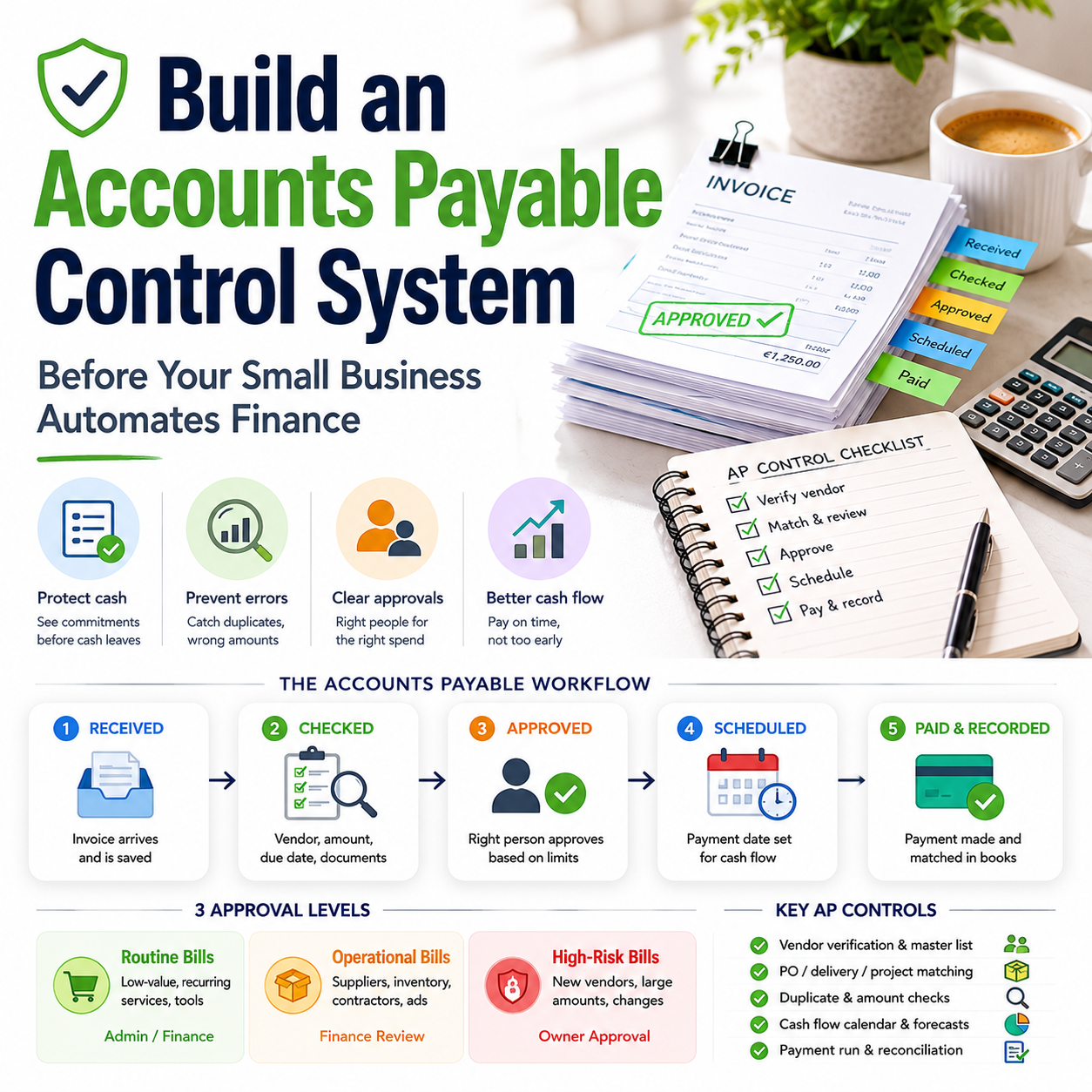
Many small businesses try to automate finance before they have decided who is allowed to approve spending, when invoices should be paid, and how errors are caught. That is how a useful tool becomes an expensive way to process the wrong payments faster. For founders, e-commerce operators and small team managers, accounts payable is not just admin; it is a cash-flow control system.
The useful question is not whether accounts payable should be streamlined. It should. The question is which parts deserve automation, which parts need human approval, and which checks must exist before invoices touch the bank account.
The real AP problem is not slow invoices; it is uncontrolled commitments
A small business can look profitable in its sales dashboard while quietly building a payment problem in the background. Supplier invoices arrive by email, SaaS renewals hit cards automatically, a contractor sends a corrected invoice, inventory deposits are paid before stock is checked, and the founder approves payments from memory because the business is still small enough to feel manageable.
That works until it does not. The common failure is not one dramatic fraud case. It is a series of small leaks: paying a duplicate invoice, missing an early payment discount, losing track of which supplier has changed terms, paying for stock before the purchase order is matched, or discovering payroll cash requirements after vendor payments have already gone out.
The Small Business Trends articles on accounts payable practices and bookkeeping/payroll both point toward the same operating issue: finance tasks become easier when they are structured, scheduled and checked. For Make Business readers, the lesson is more specific. Before adding another finance app, the owner needs an AP operating model that protects cash and reduces manual chasing.
This is especially relevant for small e-commerce sellers and service businesses with recurring tools, freelancers, fulfilment costs, marketplace fees, ad spend and irregular supplier invoices. The AP workflow has to answer four questions every week:
- What have we committed to pay?
- What has been received or delivered?
- Which payments are due before the next cash inflow?
- Which payments need owner review before release?
Separate invoice capture from payment approval
The first control is simple but often skipped: the person or system that captures invoices should not be the same step that approves payment. In a two-person company this does not require corporate bureaucracy. It means the workflow has two different states: received and approved.
For example, a Shopify seller may receive invoices from a packaging supplier, a 3PL provider, a freelance designer, a returns platform, software subscriptions and advertising tools. If every invoice simply lands in the founder’s inbox, the business has no clean view of upcoming cash needs. If every invoice goes straight to payment, the business has no protection against incorrect amounts or missing deliveries.
A lightweight workflow can be built with a shared finance inbox, cloud storage, accounting software and a payment calendar. The key is not the specific tool. The key is that every invoice is moved through the same states:
- Received: invoice has arrived and is saved.
- Checked: vendor, amount, due date and supporting document are reviewed.
- Approved: the right person has agreed the business should pay it.
- Scheduled: payment date is selected based on cash flow and supplier terms.
- Paid: payment reference is recorded and matched later in bookkeeping.
This structure matters because automation tools usually do what the workflow tells them. If the workflow is messy, automation speeds up mess. If invoice statuses are clear, automation can reduce admin without removing control.
What most people miss
Most owners think the danger is a late supplier payment. That is visible and uncomfortable. The quieter danger is approving a cost without understanding when the cash leaves and whether the related revenue has arrived.
For an e-commerce operator, this can happen with inventory. A purchase invoice may be correct, but paying it too early can create a cash squeeze if marketplace payouts are delayed, returns are higher than expected, or ad spend has already consumed the weekly cash buffer. For a service business, the same issue appears when contractors are paid before client invoices are collected.
Accounts payable is therefore not just an accuracy function. It is a timing function. The owner should be able to see not only what is owed, but which payments can be delayed without damaging supplier relationships and which payments must be made to keep operations running.
Use three approval levels, not one vague owner sign-off
Small businesses often use one approval rule: ask the owner. That sounds safe, but it becomes slow, inconsistent and dependent on memory. A better model is to create spending bands that match risk.
A practical structure could look like this:
- Routine low-value bills: software renewals, small recurring tools and pre-agreed operational services can be checked against an approved vendor list and scheduled by an admin or finance assistant.
- Operational supplier invoices: inventory, fulfilment, contractor, ad production and logistics bills need matching to an order, contract, delivery note, project record or agreed scope.
- Exceptional or high-risk payments: new vendors, changed bank details, large deposits, refunds outside the normal process and invoices above the agreed threshold require owner approval.
The thresholds should be based on the size of the business, not copied from another company. A 250 euro SaaS bill may be routine for one operator and material for another. The useful test is whether the payment could affect the week’s cash plan or whether the mistake would be painful to reverse.
Approval levels also reduce decision fatigue. The owner does not need to inspect every normal subscription. Instead, owner attention is reserved for payments that could damage margin, cash flow or supplier continuity.
The weekly payment run beats daily random payments
One of the simplest operational improvements is to stop paying invoices whenever someone remembers them. A weekly payment run gives the business a fixed decision point. It also creates a natural moment to compare upcoming payables with cash, payroll, expected receivables and sales payouts.
This is where accounts payable connects directly with bookkeeping and payroll. Payroll has dates that cannot be treated casually. Bookkeeping needs accurate transaction records. Supplier payments must sit around those realities, not compete with them at the last minute.
A weekly AP rhythm for a small operator might include:
- Monday: capture invoices from email, portals and accounting software.
- Tuesday: check invoices against orders, subscriptions, project records or delivery evidence.
- Wednesday: review cash position, payroll obligations, expected customer receipts and marketplace payouts.
- Thursday: approve and schedule the payment batch.
- Friday: reconcile paid items and update the short-term cash forecast.
The exact days can change, but the rhythm should not be random. Random payments make cash harder to forecast. Payment runs make trade-offs visible. If the cash forecast shows pressure, the owner can decide whether to delay a non-critical vendor, pause a discretionary subscription, chase receivables, or move an inventory order.
Automation should remove typing, not judgment
Invoice automation is attractive because manual finance work is repetitive. Optical character recognition, accounting rules, bank feeds, approval workflows and recurring payment schedules can save time. But not every part of AP should be automated in the same way.
The safest automation target is data capture: extracting supplier name, invoice number, date, due date, tax amount where relevant, category and payment details. The next useful layer is routing: sending invoices above a threshold to the owner, contractor invoices to the project lead, and inventory bills to the person who confirms delivery.
Payment release deserves more caution. A fully automated payment for a recurring subscription may be acceptable if the subscription is approved, the amount is predictable and the tool is still in use. A fully automated payment to a new supplier, a changed bank account, or a large stock invoice is a different risk.
Where AI can help without taking over finance
AI tools can be useful for anomaly detection and finance admin prompts. They can flag invoices that appear twice, identify payment terms that differ from the usual pattern, summarize unpaid bills by due date, or draft a query to a supplier when an invoice lacks a purchase reference.
For small teams, the realistic value is not autonomous finance management. It is reducing the time spent searching, retyping and comparing documents. A useful AI-supported workflow might flag that a fulfilment invoice is higher than the prior period and ask for a review before approval. The human still decides whether the increase is explained by order volume, storage fees, returns handling or an error.
The boundary should be clear: automation can prepare, route, compare and remind. Humans should approve exceptions, new vendors, changed bank details, large payments, and anything that changes cash commitments materially.
A practical scenario: the seller with strong sales and weak payment timing
Consider a small online seller that buys inventory from two suppliers, uses a fulfilment provider, runs paid ads, pays a freelance designer, and receives marketplace payouts several times per month. Sales are growing, but the founder is constantly surprised by cash dips.
The problem is not that the business lacks revenue. The problem is that payment timing is unmanaged. Inventory invoices are paid as soon as they arrive because the founder wants to maintain supplier goodwill. Fulfilment invoices are paid late because they get buried in email. Advertising spend is charged automatically to a card. The designer invoices irregularly. Payroll for one employee and owner drawings are considered after vendor payments, not before.
A better AP system would change the sequence. Inventory invoices would be entered when received but scheduled after checking incoming payout dates. Fulfilment bills would be routed to a specific weekly review. Ad platform charges would be treated as committed spend and included in the payment calendar even if they do not arrive as traditional invoices. Contractor invoices would require a project reference before approval. Payroll dates would be locked into the cash forecast before discretionary payments are released.
No sophisticated finance department is needed. The change is operational: all payables become visible before cash leaves. The founder stops asking, “Can I pay this invoice today?” and starts asking, “What does paying this invoice today do to the next two weeks of cash?”
The cost of AP discipline is lower than the cost of cleanup
Small businesses often avoid finance process because it feels like overhead. But the real comparison is not process versus no process. It is scheduled control versus emergency cleanup.
The cost of AP discipline may include accounting software, document storage, a bill capture tool, payment approval software, or a few hours per week from a bookkeeper or operations assistant. The benefit is not just time saved. It is fewer missed payments, fewer duplicate payments, cleaner books, better cash planning and less founder interruption.
The cleanup cost appears when invoices are missing at month-end, supplier statements do not match records, the bookkeeper has to ask for documents repeatedly, payroll cash is tight, or the owner spends a weekend reconstructing what happened. Even when no money is lost, the management attention lost to cleanup is expensive.
A good test is to calculate the monthly cost of AP friction:
- Founder hours spent searching for invoices and payment confirmations.
- Bookkeeper hours spent chasing missing documents or classifying unclear payments.
- Late fees, lost discounts or strained supplier terms.
- Duplicate subscriptions or unused tools that stay active because nobody reviews them.
- Cash shortfalls caused by paying non-urgent invoices before fixed obligations.
If that total is higher than the cost of a better workflow, the business has a finance operations problem, not an admin inconvenience.
The metrics that make AP manageable
Accounts payable can be managed with a small set of practical metrics. The point is not to create a dashboard for decoration. The point is to spot payment pressure before it becomes a crisis.
Useful AP metrics for a small operator include:
- Unpaid invoices by due date: shows what must be paid this week, next week and later.
- Unapproved invoices by age: reveals bottlenecks before late payments happen.
- Payments scheduled before next major cash inflow: highlights cash timing risk.
- Vendor concentration: shows whether too much operational dependency sits with one supplier.
- Recurring spend list: exposes subscriptions, retainers and tools that keep billing automatically.
- Invoice exceptions: tracks duplicate invoice numbers, changed bank details, missing purchase references and unusual amounts.
For e-commerce businesses, add inventory-related payables and expected marketplace payouts to the same view. For service businesses, add client receivables and contractor invoices. For agencies or digital operators, include SaaS renewals and freelancer commitments. The AP dashboard should reflect how the business actually spends money.
The AP rollout sequence for a small team
Start with control before software complexity. A small business can improve accounts payable in two weeks if it focuses on workflow decisions instead of tool shopping.
- Day 1: Create one finance inbox for all invoices, receipts, subscriptions and supplier statements.
- Day 2: Make a current vendor list with payment terms, usual amounts, bank details and owner of the relationship.
- Day 3: Define approval thresholds for routine, operational and exceptional payments.
- Day 4: Set invoice statuses: received, checked, approved, scheduled and paid.
- Day 5: Build a simple payment calendar that includes supplier invoices, payroll dates, loan payments, tax set-asides where applicable, card charges and major subscriptions.
- Week 2: Run the first weekly payment meeting, even if it is only 20 minutes. Review due invoices, cash available, expected inflows and exceptions.
- After two payment runs: automate invoice capture and reminders, but keep exception approvals manual.
- After one month: review recurring spend, late payments, unapproved invoice age and any supplier disputes.
The decision rule is straightforward: automate the steps that are repetitive and low-risk, standardize the steps where mistakes are common, and keep human approval where payment timing, supplier trust or cash flow could be affected. That is the difference between a finance tool stack and a finance control system.