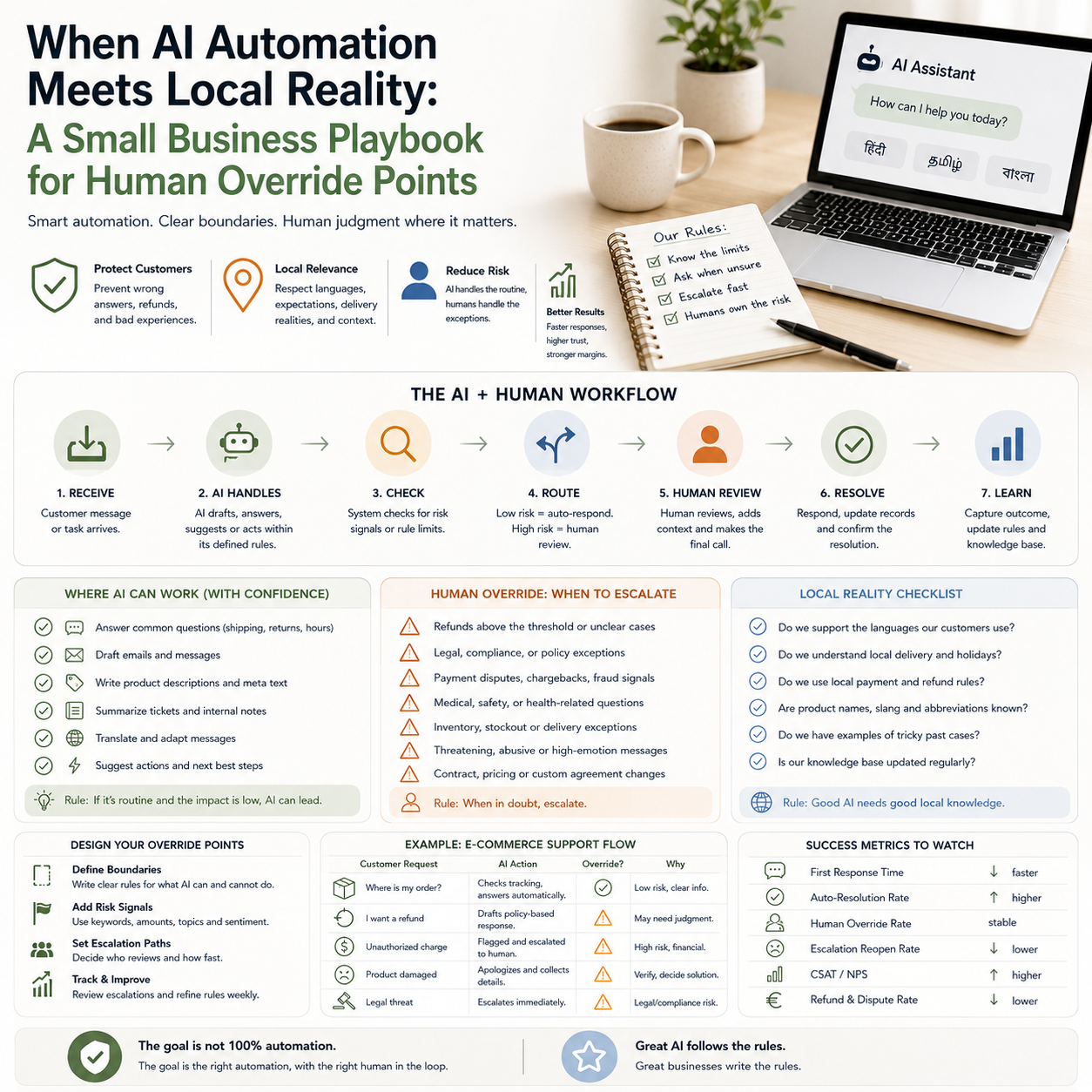
Two recent technology signals point to the same operating problem: AI systems become risky when they meet local reality. HMD is pre-loading an Indian AI chatbot that supports 22 Indic languages on a new smartphone, while Waymo paused robotaxi service in multiple cities after vehicles kept driving into flooded roads. For small businesses, the lesson is not about phones or robotaxis. It is about where automation should stop, ask for context, or hand work back to a person.
This matters for any founder using AI in customer support, product content, lead qualification, translation, inventory messaging, order updates or back-office workflows. The operational question is not whether AI can do the task. It is whether your business has defined the failure conditions clearly enough.
The real business risk is not bad AI, it is unbounded AI
Small companies often adopt AI in the most tempting places first: support replies, product descriptions, internal summaries, sales follow-ups, review responses, translation, chatbot flows and admin triage. These are high-volume tasks where automation can save time quickly. They are also tasks where a wrong answer can create refunds, chargebacks, angry customers, compliance issues or silent margin leakage.
The Waymo example is useful because it shows a simple boundary problem. A vehicle may be competent in normal road conditions, but floodwater changes the decision environment. The system needed a stronger stop condition. In a small business, the equivalent is an AI assistant that handles normal customer questions well but keeps answering when the customer mentions damaged goods, missing parcels, payment disputes, medical claims, legal wording, warranty threats or cancellation deadlines.
The HMD and Sarvam example points to a different boundary: local context. Language support across 22 Indic languages is not just a translation feature. It is an attempt to make the interface usable in the customer’s real environment. For operators, this raises a sharper question: are you automating for the customers you actually serve, or for a generic customer profile that only works in English, in one market, with simple questions?
Unbounded AI is not just a technical issue. It becomes an operations issue because every unresolved exception lands somewhere: inbox queues, refunds, bad reviews, manual rework, staff stress, payment provider disputes, or inventory errors.
Where a small business should draw the line between automation and people
The right place to use AI is not the same in every business. A €25 accessory store, a B2B agency, a paid newsletter, a local repair service and a cross-border cosmetics seller all have different failure costs. The decision should start with the cost of being wrong, not the novelty of the tool.
A practical way to map this is to divide tasks into three lanes:
- Low-risk automation: draft product descriptions, summarize internal notes, classify support messages, suggest tags, rewrite non-sensitive copy, create first drafts of FAQ answers.
- Supervised automation: respond to order-delay complaints, translate customer-facing messages, generate refund recommendations, draft B2B proposals, update CRM records, prepare supplier emails.
- Human-only or human-approved work: approve refunds above a threshold, handle legal threats, make medical or safety claims, answer tax-specific questions, override inventory promises, respond to payment disputes, change contract terms.
This is where many small businesses make the expensive mistake. They think of AI as a single switch: either automated or manual. Better operators treat AI as a routing layer. The system can draft, classify, summarize and recommend, but it does not get the same authority in every situation.
What most people miss
The hidden cost is not the AI subscription. It is the exception queue. If a chatbot saves two hours per day but creates a messy pile of unresolved edge cases every Friday, the business has not automated the process. It has moved the work to a less visible place.
That is why every AI workflow needs an owner, a queue and a timeout. If the AI cannot solve a case within the defined rules, where does it go? Who checks it? How often? What happens if nobody responds? Without these answers, small teams discover the same problem later as customer churn, support backlog, refund spikes or staff distrust of the system.
Local context is an operating requirement, not a language feature
The HMD decision to bundle a chatbot built for Indian languages is a reminder that localization is not decoration. If your customers use different languages, payment habits, delivery expectations or product vocabulary, a generic AI workflow will misunderstand them in ways that affect revenue.
For an e-commerce seller, this can show up in very practical places. A customer may describe a product defect using regional wording. A buyer may ask about delivery to an area where carriers behave differently. A customer may use mixed-language messages, informal abbreviations or voice-to-text phrases. A generic support bot may produce a polished answer that misses the real request.
For a small service business, local context might mean neighborhood names, appointment windows, common customer objections, seasonal demand, regulations in a specific market, or the way customers describe urgent problems. If AI does not understand those details, it may sound efficient while routing work incorrectly.
The operational decision is simple but often skipped: decide which local knowledge belongs inside the AI system and which knowledge should remain with staff. A small business does not need a giant data project. It needs a maintained knowledge base that includes:
- approved delivery promises by market or carrier;
- refund rules in plain language;
- product names, nicknames and common misspellings;
- known failure cases, such as fragile items or delayed suppliers;
- phrases that trigger human review;
- language rules for markets where automated translation is risky.
This knowledge base should be treated like operating infrastructure. If policies change but the AI keeps using old rules, the business has created a new source of customer conflict.
The floodwater test for every AI workflow
The Waymo flood issue is a useful metaphor because floodwater is an abnormal condition that requires a stop rule. Small businesses need the same concept in digital workflows: a defined condition where the system must stop acting confidently.
For a customer support bot, floodwater might be words such as “chargeback,” “lawyer,” “injury,” “allergic reaction,” “fraud,” “cancel my subscription today,” or “I never received the package.” For an AI product content tool, floodwater might be medical claims, prohibited marketplace terms, unsupported compatibility statements or claims about guaranteed results. For an AI sales assistant, floodwater might be a prospect asking for custom pricing, exclusivity, contract changes or data-processing commitments.
The workflow should not rely on the AI having good judgment in these cases. It should have explicit stop rules. If the message contains certain topics, order values, customer segments or sentiment levels, the automation changes mode. It can still summarize the issue and draft a response, but it should not send the final answer without review.
A simple scenario: the cross-border seller with support automation
Consider a small online store selling skincare accessories across several European markets. The team uses an AI support assistant to answer delivery questions, recommend products and draft replies in multiple languages. Most questions are simple: order tracking, returns window, product availability and usage instructions.
The risk appears when customers ask about skin reactions, product safety, delayed parcels before a gift date, or refund rights in a specific country. If the AI treats every message as a normal support ticket, it may create a polished but risky answer. A better workflow would classify the message first, then route it.
In this setup, the AI can answer tracking questions automatically using order data. It can draft product guidance only from approved text. It can translate staff-approved replies. But messages mentioning reactions, legal rights, payment disputes or damaged goods go into a human review queue. The AI still helps by summarizing the case, showing the order history and suggesting the relevant policy. The person keeps authority over the outcome.
This is not slower in practice. It prevents the team from wasting time repairing avoidable mistakes.
Cost model: what to budget beyond the AI tool
Many small companies price AI automation by looking at the monthly software fee. That is too narrow. The real cost model has four parts.
Tool cost: the chatbot, helpdesk add-on, automation platform, API usage, translation tool or CRM assistant. This is the visible line item.
Setup cost: writing policies, connecting order data, building templates, creating tags, testing languages, defining escalation rules and training staff. Even if no developer is needed, this consumes management time.
Review cost: the human time required to inspect flagged cases. If the review queue is not budgeted, it becomes a backlog.
Error cost: refunds, reshipments, chargebacks, marketplace penalties, customer loss, reputational damage and staff time spent fixing wrong answers.
For founders, the decision should be based on avoided work minus review and error cost. A workflow that automates 70% of low-risk messages and routes 30% cleanly may be more profitable than a workflow that tries to automate 95% and creates unpredictable failures.
The best metric is not “how many replies did the bot send?” The better metric is “how many cases were resolved without later rework?” That forces the team to measure quality, not activity.
The metrics that show whether AI is helping or hiding work
An AI workflow should have a small dashboard. Not a complex analytics project, just a handful of numbers that tell the operator whether the system is reducing work safely.
- Automation rate by category: what share of delivery, refund, product, billing and complaint tickets are handled automatically?
- Escalation rate: how many cases are routed to a person, and from which trigger?
- Reopen rate: how often does a customer reply because the AI answer did not solve the problem?
- Refund or reshipment after AI contact: are automated replies linked to higher recovery costs?
- Manual review time: how much staff time is spent checking flagged cases?
- Policy mismatch count: how often does the AI use outdated or incorrect business rules?
- Language fallback rate: how often does the system fail in non-primary languages and need a human?
These numbers help a small team make practical decisions. If reopen rates are high for product-fit questions, restrict the bot to drafting only. If escalation is high because policies are unclear, fix the policy library before changing tools. If translation errors appear in one market, create approved response blocks for that language instead of relying on free-form generation.
Design the override system before expanding automation
Before adding AI to more workflows, define how the business will stop it. That sounds negative, but it is the difference between controlled automation and operational drift.
A good override system includes trigger words, value thresholds, customer status, topic categories and confidence limits. For example, a high-value order might always require human approval before a refund offer. A complaint from a repeat customer might be routed to a senior person. A message in a language where the company lacks review capacity might receive a safe holding reply rather than a detailed automated answer.
Tool choice matters less than these operating rules. A small team can implement this with a helpdesk, shared inbox, Shopify or WooCommerce order tags, Zapier or Make workflows, CRM fields, saved replies and a simple knowledge base. The expensive part is usually not software. It is the discipline to keep rules updated.
The boundary between human and automation should be visible to staff. If employees do not know why a case was escalated, they will either ignore the system or manually inspect everything. Both outcomes reduce the value of automation.
Practical rollout sequence for a safer AI workflow
Use this sequence before letting AI speak directly to customers or update operational records:
- Pick one workflow with repeat volume: start with order tracking, appointment reminders, FAQ routing, product tagging or support classification, not the most sensitive customer issue.
- List the failure conditions: define the words, topics, order values and customer situations where automation must stop or switch to draft mode.
- Create approved source material: use current policies, product rules, delivery promises and market-specific wording. Remove old policy text before connecting AI to it.
- Run in silent mode first: let the AI classify or draft without sending. Compare its output with what staff would have done.
- Measure rework, not only speed: track reopen rate, manual correction rate, refund after AI contact and staff review time.
- Allow automatic action only in narrow lanes: send replies automatically only where the cost of being wrong is low and the answer is based on verified data.
- Assign an owner: one person must review escalations, update rules and remove broken prompts or outdated policy text.
- Review exceptions weekly: every failed or escalated case should improve the knowledge base, the routing rule or the human handoff.
The operator’s goal is not to make AI appear autonomous. The goal is to remove predictable work while making unusual cases easier for people to handle. That is the practical lesson from both local-language AI and automation failures in messy real-world conditions: the business value comes from knowing exactly where the machine should not continue alone.