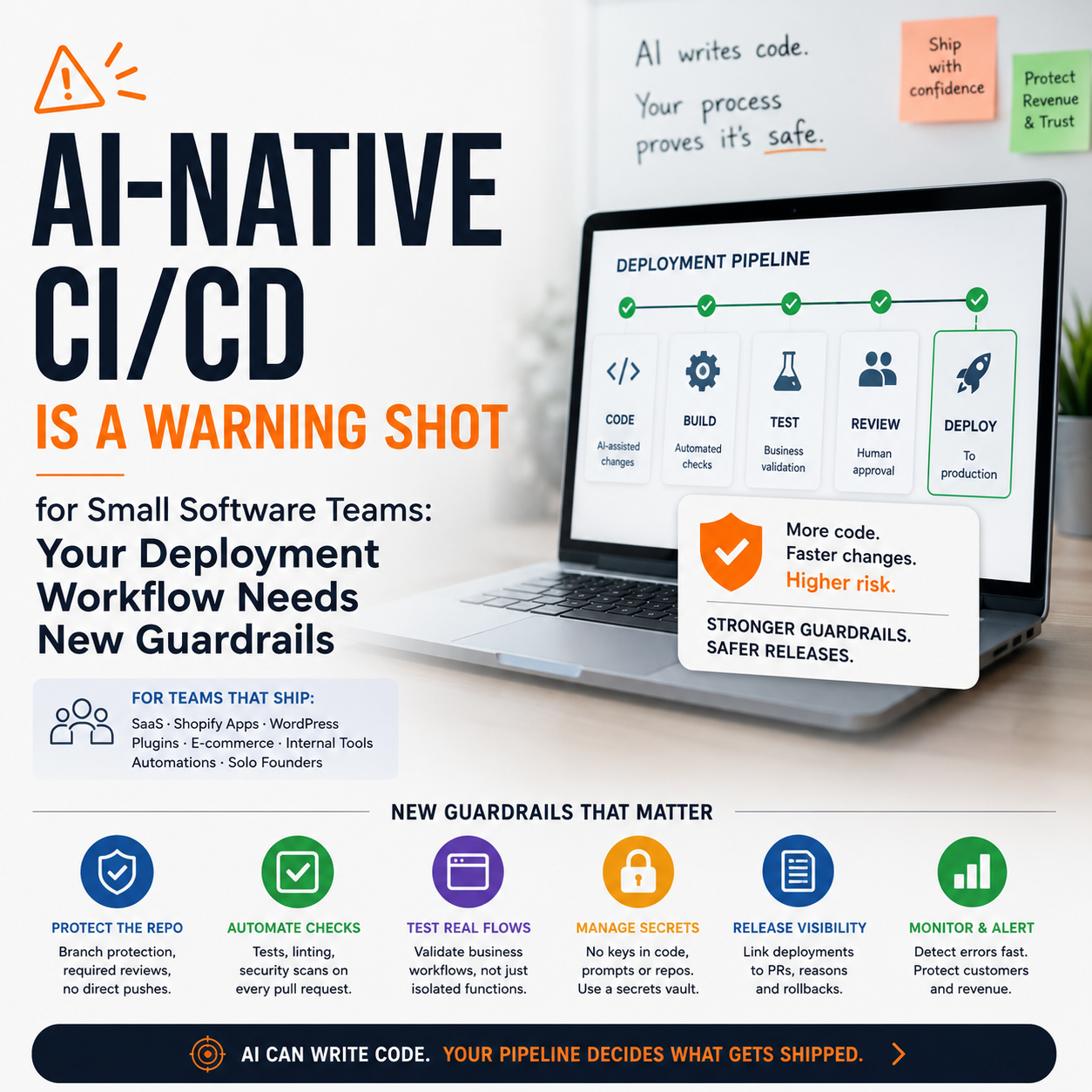
Avrea, a Helsinki startup founded by Aiven co-founder Hannu Valtonen and Nosto co-founder Juha Valvanne, has emerged from stealth with €4 million to build an AI-native CI/CD platform. For small software teams, the useful signal is not the funding round. It is that deployment pipelines are being redesigned around a new operating reality: more code will be generated, changed and shipped with AI assistance, and the old review process may not catch the risk fast enough.
This matters most to solo founders, small SaaS teams, Shopify app developers, WordPress plugin businesses, internal tool builders and e-commerce operators with custom automations. If AI coding tools increase output but your release workflow remains a loose mix of GitHub branches, manual checks and hope, your bottleneck moves from writing code to proving that code should be shipped.
The real decision is not whether to use AI coding tools
Most small digital teams are already exposed to AI-generated code in some form. A founder asks an assistant to write a script. A developer uses autocomplete to refactor a payment integration. A marketing operator asks for a small automation between the CRM and the store. The question is no longer whether AI enters the codebase. The practical decision is whether the business has a release system that can tolerate faster code creation without increasing production incidents.
That is the operator angle behind AI-native CI/CD. Traditional CI/CD pipelines were designed to automate build, test and deployment steps. They work well when the main problem is human waiting time: someone forgot to run tests, someone delayed a deployment, someone repeated a manual release checklist. AI-assisted development changes the shape of the problem. The volume of small changes can rise. The person approving the change may understand the business process but not every line of implementation. The code may pass basic tests while still breaking pricing logic, fulfilment routing, permissions or reporting.
For a small business, the cost of a bad release is not abstract. A broken checkout can stop revenue. A faulty stock sync can oversell inventory. A misconfigured webhook can duplicate customer emails. A small SaaS product can lose trust if an account permission bug exposes the wrong data. These are not enterprise-only problems; they are exactly the kind of issues that hit lean teams because one person often owns development, operations and customer support at the same time.
Where AI-assisted development changes the release bottleneck
Before AI coding tools, a small team’s release constraint was often developer time. The developer wrote the code, tested it locally, opened a pull request and deployed when there was enough confidence. With AI assistance, code can be produced faster than the business can evaluate it. That creates three new bottlenecks.
Review becomes more expensive than writing
If a developer can generate a working implementation quickly, the scarce resource becomes review quality. Someone still needs to verify whether the generated code matches the business rule. For an e-commerce operator, this might mean checking that a discount applies only to eligible SKUs, that a tax rule does not affect the wrong region, or that a return automation does not refund before inspection.
Small teams should separate technical review from business-rule review. A developer can assess structure, security and maintainability. The operator who owns the process should verify the operational rule. If the same person does both, the checklist should still separate those two modes of thinking. Otherwise the review becomes a vague approval step instead of a control point.
Testing must move closer to business workflows
Unit tests are useful, but many small-business failures happen across systems: the store, payment provider, warehouse tool, email platform, CRM and accounting export. AI-generated code can be syntactically clean while still misfiring in that chain. The pipeline needs tests that reflect actual revenue and operational workflows, not only isolated functions.
For example, if a WooCommerce store uses a custom script to send wholesale orders into an ERP-like inventory tool, the test should not only check whether the API call works. It should check whether the correct customer group, tax status, SKU mapping and fulfilment status are passed through. That is where AI-assisted coding can create hidden risk: the code may look right while the business state is wrong.
A practical release stack for a team that cannot afford enterprise complexity
Small teams do not need a huge DevOps department to make AI-assisted development safer. They need a narrow release system with explicit gates. The point is not to buy every tool in the category. The point is to create a pipeline that catches the most expensive mistakes before customers do.
A lean stack might include:
Version control: GitHub, GitLab or Bitbucket with branch protection enabled.
Automated checks: tests and linting that run on every pull request, not only before major releases.
Preview environments: a temporary environment where the change can be checked against realistic data or mocked operational flows.
Secrets management: no API keys, payment tokens or production credentials copied into prompts, scripts or local files.
Deployment visibility: a simple release log that links each deployment to the business reason, pull request and rollback path.
Error monitoring: a tool such as Sentry or equivalent monitoring so production failures are visible quickly.
The costly mistake is treating AI code as a productivity layer while leaving deployment as an informal habit. If the release process depends on memory, AI will increase the number of moments where memory fails.
The cost model: where to spend first
For a small business, the budget question is not whether an AI-native CI/CD platform sounds modern. The question is where the next euro or hour reduces the largest operational risk. A team with no tests does not need sophisticated release intelligence first. It needs repeatable checks. A team with tests but no staging flow may need preview environments. A team shipping several times a day may need stronger deployment controls and alerting.
Use a simple cost ladder:
First spend: time to document the five workflows that must not break. Examples: checkout, subscription billing, order export, login, admin permissions.
Second spend: automated tests around those workflows, even if the first version is narrow.
Third spend: branch protection and required checks so code cannot bypass the pipeline.
Fourth spend: monitoring and rollback procedures for when checks miss something.
Later spend: more advanced CI/CD tooling, AI review support or deployment analysis once the basics are enforced.
This order matters because many small teams buy tools before they define failure. The right question is: what is the business event we cannot afford to break? Only then should the team decide which part of CI/CD needs automation.
What most people miss
The hidden issue is prompt-to-production traceability. When a developer uses an AI assistant to generate or modify code, the business often loses the reasoning trail. The pull request may show what changed, but not why the assistant chose that approach, which assumptions were made, or what edge cases were ignored.
Small teams do not need to store every prompt forever. They do need to capture enough context for risky changes. If AI helped write payment logic, permission rules, pricing calculations, fulfilment workflows or customer data handling, the pull request should include a short note: what the AI was asked to do, what was manually verified, and which business workflow was tested. This is not bureaucracy. It is incident insurance.
When something breaks two weeks later, the team should be able to answer: why did we ship this, which assumption was wrong, and how do we prevent a similar mistake? Without that trail, AI-assisted development can make debugging slower even while it makes coding faster.
A realistic scenario: the small e-commerce automation that quietly creates risk
Consider a small e-commerce seller that uses Shopify, a shipping platform, an email tool and a spreadsheet-based purchasing process. The founder asks an AI tool to help build a small script that flags orders containing certain products and sends them to a supplier for direct fulfilment. The script works in a quick test. It saves manual work. The founder deploys it.
The risk is not that the script fails immediately. The risk is that it works for the normal case and fails at the edge. A mixed cart includes one direct-fulfilment item and one warehouse item. A customer changes address after checkout. A discount bundle changes SKU structure. The script sends the wrong line item, or sends the same order twice, or misses a cancellation state.
A safer workflow would not require a large engineering setup. It would require:
a test order for a single direct-fulfilment product;
a test order for a mixed cart;
a cancellation test;
a duplicate-send check;
a log of every supplier payload sent;
a manual review queue for orders the script cannot classify confidently.
The automation still saves time, but the release process now protects margin, customer trust and support workload. That is the difference between using AI to create code and using AI inside an operational system.
Human approval should sit where the business risk sits
Small teams often put human approval in the wrong place. They approve every small technical change because it feels safe, then allow high-risk workflow changes to pass because the code looks simple. A better model is risk-based approval.
Low-risk changes might include copy changes, internal dashboard layout changes or non-critical reporting adjustments. Medium-risk changes might include CRM tagging, email segmentation logic or admin workflow improvements. High-risk changes include anything touching payments, refunds, tax treatment, permissions, inventory, order routing or customer data exports.
AI-generated code should not automatically be treated as high risk. But AI assistance should raise the requirement for clarity. If the reviewer cannot explain what business rule changed, the change is not ready to ship. That standard is more useful than debating whether AI-written code is inherently safe or unsafe.
The metrics that show whether the pipeline is helping
A small team should avoid vanity engineering metrics. The useful dashboard is operational. Track the numbers that tell you whether faster development is creating more business noise.
Change failure rate: how often a deployment causes a bug, rollback or urgent fix.
Time to detect: how long it takes to notice a production issue after release.
Time to recover: how long it takes to restore the affected workflow.
Escaped workflow defects: how many issues are found by customers, suppliers or support rather than by internal checks.
Manual exception volume: how many orders, accounts or records need manual correction after automation changes.
Rollback readiness: whether each high-risk release has a clear way back.
These metrics connect CI/CD to business operations. A founder does not need to admire the pipeline; they need to know whether it is reducing emergency work, customer complaints and revenue leakage.
Decision criteria before adopting an AI-native CI/CD tool
Avrea’s emergence points to a category that may become more relevant as AI agents participate directly in software delivery. But small teams should not adopt a new CI/CD platform just because the category is moving. They should make the decision based on workflow pressure.
Consider a more advanced CI/CD or AI-native release tool when at least three of these conditions are true:
Your team uses AI coding tools in production-related work every week.
You ship changes often enough that manual release notes are unreliable.
Non-developers request automations that touch customer, order, payment or inventory data.
You have had at least one incident where a small code change created operational cleanup.
Your tests cover code functions but not end-to-end business workflows.
You cannot quickly answer what changed in the last deployment and how to reverse it.
If only one of these is true, fix the basics first. Add branch rules. Create a release checklist. Write tests for the workflows that generate revenue or support cost. Add monitoring. The tool decision becomes clearer after the operational weak spots are visible.
Seven controls to put in place before AI writes more of your code
The immediate work for a small software or e-commerce operations team is specific. These controls are light enough for a small team but strong enough to reduce the most common AI-assisted release risks.
Mark high-risk files and workflows: payment logic, refund rules, permissions, order routing, tax-related configuration, inventory sync and customer data exports.
Require pull requests for production changes: even if the founder is the only developer, the pull request creates a reviewable record.
Add business-rule notes to AI-assisted changes: include what was changed, what assumption was checked and which workflow was tested.
Use preview or staging for workflow tests: do not test order, payment or fulfilment changes for the first time in production.
Create a rollback note for high-risk releases: the team should know whether rollback means reverting code, disabling a feature flag, pausing a webhook or restoring configuration.
Watch the first hour after deployment: monitor errors, order flow, payment events, support messages and key automation logs.
Review incidents by workflow, not blame: ask which control failed: prompt clarity, code review, test coverage, staging data, monitoring or rollback.
AI-native CI/CD may become a tool category with real value. For small operators, the useful move now is to stop treating deployment as an afterthought. The more code AI helps create, the more discipline the business needs around what gets released, who approves it, how it is tested and how quickly it can be undone.