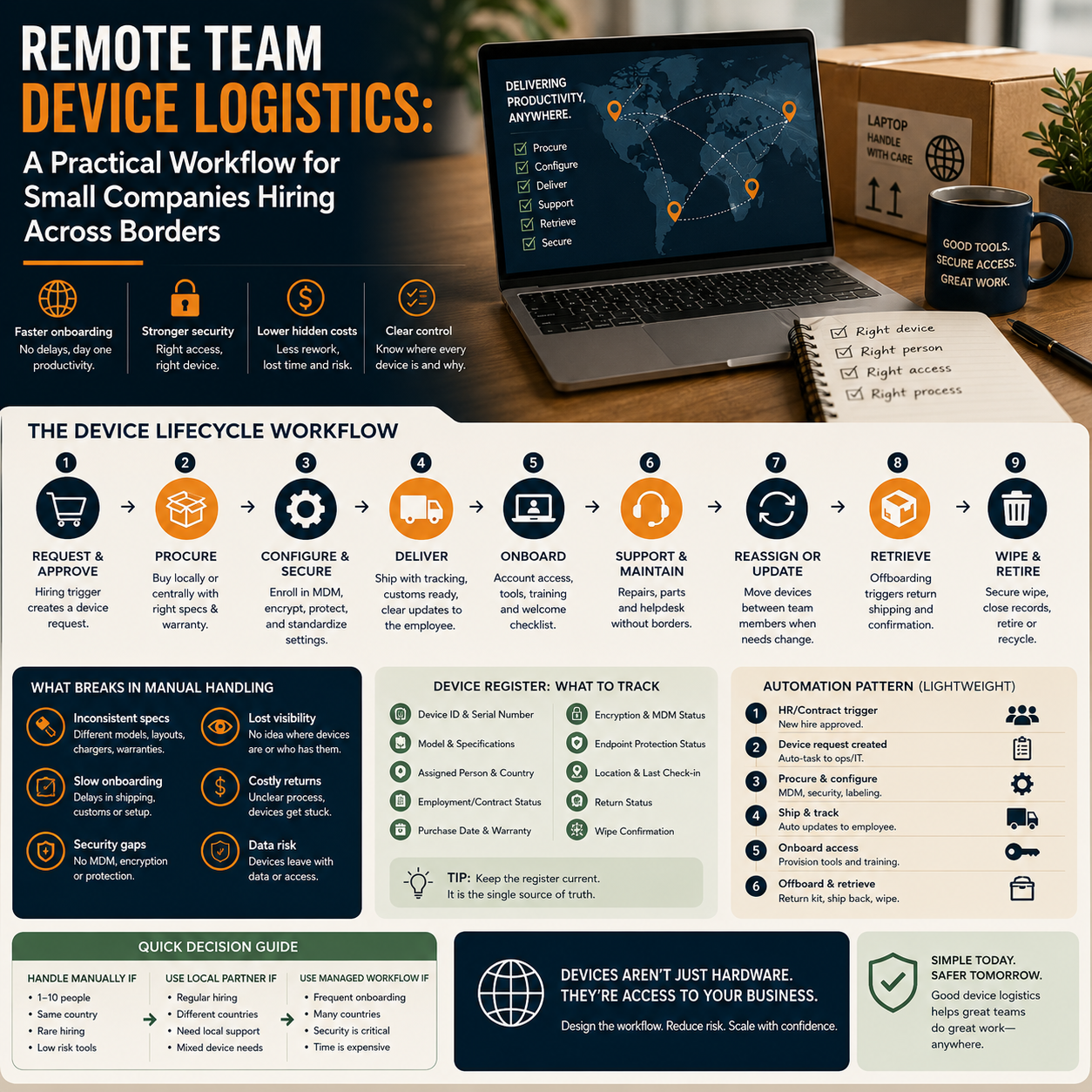
Remote hiring creates a quiet operations problem long before it becomes an IT problem: laptops, access, repairs, returns and data security start moving across borders. The funding news around Tequipy, a Polish-British startup focused on shipping, servicing and retrieving employee IT devices, is useful not because every small company should buy that specific platform, but because it shows a workflow that many small teams still handle with spreadsheets, courier receipts and last-minute Slack messages.
This article is for founders, operations managers and small team leads who employ people in more than one country and are trying to decide whether device logistics should remain manual, be handled by a local supplier, or be moved into a managed workflow.
The real decision is not laptop shipping, it is access control
When a small company hires its first remote employee abroad, the visible task is simple: get the person a working laptop. The hidden task is more important: make sure the company knows which device exists, who has it, what access it carries, whether it is encrypted, when it needs repair, and how it comes back when the working relationship ends.
That difference matters because device logistics sits between HR, finance, IT and security. In a five-person company, the founder may handle it personally. In a 25-person remote team, that same informal system starts creating avoidable risk. A laptop bought with a founder’s card, shipped by a random courier and tracked in an old spreadsheet is not just an admin nuisance. It can become a data exposure, a missed cost, a delayed start date, or a messy offboarding problem.
The Tequipy announcement points to a specific operational category: hardware logistics as a managed process, not an occasional purchasing task. That same pattern appears in other vertical software, such as Backoffice for hospitality operations, where the business value is not the software label but the reduction of scattered operational tasks. Small companies should read this as a signal: more operational workflows that used to be handled manually are being packaged into systems.
Where manual device handling breaks first
Manual handling works while the team is local, small and stable. It starts to fail when three conditions appear together: remote hiring, frequent onboarding, and cross-border employment or contractor arrangements.
The first failure point is procurement. Buying the same laptop model in different countries can mean different keyboard layouts, warranty terms, chargers, VAT treatment, availability and delivery times. If the employee buys the laptop and claims reimbursement, the company may lose control over specifications and timing. If the company buys centrally and ships internationally, delivery delays and customs friction can block onboarding.
The second failure point is setup. A device that arrives without mobile device management, disk encryption, password policy, endpoint protection and account provisioning creates an awkward choice: let the employee start quickly with weak controls, or delay their work while someone fixes the setup. Small companies often pick speed, then forget to close the gap.
The third failure point is retrieval. Offboarding is where many weak systems reveal themselves. Someone leaves, the account is disabled, but the physical device remains in another country. If the device contains cached files, browser sessions, local development environments, customer exports or admin tools, the company has not really finished offboarding.
What most people miss
The largest cost is often not the laptop. It is the unmanaged time around the laptop. A founder chasing a courier, an operations manager comparing country-specific purchase options, a developer waiting two days for access, and an ex-employee holding a device because return instructions are unclear all create operational drag.
Small companies tend to track hardware as an asset, but not as a workflow. The practical shift is to treat every device as moving through a lifecycle: requested, approved, purchased, configured, delivered, active, repaired, reassigned, retrieved, wiped and retired. Once that lifecycle is visible, the decision about tools becomes easier.
A lightweight device workflow before buying a platform
A small team does not need to jump straight into enterprise IT procurement. Before selecting a managed device logistics provider, build a basic workflow that makes the problem measurable. If the workflow becomes too painful, the company will know exactly what to outsource or automate.
Start with a device register. This can live in Airtable, Notion, Google Sheets or an operations database, as long as it has an owner and is updated as part of onboarding and offboarding. The register should include device ID, serial number, model, purchase date, assigned person, country, employment status, warranty details, encryption status, MDM status, endpoint protection status, delivery tracking link, return status and wipe confirmation.
Then connect it to your people workflow. The device request should be triggered when a new hire is approved, not when their start date is three days away. The offboarding checklist should create a device return task automatically when a contract end date or resignation is entered. If the company uses tools such as Google Workspace, Microsoft 365, Slack, Jira, GitHub, Shopify, WooCommerce, Help Scout or a CRM, the device process should sit beside account provisioning and access removal, not separately in someone’s inbox.
The goal is not administrative neatness. The goal is to know, at any moment, which device has business access and what must happen next.
A simple automation pattern
For a small remote team, the workflow can be built with ordinary tools:
HR or contract trigger: a new person is marked as hired in the team’s HR tool, spreadsheet or project board.
Operations task: an onboarding checklist is generated with a device request, shipping deadline and setup owner.
IT setup task: the assigned person confirms encryption, MDM enrolment, endpoint protection and admin rights policy.
Delivery record: the tracking link and delivery confirmation are added to the device register.
Access dependency: high-risk access is not granted until the device status is marked as configured.
Offboarding trigger: the contract end date creates return instructions, courier booking, account removal and wipe confirmation tasks.
This does not require a large IT department. It requires one named owner, one register, and a rule that devices are part of the people process.
Build, outsource or use a managed logistics tool?
The decision depends on volume, geography, risk and internal time. A team hiring one person every few months in one country can usually manage the workflow internally. A team hiring in five countries, replacing contractors regularly or handling sensitive customer data should be more careful.
Use an internal workflow when devices are few, locations are predictable and the company already has someone who can handle setup properly. The cost is mainly staff time, occasional shipping friction and the need to maintain records. This is often enough for early-stage teams.
Use a local IT supplier when most employees are in one country or region and the company wants consistent hardware procurement and repair support without building internal IT capacity. The tradeoff is that cross-border support may still be weak, and offboarding may remain the company’s responsibility.
Consider a managed device logistics platform when the company is hiring across borders, needs device retrieval, wants consistent setup and has limited internal IT time. The relevant cost comparison is not only subscription or service fees. Compare it with delayed onboarding, lost devices, founder time, repair downtime, inconsistent security controls and the cost of replacing hardware that should have been recovered.
A useful rule: if the company cannot answer within ten minutes which devices are active, who has them, where they are, and whether they can be wiped or retrieved, the current process is too informal for cross-border growth.
The cost lines founders should actually compare
Device logistics is usually mispriced because teams look only at hardware purchase price. A better cost view separates direct, hidden and risk-related costs.
Direct costs include the laptop, accessories, shipping, insurance, customs handling where relevant, setup labour, repairs, replacement devices and return shipping. These are visible and easy to budget.
Hidden costs include time spent selecting country-specific options, chasing receipts, handling reimbursement, preparing setup instructions, solving compatibility issues, waiting for repairs and manually updating records. In founder-led teams, these costs are often ignored because they are absorbed by senior people.
Risk-related costs include unrecovered devices, weak access removal, local files left on machines, unpatched endpoints and former staff retaining hardware. These costs may never appear in the accounts until something goes wrong, but they should influence the operating model.
For a small digital business, the highest-risk devices are not always the most expensive ones. A support agent laptop with customer exports, an e-commerce manager’s machine with marketplace access, a developer laptop with repository credentials, or a finance assistant’s device with payment platform access may carry more operational risk than its book value suggests.
Practical scenario: a 12-person e-commerce operator hiring abroad
Consider a small e-commerce company with a founder, two operations staff, three customer support agents, two marketers, one finance assistant and three technical or automation contractors. The company sells through its own store and marketplaces, uses cloud tools for support, email, analytics, product data and payments, and is about to hire a customer support agent in another EU country.
If the company lets the new agent use a personal laptop, onboarding is fast but control is weak. Customer data may be downloaded locally, browser sessions may stay active, and the company may have no reliable wipe or return process. If the company buys and ships a laptop manually, it gains ownership but still needs setup, tracking and retrieval. If it uses a managed workflow, the direct cost may be higher, but onboarding and offboarding become more predictable.
The better answer depends on the agent’s access. If the role only uses a locked-down browser profile with limited permissions and no exports, the company may accept a temporary bring-your-own-device arrangement with strict access controls. If the role touches order data, refunds, customer messages, payment tools or marketplace admin panels, the device should be company-controlled from the start.
The operational decision is therefore not simply whether remote staff deserve company laptops. It is whether the combination of device, data and permissions creates a risk that the business can manage manually.
The human boundary: what should not be automated away
Automation can create tasks, collect device data, trigger courier steps, update registers and remind managers when returns are overdue. It should not decide who gets sensitive access without a human approval step.
Small companies should keep human review for three moments. First, before a role receives access to finance, customer exports, code repositories, marketplace administration or payment systems. Second, when a device is reported lost, stolen or compromised. Third, when an employee or contractor leaves under difficult circumstances and return risk is higher.
Automated device logistics is useful when it removes routine coordination. It becomes dangerous if it gives the team a false sense that account access, endpoint security and hardware control are solved automatically. A courier booking does not equal offboarding. A wiped laptop does not prove every SaaS session has been revoked. A device register does not replace permission reviews.
Metrics that show whether the workflow is working
Small teams do not need a large IT dashboard, but they do need a few operating metrics. These numbers help decide when manual handling is still acceptable and when the process should move to a provider or more structured tool stack.
Device readiness before start date: how often the laptop is delivered and configured before the first working day.
Average onboarding delay caused by hardware: the number of working days lost because the device was late, unconfigured or faulty.
Unassigned or unknown devices: company-owned hardware without a clear user, location or status.
Return completion time: days between offboarding and confirmed device return or wipe.
Recovered device rate: how many company-owned devices are successfully retrieved when people leave.
Security setup completion: percentage of active devices with encryption, endpoint protection and management controls confirmed.
Manual operations time: hours spent each month on purchasing, shipping, setup, repair and return coordination.
If these metrics are unknown, the first improvement is measurement, not procurement. Once they are known, the company can compare the cost of manual work with the cost of using a specialist provider or a more integrated workflow.
Device logistics checklist for the next remote hire
Before the next cross-border hire starts, the operator should run this checklist. It is deliberately practical because this is where most small teams lose control.
Define whether the role requires a company-controlled device based on data access, not seniority.
Choose the procurement route: company purchase, local supplier, employee reimbursement with strict specification, or managed logistics provider.
Record the device before shipment: model, serial number, owner, purchase record, warranty and assigned user.
Set the device configuration standard: encryption, operating system updates, endpoint protection, MDM or remote wipe capability, password policy and admin rights.
Link access permissions to device status so sensitive tools are not opened before setup is confirmed.
Add shipping and delivery tracking to the onboarding workflow, not a private message thread.
Create repair instructions before the first problem happens, including who pays, who approves and whether a replacement device is available.
Put return instructions into the contract or onboarding pack so offboarding is not negotiated later.
During offboarding, confirm three separate events: account access removed, device returned or wiped, and the asset register updated.
Review the workflow after every five hires or exits. If manual coordination keeps delaying starts or returns, compare the cost of a managed process against the internal time being consumed.